Volkano SMD'S Padded Bluetooth Headphones - Marvel Spiderman User Manual
Model: MV-9938-SP
Introduction
Welcome to the user manual for your new Volkano SMD'S Padded Bluetooth Headphones. These headphones are designed to provide a safe and enjoyable audio experience for children, featuring a fun Marvel Spiderman theme, comfortable padding, and versatile connectivity options. Please read this manual carefully to ensure proper use and maintenance of your headphones.

Figure 1: Front view of the Volkano Spiderman Bluetooth Headphones.
Product Overview Video
Video: An official overview of the Spiderman Bluetooth Headphones, highlighting their soft padded design, built-in microphone, and foldable nature.
Setup Guide
Charging the Headphones
Before first use, ensure your headphones are fully charged to maximize battery life.
- Connect the micro USB cable (included) to the charging port on the headphones.
- Connect the other end of the USB cable to a compatible USB power source (e.g., computer USB port, USB wall adapter).
- The charging indicator light will illuminate. It will turn off or change color when charging is complete.
Charging Time: Approximately 2 hours for a full charge.
Initial Bluetooth Pairing
Follow these steps to connect your headphones wirelessly to a Bluetooth-enabled device:
- Ensure the headphones are turned off.
- Press and hold the power button on the headphones until the LED indicator flashes blue and red alternately. This indicates pairing mode.
- On your device (smartphone, tablet, etc.), go to Bluetooth settings and enable Bluetooth.
- Search for available devices. Select 'Volkano Spiderman Headphones' (or a similar name) from the list.
- Once connected, the LED indicator on the headphones will show a solid blue light or flash slowly, indicating a successful connection.
Bluetooth Distance: Up to 10 meters (33 feet) in an open area.
Operating Instructions
Power On/Off
- To Power On: Press and hold the power button until the LED indicator lights up.
- To Power Off: Press and hold the power button until the LED indicator turns off.
Music Playback
- Play/Pause: Press the Play/Pause button.
- Next Track: Press and hold the '+' button.
- Previous Track: Press and hold the '-' button.
- Volume Up: Short press the '+' button.
- Volume Down: Short press the '-' button.
Call Management (with Built-in Mic)
- Answer/End Call: Press the Play/Pause button.
- Reject Call: Press and hold the Play/Pause button.
- Redial Last Number: Double-press the Play/Pause button.
Wired Connection (AUX Mode)
For devices without Bluetooth or when the headphone battery is low, you can use the included 3.5mm AUX cable.
- Connect one end of the 3.5mm AUX cable to the auxiliary input port on the headphones.
- Connect the other end to the 3.5mm audio jack of your device.
Note: In AUX mode, headphone controls (volume, track skip) may not function. Control playback directly from your connected device.
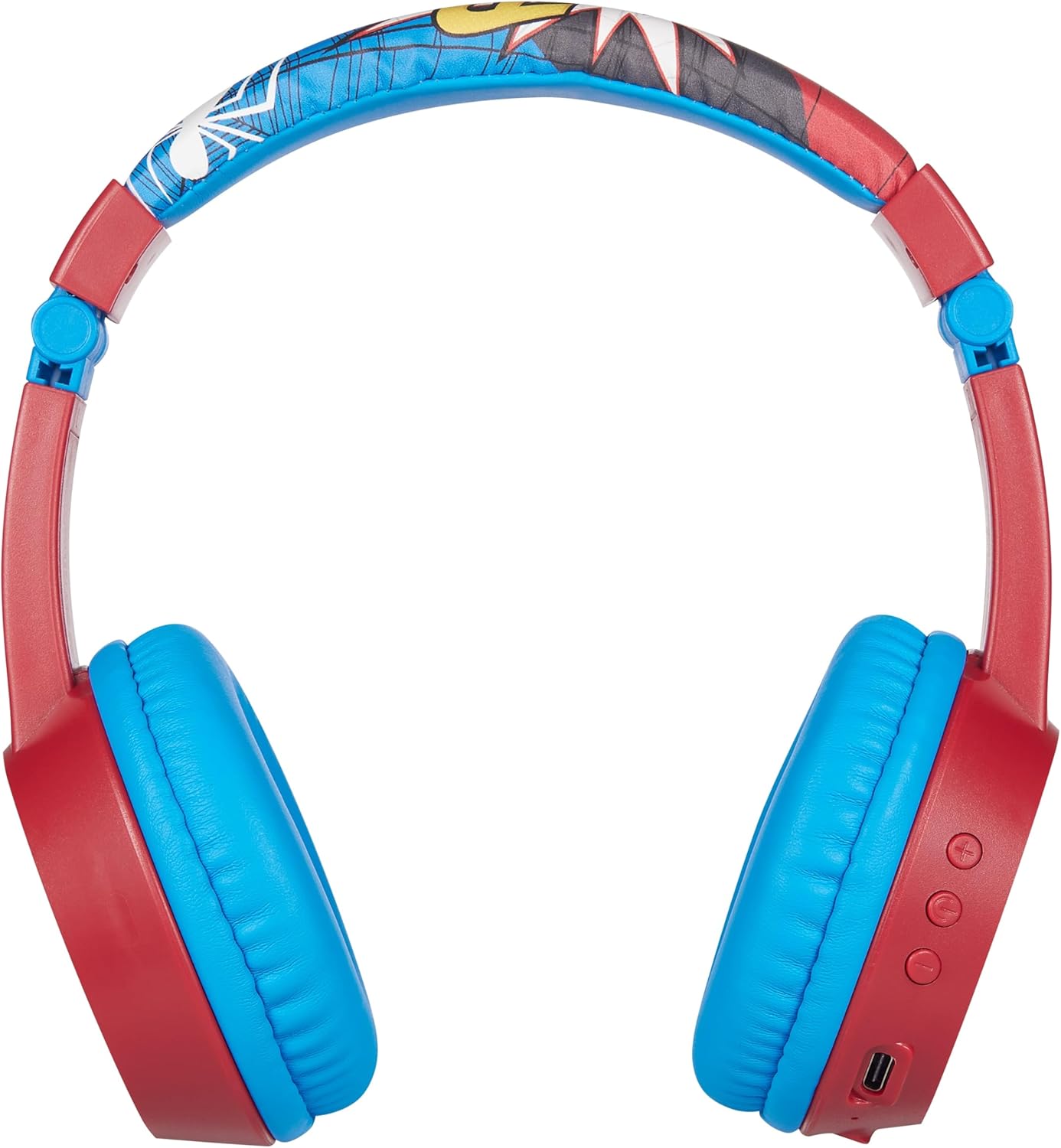
Figure 2: Side view of the headphones, illustrating the control buttons and ports.
Care and Maintenance
To ensure the longevity and optimal performance of your Volkano Spiderman Headphones, please follow these care instructions:
- Clean the headphones with a soft, dry cloth. Do not use abrasive cleaners, solvents, or harsh chemicals.
- Keep the headphones dry. Do not expose them to water, rain, or excessive moisture.
- Store the headphones in a cool, dry place when not in use. The foldable design (
 ) allows for compact and convenient storage.
 - Avoid exposing the headphones to extreme temperatures (hot or cold).
- Do not attempt to disassemble or repair the headphones yourself, as this will void the warranty.
Troubleshooting
If you encounter any issues with your headphones, please refer to the following common problems and solutions:
| Problem | Possible Cause | Solution |
|---|---|---|
| Headphones do not power on. | Battery is depleted. | Charge the headphones fully using the provided USB cable. |
| Cannot pair with Bluetooth device. | Headphones not in pairing mode; device Bluetooth off; too far from device. | Ensure headphones are in pairing mode (flashing blue/red LED). Turn on Bluetooth on your device. Move headphones closer to the device (within 10m). |
| No sound or low volume. | Volume too low; incorrect input mode; device not playing audio. | Increase volume on both headphones and connected device. Ensure headphones are connected via Bluetooth or AUX cable correctly. Check if audio is playing on the source device. |
| Poor sound quality or static. | Out of Bluetooth range; interference; low battery. | Move closer to the connected device. Avoid strong electromagnetic interference. Charge the headphones. |
Technical Specifications
| Feature | Specification |
|---|---|
| Bluetooth Version | V5.0 |
| Chipset | JL chipset |
| Bluetooth Distance | 10 meters |
| Impedance | 32 Ohm |
| Frequency Range | 20-20kHz |
| Sensitivity | 85dB (Volume limiting for child safety) |
| Battery Capacity | 350mAH |
| Driver Size | 30mm |
| Charging Port Type | Micro USB |
| Charging Time | Approx. 2 hours |
| Play Time | 6 - 8 hours |
| Dimensions (Product) | 16 x 7 x 18 cm |
| Weight | 240 g |
Warranty and Support
The Volkano SMD'S Padded Bluetooth Headphones come with a 1-year warranty from the date of purchase, covering manufacturing defects.
For technical support, warranty claims, or further information regarding your product, please contact Volkano customer service or visit the official product page on Amazon:
Visit Product Page on Amazon.ae

Figure 3: The headphones as they appear in their retail packaging.