
1. Introduction
Thank you for choosing the Carpuride W103 Pro Portable Car Stereo. This device is designed to enhance your driving experience by integrating advanced smartphone features like Apple CarPlay and Android Auto directly into your vehicle. This manual provides detailed instructions for installation, operation, and troubleshooting to ensure optimal performance and user satisfaction.
2. Product Overview
2.1 Key Features
- 10.3-inch IPS Smart Display: High-definition 1080P touch screen for clear and responsive interaction.
- Wireless & Wired CarPlay/Android Auto: Seamless integration with your smartphone for navigation, calls, messages, and music.
- Dual Bluetooth Design: Allows connection to the car's Bluetooth system for audio output and phone calls.
- Mirror Link: Compatible with Android and iOS phones for screen mirroring.
- Siri & Voice Control: Built-in microphone and support for external mic for hands-free operation.
- Sensor Light Design: Automatic brightness adjustment based on ambient light.
- Five Audio Output Options: Built-in speaker, AUX cable, FM transmission, and Bluetooth to car speakers.
- Wide Compatibility: Suitable for almost all types of cars and trucks (12-24V).
- Support for Wired & Wireless Rear Camera: Enhances safety during reversing.
2.2 Package Contents
Please check the package to ensure all items are present:
- 1 x Carpuride W103 Pro Car Stereo Unit
- 1 x Type-C Charger (Cigarette Lighter Adapter)
- 2 x Mounting Brackets (Self-adhesive bracket, Suction mount bracket)
- 1 x User Manual
- 1 x Backup Camera (if included in your package)
- 1 x AUX Cable
- 1 x Camera Wire (if backup camera included)

Image: Carpuride W103 Pro main unit, showing the 10.3-inch display, included backup camera, and icons for wireless connectivity.

Image: Illustration of the Carpuride W103 Pro's compatibility with various vehicle types and a detailed diagram of the included components and their dimensions.
3. Setup and Installation
3.1 Mounting Options
The Carpuride W103 Pro offers flexible mounting options to suit your vehicle's interior:
- Dashboard Mounted: Use the self-adhesive bracket to securely fix the unit to your dashboard.
- Windshield Mounted: Utilize the strong suction cup bracket to attach the unit to your windshield.
Adjust the height and length of the mount according to your personal visual habits. The base supports 360-degree rotation for optimal viewing angles.
3.2 Power Connection
Connect the Carpuride W103 Pro to your vehicle's power supply using the provided Type-C charger (cigarette lighter adapter). The unit supports 12-24V voltage, making it compatible with most cars and trucks.

Image: Step-by-step guide on how to install the Carpuride screen, including locking it on the mount, fixing it to the windshield or dashboard, and connecting to the cigarette lighter for power.
4. Operating Instructions
4.1 Wireless/Wired CarPlay & Android Auto
The W103 Pro supports both wireless and wired connections for Apple CarPlay and Android Auto. Once connected, your phone's essential features will be displayed on the 10.3-inch touchscreen, allowing for safe and easy access to navigation, messaging, phone calls, and music.
- For wireless connection, ensure Bluetooth and Wi-Fi are enabled on your smartphone.
- For wired connection, use a compatible USB cable to connect your smartphone to the unit.
Note: The latest version 17.2 of iOS may cause wireless mirroring to become unavailable. Please upgrade the software through CARPURIDE SUPPORT if you encounter this issue.

Image: Diagram illustrating the various connectivity options including Apple CarPlay, Android Auto (both wireless and wired), Airplay Mirror Link, and AutoLink.
4.2 Mirror Link Function
The W103 Pro features Phone Mirror-Link technology, allowing you to mirror your Android or iOS phone's screen directly onto the unit. This enables easy access to map navigation, YouTube videos, and other content from your phone.
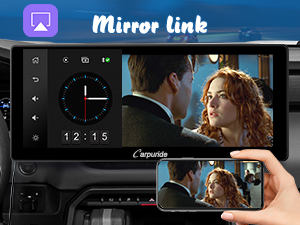
Image: A visual representation of the Mirror Link function, showing a smartphone screen mirrored onto the Carpuride display.
4.3 Audio Output Options
The W103 Pro offers multiple ways to output audio to your car's speakers:
- Built-in Speaker: The unit has a 4Ω5W speaker for direct audio output.
- AUX Cable: Connect the W103 Pro to your car's AUX IN port using the provided 3.5mm audio cable.
- FM Transmission: Transmit audio wirelessly to your car's FM radio. Select an unused FM frequency on both the W103 Pro and your car radio. Recommended frequencies are between 80MHz and 100MHz for best signal.
- Bluetooth to Car Speakers (Dual BT Design): The W103 Pro can transmit Bluetooth signals to pair with your car's Bluetooth system, allowing music playback through car speakers. When in CarPlay/Android Auto mode, you can also connect your smartphone directly to the car's Bluetooth for music and calls.
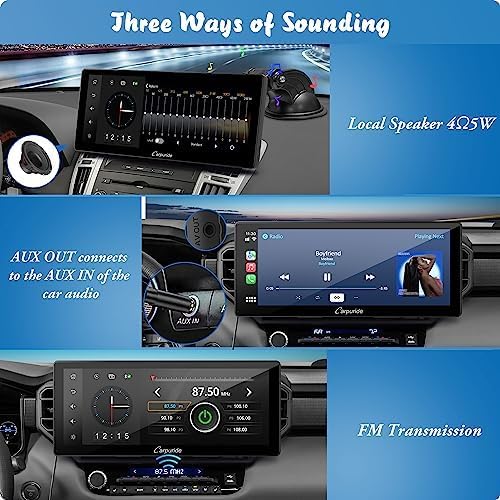
Image: Diagram illustrating the three primary audio output methods: the unit's local speaker, AUX cable connection, and FM transmission to the car's radio.

Image: Depiction of the dual Bluetooth connection, showing the Carpuride unit connected to the car's speakers via Bluetooth, and a smartphone also connected to the car's Bluetooth.
4.4 Voice Control (Siri/Google Assistant)
Utilize your device's voice assistant (Siri for iOS, Google Assistant for Android) for hands-free control. The built-in mic allows for smooth phone calls, music control, text notifications, and navigation commands.
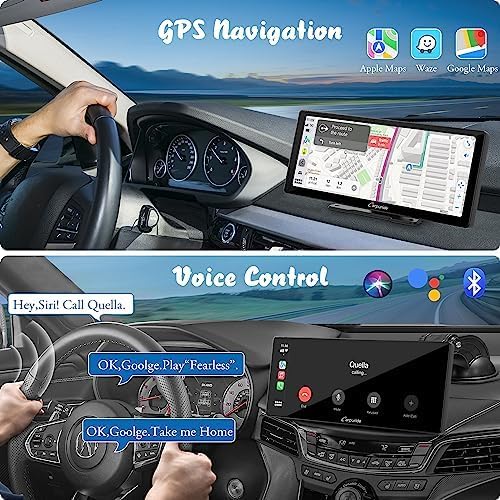
Image: Demonstrates the use of voice commands for GPS navigation and music playback through Siri or Google Assistant on the Carpuride display.
4.5 GPS Navigation
Access your preferred navigation apps (Apple Maps, Waze, Google Maps) directly on the large 10.3-inch display via CarPlay or Android Auto. The clear visuals and voice prompts provide an optimal navigation experience.

Image: The Carpuride W103 Pro display showing a GPS navigation map, highlighting its use for turn-by-turn directions.
5. Display Features
5.1 Touch Screen and Resolution
The W103 Pro features a 10.3-inch 1080P IPS HD capacitive touch monitor with a resolution of 1280*480. This provides responsive and clear viewing for all functions.

Image: Visual representation of the 10.3-inch 1080P IPS HD capacitive touch screen, demonstrating its clarity and touch responsiveness.
5.2 Sensor Light and Brightness Adjustment
The built-in sensor light automatically adjusts the display brightness based on ambient light conditions, protecting your eyes and ensuring optimal visibility. For example, the display will dim when entering a tunnel and brighten upon exiting. Manual brightness adjustment is also available with ten levels.
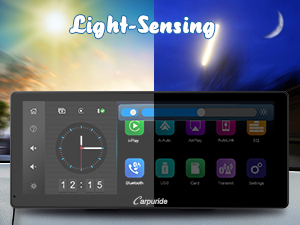
Image: Illustrates the light-sensing feature, showing how the screen brightness automatically adjusts between bright daylight and dim night conditions.
6. Camera Integration
6.1 Backup Camera
The Carpuride W103 Pro supports both wired and wireless rear cameras (sold separately). When a compatible camera is connected, the display will automatically show the rear view image when the vehicle is in reverse, significantly improving safety and ease of parking.
7. Compatibility
7.1 Vehicle Compatibility
The W103 Pro is powered by a Type-C connection and supports 12-24V voltage, making it compatible with almost all types of cars and trucks.
7.2 Phone Compatibility
The unit is compatible with most Android and iOS smartphones for CarPlay, Android Auto, and Mirror Link functions.
8. Maintenance
To ensure the longevity and optimal performance of your Carpuride W103 Pro, follow these maintenance guidelines:
- Cleaning: Use a soft, dry cloth to clean the screen and exterior. For stubborn smudges, slightly dampen the cloth with water or a screen-safe cleaner. Avoid abrasive materials or harsh chemicals.
- Temperature: Avoid exposing the unit to extreme temperatures, both hot and cold, for extended periods.
- Storage: If storing the unit for a long time, disconnect it from power and store it in a cool, dry place.
- Cable Management: Ensure all cables are properly routed and not pinched or stressed to prevent damage.
9. Troubleshooting
If you encounter issues with your Carpuride W103 Pro, refer to the following common problems and solutions:
| Problem | Possible Cause | Solution |
|---|---|---|
| No Power | Loose power connection; faulty cigarette lighter socket; unit not receiving sufficient power. | Check the Type-C charger connection. Ensure the cigarette lighter socket is working. Try a different power source if available. |
| Wireless CarPlay/Android Auto not connecting | Bluetooth/Wi-Fi off on phone; incorrect pairing; iOS 17.2 compatibility issue. | Ensure phone's Bluetooth and Wi-Fi are on. Re-pair the device. If using iOS 17.2, contact CARPURIDE SUPPORT for software upgrade. |
| Poor FM Transmission Quality | Interference from other radio stations; weak signal. | Try a different FM frequency, ideally between 80MHz and 100MHz, that is not used by local radio stations. |
| Microphone Echo/Low Volume | Built-in mic limitations; interference. | Consider using an external 3.5mm jack microphone for improved call quality. Adjust volume settings on the unit and your phone. |
| Screen Brightness Issues | Sensor light obstruction; manual setting override. | Ensure the sensor light is not covered. Check manual brightness settings and adjust as needed. |
| Backup Camera Not Displaying | Camera not connected; faulty camera/cable. | Verify the camera connection to the unit. Ensure the camera is receiving power (if applicable). |
10. Technical Specifications
| Feature | Specification |
|---|---|
| Model Name | carpuride w103pro with cam |
| Screen Size | 10.3 Inches |
| Display Type | LCD |
| Display Resolution | 1024*600 (effective resolution, supports 1280*480 input) |
| Operating System (Compatibility) | iOS, Android |
| Memory Storage Capacity | 64 GB (internal storage for system) |
| Tuner Technology | FM (76MHz~108MHz) |
| Connectivity | Bluetooth, Wi-Fi, USB |
| Human Interface Input | Touchscreen, Microphone |
| Audio Output Mode | Stereo |
| Power Input | Type-C (12-24V) |
| Material Type | Polyethylene Terephthalate |
| Parcel Dimensions | 29.8 x 14.1 x 9.6 cm |
| Weight | 1.28 kg |
11. Warranty and Support
For warranty information, technical support, or any inquiries regarding your Carpuride W103 Pro, please refer to the contact information provided on the product packaging or visit the official Carpuride website. Keep your purchase receipt for warranty claims.


