Product Overview
The Voerou Sleep Headphones are a versatile 3-in-1 device designed for comfort and convenience. They function as sleep headphones, a sports Bluetooth headband, and a sleep mask. Crafted from highly elastic and breathable materials, this headband ensures a secure and comfortable fit for various activities including sleeping, exercising, working out, traveling, yoga, and meditation. It features advanced Bluetooth 5.2 technology and 40mm composite drivers for immersive audio, along with a built-in ultra-thin microphone for hands-free calls.

Figure 1: Voerou Sleep Headphones Wireless Bluetooth Headband.
Setup Guide
1. Charging the Device
Before first use, fully charge the Voerou Sleep Headphones. The device is equipped with a rechargeable lithium battery. A full charge typically takes 1 to 2 hours and provides up to 10 hours of playtime.
- Connect the charging cable to the charging port on the control panel.
- Plug the other end of the cable into a USB power source (e.g., computer, wall adapter).
- The indicator light will show charging status (refer to LED indicator section for details).

Figure 2: Battery and Charging Information.
2. Bluetooth Pairing
The Voerou Sleep Headphones utilize Bluetooth 5.2 for a stable and seamless connection to your devices.
- Ensure the headband is charged.
- Press and hold the Play/Pause button on the control panel until the indicator light flashes, indicating pairing mode.
- On your smartphone, tablet, or other Bluetooth-enabled device, go to Bluetooth settings.
- Search for "BT-DLAB" (or similar device name) in the list of available devices.
- Select the device to connect. Once connected, the indicator light will change (refer to LED indicator section for details) and a voice prompt may confirm the connection.

Figure 3: Bluetooth 5.2 Connectivity.
3. Adjusting the Fit
The headband features an adjustable strap to ensure a comfortable and secure fit for most head sizes. Adjust the strap at the back of the headband to achieve the desired snugness. The soft, stretchy fabric is designed for extended wear.

Figure 4: Adjustable Headband for Optimal Fit.
Operating Instructions
Control Panel Functions
The control panel, located on the front of the headband, allows for easy management of audio playback and calls.
| Button | Action | Function |
|---|---|---|
| - | Short Press | Next Song |
| - | Long Press | Volume Down |
| + | Short Press | Previous Song |
| + | Long Press | Volume Up |
| Play/Pause | Short Press | Play/Pause Music |
| Play/Pause | Long Press | Power ON/OFF |

Figure 5: Control Panel Functions.
Audio Experience
The 40mm composite drivers deliver rich, well-balanced sound with deep bass, clear midranges, and crisp trebles. Enjoy your favorite audio content with exceptional clarity.

Figure 6: Immersive Stereo Sound.
Integrated Microphone
The built-in ultra-thin microphone allows for hands-free phone calls. When a call comes in, you can answer or end it using the control panel (refer to specific button functions if available, otherwise assume Play/Pause button).
Maintenance and Care
Washing Instructions
The fabric headband is washable, ensuring hygiene and longevity. It is crucial to remove the electronic components before washing.
- Locate the control panel and speakers within the headband.
- Gently push the control panel and speakers out of their pockets.
- Carefully pull the speakers and control panel out from the separated stitching of the headband.
- Once all electronic components are removed, the fabric headband can be washed by hand or machine.
- Allow the headband to air dry completely before reinserting the electronic components.
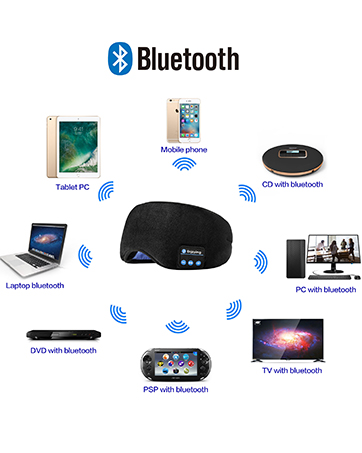
Figure 7: Steps for Washing the Headband.
Troubleshooting
If you encounter any issues with your Voerou Sleep Headphones, please refer to the following common solutions:
- No Power: Ensure the device is fully charged. Connect it to a power source and allow it to charge for 1-2 hours.
- Cannot Pair Bluetooth:
- Make sure the headband is in pairing mode (flashing indicator light).
- Ensure Bluetooth is enabled on your device.
- Move the headband closer to your device (within 10 meters).
- Forget the device from your phone's Bluetooth settings and try pairing again.
- Restart both the headband and your Bluetooth device.
- No Sound or Low Volume:
- Check the volume level on both the headband and your connected device.
- Ensure the headband is properly connected via Bluetooth.
- Verify that the audio source is playing.
- Intermittent Connection:
- Ensure there are no obstacles between the headband and your device.
- Move away from other wireless devices that might cause interference.
- Re-pair the device.
Specifications
| Feature | Detail |
|---|---|
| Model Name | VOEB01 |
| Connectivity Technology | Wireless (Bluetooth) |
| Bluetooth Version | 5.2 |
| Bluetooth Range | Up to 10 meters (33 feet) |
| Audio Driver Size | 40 Millimeters |
| Audio Driver Type | Dynamic Driver |
| Frequency Range | 20 Hz - 20,000 Hz |
| Battery Type | Lithium Ion (2 included) |
| Charging Time | 1-2 Hours |
| Battery Life | Up to 10 Hours |
| Control Type | Media Control, Touch |
| Material | Nylon |
| Water Resistance Level | Not Water Resistant |
| Item Weight | 3.2 ounces |
| Package Dimensions | 4.37 x 3.19 x 1.26 inches |
Warranty and Support
Voerou Sleep Headphones come with a 2-year manufacturer's warranty. For any concerns, technical support, or warranty claims, please contact Voerou customer support. Their dedicated after-sales team aims to assist within 6 hours of your inquiry.
Please refer to the product packaging or the official Voerou website for specific contact details.

