
1. Introduction
The TERENCE Digital Metronome is an advanced electronic metronome designed for musicians of all levels. It features a built-in rechargeable battery, an LCD display, and a wide range of rhythm and beat settings. This device is suitable for practicing various musical instruments, including piano, guitar, drums, violin, and bass. Its compact design and versatile functions make it an ideal tool for both home and outdoor practice.
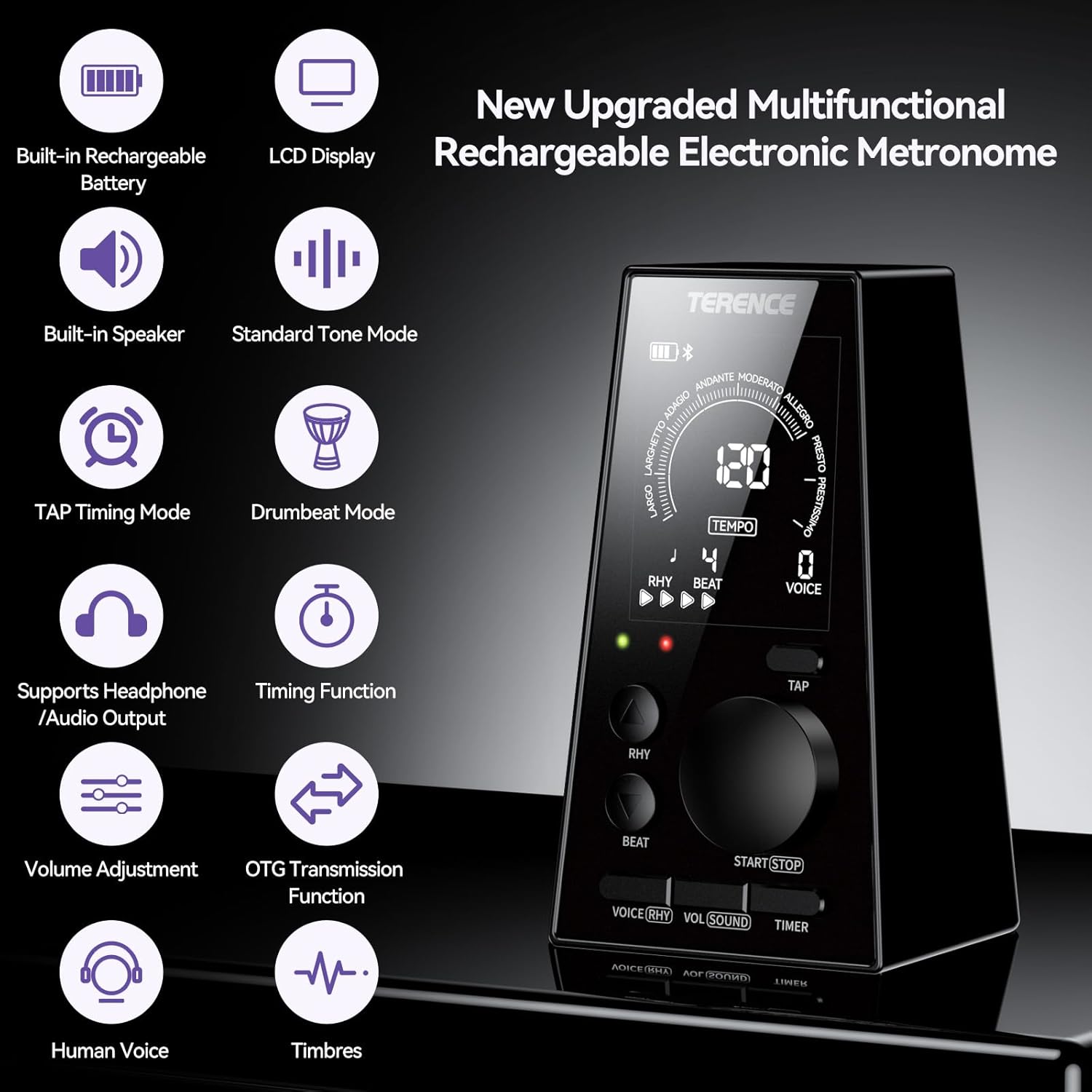
Figure 1: Overview of the TERENCE Digital Metronome and its key features.

Figure 2: The upgraded internal chip for enhanced performance.
2. Setup
2.1 Charging the Metronome
The metronome features a built-in rechargeable battery. Before first use, or when the battery indicator on the LCD shows low power, connect the device to a power source using a compatible USB cable. The LCD display will show the battery charge status.

Figure 3: The metronome's compact size and rechargeable battery for portability.
2.2 Powering On/Off
Locate the power button, typically on the side or back of the device. Press and hold to power on or off. The LCD screen will illuminate upon powering on.
3. Operating Instructions
The TERENCE Digital Metronome offers intuitive controls for various functions. The LCD display provides clear visual feedback for all settings.
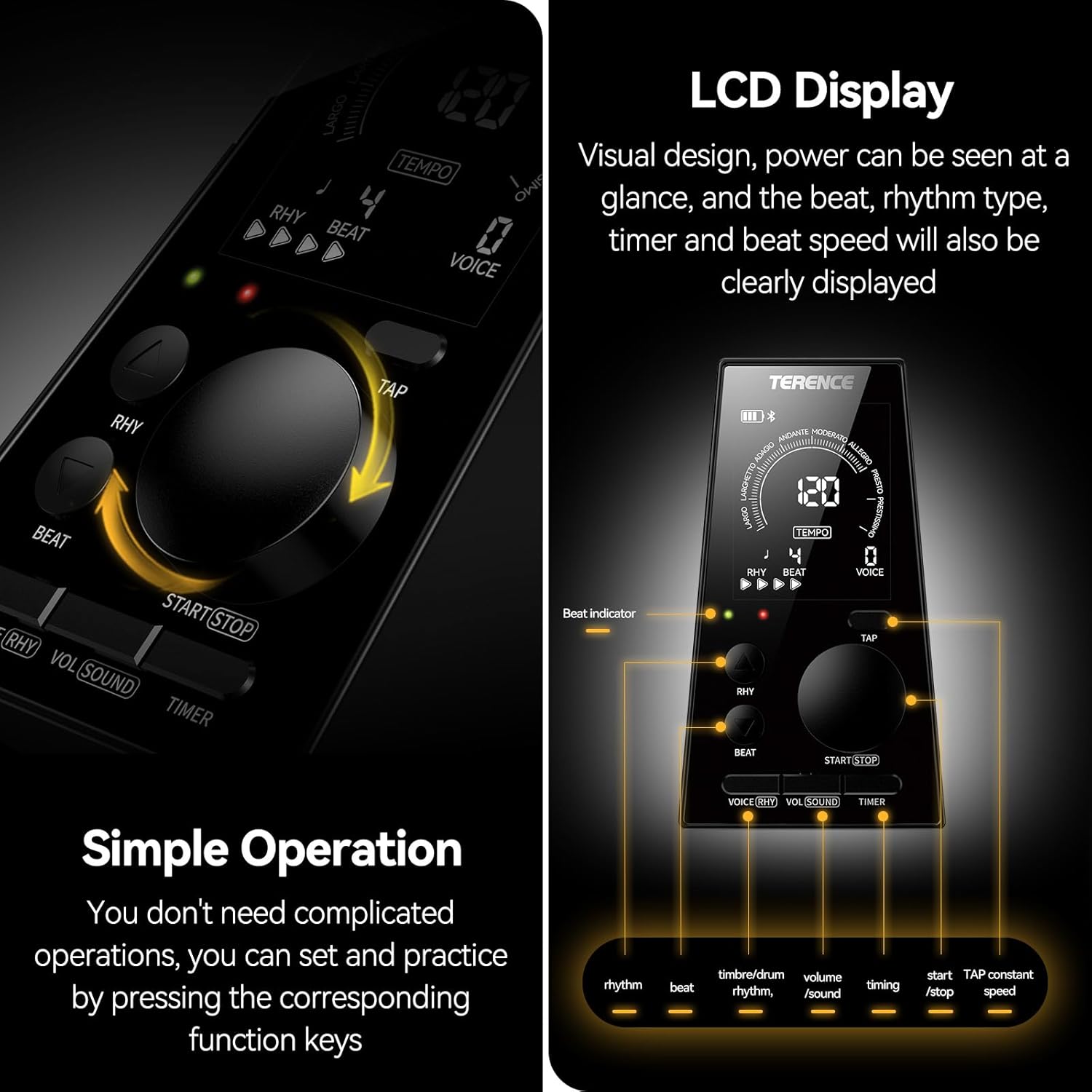
Figure 4: LCD display and simple operation buttons.
3.1 Adjusting Tempo (BPM)
Use the main rotary knob or dedicated tempo buttons to adjust the beats per minute (BPM). The metronome supports a rhythm range of 30-252 BPM. The current tempo will be displayed prominently on the LCD.
3.2 Selecting Rhythm Type and Beat
The metronome is equipped with 9 rhythm types and 8 rhythms. Use the 'RHY' and 'BEAT' buttons to cycle through the available options. The selected rhythm type and beat will be shown on the LCD.
3.3 Volume Adjustment and Headphone Use
The metronome features high-quality speakers. Adjust the volume using the 'VOL/SOUND' button or a dedicated volume control. For private practice, connect 3.5mm wired headphones to the audio jack located on the device.

Figure 5: High-quality speakers and 3.5mm audio output.
3.4 Standard Tone Setting Mode (Tuner)
Activate the standard tone setting mode to assist with instrument tuning. This mode can emit C4-B4 standard sounds, which is particularly helpful for beginners.
3.5 TAP Timing Mode
The TAP timing function allows you to set a custom tempo by tapping the 'TAP' button. This feature helps in creating personalized rhythms for practice.
3.6 Drumbeat Mode
Engage the drumbeat mode to practice with built-in drum demos, enhancing your rhythm and timing skills.

Figure 6: Metronome features for beginners, including standard tone, TAP timing, and drumbeat modes.
3.7 Timer Function
Utilize the built-in timer function to set specific practice durations. This helps in planning and executing efficient practice sessions.

Figure 7: The metronome's timing function for structured practice.
3.8 OTG Transmission Function
The metronome supports OTG (On-The-Go) transmission, allowing you to transfer songs and files from smartphones or MP3 players to the metronome for playback. Ensure your external device is OTG-compatible.

Figure 8: OTG transmission function for playing external audio files.
3.9 Sleep Mode and Memory Function
The device automatically enters sleep mode after 5 minutes of inactivity to conserve energy. It also features a memory function that automatically saves your personal settings after powering off, ensuring your preferred configurations are retained for the next use.
4. Maintenance
To ensure the longevity and optimal performance of your TERENCE Digital Metronome, follow these maintenance guidelines:
- Cleaning: Use a soft, dry cloth to clean the exterior of the metronome. Avoid using abrasive cleaners or solvents, as they may damage the finish or electronic components.
- Storage: Store the metronome in a cool, dry place away from direct sunlight, extreme temperatures, and high humidity.
- Battery Care: For optimal battery life, avoid fully discharging the battery frequently. Charge the device regularly, even if not in constant use.
5. Troubleshooting
If you encounter any issues with your metronome, please refer to the following common solutions:
- Device Not Turning On: Ensure the battery is charged. Connect the metronome to a power source and try again.
- No Sound: Check the volume level. Ensure headphones are not plugged in if you intend to use the internal speaker.
- Inaccurate Tempo: Verify that the tempo setting is correct. If using TAP mode, ensure consistent tapping.
- OTG Connection Issues: Confirm that your external device supports OTG functionality and that the cable is securely connected.
If the problem persists, please contact customer support.
6. Specifications
| Feature | Specification |
|---|---|
| Item Weight | 8.1 ounces |
| Product Dimensions | 2.6 x 2.4 x 4.7 inches |
| ASIN | B0CLJ8CV3C |
| Batteries | 1 Lithium Ion battery (included) |
| Color | Black |
| Battery Type | Lithium Ion |
| Tempo Range | 30-252 BPM |
| Rhythm Types | 9 |
| Rhythms | 8 |
| Audio Output | 3.5mm Headphone Jack |
7. Product Video
Video 1: Official product overview of the TERENCE Digital Metronome, demonstrating its features and ease of use.
8. Warranty and Support
For warranty information or technical support, please refer to the product packaging or contact TERENCE customer service directly. Keep your purchase receipt for any warranty claims.
For further assistance, visit the TERENCE Store on Amazon.