
Introduction
This document provides instructions for the KRPTQJoo replacement infrared remote control, model Joo1322. This remote is designed as a spare or replacement for various Haier Smart LCD LED HDTV Television models, including 55E5500UB, 49U2500A, 55E5500UC, 65UF2505D, 65UF2505E, 48E2500C, 48E2500D, 49UF2500C, 49UF2500D, 75UF2500A, 55E5500UG, 65UF2505F, and KIVI models such as KT-1346A, 24HK10G, 24HK20G, 32HK10G, 32HK20G, 40FK20G. The remote control is made of high-quality ABS material.
Please note that the functions and buttons on this replacement remote may not be exactly identical to your original remote. Some keys may have no function if your television model does not support those specific features.

Image: The KRPTQJoo replacement remote control shown alongside its retail packaging.
Setup
The KRPTQJoo replacement remote control requires no pairing or programming. To begin using the remote, follow these steps:
- Open the Battery Compartment: Locate the battery compartment cover on the back of the remote control. Slide or lift the cover to open it.
- Insert Batteries: Insert two (2) AAA batteries into the compartment. Ensure the positive (+) and negative (-) terminals of the batteries align correctly with the markings inside the compartment.
- Close the Battery Compartment: Replace the battery compartment cover, ensuring it clicks securely into place.
The remote control is now ready for use with your compatible television.

Image: The rear of the remote control with the battery compartment open, showing where to insert two AAA batteries.
Operating Instructions
This infrared remote control functions similarly to your original television remote. Point the remote directly at your television's infrared receiver for optimal performance.
- Power Button: Located at the top, typically red, to turn the TV on or off.
- Number Buttons (0-9): Used for direct channel selection.
- Volume Control (VOL +/-): Adjusts the audio volume.
- Channel Control (CH +/-): Changes television channels.
- Navigation Buttons (Up, Down, Left, Right, OK): Used to navigate menus and confirm selections.
- Source/Input Button: Selects the input source (e.g., HDMI, AV).
- Menu Button: Accesses the television's main menu.
- Back/Exit Button: Returns to the previous screen or exits a menu.
- App Buttons: Dedicated buttons for specific applications like YouTube, if supported by your TV model.
Refer to your television's original manual for specific functions of certain buttons, as some features may vary or not be supported by all compatible models.

Image: A composite view showing the front of the remote control, a close-up of the top buttons, the open battery compartment, and the remote being held in a hand.
Maintenance
- Battery Replacement: Replace batteries when the remote's performance degrades or it stops responding. Always replace both AAA batteries simultaneously.
- Cleaning: Use a soft, dry cloth to clean the remote control. Do not use liquid cleaners or abrasive materials, as they may damage the surface or internal components.
- Storage: Store the remote in a dry place, away from direct sunlight and extreme temperatures. If not used for an extended period, remove the batteries to prevent leakage.
Troubleshooting
- Remote Not Responding:
- Check if the batteries are inserted correctly with the correct polarity.
- Replace old batteries with new AAA batteries.
- Ensure there are no obstructions between the remote control and the television's infrared receiver.
- Confirm you are pointing the remote directly at the TV.
- Certain Buttons Do Not Work:
- As a replacement remote, some advanced or specific functions may not be supported by all compatible television models. Refer to your TV's original manual to confirm feature compatibility.
- If a basic function (e.g., volume, channel) is not working, try the steps for "Remote Not Responding."
If issues persist after following these troubleshooting steps, please contact the seller for further assistance.
Specifications
| Feature | Specification |
|---|---|
| Model Number | Joo1322 |
| Brand | KRPTQJoo |
| Compatible Devices | Television (Haier, KIVI) |
| Max Number of Supported Devices | 1 |
| Color | Black |
| Special Feature | Ergonomic design |
| Batteries Required | 2 x AAA (not included) |
| Item Weight | 1.28 ounces (approximately 36 grams) |
| Package Dimensions | 5 x 3 x 2 inches (approximately 12.7 x 7.6 x 5.1 cm) |
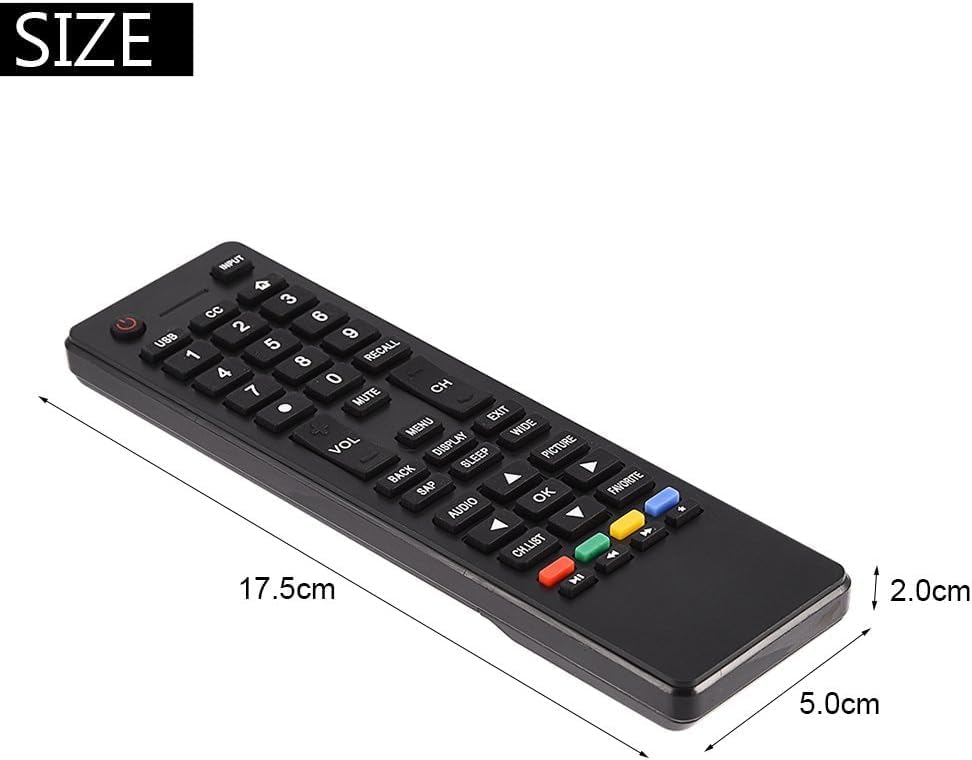
Image: The remote control with its approximate dimensions: 17.5cm length, 5.0cm width, and 2.0cm thickness.
Support
For any questions, concerns, or technical support regarding your KRPTQJoo replacement remote control, please contact the seller directly through your purchase platform. Provide your order details for efficient assistance.