1. Introduction
This manual provides detailed instructions for the safe and efficient operation of your Huanyu 9-in-1 Multifunctional Electric Kitchen Stand Mixer. Please read all instructions carefully before first use and retain this manual for future reference.
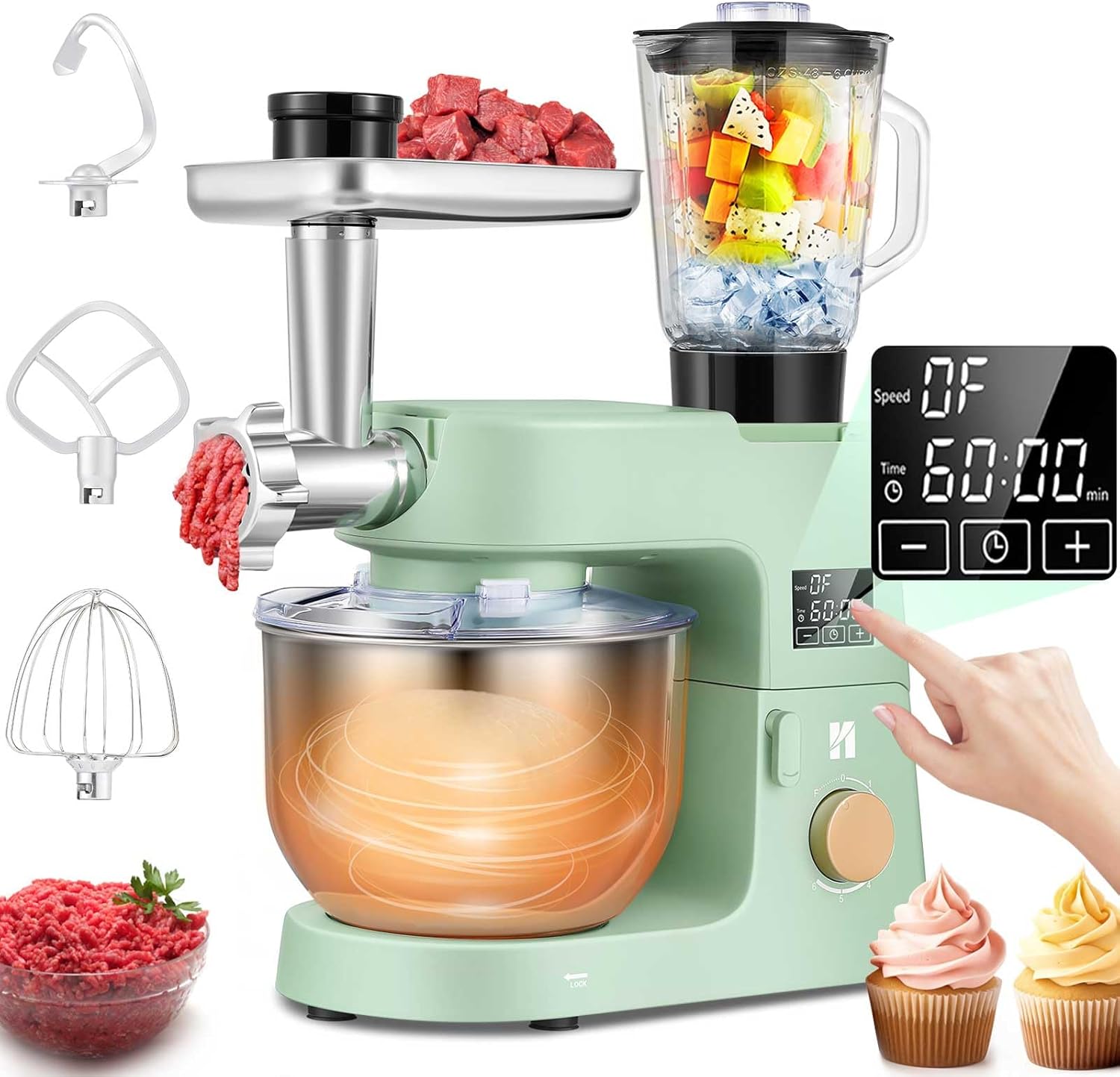
Image: The Huanyu 9-in-1 Multifunctional Electric Kitchen Stand Mixer, showcasing its main unit, mixing bowl, and various attachments including the meat grinder, blender, dough hook, beater, and whisk.
2. Important Safety Instructions
- Read all instructions before operating the appliance.
- Do not immerse the motor unit in water or other liquids.
- Unplug from outlet when not in use, before putting on or taking off parts, and before cleaning.
- Avoid contact with moving parts. Keep hands, hair, and clothing, as well as spatulas and other utensils, away from moving beaters during operation to reduce the risk of injury to persons and/or damage to the mixer.
- Do not use attachments not recommended or sold by the manufacturer.
- Do not let cord hang over edge of table or counter.
- Do not operate any appliance with a damaged cord or plug or after the appliance malfunctions, or has been dropped or damaged in any manner.
- Close supervision is necessary when any appliance is used by or near children.
- The appliance is equipped with an overheat protection function to ensure safety and reliability.
3. Package Contents
Your Huanyu 9-in-1 Stand Mixer package includes the following items:
- Main Stand Mixer Unit
- 6-Quart Stainless Steel Mixing Bowl
- Dough Hook (aluminum with PTFE coating)
- Beater (aluminum with PTFE coating)
- Whisk (stainless steel)
- Splash Guard
- Meat Grinder Attachment (die-cast aluminum)
- Sausage Kits (ABS plastic)
- Slicer & Shredder Attachments (die-cast aluminum)
- 1.5L Glass Juice Blender
- Pasta Maker Attachments (ABS plastic)
- Cookie Maker (die-cast aluminum)
- Silicone Spatula
- Egg Separator
- User Manual
- Service Card

Image: A visual representation of all components included with the Huanyu 9-in-1 Stand Mixer, detailing each attachment and accessory.
4. Product Components and Diagram
Familiarize yourself with the main parts of your stand mixer:
- Tilt-Head Design: Allows easy access to the mixing bowl and attachments.
- 6-Quart Stainless Steel Bowl: Large capacity for various recipes. Features a locking groove design for stability.
- LED Touch Screen with Timer: Digital display for speed and time settings.
- Speed Control Knob: Adjusts mixing speed from 0 to 6, including a fermentation setting.
- Accessory Ports: Front port for meat grinder/slicer, top port for blender.
- Non-Slip Suction Cups: Four silicone suction cups on the base ensure stability during operation.

Image: The Huanyu Stand Mixer with its dimensions labeled, showing its compact design suitable for kitchen countertops.

Image: A close-up view of the 6-quart stainless steel mixing bowl, highlighting its large capacity and stable locking groove design.

Image: The transparent splash guard in place over the mixing bowl, showing its convenient vent for adding ingredients during operation.
Image: A detailed view of the tilt-head design, illustrating how the head lifts for easy installation and removal of the bowl and accessories.

Image: The base of the stand mixer, highlighting the four non-slip silicone suction cups designed to firmly secure the unit to the countertop and reduce noise.
5. Setup and Assembly
Before first use, ensure all packaging materials are removed and clean all parts as described in the 'Maintenance and Cleaning' section.
5.1 Attaching the Mixing Bowl and Splash Guard
- Place the mixer on a dry, flat, stable surface.
- Lift the tilt-head by pushing the release lever.
- Place the 6-quart stainless steel bowl onto the base, aligning the locking groove, and turn clockwise until it locks securely.
- Attach the splash guard by sliding it onto the mixer head until it clicks into place.
5.2 Attaching Mixing Accessories (Dough Hook, Beater, Whisk)
- Ensure the mixer is unplugged.
- Lift the tilt-head.
- Slide the desired accessory (dough hook, beater, or whisk) onto the attachment shaft and push upwards, then rotate slightly to lock it into place.
- Lower the tilt-head until it locks.

Image: The three primary mixing attachments – dough hook, beater, and whisk – with visual guides indicating their appropriate speed levels for different tasks.
5.3 Attaching Meat Grinder / Slicer / Blender
- Ensure the mixer is unplugged.
- For the Meat Grinder/Slicer: Open the front accessory port cover. Insert the meat grinder or slicer attachment into the port, aligning the drive shaft, and turn to lock.
- For the Blender: Place the blender jug onto the top accessory port, aligning the base with the motor coupling, and turn clockwise until it locks securely.
6. Operating Instructions
Your Huanyu Stand Mixer features a powerful 660W motor and a user-friendly LED touch screen with timer function for precise control.
6.1 General Operation
- Plug the mixer into a suitable power outlet.
- Use the speed control knob to select the desired speed (0-6).
- The LED touch screen displays the current speed and allows you to set a timer for automatic operation. Use the '+' and '-' buttons to adjust the time.

Image: A close-up of the mixer's control panel, showing the LED touch screen for timer and speed settings, and the rotary knob for speed selection.
6.2 Mixing and Kneading
The 360° planetary mixing motion ensures thorough and even mixing for all your ingredients.
- Dough Hook (Level 1-3): Ideal for kneading heavy mixtures like bread dough, pizza dough, and pasta.
- Beater (Level 2-4): Suitable for medium-heavy mixtures such as cake batters, mashed potatoes, and cookie dough.
- Whisk (Level 5-6): Perfect for light mixtures like whipping cream, egg whites, and sauces.
Video: Demonstrates the 360° planetary mixing action of the Huanyu Stand Mixer, showing how ingredients are thoroughly combined within the bowl.
6.3 Fermentation Function
The improved fermentation function provides an optimal temperature for dough rising.
- After kneading, leave the dough in the mixing bowl.
- Turn the speed control knob to 'F' (Fermentation).
- The mixer will maintain the ideal temperature to help your dough rise perfectly.

Image: The Huanyu Stand Mixer with its fermentation function highlighted, showing the knob set to 'F' and indicating the warming effect within the bowl for optimal dough rising.
6.4 Meat Grinding and Sausage Making
Attach the meat grinder to the front port for fresh ground meat or homemade sausages.
- Choose the desired grinding plate (coarse, medium, fine).
- For sausage making, attach the appropriate sausage stuffer.
- Ensure meat is cut into appropriate sizes before feeding into the grinder.

Image: The meat grinder attachment in action, demonstrating its ability to produce coarse and fine ground meat, along with various sausage and pasta shapes.
6.5 Vegetable Slicing and Shredding
Utilize the slicer and shredder attachments for quick and easy vegetable preparation.
- Insert the desired slicing or shredding drum into the attachment.
- Feed vegetables through the chute for consistent results.
6.6 Juice Blending
The 1.5L glass juice blender is perfect for smoothies, juices, and sauces.
- Add ingredients to the blender jug.
- Secure the lid.
- Select a higher speed setting for blending.

Image: The 1.5L glass juice blender attachment, illustrating its use for preparing various fruit and vegetable smoothies and juices.
6.7 Pasta and Cookie Making
Expand your culinary creations with the included pasta and cookie attachments.
- Attach the pasta maker or cookie maker to the appropriate port.
- Follow specific recipe instructions for dough consistency.

Image: The pasta and cookie accessories, demonstrating the variety of pasta shapes and decorative cookies that can be created using these attachments.
7. Maintenance and Cleaning
Proper care ensures the longevity and performance of your Huanyu Stand Mixer.
- Always unplug the mixer before cleaning.
- Wipe the main unit with a damp cloth. Do not immerse in water.
- Mixing Bowl: The stainless steel bowl is generally dishwasher safe, but hand washing is recommended for best care.
- Dough Hook, Beater, Whisk: Hand wash these accessories with warm, soapy water. Do not wash in a dishwasher to maintain their finish and prevent damage.
- Meat Grinder, Slicer, Blender, Pasta/Cookie Attachments: Disassemble and hand wash all parts with warm, soapy water. Ensure all components are thoroughly dried before reassembly and storage.
- Do not use abrasive cleaners or scouring pads.
8. Troubleshooting
If you encounter any issues with your mixer, refer to the following common problems and solutions:
| Problem | Possible Cause | Solution |
|---|---|---|
| Mixer does not turn on. | Not plugged in; Power outlet malfunction; Overheat protection activated. | Check power connection; Try a different outlet; Allow mixer to cool down for 30 minutes. |
| Attachments not mixing properly. | Attachment not securely installed; Incorrect attachment for task; Too much/too little mixture. | Ensure attachment is locked; Use correct attachment for recipe; Adjust ingredient quantities. |
| Mixer is noisy or wobbles excessively. | Unstable surface; Bowl not locked; Dense dough. | Place on a flat, stable surface; Ensure bowl is locked; This is normal for very dense dough. |
| Meat grinder/slicer/blender not working. | Attachment not securely installed; Ingredients too large/hard. | Ensure attachment is locked into the correct port; Cut ingredients into smaller pieces. |
9. Specifications
- Brand: Huanyu
- Model Name: Electric Stand Mixer
- Color: Green
- Product Dimensions: 23.81"D x 11.1"W x 14.76"H
- Blade Material: Stainless Steel
- Special Features: Digital Display, Fermentation Function, Tilt Head, Vegetable slicer
- Capacity: 6 Quarts (Mixing Bowl)
- Controls Type: Knob
- Container Material: Stainless Steel (Bowl), Glass (Blender)
- Item Weight: 24.9 pounds
10. Warranty and Support
Huanyu provides worry-free service for your product. For non-consumable and non-human damaged accessories, we will resend a new one for customers to replace. Please refer to the included Service Card for detailed warranty information and contact support channels.


