
1. Introduction
This manual provides comprehensive instructions for the installation, operation, and maintenance of your Generic phone case and tempered glass screen protector, designed specifically for the Emporia Smart.5 Mini (also compatible with Emporia E5 Smart 5 Mini) smartphone. Please read this manual carefully to ensure proper use and to maximize the product's lifespan.

Image 1.1: Overview of the Emporia Smart.5 Mini phone case and included tempered glass screen protector.
2. Package Contents
Verify that all items are present in your package:
- 1 x Phone Case (CSKB-ZI)
- 1 x Tempered Glass Screen Protector
3. Installation Guide
3.1. Phone Case Installation
- Ensure your Emporia Smart.5 Mini phone is clean and free of dust or debris.
- Align the phone case with your device, starting with one side.
- Gently press the phone into the case, ensuring all corners and edges are securely fitted. The flexible TPU material allows for easy installation while providing a snug fit.
- Verify that all precision cutouts for ports, buttons, and speakers align correctly with your phone's features.
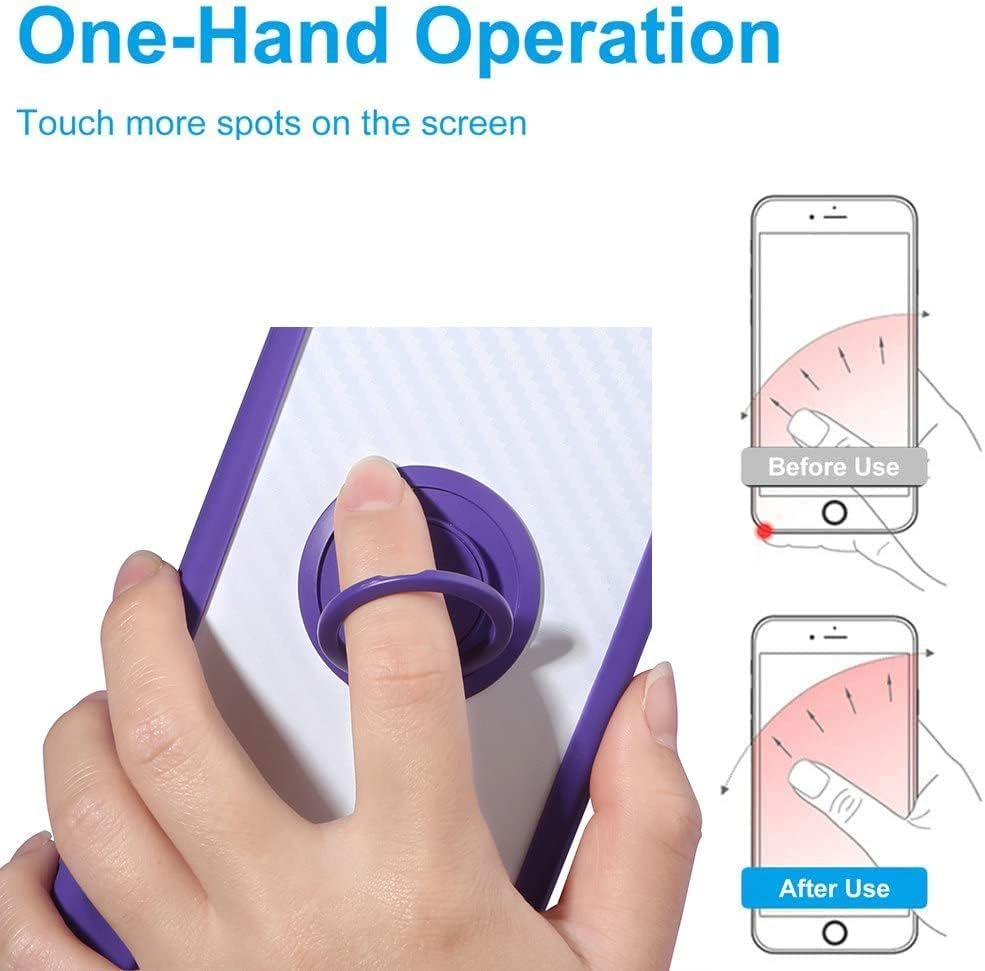
Image 3.1: The phone case features a soft silicone frame and hard PC backplane with thickened four corners and a silicone buffer layer for enhanced shock protection.
3.2. Tempered Glass Screen Protector Installation
- Thoroughly clean your phone screen using a microfiber cloth to remove all dust, smudges, and fingerprints. A clean screen is crucial for bubble-free application.
- Carefully peel off the protective film from the adhesive side of the tempered glass screen protector. Avoid touching the adhesive surface.
- Align the screen protector precisely with your phone's screen, paying attention to the edges and cutouts for the camera and sensors.
- Once aligned, gently lower the screen protector onto the screen. It will adhere automatically.
- If any bubbles appear, gently push them towards the edges of the screen using a soft cloth or a credit card wrapped in cloth.

Image 3.2: The tempered glass screen protector provides an additional layer of protection for your phone's display.

Image 3.3: Key features of the tempered glass screen protector, including 9H hardness and anti-fingerprint properties.
4. Key Features and Operation
4.1. 360° Rotatable Ring Holder
The integrated ring holder on the back of the case offers multiple functionalities:
- Kickstand Function: Rotate the ring to a comfortable angle to prop up your phone for hands-free viewing of videos or video calls. The ring can rotate 360 degrees horizontally and 180 degrees vertically for optimal positioning.
- Secure Grip: Slip your finger through the ring for a more secure hold on your phone, reducing the risk of accidental drops, especially during one-handed operation.

Image 4.1: The ring holder offers 180-degree and 360-degree rotation for versatile viewing angles and improved grip.

Image 4.2: Detailed view of the integrated ring holder mechanism.
4.2. Magnetic Car Mount Function
The phone case is designed with a built-in metal plate within the ring holder, allowing it to be directly adsorbed onto magnetic car mount holders. This feature provides a convenient and secure way to use your phone for GPS navigation or music playback while driving. No additional patches or accessories are required for magnetic mounting.
Note: A magnetic car mount holder is not included with this product and must be purchased separately. This case does not support wireless charging due to the metal ring.

Image 4.3: The case's magnetic compatibility allows for easy attachment to a magnetic car mount.
5. Maintenance and Care
- Cleaning the Case: To clean the phone case, remove it from your device. Wipe it gently with a soft, damp cloth. For stubborn stains, a mild soap solution can be used, followed by rinsing and thorough drying. Avoid harsh chemicals or abrasive materials.
- Cleaning the Screen Protector: Use a microfiber cloth to wipe the screen protector. For smudges, a screen cleaning spray designed for electronics can be applied to the cloth (not directly to the screen) and then wiped.
- Avoid Extreme Conditions: Do not expose the case or screen protector to extreme temperatures or direct sunlight for prolonged periods, as this may affect material integrity.
6. Troubleshooting
- Case Not Fitting Properly: Ensure you have the correct model (Emporia Smart.5 Mini / Emporia E5 Smart 5 Mini). Remove any existing screen protectors or skins that might interfere with the case's fit.
- Bubbles Under Screen Protector: Small bubbles can often be pushed out to the edges with a soft cloth. If large bubbles persist, it may indicate dust particles were present during installation. Re-cleaning the screen and re-applying the protector might be necessary.
- Ring Holder Stiffness: The ring holder is designed to be firm to provide stable support. If it feels too stiff, gently rotate it a few times to loosen it slightly.
- Magnetic Car Mount Not Holding: Ensure your car mount is magnetic and strong enough to hold your device. The case's metal plate is designed for standard magnetic mounts.
7. Product Specifications
| Feature | Specification |
|---|---|
| Compatible Phone Models | Emporia E5 SMART 5 mini |
| Material | Polyurethane (TPU) |
| Product Dimensions | 0.39 x 0.39 x 0.39 inches |
| Item Weight | 2.46 ounces |
| Special Features | 360 Rotating Ring, Car Magnetic Fixing, Stylish Design |
| Color | CSKB-ZI |
8. Warranty and Support Information
This product is manufactured by Generic. For any inquiries regarding product defects or support, please refer to the retailer's return policy or contact the seller directly. Specific warranty details are not provided with this manual.