
ETLIN ETLIN688
ETLIN T4024 4X2.4X3 3-Blade PC Propeller User Manual
Model: ETLIN688
1. Introduction
This manual provides essential information for the proper installation, use, and maintenance of your ETLIN T4024 4X2.4X3 3-Blade PC Propellers. These propellers are designed for FPV freestyle 4-inch drones and are made from durable PC material, offering a balance of performance and reliability. Please read this manual thoroughly before installation and use to ensure optimal performance and safety.
2. Product Overview

Figure 2.1: Two ETLIN T4024 3-Blade PC Propellers.
The ETLIN T4024 propellers are specifically engineered for 4-inch FPV freestyle drones. They feature a 3-blade design for efficient thrust and control. The T-Mount system ensures secure attachment to compatible motors. Each set includes both Clockwise (CW) and Counter-Clockwise (CCW) propellers to accommodate standard drone motor configurations.
Package Contents:
- 4 x T4024 4X2.4X3 3-Blade PC Propellers (CW)
- 4 x T4024 4X2.4X3 3-Blade PC Propellers (CCW)
- Total: 8 propellers (4 pairs)
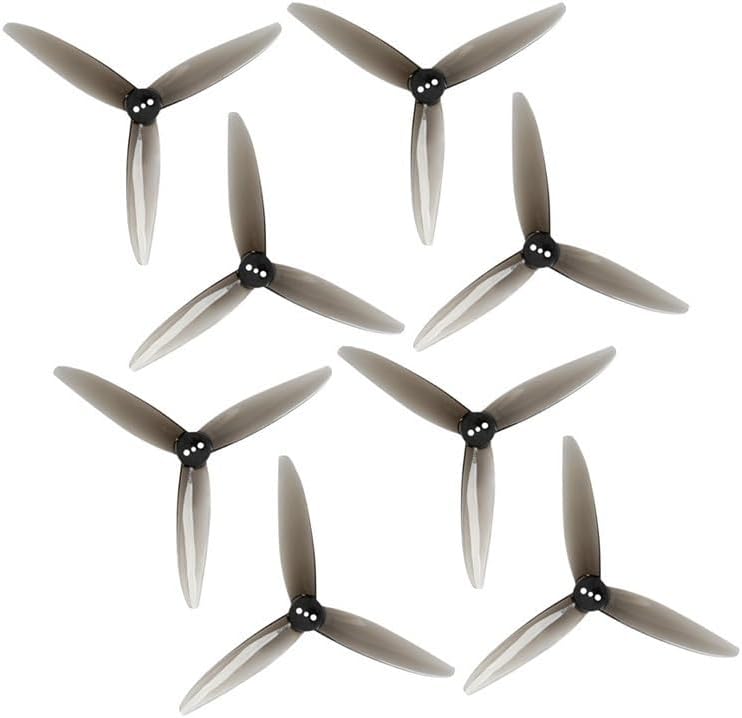
Figure 2.2: Full set of ETLIN T4024 3-Blade PC Propellers (8 pieces).
3. Installation (Setup)
Proper installation of propellers is crucial for flight safety and performance. Always ensure your drone's power is disconnected before handling propellers.
3.1 Identifying Propeller Rotation:
Propellers are designated as Clockwise (CW) or Counter-Clockwise (CCW). Most FPV drones use a "props out" configuration, meaning the front-left and rear-right motors spin CW, and the front-right and rear-left motors spin CCW. Refer to your drone's flight controller or frame manual for the correct motor rotation direction.
- CW Propellers: Typically marked with an 'R' or a specific notch, designed to spin clockwise.
- CCW Propellers: Designed to spin counter-clockwise.

Figure 3.1: Side view of a single ETLIN T4024 propeller, showing the hub design.
3.2 Mounting Procedure (T-Mount):
- Prepare Motor: Ensure the motor shaft is clean and free of debris. The T-Mount system typically uses two small screws to secure the propeller to the motor bell.
- Align Propeller: Carefully align the two mounting holes on the propeller hub with the corresponding holes on the motor bell.
- Insert Screws: Insert the small mounting screws (usually M2 or M1.5, depending on your motor) through the propeller holes and into the motor bell.
- Tighten Screws: Using an appropriate screwdriver, gently tighten the screws. Do not overtighten, as this can strip the threads or crack the propeller hub. The propeller should be snug and not wobble.
- Verify Rotation: Double-check that the correct CW/CCW propeller is installed on the corresponding motor.

Figure 3.2: Top view of a single ETLIN T4024 propeller, highlighting mounting holes.
Important: Always check that all propellers are securely fastened before each flight. Loose propellers can lead to loss of control and potential damage.
4. Operation
Once installed, the ETLIN T4024 propellers work in conjunction with your drone's motors and flight controller to generate thrust and provide flight control. Their 3-blade design and 2.4 pitch are optimized for freestyle flying, offering a balance of responsiveness and efficiency for 4-inch drone setups.
4.1 Pre-Flight Checks:
- Visually inspect all propellers for any signs of damage (cracks, bends, nicks).
- Ensure all propellers are securely attached to their respective motors.
- Confirm that the correct CW/CCW propellers are on the correct motors according to your drone's configuration.
4.2 Flight Characteristics:
These propellers are designed for agile and responsive flight. Users may experience:
- Good Thrust: Suitable for aggressive maneuvers and quick acceleration.
- Responsive Control: The 3-blade design provides precise control inputs.
- Durability: Made from Pure PC material, offering good resistance to impacts during typical freestyle flying.
5. Maintenance
Regular inspection and proper care will extend the lifespan of your propellers and ensure safe flight.
5.1 Cleaning:
- Wipe propellers with a soft, damp cloth to remove dirt, dust, or grass stains.
- Avoid using harsh chemicals or abrasive materials, as these can damage the PC material.
5.2 Inspection:
- Before and after each flight, carefully inspect each propeller blade for:
- Cracks, especially near the hub or along the blade.
- Nicks or chips on the leading or trailing edges.
- Bends or deformities.
- Check the propeller hub for any signs of stress or damage around the mounting holes.
- Ensure the mounting screws are still tight.
5.3 Replacement:
Even minor damage to a propeller can significantly affect flight performance, cause vibrations, and potentially lead to a crash. It is highly recommended to replace any damaged propeller immediately. Always replace propellers in pairs (CW and CCW) or a full set if multiple are damaged to maintain balance.
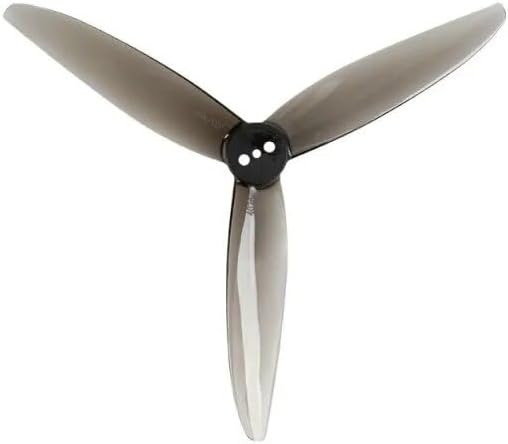
Figure 5.1: Angled view of a single ETLIN T4024 propeller.
6. Troubleshooting
This section addresses common issues related to propellers.
6.1 Drone Vibrations or Unstable Flight:
- Cause: Damaged, bent, or unbalanced propellers. Loose propellers. Incorrect propeller rotation direction.
- Solution:
- Inspect all propellers for damage. Replace any damaged propellers.
- Ensure all propellers are securely tightened to their motors.
- Verify that CW and CCW propellers are installed on the correct motors according to your drone's configuration.
6.2 Propeller Detachment During Flight:
- Cause: Insufficiently tightened mounting screws. Stripped screw threads in the motor bell or propeller hub.
- Solution:
- Ensure screws are tightened firmly but not overtightened.
- If threads are stripped, replace the propeller and/or motor bell as necessary.
- Use thread-locking compound (non-permanent) if recommended by your motor manufacturer, but be cautious not to get it on the motor bearings.
7. Specifications
| Feature | Specification |
|---|---|
| Propeller Size | 4 inch |
| Pitch | 2.4 |
| Blades | 3-Blade |
| Mount Type | T-Mount |
| Material | Pure PC (Polycarbonate) |
| Height of Hub | 5mm |
| Hole Diameter | 1.5mm / 2mm (Dual compatibility) |
| Weight (per propeller) | 2.1g |
| Quantity per Pack | 4 x CW, 4 x CCW (Total 8 propellers) |
| Recommended Age | 3 years and up |
| Model Number | ETLIN688 |
8. Safety Information
- Always disconnect power from your drone before installing, removing, or inspecting propellers.
- Propellers can cause serious injury. Keep hands and face clear of spinning propellers.
- Never fly a drone with damaged or unbalanced propellers.
- Ensure propellers are correctly oriented (CW/CCW) and securely fastened.
- This product is a component for DIY drone assembly and requires knowledge of drone operation and safety.
9. Warranty and Support
For any questions regarding the ETLIN T4024 propellers or for technical support, please contact your retailer or the manufacturer directly. Please refer to your purchase documentation for specific warranty terms and conditions, as these may vary by region and retailer.