1. Introduction
This manual provides essential instructions for the setup, operation, maintenance, and troubleshooting of your Aiwa ASMR-GPS Smart Watch. Please read this manual thoroughly before using the device to ensure proper function and longevity.
2. Package Contents
Upon unboxing, please verify that all items listed below are present:
- 1 x Aiwa ASMR-GPS Smart Watch (Black)
- 1 x Charging Cable
- 1 x User Manual
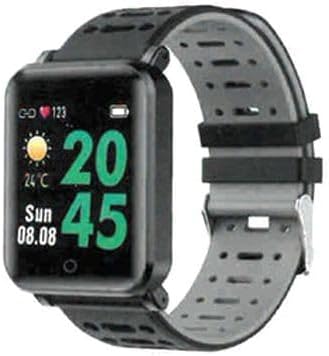
Image 1: Aiwa ASMR-GPS Smart Watch. This image displays the black smart watch with a square face and a two-tone black and grey silicone strap. The watch face shows time, date, weather, and heart rate icons.
3. Setup
3.1 Charging the Device
- Connect the charging cable to the charging port on the back of the watch.
- Plug the other end of the charging cable into a standard USB power adapter (not included) or a computer's USB port.
- The watch display will indicate charging status. Ensure the watch is fully charged before first use. A full charge typically takes approximately 2 hours.
3.2 Powering On/Off
- Power On: Press and hold the side button for a few seconds until the Aiwa logo appears.
- Power Off: Navigate to the 'Settings' menu on the watch, then select 'Power Off' or press and hold the side button, then confirm power off.
3.3 App Installation and Pairing
To utilize all smart features, the watch must be paired with a compatible smartphone via a companion application. The specific app name is not provided, please refer to the packaging or a quick start guide for the exact app name.
- Download and install the companion app from your smartphone's app store (e.g., Google Play Store or Apple App Store).
- Ensure Bluetooth is enabled on your smartphone.
- Open the companion app and follow the on-screen instructions to create an account and set up your profile.
- In the app, select 'Add Device' or 'Pair Device' and choose 'ASMR-GPS' from the list of available devices.
- Confirm the pairing request on both your smartphone and the watch.
4. Operating the Smart Watch
4.1 Navigating the Interface
The Aiwa ASMR-GPS Smart Watch features a 1.1-inch color AMOLED display. Navigation is primarily touch-based:
- Swipe Up/Down: Scroll through menus and notifications.
- Swipe Left/Right: Access different widgets or quick settings.
- Tap: Select an item or confirm an action.
- Side Button: Press to return to the home screen or wake the device.
4.2 Key Features
- GPS Functionality: The built-in GPS allows for accurate tracking of outdoor activities such as running, cycling, and walking without needing your phone. Access GPS tracking through the 'Workout' or 'Activity' menu.
- Heart Rate Monitoring: The watch continuously monitors your heart rate throughout the day. View your current heart rate on the watch face or in the dedicated heart rate app.
- Blood Pressure Monitoring: The watch can estimate your blood pressure. For accurate medical readings, consult a healthcare professional. Access this feature via the 'Blood Pressure' app on the watch.
- SpO2 Monitoring: Measure your blood oxygen saturation levels. This feature is accessible through the 'SpO2' app on the watch.
- Step Pedometer & Calorie Count: Tracks your daily steps, distance traveled, and calories burned. This data is typically displayed on the main watch face or in the 'Activity' summary.
- Sleep Tracking: Monitors your sleep patterns, including deep sleep, light sleep, and awake times. View detailed sleep analysis in the companion app.
- Smart Notifications: Receive alerts for incoming calls, messages, and app notifications directly on your watch when paired with your smartphone.
- Sedentary Reminder: The watch can remind you to move if you have been inactive for an extended period. This feature can be configured in the companion app.
- Music and Camera Remote Control: Control your smartphone's music playback and camera shutter directly from your watch. Access these functions through the respective apps on the watch.
- Additional Tools: Includes features such as 'Find My Phone', alarm clock, timer, and stopwatch, accessible through the watch's menu.
4.3 Water Resistance (IP67)
The Aiwa ASMR-GPS Smart Watch is IP67 rated, meaning it is protected from dust and can withstand immersion in water up to 1 meter for 30 minutes. It is suitable for daily use, such as washing hands or light rain. It is not recommended for swimming, showering with hot water, or diving.
5. Maintenance
5.1 Cleaning the Watch
- Wipe the watch screen and strap regularly with a soft, damp, lint-free cloth.
- Avoid using harsh chemicals, abrasive cleaners, or solvents.
- Ensure the watch is dry before charging.
5.2 Charging Best Practices
- Use only the provided charging cable.
- Avoid charging in extreme temperatures.
- Do not leave the watch charging for extended periods after it is fully charged.
5.3 Software Updates
Periodically check the companion app for available software updates. Updates often include performance improvements, new features, and bug fixes. Follow the app's instructions to install updates.
5.4 Storage
When not in use for an extended period, store the watch in a cool, dry place. It is advisable to charge the watch to about 50% before long-term storage to preserve battery health.
6. Troubleshooting
- Watch not powering on: Ensure the watch is fully charged. If it still doesn't power on, try performing a soft reset by holding the side button for 10-15 seconds.
- Pairing issues: Ensure Bluetooth is enabled on your phone and the watch is within range. Restart both the watch and your phone, then try pairing again. Clear previous pairings from your phone's Bluetooth settings if necessary.
- Inaccurate readings (HR, BP, SpO2): Ensure the watch is worn snugly on your wrist, about one finger-width above the wrist bone. Avoid excessive movement during measurements. Note that these readings are for reference and not for medical diagnosis.
- Notifications not appearing: Check that the watch is successfully paired with your phone. Verify notification permissions are enabled for the companion app in your phone's settings. Ensure 'Do Not Disturb' mode is not active on either device.
- Battery life issues: Reduce screen brightness, disable unnecessary features like 'Always-On Display' (if available), and limit background app refresh. Ensure the watch is fully charged using the correct cable.
7. Specifications
| Feature | Specification |
|---|---|
| Model | ASMR-GPS |
| Display | 1.1-inch Color AMOLED |
| Connectivity | Bluetooth V4.0, Built-in GPS |
| Water Resistance | IP67 |
| Battery | 240 mAh Lithium Ion |
| Sensors | Heart Rate, Blood Pressure, SpO2, Pedometer |
| Strap Material | TPU Silicone |
| Item Weight | 80 g |
| Package Dimensions | 12 x 6.6 x 5.2 cm |
8. Warranty and Support
8.1 Warranty Information
The Aiwa ASMR-GPS Smart Watch comes with a 1 Year Warranty from the date of purchase. This warranty covers manufacturing defects under normal use. It does not cover damage caused by misuse, accidents, unauthorized modifications, or failure to follow the instructions in this manual.
8.2 Customer Support
For technical assistance, warranty claims, or further inquiries, please refer to the contact information provided on your product packaging or the official Aiwa website. Please have your product model (ASMR-GPS) and proof of purchase ready when contacting support.