
1. Introduction
Thank you for choosing the Aiwa ACR-2018 Bluetooth Clock Radio. This device is designed to be a versatile addition to your nightstand, combining a digital clock, FM radio, Bluetooth speaker, and a convenient wireless charging pad. Its large, easy-to-read LED display ensures clear visibility of time and temperature. This manual will guide you through the features and functions of your new device, ensuring a seamless and enjoyable experience.
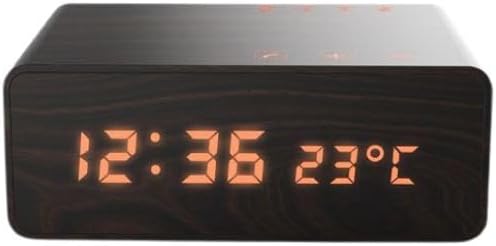
Figure 1.1: The Aiwa ACR-2018 Bluetooth Clock Radio, featuring a dark wood-grain finish and a bright orange LED display showing the time as 12:36 and the temperature as 23°C. Control buttons are subtly integrated on the top surface.
2. Setup
2.1 Power Connection
- Unpack the Aiwa ACR-2018 and all accessories from the box.
- Connect the provided power adapter to the DC input port on the back of the clock radio.
- Plug the power adapter into a standard wall outlet. The display will illuminate, and the clock will be ready for initial setup.
2.2 Initial Time Setting
Upon first power-on, the clock may display a default time or flash. Refer to the control buttons on the top of the unit:
- Press and hold the 'Time Set' button (usually indicated by a clock icon) to enter time setting mode.
- Use the '+' and '-' buttons (or 'Hour' and 'Minute' buttons) to adjust the hour and minute.
- Press the 'Time Set' button again to confirm and exit time setting mode.
3. Operating Instructions
3.1 Clock and Alarm Functions
- Time Display: The large LED display continuously shows the current time.
- Setting Alarms: Press the 'Alarm Set' button. Use '+' and '-' to set the desired alarm time. Press 'Alarm Set' again to confirm. You may be able to set multiple alarms depending on the model.
- Snooze Function: When the alarm sounds, press the 'Snooze' button to temporarily silence it for a few minutes.
- Alarm Off: Press the 'Alarm Off' button or the 'Power' button to turn off the alarm for the day.
3.2 Bluetooth Speaker Operation
- Press the 'Mode' button until 'Bluetooth' mode is selected (indicated by a Bluetooth icon or 'BT' on the display). The device will enter pairing mode, and the Bluetooth indicator will flash.
- On your smartphone or tablet, enable Bluetooth and search for available devices. Select 'Aiwa ACR-2018' from the list.
- Once paired, the Bluetooth indicator will become solid, and you can now stream audio from your device to the clock radio.
- Use the volume controls on the clock radio or your connected device to adjust the audio level.
3.3 FM Radio Operation
- Press the 'Mode' button until 'FM Radio' mode is selected.
- Auto Scan: Press and hold the 'Play/Pause' or 'Scan' button to automatically scan and save available FM stations.
- Manual Tuning: Use the 'Previous' and 'Next' buttons to manually tune to specific frequencies.
- Preset Stations: If available, use the 'Preset' buttons to cycle through saved stations.
3.4 Wireless Charging
- Place your Qi-compatible smartphone or device on the designated wireless charging pad area on top of the clock radio.
- Ensure the device is centered on the charging pad for optimal contact.
- The charging indicator on the clock radio (if present) or on your phone will confirm that charging has begun.
- Remove your device once fully charged.
4. Maintenance
4.1 Cleaning
- Always unplug the device from the power outlet before cleaning.
- Use a soft, dry cloth to wipe the exterior surfaces.
- Do not use abrasive cleaners, waxes, or solvents as they may damage the finish.
- Avoid spraying liquids directly onto the device.
4.2 Storage
If storing the device for an extended period, unplug it and store it in a cool, dry place, away from direct sunlight and extreme temperatures.
5. Troubleshooting
| Problem | Possible Cause | Solution |
|---|---|---|
| No power/Display off | Power adapter not connected or faulty outlet. | Ensure power adapter is securely plugged into the device and a working wall outlet. Try a different outlet. |
| Bluetooth not pairing | Device not in pairing mode; Bluetooth on source device is off or already connected to another device. | Ensure the clock radio is in Bluetooth pairing mode. Turn Bluetooth off and on again on your source device. Disconnect from other Bluetooth devices. |
| Wireless charging not working | Phone not Qi-compatible; phone not centered; foreign objects on pad; phone case too thick. | Verify your phone supports Qi wireless charging. Reposition the phone on the pad. Remove any metal objects. Try charging without the phone case. |
| Poor radio reception | Weak signal; antenna not extended. | Extend the FM antenna fully. Reposition the clock radio to improve signal reception. |
6. Specifications
- Brand: Aiwa
- Model Number: ACR-2018
- Connections: Bluetooth
- Compatible Devices: Smartphone, Tablet
- Colour: Black
- ASIN: B0CLDWQVJR
- First Available: 19 October 2023
7. Warranty and Support
7.1 Manufacturer's Warranty
The Aiwa ACR-2018 Bluetooth Clock Radio comes with a 1 Year Manufacturer's Warranty. This warranty covers defects in materials and workmanship under normal use. Please retain your proof of purchase for warranty claims.
7.2 Customer Support
For technical assistance, warranty claims, or further inquiries, please contact Aiwa customer support through their official website or the retailer from whom you purchased the product. Please have your model number (ACR-2018) and proof of purchase ready when contacting support.


