
1. Product Overview
The H HONSIT Ergonomic Mesh Office Chair is designed to provide optimal comfort and support for extended periods of sitting. Featuring a high back, split lumbar support, adjustable armrests, and a retractable footrest, this chair promotes healthy posture and reduces fatigue. Its multifunctional design makes it suitable for various environments, including home offices and gaming setups.

Image: Front and side view of the H HONSIT Ergonomic Mesh Office Chair in Cream.

Image: The ergonomic office chair positioned at a modern desk with a computer setup.
2. Setup and Assembly
This ergonomic office chair is designed for straightforward assembly. All necessary accessories and tools are included in the packaging. Please follow the assembly instructions carefully to ensure proper and safe setup.
Important Safety Information for Assembly:
- Always follow the assembly instructions provided in the package.
- Ensure all components are present before beginning assembly.
- Tighten all screws and bolts securely, but do not overtighten.
- Keep fingers and other body parts away from moving parts during assembly.
- Assemble the chair on a soft, clean surface to prevent damage.
3. Operating Instructions
The H HONSIT Ergonomic Mesh Office Chair offers multiple adjustment features to customize your seating experience for maximum comfort and ergonomic support.
3.1. Seat Height Adjustment
To adjust the seat height, locate the lever under the right side of the seat. While seated, pull the lever up to lower the seat. To raise the seat, stand up slightly and pull the lever up. Release the lever at your desired height.
3.2. Backrest Recline and Lock
The backrest can recline between 90 and 135 degrees. To recline, pull the recline lever (typically located under the left side of the seat) and lean back. Release the lever to lock the backrest at your preferred angle. To return to an upright position, lean forward slightly while pulling the lever.
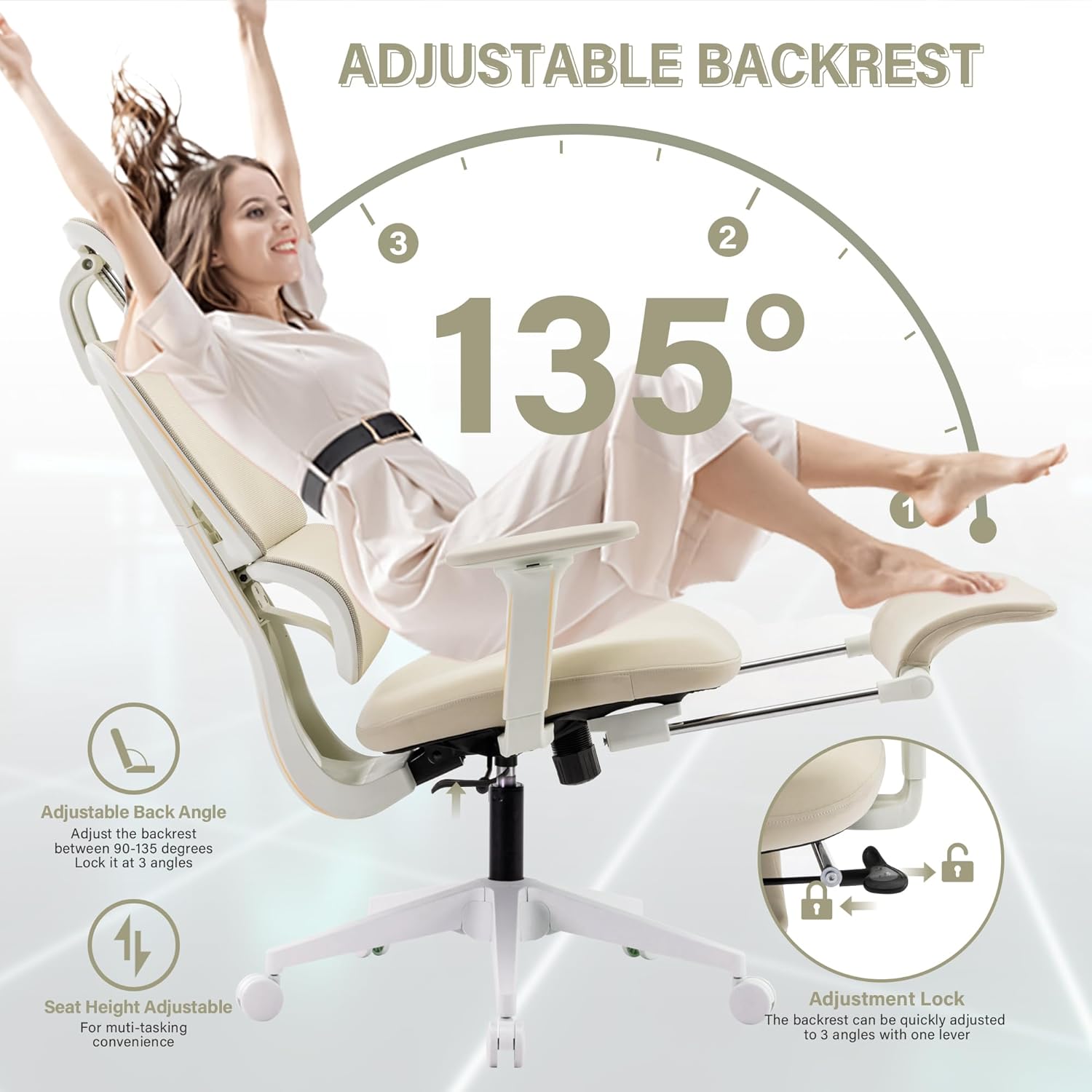
Image: Illustration of the adjustable backrest angle (90-135 degrees) and seat height adjustment mechanism.

Image: A person demonstrating the 90-135 degree reclining tilt, highlighting ergonomic support.
3.3. Adjustable Headrest
The headrest can be adjusted for both height and angle. To adjust the height, grasp the headrest and slide it up or down. To adjust the angle, tilt the headrest forward or backward to find the most comfortable position for your neck and head.

Image: Detailed view of the headrest, illustrating its 2.3-inch height adjustment and 45-degree angle adjustment capabilities.
3.4. Adjustable Armrests
The chair features 2D adjustable armrests. These can be moved up and down to suit your preferred height for working or gaming. Locate the button or lever on the side of the armrest to unlock and adjust its height.
3.5. Retractable Footrest
For added relaxation, the chair includes a retractable footrest. To deploy, pull the footrest out from under the seat. To retract, push it back in until it is fully stored. This feature is ideal for resting your legs during breaks or while reclining.

Image: Close-up of the telescopic foot pedal, showing its extension mechanism for leg relaxation.
3.6. Lumbar Support
The chair features a split lumbar support system designed to conform to your lower back, promoting an S-shaped curve for correct sitting posture and reducing waist pressure. This dynamic support responds to pressure, providing continuous comfort.

Image: Diagram detailing the ergonomic lumbar support, showing 5 key support points and the double-back structure for spinal alignment.

Image: Comprehensive view of the chair's adjustable components: headrest, dynamic lumbar support, 2D armrests, and retractable footrest.
4. Maintenance and Care
Proper maintenance ensures the longevity and optimal performance of your office chair.
- Cleaning: For mesh and fabric parts, use a soft brush or vacuum cleaner to remove dust. For stains, gently dab with a damp cloth and mild soap, then wipe with a clean, dry cloth. Avoid harsh chemicals.
- Frame and Base: Wipe metal and plastic components with a soft, damp cloth.
- Casters: Periodically check casters for hair or debris and clean as needed to ensure smooth rolling.
- Fasteners: Occasionally check all screws and bolts to ensure they are tight. Retighten if necessary.
- Environment: Keep the chair away from direct sunlight, extreme temperatures, heat sources, and flammable materials to prevent material degradation.
- Weight Capacity: Do not exceed the maximum weight capacity of 300 lbs.
5. Troubleshooting
If you encounter any issues with your H HONSIT Ergonomic Mesh Office Chair, please refer to the following common troubleshooting tips:
| Problem | Possible Cause | Solution |
|---|---|---|
| Chair feels wobbly or unstable | Loose screws or improper assembly. | Check all assembly points and tighten any loose screws. Ensure all parts are correctly installed according to the manual. |
| Seat height adjustment not working | Gas lift mechanism issue or lever malfunction. | Ensure the lever is fully engaged. If the issue persists, contact customer service. |
| Backrest does not recline or lock | Recline mechanism jammed or lever issue. | Check for obstructions. Ensure the recline lever is functioning correctly. |
| Casters not rolling smoothly | Debris (hair, dust) caught in casters. | Turn the chair over and carefully remove any debris from the caster wheels. |
| New product odor | Common with new materials. | Allow the chair to air out in a well-ventilated area for a few days. The odor should dissipate naturally. |
If these solutions do not resolve the issue, please contact H HONSIT customer service for further assistance.
6. Specifications
| Feature | Detail |
|---|---|
| Brand | H HONSIT |
| Model Name | A (Item model number: 3116-Cream) |
| Color | Cream |
| Product Dimensions (D x W x H) | 29.13"D x 30.31"W x 48.62"H |
| Item Weight | 45 pounds |
| Back Style | Mesh Back |
| Special Features | Ergonomic, Adjustable Headrest, Adjustable Height, Adjustable Armrests, Lumbar Support, Swivel, Reclining, Rolling, Breathable Mesh, Retractable Footrest, Seat For Long Hours, For Lower Back Pain |
| Recommended Uses | Gaming, Office |
| Fill Material | Sponge (for seat cushion) |
| Seat Height | 18.9 Inches |
| Seat Depth | 18.8 inches |
| Reclining Position Count | 1+ (90-135 degrees) |
| Maximum Weight Capacity | 300 lbs |

Image: Detailed dimensions of the H HONSIT Ergonomic Mesh Office Chair.
7. Warranty and Support
H HONSIT is committed to providing high-quality products and customer satisfaction.
7.1. Money Back Guarantee
This product comes with a 30-day money-back guarantee from the date of purchase. Please refer to your purchase documentation for specific terms and conditions.
7.2. Customer Service
For any questions, concerns, or assistance with your product, H HONSIT provides 24-hour customer service. Please refer to your purchase platform or the official H HONSIT website for contact information.


