
1. Introduction
This manual provides essential information for the proper setup, operation, and maintenance of your Enya X3 Pro AcousticPlus 41-inch Carbon Fiber Guitar. Please read this manual thoroughly to ensure optimal performance and longevity of your instrument.

Image 1.1: Enya X3 Pro AcousticPlus Carbon Fiber Guitar with its included gig bag.
2. Key Features
- Carbon Fiber Construction: The guitar is constructed from carbon fiber, offering enhanced durability, stability, and resistance to environmental changes compared to traditional wooden guitars. This material contributes to increased resonance, up to 50% more than some wooden acoustic guitars.
- AcousticPlus SP1 Pickup System: This integrated system allows for the application of various effects directly through the guitar's soundboard, without the need for external amplifiers or effects pedals. Effects include Reverb, Chorus, Delay, and Wah.
- Elevated Neck Design: The unique elevated neck design reduces pressure on the guitar's soundboard, allowing for greater vibration and resonance. This design enhances tonal response and dynamic range across all frequencies.
- R.S.B Carbon Technology: Enya's R.S.B (Resonance Structure Body) Carbon technology further contributes to the guitar's rich and balanced tonal qualities.
- Quality Components: Features a TUSQ nut and saddle for improved tone and sustain, along with round-end frets for comfortable playability.

Image 2.1: Front and back view of the Enya X3 Pro AcousticPlus guitar, showcasing its carbon fiber finish.

Image 2.2: Diagram illustrating the elevated neck design, which enhances the guitar's acoustic properties.
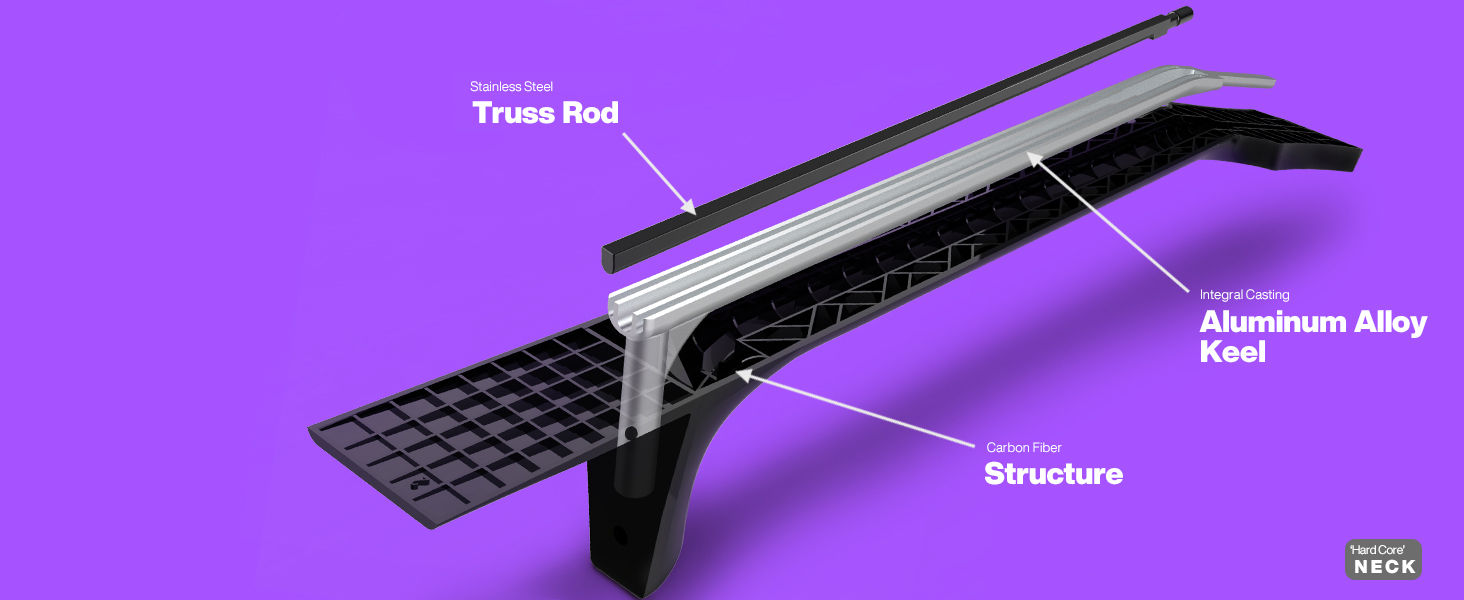
Image 2.3: Diagram of the AcousticPlus SP1 Pickup System, highlighting its integrated controls.
3. Setup
3.1 Unpacking and Initial Inspection
- Carefully remove the guitar from its packaging and gig bag.
- Inspect the guitar for any visible damage that may have occurred during shipping.
- Ensure all included accessories are present (refer to Section 7: Included Accessories).
3.2 Charging the AcousticPlus System
The AcousticPlus system is powered by an internal lithium-ion battery. Before first use, or if the battery is low, charge the system using the provided USB Type-C cable.
- Locate the USB Type-C charging port on the guitar's lower bout.
- Connect the USB Type-C cable to the guitar and a compatible USB power adapter (not included).
- The indicator light on the pickup control will show charging status.

Image 3.1: Output jacks and USB Type-C charging port.
3.3 Tuning
The guitar features an onboard tuner for convenient and accurate tuning.
- Activate the onboard tuner by pressing the appropriate button on the AcousticPlus control panel (refer to Section 4.2).
- Pluck each string individually. The display will indicate the note and whether it is sharp or flat.
- Adjust the tuning pegs until each string is in tune. Standard tuning is E-A-D-G-B-e (from thickest to thinnest string).
3.4 String Height Adjustment
The guitar's action (string height) is factory-set. If adjustments are desired, use the included adjustment wrench for the truss rod. Saddle adjustments may require professional assistance.
- The truss rod adjusts the neck relief. Consult a qualified technician if you are unfamiliar with truss rod adjustments.
- Saddle height affects overall string action. Minor adjustments can be made by sanding the bottom of the saddle, but this should be done carefully to avoid irreversible changes.
4. Operating
4.1 Basic Acoustic Playback
The Enya X3 Pro AcousticPlus functions as a high-quality acoustic guitar. Simply hold and play as you would any traditional acoustic instrument.
4.2 Using the AcousticPlus SP1 System
The AcousticPlus SP1 system allows you to add various effects directly to your guitar's sound, both acoustically and when amplified.

Image 4.1: AcousticPlus control button.
- Power On/Off: Press and hold the control button to power the AcousticPlus system on or off. An indicator light will confirm the status.
- Effect Selection: Briefly press the control button to cycle through available effects: Reverb, Chorus, Delay, and Wah. The indicator light may change color or pattern to denote the active effect.
- Effect Level Adjustment: Rotate the control button to adjust the intensity or level of the selected effect.
- Onboard Tuner: A quick double-press of the control button may activate the onboard tuner. Refer to the indicator light for tuning guidance.
4.3 Connecting to an Amplifier
To amplify your guitar's sound, connect it to an external amplifier using the provided audio cable.
- Insert one end of the audio cable into the guitar's output jack.
- Connect the other end to the input of your amplifier.
- Adjust the volume and tone settings on your amplifier as desired. The AcousticPlus effects will also be audible through the amplifier.
4.4 Mobile App Connectivity
The AcousticPlus system supports connection to a mobile application via Bluetooth for advanced settings and tone customization.
- Download the official Enya AcousticPlus app from your device's app store.
- Ensure the AcousticPlus system on your guitar is powered on.
- Open the app and follow the on-screen instructions to pair your guitar via Bluetooth.
- Within the app, you can fine-tune effects, adjust equalization, and explore additional sound presets.
5. Maintenance
5.1 Cleaning
To maintain the appearance of your carbon fiber guitar:
- Wipe the body and neck with a soft, dry, lint-free cloth after each use to remove fingerprints and sweat.
- For deeper cleaning, a slightly damp cloth with mild soap can be used, followed by a dry cloth. Avoid abrasive cleaners or solvents.
- Clean the fretboard and strings regularly to prevent buildup.
5.2 String Replacement
Replace strings regularly to maintain optimal tone and playability.
- Replace strings one at a time to maintain neck tension.
- Use high-quality acoustic guitar strings. The guitar is factory-equipped with D'Addario XS strings.
- Ensure strings are properly seated in the nut slots and bridge pins.
5.3 Battery Care
To prolong the life of the internal lithium-ion battery:
- Avoid completely draining the battery frequently.
- Charge the battery regularly, even if the guitar is not in frequent use.
- Store the guitar in a cool, dry place, away from extreme temperatures.
5.4 Storage
Due to its carbon fiber construction, the Enya X3 Pro is highly stable and less susceptible to humidity and temperature changes than wooden guitars. However, proper storage is still recommended:
- Store the guitar in its included gig bag when not in use to protect it from dust and minor impacts.
- Avoid prolonged exposure to direct sunlight or extreme heat/cold.
6. Troubleshooting
This section addresses common issues you might encounter.
| Problem | Possible Cause | Solution |
|---|---|---|
| Guitar not staying in tune | New strings stretching, improper string winding, worn tuning pegs, nut friction. | Stretch new strings thoroughly. Ensure strings are correctly wound around tuning posts. Check tuning pegs for looseness. Apply graphite to nut slots if friction is suspected. |
| Buzzing strings | Low string action, uneven frets, neck relief issues. | Check neck relief with the included adjustment wrench. If buzzing persists, consult a professional technician for fret leveling or saddle adjustment. |
| No sound from AcousticPlus system | Battery drained, system not powered on, faulty cable (if amplified). | Charge the battery. Press and hold the control button to power on. Test with a different audio cable if connected to an amplifier. |
| Effects not working or inconsistent | Incorrect effect selection, low battery, software glitch. | Cycle through effects to ensure the desired one is active. Charge the battery. If using the mobile app, ensure a stable Bluetooth connection. Try restarting the AcousticPlus system. |
For issues not covered here or for complex repairs, please contact Enya customer support or a qualified guitar technician.
7. Included Accessories
Your Enya X3 Pro AcousticPlus guitar comes with the following accessories:
- Thick Gig Bag: Provides protection for your instrument during transport and storage.
- Audio Cable: For connecting the guitar to an amplifier or other audio equipment.
- Adjustment Wrench: For truss rod adjustments.
- USB Type-C Charging Cable: For recharging the AcousticPlus system's internal battery.
8. Specifications
| Feature | Detail |
|---|---|
| Brand | Enya |
| Model Number | X3 PRO |
| Size | 41 inches |
| Color | X3 Pro Carbon Black |
| Top Material | Carbon Fiber |
| Body Material | Carbon Fiber |
| Back Material | Carbon Fiber |
| Number of Strings | 6 |
| Battery Type | Lithium Ion (1 included) |
9. Warranty and Support
For warranty information, product support, or service inquiries, please refer to the warranty card included with your purchase or visit the official Enya Music website. You may also contact Enya customer service directly for assistance.


