
Cubehom B0CL97T7TM
Cubehom 63-inch Black TV Stand Instruction Manual
Model: B0CL97T7TM
1. Safety Information
Please read all instructions carefully before assembly and use. Keep this manual for future reference.
- Ensure the TV stand is properly secured to the wall to prevent tipping. Wall anchoring hardware may be required and is recommended for safety, especially in homes with children or pets.
- Do not exceed the weight limit for the top surface or shelves. Refer to the specifications section for details.
- Keep small parts and packaging materials away from children during assembly to prevent choking hazards.
- Assemble the unit on a soft, clean surface to prevent scratches.
- Periodically check all connections and fasteners to ensure they remain tight.
2. Package Contents
Before beginning assembly, verify that all parts and hardware are present and undamaged. If any components are missing or damaged, please contact customer support.
The package typically includes:
- Wooden panels (top, bottom, side, back panels)
- Glass shelf
- Acrylic support legs
- LED strip lights with remote control
- Assembly hardware (screws, dowels, cam locks, etc.)
- Assembly tools (e.g., Allen wrench, screwdriver - may not be included)
3. Assembly Instructions
Assembly is required for this TV stand. It is recommended that two adults assemble this unit. Please follow the steps below carefully.
- Prepare the Area: Clear a spacious area and lay out all components on a soft, clean surface to prevent damage.
- Attach Base Supports: Secure the base supports to the bottom panel using the provided hardware.
- Assemble Side Panels: Connect the side panels to the bottom panel. Ensure all connections are firm.
- Install Middle Shelf and Dividers: Insert the middle shelf and any internal dividers.
- Attach Acrylic Support Legs: Position and secure the clear acrylic support legs that elevate the top surface.
- Place Top Panel: Carefully align and attach the top panel to the assembled structure, securing it with the appropriate hardware.
- Install Glass Shelf: Gently place the glass shelf into its designated slots within the open compartment.
- Apply LED Strip Lights: Adhere the LED strip lights to the designated areas, typically along the underside of the top panel and within the open compartments. Ensure the wiring is neatly routed.
- Connect Power: Plug in the LED lights and test their functionality.
- Final Check: Verify all screws and fasteners are tightened. Move the assembled TV stand to its desired location.
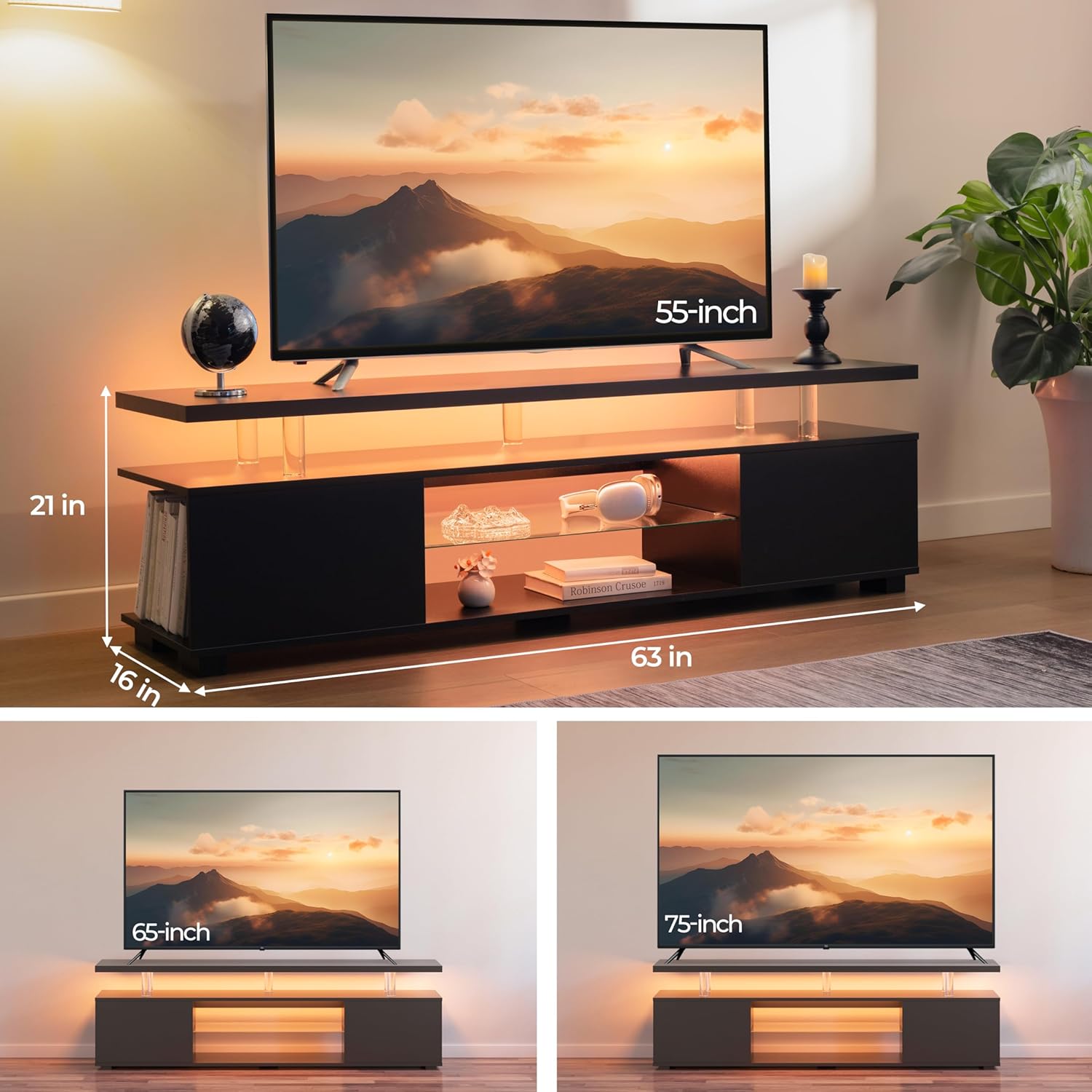
Image 1: Product Dimensions. This diagram illustrates the overall size of the TV stand, measuring 63 inches in length, 21 inches in height, and 16 inches in depth. It also shows how various TV sizes (55-inch, 65-inch, 75-inch) fit on the stand.

Image 2: Fully assembled Cubehom 63-inch Black TV Stand with warm LED lighting. The image displays the stand with a television, decorative items, and books, highlighting its functional and aesthetic features.
4. Operating Instructions (LED Lights)
Your Cubehom TV stand features integrated LED strip lights for customizable ambiance. The lights are controlled via a remote control or a mobile application.
- Power On/Off: Use the power button on the remote control or in the app to turn the LED lights on or off.
- Color Selection: Select from 16 available colors using the color palette buttons on the remote or the color wheel in the app.
- Brightness Adjustment: Increase or decrease the brightness level using the designated buttons on the remote or slider in the app.
- Mode Selection: Cycle through various lighting modes (e.g., static, fade, flash, strobe) using the mode buttons.
- Music Rhythm Mode: Activate the music rhythm mode via the remote or app to synchronize the lights with audio.

Image 3: LED Lighting Features. This graphic highlights the multi-color LED lighting effects, including 16 RGB light options, brightness control, and remote control functionality for easy operation.
5. Maintenance
Proper care will ensure the longevity and appearance of your TV stand.
- Cleaning: Wipe surfaces with a soft, damp cloth. Avoid harsh chemicals or abrasive cleaners, which can damage the finish.
- Spills: Clean spills immediately with a dry cloth to prevent staining or damage to the engineered wood.
- LED Lights: The LED strips are designed for long-term use. If a strip malfunctions, contact customer support for replacement options. Do not attempt to repair them yourself.
- Glass Shelf: Clean the glass shelf with a glass cleaner and a soft cloth.
- Avoid Direct Sunlight: Prolonged exposure to direct sunlight can cause fading or discoloration.
6. Troubleshooting
If you encounter any issues with your TV stand, refer to the following common problems and solutions.
- LED Lights Not Working:
- Ensure the power adapter is securely plugged into both the LED strip and a working power outlet.
- Check the remote control battery. Replace if necessary.
- Verify that the remote control is pointed directly at the LED receiver.
- Stand is Unstable/Wobbly:
- Check all assembly hardware (screws, cam locks) to ensure they are fully tightened.
- Ensure the stand is placed on a flat, level surface.
- Consider using the recommended wall anchoring hardware for added stability.
- Parts Do Not Fit Together:
- Review the assembly instructions to ensure you are using the correct parts for each step.
- Do not force parts together. If a part does not fit, re-examine the orientation and ensure no foreign objects are obstructing the connection.
7. Specifications
| Feature | Detail |
|---|---|
| Brand | Cubehom |
| Model Number | B0CL97T7TM |
| Color | Black |
| Size | 63 inches (Length) |
| Recommended Uses | Decorative items, Entertainment Center, Gaming Accessories |
| Mounting Type | Floor Mount |
| Room Type | Living Room |
| Finish Type | High-gloss |
| Number of Shelves | 1 (Glass Shelf) |
| Number of Levels | 3 |
| Top Material Type | Engineered Wood |
| Frame Material | Engineered Wood |
| Assembly Required | Yes |
| Manufacturer | Home to Power |
8. Warranty and Support
For warranty information or customer support, please refer to the documentation included with your purchase or contact the retailer/manufacturer directly. Keep your proof of purchase for any warranty claims.
Ask a question about this manual
Ask about setup, troubleshooting, compatibility, parts, safety, or missing instructions. Manuals+ will review the question and use this page’s manual context to help answer it.