
Tangkula 11089-JV-TA
Tangkula Bamboo Mid Century Desk User Manual
Model: 11089-JV-TA
1. Introduction
Thank you for choosing the Tangkula Bamboo Mid Century Desk. This desk is designed to provide an efficient workspace with ample storage, crafted from durable bamboo for lasting use. Its thoughtful design includes features like a wide desktop, under-desk shelf, two pull-out drawers, and a cable management groove, making it ideal for various activities in your home, office, or dormitory.
Please read this manual thoroughly before assembly and use to ensure proper setup and maintenance of your new desk.

Figure 1.1: Tangkula Bamboo Mid Century Desk (Natural finish)
2. Safety Information
- Always assemble the desk on a soft, clean surface to prevent scratches.
- Ensure all screws and fasteners are securely tightened before use. Periodically check and re-tighten as needed.
- Do not overload the desktop or drawers beyond their recommended weight capacity.
- Keep small parts and packaging materials away from children to prevent choking hazards.
- Avoid placing hot items directly on the desk surface without protection.
- Do not stand or climb on the desk.
3. Parts List
Please verify that all components are present before beginning assembly. If any parts are missing or damaged, please contact customer support.
| Part | Description | Quantity |
|---|---|---|
| A | Desktop with Drawers (Pre-assembled) | 1 |
| B | Desk Legs | 4 |
| C | Crossbars (for reinforcement) | 2 |
| D | Hardware Pack (Screws, Allen Wrench, Foot Pads) | 1 |
Note: The main desktop unit with drawers is largely pre-assembled for ease of setup.
4. Setup & Assembly
Assembly of the Tangkula Bamboo Mid Century Desk is straightforward. All necessary tools are included.
- Unpack Components: Carefully remove all parts from the packaging. Place them on a soft, clean surface to prevent damage.
- Attach Legs: Identify the four desk legs (Part B). Align each leg with the pre-drilled holes on the underside of the desktop unit (Part A). Secure each leg using the provided screws from the Hardware Pack (Part D) and the Allen wrench. Ensure they are firmly tightened.
- Install Crossbars: Attach the two crossbars (Part C) between the desk legs as indicated in the assembly diagram (refer to the included paper manual for detailed diagrams). These crossbars provide additional stability. Secure them with the appropriate screws from the Hardware Pack (Part D).
- Apply Foot Pads: Gently turn the desk upright. Apply the protective anti-slip foot pads from the Hardware Pack (Part D) to the bottom of each leg. These pads protect your floor from scratches.
- Final Check: Ensure all connections are secure and the desk is stable before placing any items on it.
Video 4.1: Overview of the Tangkula Bamboo Mid Century Desk, demonstrating its features and potential setup.
5. Operating Instructions
Your Tangkula Bamboo Mid Century Desk is designed for versatile use in various settings.
- Desktop Usage: The wide desktop provides ample space for a laptop, monitor, books, and other work essentials. The elevated edges help prevent items from rolling off.
- Storage Drawers: Utilize the two pull-out drawers for organizing documents, stationery, and other small items. These drawers offer convenient, concealed storage.
- Under-Desk Shelf: The integrated under-desk shelf is perfect for storing books, decorative items, or small electronic devices, keeping them within easy reach but off the main desktop.
- Cable Management Groove: The desk features a dedicated groove for routing cables, helping to keep your workspace tidy and free from tangled wires.

Figure 5.1: Illustration of the desk's storage features, including two pull-out drawers and an under-desk shelf.
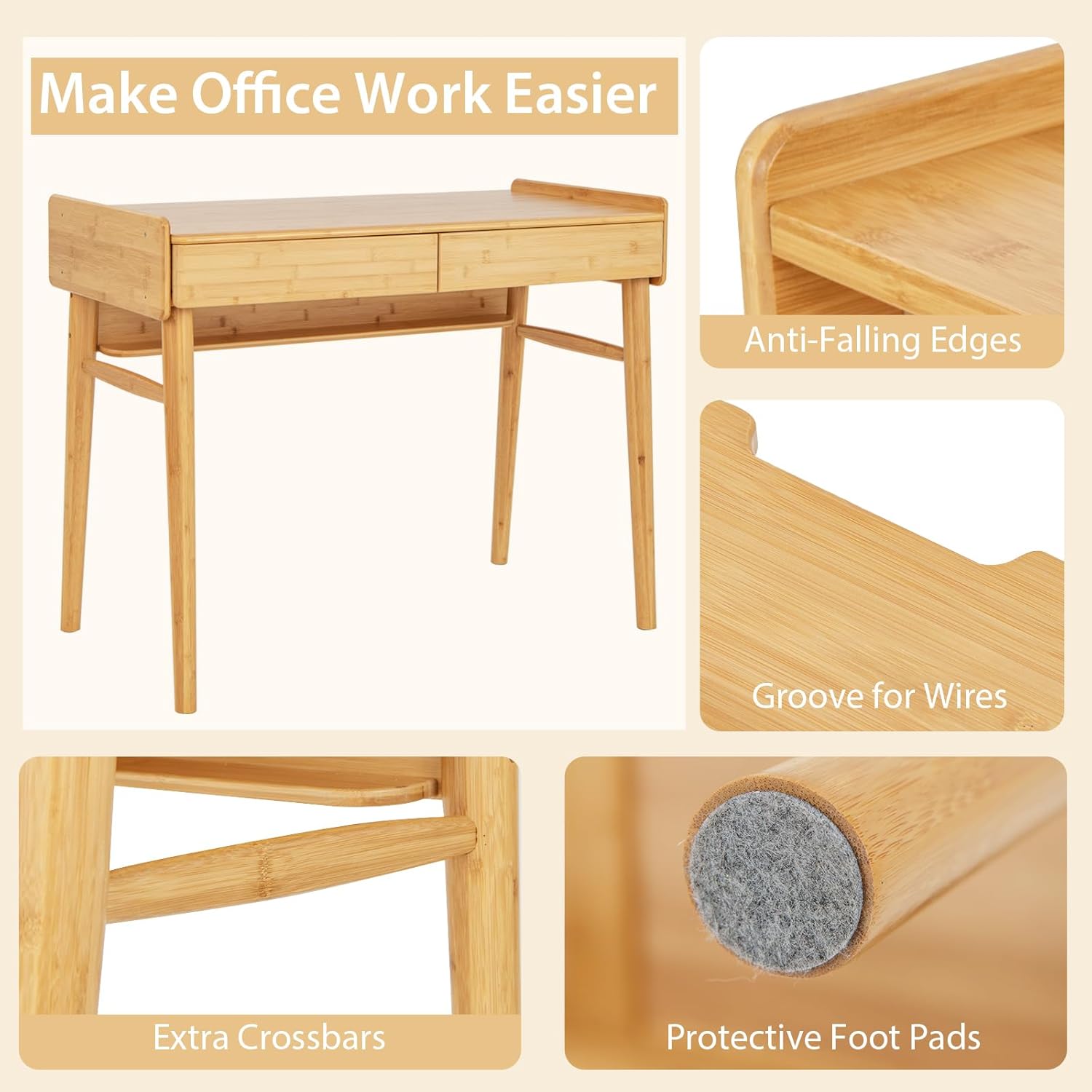
Figure 5.2: Close-up view of key features such as anti-falling edges, cable groove, extra crossbars, and protective foot pads.
6. Maintenance
Proper care will extend the life and maintain the appearance of your bamboo desk.
- Cleaning: Wipe the desk surface with a soft, damp cloth. For stubborn stains, use a mild soap solution and immediately dry with a clean cloth. Avoid abrasive cleaners or harsh chemicals.
- Spills: The painted bamboo surface is waterproof and stain-proof. In case of spills, wipe them immediately to prevent any potential damage or discoloration.
- Sunlight Exposure: While bamboo is durable, prolonged direct sunlight exposure may cause slight color changes over time.
- Humidity: Maintain a stable humidity level in the room to prevent the bamboo from drying out or absorbing too much moisture, which could lead to warping.
- Hardware Check: Periodically check all screws and fasteners to ensure they remain tight. Re-tighten if necessary.

Figure 6.1: Demonstrates the waterproof and stain-resistant properties of the desk's surface, and ease of cleaning.
7. Troubleshooting
| Problem | Possible Cause | Solution |
|---|---|---|
| Desk wobbles | Loose screws; uneven floor | Check and tighten all assembly screws. Ensure the desk is on a flat, even surface. Adjust foot pads if necessary. |
| Drawers stick or are difficult to open/close | Dust/debris in runners; misalignment | Clean drawer runners. Ensure drawers are properly aligned within their tracks. A small amount of wax on wood runners can improve smoothness. |
| Surface scratches | Sharp objects; abrasive cleaning | Use coasters or desk mats for protection. Avoid dragging sharp objects across the surface. Use only soft cloths for cleaning. |
8. Specifications
| Feature | Detail |
|---|---|
| Overall Dimension | 39.5" (L) x 20" (W) x 31" (H) |
| Inner Size of Each Drawer | 17.5" (L) x 15.5" (W) x 2.5" (H) |
| Size of Under-Desk Shelf | 34" (L) x 2.5" (W) |
| Height of Legroom | 25.5" |
| Load Capacity of Desktop | 110 lbs |
| Net Weight | 40.5 lbs |
| Material | Bamboo |
| Color | Natural |
| Model Number | 11089-JV-TA |

Figure 8.1: Detailed dimensions of the Tangkula Bamboo Mid Century Desk and its components.
9. Warranty & Support
This product comes with a Limited Warranty. For specific details regarding warranty coverage, please refer to the warranty card included in your package or visit the official Tangkula website.
For any questions, missing parts, or assistance with assembly, please contact Tangkula Customer Service:
- Website: Visit the Tangkula Store on Amazon
- Email: Refer to your purchase documentation for direct email support.
- Phone: Refer to your purchase documentation for direct phone support.
Please have your model number (11089-JV-TA) and purchase date ready when contacting support.
Ask a question about this manual
Ask about setup, troubleshooting, compatibility, parts, safety, or missing instructions. Manuals+ will review the question and use this page’s manual context to help answer it.