Introduction
This manual provides detailed instructions for the installation, operation, and maintenance of the Generic DSX1138 Browse S1703 Replacement Switch. This component is designed to replace a worn or damaged browse switch in compatible Pioneer DJ controller models, restoring full functionality for navigation and selection within your DJ software or hardware interface.
Please read this manual thoroughly before attempting any installation or repair to ensure proper handling and to prevent damage to your equipment.
Compatibility
The DSX1138 Browse S1703 Replacement Switch is compatible with the following Pioneer DJ controller models:
- Pioneer DJ DDJ-400
- Pioneer DJ DDJ-FLX4
- Pioneer DJ DDJ-400N
- Pioneer DJ DDJ-400S
- Pioneer DJ DDJ-FLX6
- Pioneer DJ DDJ-REV1
Safety Information
Warning: Disconnecting and reconnecting internal components of electronic devices carries risks, including electric shock and damage to the device. If you are not comfortable performing this installation, seek assistance from a qualified technician.
- Always disconnect the DJ controller from all power sources and other connected devices before beginning installation.
- Use appropriate tools for disassembly and reassembly.
- Avoid touching internal components unnecessarily.
- Keep small parts away from children.
Package Contents
Verify that your package contains the following items:
- 1 x Generic DSX1138 Browse S1703 Replacement Switch
- (Optional, depending on supplier) Small screwdriver or prying tool
If any items are missing or damaged, please contact your retailer.
Installation Guide
This section outlines the general steps for replacing the browse switch. Specific disassembly procedures may vary slightly between controller models. Refer to your specific controller's service manual or online resources for detailed disassembly instructions if needed.
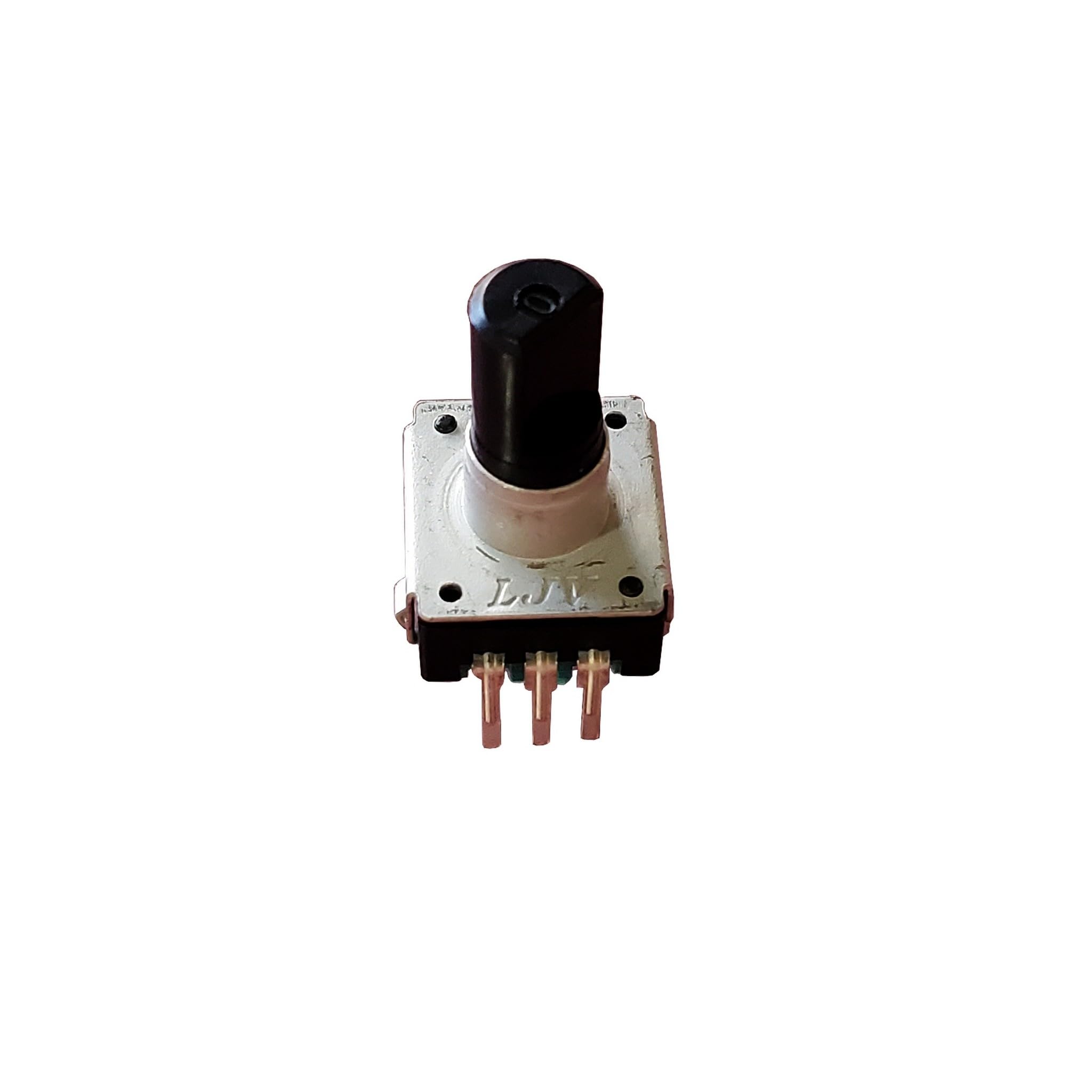
Figure 1: The Generic DSX1138 Browse S1703 Replacement Switch. This image shows the compact design of the replacement switch, highlighting its connection points and button mechanism.
- Preparation:
- Ensure your Pioneer DJ controller is powered off and disconnected from the mains power supply, USB cable, and any other connected devices.
- Place the controller on a clean, stable, and static-free surface.
- Accessing the Switch:
- Carefully remove the necessary screws from the bottom and/or top casing of your DJ controller to gain access to the internal circuit board where the browse switch is located. Keep track of all screws and their locations.
- Gently separate the casing halves. Be mindful of any ribbon cables or wires connecting the two halves.
- (Image description if available: An image showing the underside of a DJ controller with screws being removed, or the top panel being carefully lifted.)
- Removing the Old Switch:
- Locate the existing browse switch on the circuit board. It is typically a small, tactile button with a rotary encoder function.
- If the switch is soldered, desolder the old switch carefully using appropriate desoldering tools. If it's a plug-and-play component, gently disconnect its connector or unclip it from its mounting.
- (Image description if available: A close-up image of the circuit board, highlighting the old browse switch and the process of desoldering or disconnecting it.)
- Installing the New Switch:
- Align the new DSX1138 Browse S1703 Replacement Switch with the corresponding pads or connector on the circuit board.
- If soldering, carefully solder the new switch into place, ensuring all pins make good contact and there are no solder bridges. If it's a connector, firmly plug it in or clip it into its mounting.
- (Image description if available: An image showing the new switch being soldered onto the circuit board or connected to its designated port.)
- Reassembly:
- Carefully reassemble the controller casing, ensuring all cables are properly routed and not pinched.
- Replace all screws, tightening them gently to avoid stripping the threads. Do not overtighten.
- (Image description if available: An image depicting the reassembly of the controller casing, showing screws being replaced.)
- Testing:
- Reconnect the power supply and USB cable to your DJ controller.
- Power on the controller and test the functionality of the new browse switch. Ensure it rotates smoothly and registers presses correctly within your DJ software.
Operating the Browse Switch
The browse switch typically performs two primary functions:
- Rotation: Turning the switch clockwise or counter-clockwise allows you to navigate through lists, tracks, folders, or menu options in your DJ software or controller's display.
- Press: Pressing the switch down (like a button) typically confirms a selection, loads a track, or activates a specific function depending on the context within the software.
Refer to your Pioneer DJ controller's specific user manual for detailed information on how the browse switch interacts with its various functions and your DJ software.
Maintenance and Care
The DSX1138 Browse S1703 Replacement Switch is designed for durability. To ensure its longevity and optimal performance:
- Cleaning: Keep the exterior of your DJ controller clean. If dust or debris accumulates around the switch, use a soft, dry brush or compressed air to gently remove it. Avoid using liquid cleaners directly on the switch.
- Handling: Avoid excessive force when rotating or pressing the switch.
- Storage: When not in use, store your DJ controller in a clean, dry environment, away from extreme temperatures and direct sunlight.
Troubleshooting
If you encounter issues after installing the replacement switch, consider the following:
| Problem | Possible Cause | Solution |
|---|---|---|
| Switch does not respond to rotation or press. | Incorrect installation, loose connection, faulty switch. | Recheck all connections. If soldered, inspect solder joints for cold joints or bridges. Ensure the switch is fully seated. If the issue persists, the switch may be faulty. |
| Switch feels loose or wobbly. | Improper seating or mounting. | Ensure the switch is correctly aligned and secured to the circuit board and/or casing. |
| Intermittent response. | Poor connection, debris. | Clean around the switch with compressed air. Recheck connections. |
| Controller does not power on after reassembly. | Internal cable disconnected, short circuit. | Immediately disconnect power. Reopen the controller and carefully inspect all internal connections, especially power cables and ribbon cables. Ensure no tools or debris are left inside. |
Specifications
- Model: DSX1138 Browse S1703
- Type: Replacement Browse Switch
- Compatibility: Pioneer DJ DDJ-400, DDJ-FLX4, DDJ-400N, DDJ-400S, DDJ-FLX6, DDJ-REV1
- Item Weight: Approximately 2 pounds (including packaging for shipping)
- ASIN: B0CL81CBLP
- Date First Available: August 6, 2024
Warranty and Support
This product is covered by a standard manufacturer's warranty against defects in materials and workmanship. Please refer to your purchase documentation for specific warranty terms and duration.
For technical support or warranty claims, please contact your retailer or the product manufacturer directly. Keep your proof of purchase for all warranty-related inquiries.