
SUNMAX RT50+ 22-inch Walk-Behind Commercial Floor Scrubber Dryer User Manual
Model: RT50+
1. Product Overview
The SUNMAX RT50+ is a 22-inch walk-behind commercial floor scrubber dryer designed for efficient cleaning of medium to large hard floor surfaces. This machine scrubs and dries in a single pass, featuring dual tanks for clean and sewage water, a long-lasting lithium battery, and intuitive controls.
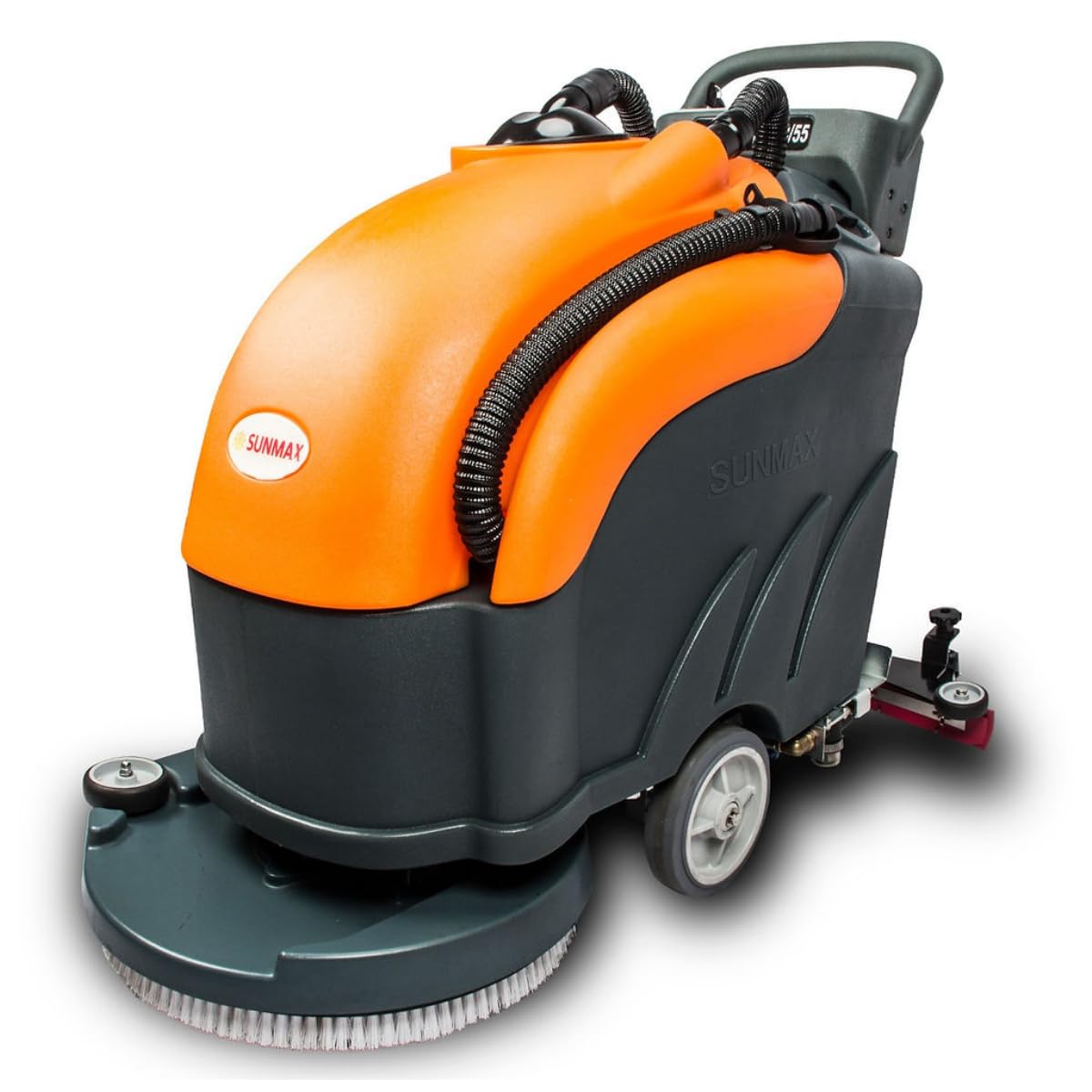
Figure 1: Overview of the SUNMAX RT50+ Floor Scrubber Dryer, showing the display screen/operation panel, handle, sewage tank, drain pipe, water tank, squeegee, and burnishing pad.
2. Setup and Assembly
2.1 Unpacking and Initial Inspection
Carefully remove all components from the packaging. Inspect the machine for any signs of damage during transit. Ensure all listed components are present: main unit, 22" burnishing pad and pad holder, 22" disc brush, battery and charger, keys, user manual, squeegee assembly, and 2 rubber blades.
2.2 Attaching the Brush
- Place the machine on a flat, stable surface.
- Locate the brush attachment point underneath the machine.
- Align the 22-inch disc brush with the attachment mechanism.
- Securely attach the brush by rotating it until it locks into place.

Figure 2: Illustration of attaching the disc brush to the underside of the scrubber.
2.3 Attaching the Squeegee Assembly
- Position the squeegee assembly at the rear of the machine.
- Connect the squeegee to the designated mounting points.
- Ensure the vacuum hose from the squeegee is securely connected to the machine's suction inlet.

Figure 3: Illustration of attaching the squeegee assembly to the rear of the scrubber.
2.4 Battery Connection
Connect the battery cables to the appropriate terminals inside the battery compartment. Ensure a secure connection to prevent power interruptions.
Video 1: This video demonstrates the initial setup steps, including battery connection, brush attachment, and squeegee installation for the SUNMAX RT50+ Industrial Floor Scrubber.
3. Operation
3.1 Control Panel Overview
The control panel provides access to all operational functions of the scrubber dryer.

Figure 4: The control panel features a power display, sewage suction motor switch, brush switch, water switch, and the main power switch with key ignition.
3.2 Filling the Clean Water Tank
- Open the clean water tank cap.
- Fill the tank with clean water and an appropriate, non-foaming floor cleaning solution. Do not overfill.
- Securely close the cap.

Figure 5: The clean water tank being filled with water and cleaning solution.
3.3 Starting the Machine and Cleaning
- Insert the key into the power switch and turn it to the 'ON' position.
- Lower the brush using the brush lifting pedal.
- Lower the squeegee using the squeegee lifting handle.
- Activate the brush switch, water switch, and sewage suction motor switch on the control panel.
- Begin walking behind the machine to clean the desired area. The machine will scrub the floor and vacuum the dirty water simultaneously.
Video 2: This video demonstrates the operational sequence of the SUNMAX RT50+ Industrial Floor Scrubber, including starting the machine and performing a cleaning pass.
Video 3: This video provides a user's guide for the RT50+ Walk Behind Floor Scrubber, focusing on its cleaning capabilities and ease of use.
3.4 Emptying the Sewage Tank
- After cleaning, turn off the machine.
- Locate the drain pipe for the sewage tank.
- Place a suitable bucket or drain into a floor drain.
- Remove the cap from the drain pipe to empty the dirty water.
- Rinse the sewage tank with clean water after emptying.

Figure 6: The drain pipe for emptying the sewage tank.
4. Maintenance
4.1 Daily Maintenance
- Empty and rinse both the clean water and sewage tanks.
- Clean the squeegee blades and check for wear.
- Inspect the brush for debris and wear.
- Wipe down the exterior of the machine.
4.2 Brush and Squeegee Care
Regularly inspect the brush and squeegee blades. Replace worn brushes or damaged squeegee blades to maintain optimal cleaning performance.
4.3 Charging the Battery
Connect the provided charger to the machine's charging port and then to a power outlet. The lithium battery supports fast charging in 3.5 hours and provides up to 5 hours of continuous working time.

Figure 7: Connecting the battery charger to the machine.
5. Troubleshooting
| Problem | Possible Cause | Solution |
|---|---|---|
| Machine does not start | Battery not connected or discharged; Power switch off; Key not inserted. | Check battery connection and charge level; Turn power switch on; Insert key. |
| Poor scrubbing performance | Worn brush; Insufficient water/solution; Brush not engaged. | Replace brush; Refill clean water tank; Ensure brush is lowered. |
| Water not being picked up | Squeegee blades worn or damaged; Vacuum hose clogged; Sewage tank full; Suction motor off. | Replace squeegee blades; Clear vacuum hose; Empty sewage tank; Turn suction motor on. |
| Machine stops unexpectedly | Low battery charge; Overload protection activated. | Charge battery; Reduce load or check for obstructions. |
6. Specifications

Figure 8: Detailed specifications for the RT50+ model.
- Cleaning Efficiency: 30,000 sq. ft./h
- Cleaning Width: 22 inches
- Suction Working Width: 31 inches
- Recovery Tank Capacity: 14.5 gallons
- Solution Tank Capacity: 13.2 gallons
- Power Source: Lithium Batteries
- Charging Time: 3.5 hours
- Continuous Working Time: Up to 5 hours
- Voltage: 24 V/200 Ah
- Brush Motor Power: 0.7 hp (550W)
- Vacuum Motor Power: 0.7 hp (550W)
- Brush/Pad Pressure: 51 lbs.
- Brush/Pad Speed: 200 RPM
- Scrub Style: Rotary
- Drive System: Walk-behind
- Noise Level: 68 dBA
- Dimensions: 45" L x 23" W x 37" H
- Packaged Weight: 305 lbs.
7. Warranty and Support
The SUNMAX RT50+ comes with a 2-year warranty, ensuring reliable performance and peace of mind. For any technical assistance, parts, or warranty claims, please contact SUNMAX customer support.
Figure 9: SUNMAX offers 2-year protection, US local support, complete OEM kits, and nationwide on-site repair services.