
Introduction
The BrizLabs RGB String Lights offer versatile illumination with 100 LEDs on a 33ft clear wire, powered via USB. These lights feature color-changing capabilities, dimming, and remote control for various lighting effects. Designed for year-round use, they provide multiple color options and dynamic modes to suit different occasions and preferences.
Each light string can display 16 single colors and 7 mixed color combinations, all of which can be set to 8 built-in dynamic modes or a steady-on state. The included remote control allows for easy adjustment of colors, modes, brightness, and speed.
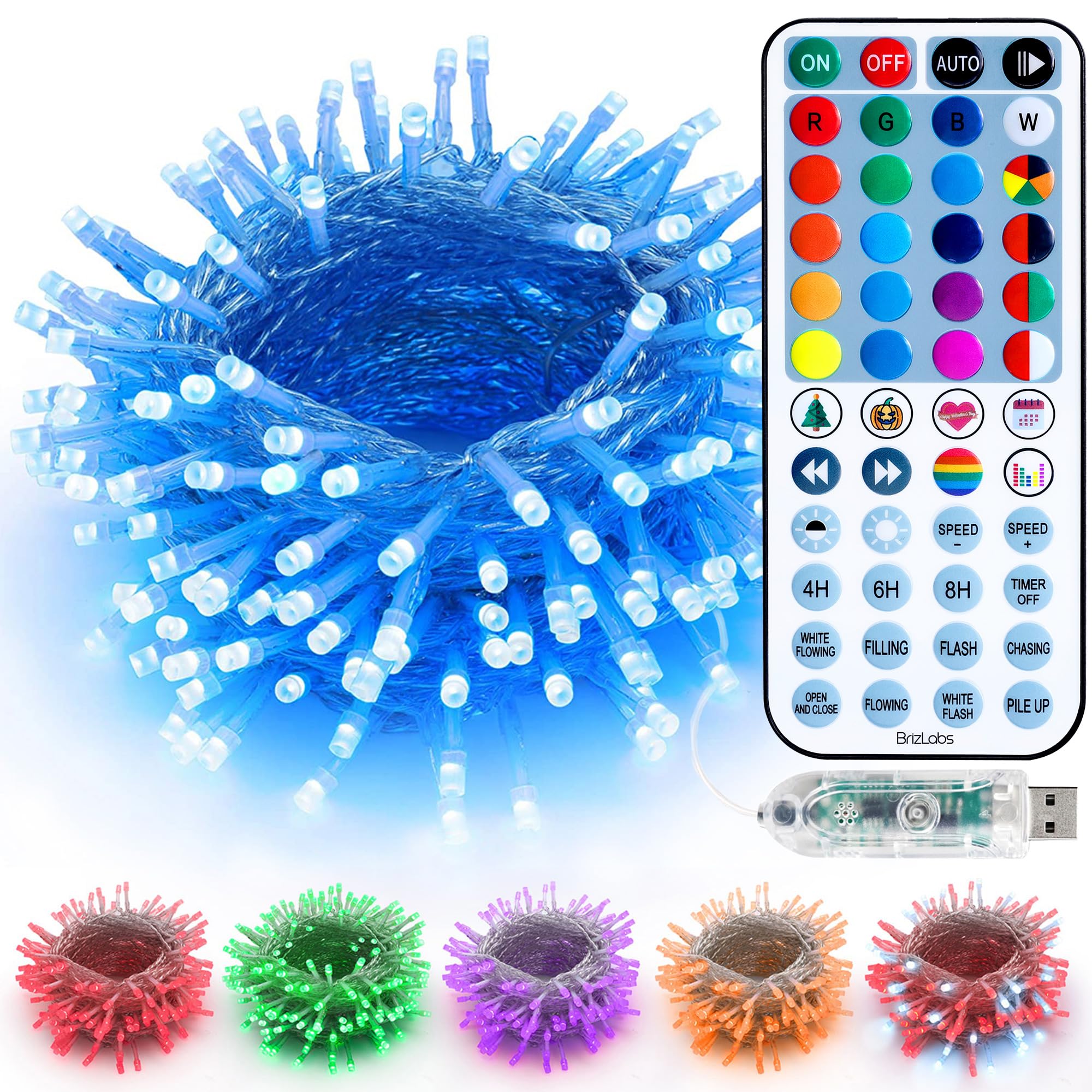
Image: BrizLabs RGB String Lights illuminating a room with patriotic red, white, and blue colors.
What's in the Box
- 1 x 100 LED RGB String Lights
- 1 x Remote Control
- 1 x User Manual (this document)
Specifications
| Brand | BrizLabs |
| Model Number | a5838432-fd1d-4dec-8683-f3b602484bb5 |
| Lighted Length | 33 feet |
| Lead Length | 6.56 feet |
| Bulb Space | 0.33 feet |
| LED Quantity | 100 LEDs |
| Light Color | RGB Color Changing (Multicolor) |
| Wire Color | Clear Wire |
| Power Source | USB Powered |
| Wattage | 5 watts |
| Ingress Protection (Lights) | IP44 (Waterproof) |
| Connectivity | USB |
| Control Method | Remote Control, Button Control (on USB plug) |
Setup Instructions
- Unpack the Lights: Carefully remove the string lights and remote control from the packaging.
- Prepare the Remote: Locate the remote control. Before first use, remove the insulation sheet from the battery compartment.
- Connect Power: Plug the USB connector of the string lights into a compatible USB power source (e.g., USB wall adapter, power bank, computer USB port). Note: A power adapter is not included.
- Placement: Arrange the string lights in your desired location. Ensure the USB plug is protected from water if used outdoors, as it is not waterproof.
- Initial Test: Once powered, the lights should illuminate. Use the remote control or the button on the USB plug to test basic functions.
Operating Instructions
Remote Control Functions
The included remote control provides comprehensive control over the light functions. Point the remote directly at the USB plug for optimal response.
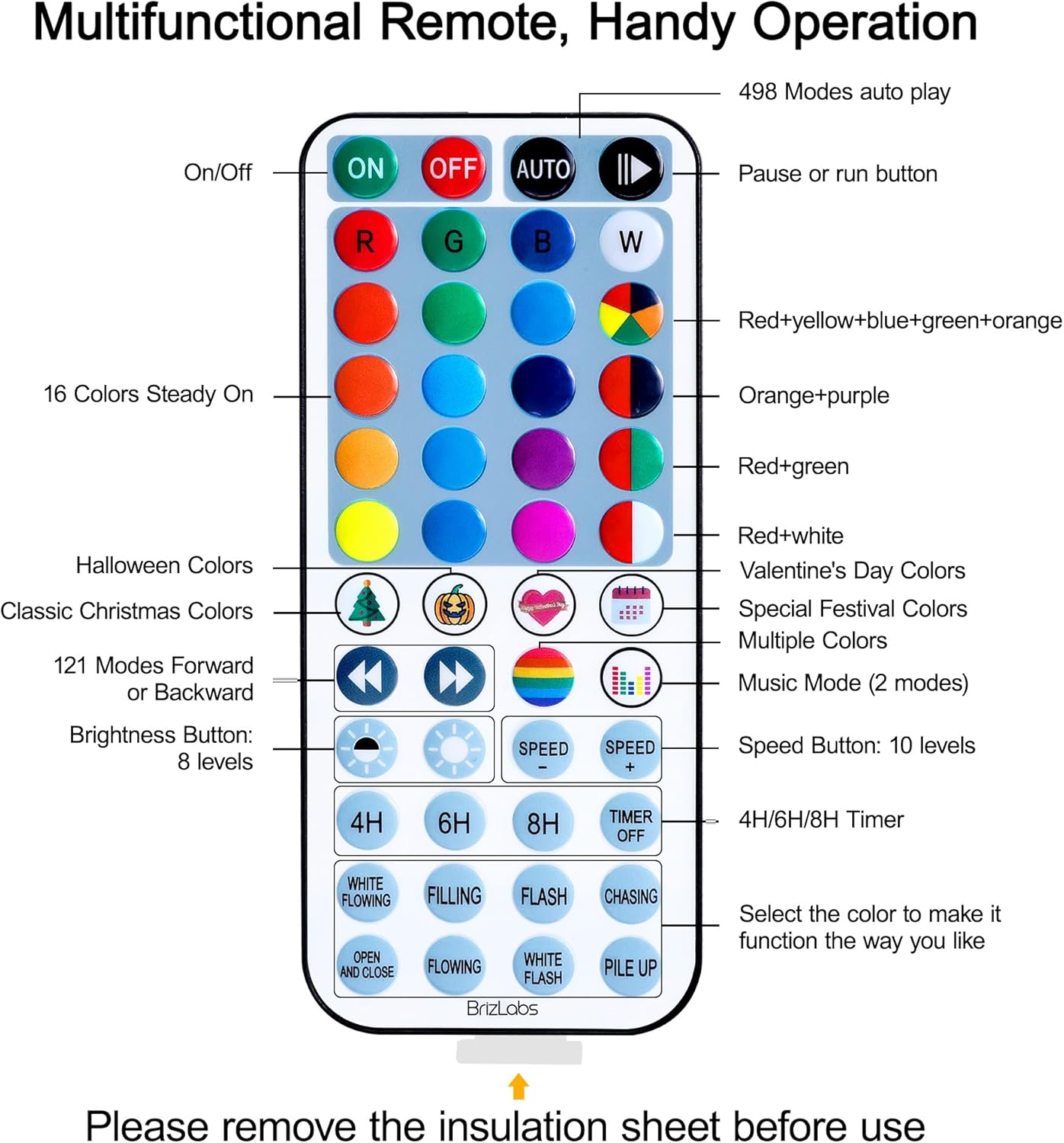
Image: Multifunctional remote control layout with various buttons for light operation.
- ON/OFF: Power the lights on or off.
- AUTO: Activates an automatic cycle through various modes.
- Pause/Run Button: Pauses any dynamic mode to hold the current color and effect. Press again to resume.
- 16 Color Buttons: Selects one of 16 static single colors.
- Mixed Color Buttons: Selects specific mixed color combinations for various festivals (e.g., Red+White, Orange+Purple, Red+Green+White).
- Special Festival Buttons: Dedicated buttons for Halloween, Classic Christmas, and Valentine's Day color schemes.
- Forward/Backward Buttons: Navigates through 121 preset modes.
- Music Mode: Activates two sound-activated modes.
- Brightness Buttons (Sun icon): Adjusts the brightness level (8 levels).
- Speed Buttons (SPEED +/-): Adjusts the speed of dynamic modes (10 levels).
- Timer Buttons (4H, 6H, 8H, TIMER OFF): Sets the lights to automatically turn off after 4, 6, or 8 hours. Select TIMER OFF to disable.
- Dynamic Mode Buttons (WHITE FLOWING, FILLING, FLASH, CHASING, OPEN AND CLOSE, FLOWING, WHITE FLASH, PILE UP): Selects one of the 8 built-in dynamic lighting effects. These can be applied to any selected color.
Color Modes and Effects
The lights offer a wide range of color and mode options:
- 16 Single Colors: Direct selection of individual colors.
- 7 Mixed Colors: Pre-programmed combinations for holidays like Christmas (multicolor, red & white, red & green, red & green & white), Halloween (purple & orange, purple & green, orange & purple & green), and July 4th (red & white & blue).
- Dynamic Effects: Each color (single or mixed) can be combined with one of the 8 dynamic modes (e.g., twinkle, flash, chase) or set to steady-on.
- 400+ Modes: The lights feature over 400 modes, accessible via the forward/backward buttons or the AUTO button.

Image: Various solid and mixed color options available with the string lights.
Brightness and Speed Adjustment
Use the dedicated buttons on the remote to fine-tune the lighting:
- Brightness: 8 levels of brightness are available for all modes.
- Speed: 10 levels of speed adjustment are available for dynamic modes.

Image: Visual representation of 8 levels of brightness adjustment for the lights.
Video Demonstrations of Features
Video: Demonstration of the light string's ability to display various holiday hues for different seasons.
Video: Overview of the upgraded RGB string lights, highlighting 40+ colors and 490+ effects.
Video: Further demonstration of the upgraded RGB string lights, suitable for every holiday throughout the year.
Maintenance
- Cleaning: Gently wipe the lights with a soft, dry cloth if they become dusty. Do not use harsh chemicals or abrasive materials.
- Storage: When not in use, carefully coil the string lights and store them in a cool, dry place away from direct sunlight and extreme temperatures.
- Inspection: Periodically inspect the wire and LED bulbs for any damage. Do not use if the wire is frayed or bulbs are broken.
Troubleshooting
Lights Not Working
- Ensure the power socket or USB port is functioning correctly.
- Check the entire length of the wire for any breaks or damage.
- Confirm the USB plug is securely inserted into the power source.
- If the lights still do not work, try controlling them directly with the button on the USB plug, or with the remote control.
Remote Control Not Working
- Remove Insulation Sheet: Ensure the insulation sheet has been removed from the remote's battery compartment.
- Point Directly: Always point the remote control directly at the USB plug of the lights.
- Check Battery: Replace the remote control battery if it is depleted.
- Contact Support: If the remote still does not function after these steps, please contact customer service for assistance.
Video: Instructions on how to open the battery compartment of the remote control.

Image: Visual guide for troubleshooting common light issues.
Safety Information
- Power Source: These lights are USB powered. Ensure your USB power source meets the required specifications.
- Water Resistance: The string lights themselves are IP44 waterproof, suitable for outdoor use. However, the USB plug is NOT waterproof. When using outdoors, ensure the USB plug is protected from water and moisture.
- Connectivity: These lights are NOT connectable end-to-end with other light strings. Do not attempt to connect multiple sets.
- Overheating: Do not cover the lights with materials that could cause overheating.
- Children and Pets: Keep the lights and remote out of reach of small children and pets to prevent choking hazards or damage.
Warranty and Support
All BrizLabs RGB string lights undergo thorough inspection and packaging before shipment. If you encounter any issues with your product, please do not hesitate to contact us. We are committed to providing a response within 24 hours and ensuring a 100% satisfactory resolution.
For support, please refer to the contact information provided with your purchase or visit the official BrizLabs website.