
1. Introduction
Thank you for choosing the HAUOMS Vanity Desk VD10. This manual provides detailed instructions for assembly, operation, maintenance, and troubleshooting to ensure safe and efficient use of your new vanity desk. Please read all instructions carefully before beginning assembly or operation.
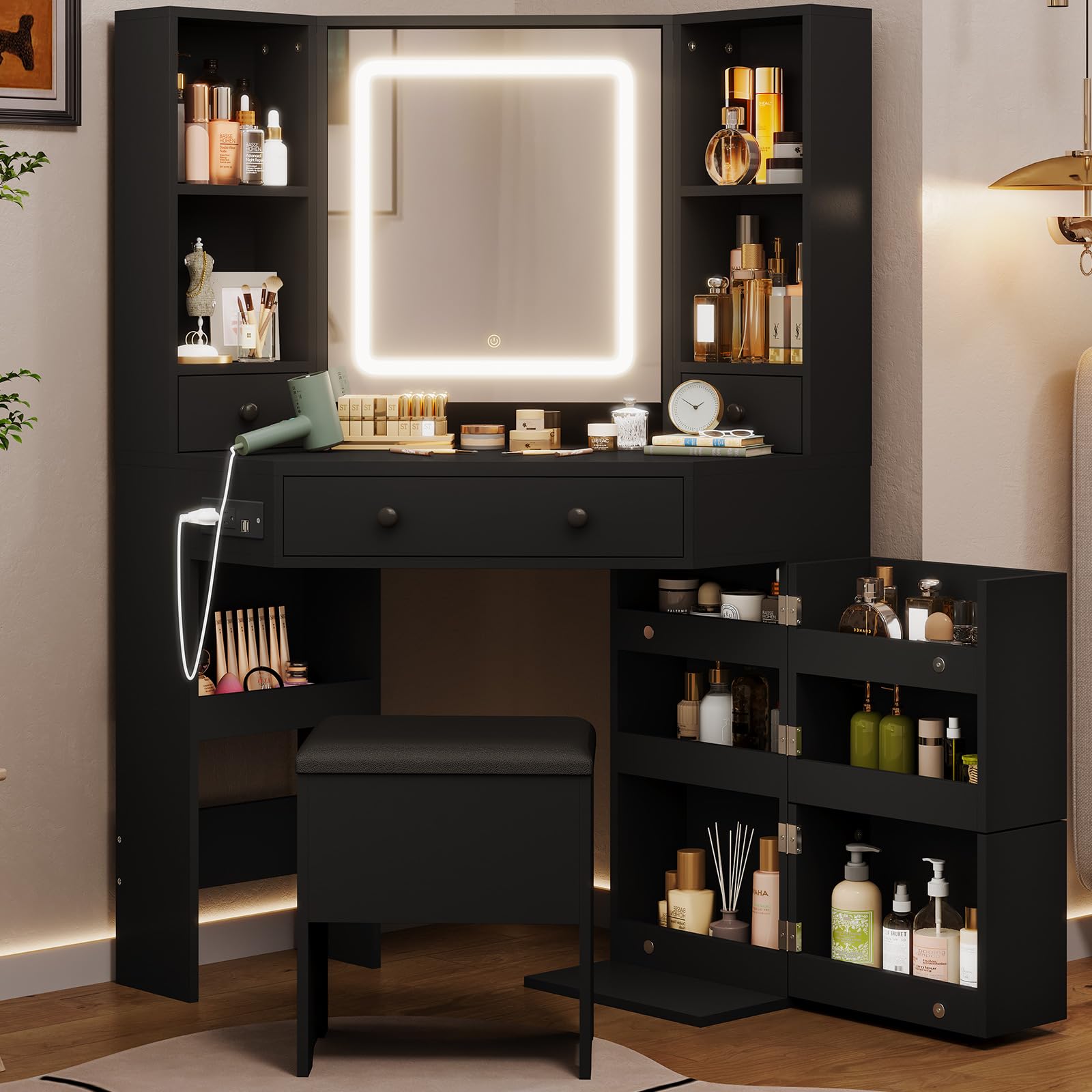
Figure 1: HAUOMS Vanity Desk VD10, Modern Black. This image shows the complete vanity desk with the LED mirror illuminated, rotating side cabinets open, and the storage bench positioned underneath.
2. Safety Information
WARNING: This product requires assembly. Use caution when handling sharp edges and small parts during assembly. Keep electrical components dry and away from heat sources. Unplug the product when not in use. Do not overload the power outlet or USB ports. Keep the product away from children and pets.
- Always ensure all screws and fasteners are securely tightened before use.
- Do not stand or sit on the vanity desk surface.
- Avoid placing hot items directly on the surface without protection.
- Keep liquids away from electrical components to prevent electric shock.
3. Package Contents
Verify that all components are present before beginning assembly. If any parts are missing or damaged, please contact customer support.
- Vanity Desk Panels (labeled A, B, C, etc.)
- LED Mirror Assembly
- Storage Bench Components
- Hardware Pack (screws, dowels, cam locks, etc.)
- Power Outlet Unit
- Instruction Manual
4. Setup and Assembly
Assembly is required for this product. Follow the numbered steps in the provided assembly guide. Each part is clearly labeled for easy identification.
- Prepare Workspace: Clear a spacious area and lay out all components on a soft, clean surface to prevent scratches.
- Identify Parts: Match each panel and hardware piece to its corresponding label in the assembly diagram.
- Assemble Main Frame: Begin by connecting the main desk panels according to the step-by-step illustrations.
- Install Drawers: Assemble and insert the drawers into their designated slots.
- Attach Rotating Cabinets: Secure the rotating cabinet sections to the main desk structure.
- Mount LED Mirror: Carefully attach the LED mirror assembly to the vanity desk. Ensure all wiring is properly routed and secured.
- Install Power Outlet: Insert the power outlet unit into the pre-cut opening and secure it with screws.
- Assemble Storage Bench: Follow the separate instructions for assembling the storage bench.
- Final Check: Verify all connections are tight and the vanity desk is stable before use.
For a visual guide on the assembly process and features, please refer to the official product video:
Video 1: HAUOMS Large Corner Vanity Desk with Rotatable Shelves. This video demonstrates the assembly process and highlights key features such as the rotating shelves and mirror.
5. Operating Instructions
5.1. HD LED Mirror with 3 Light Settings
The mirror features an integrated LED light with three adjustable color settings and dimmable brightness.
- Power On/Off: Touch the power icon on the mirror surface to turn the light on or off.
- Change Light Color: Briefly touch the light icon to cycle through the three light settings: Cool White, Warm White, and Warm Yellow.
- Adjust Brightness: Press and hold the light icon to continuously adjust the brightness level. Release when the desired brightness is reached.

Figure 2: Mirror Light Settings. This image illustrates the three distinct light settings (Cool White, Warm White, Warm Yellow) and the touch controls for power and brightness adjustment.
5.2. Vertical Power Outlet
The vanity desk includes a vertical power outlet with 2 AC outlets and 2 USB ports for charging devices.
- Plug the vanity desk's main power cord into a standard wall outlet.
- Connect your electronic devices to the AC outlets (120V/12A) or USB ports (5V/2A) as needed.
- Avoid overloading the outlets. Refer to the safety information for details.

Figure 3: Vertical Power Outlet. This image shows a close-up of the integrated power strip with two AC outlets and two USB ports, designed to keep the desktop clear.
5.3. Rotating Cabinet and Storage
The vanity desk features a unique rotating cabinet with multiple shelves and additional drawers for organized storage.
- The side cabinet can be rotated to access additional storage shelves.
- Use the various drawers and open shelves to store cosmetics, accessories, and other personal items.
- The mirror also conceals an adjustable shelf for private items.

Figure 4: Rotatable Shelves. This image demonstrates the rotating cabinet feature, showing how the shelves can be accessed by rotating the unit.
5.4. Storage Bench
The included PU leather storage bench provides comfortable seating and additional hidden storage.
- Lift the cushioned top of the bench to reveal a storage compartment.
- Store larger items or frequently used accessories within the bench.

Figure 5: PU Leather Storage Stool. This image shows the vanity stool in both closed and open states, highlighting its hidden storage compartment.
6. Maintenance
Proper care will extend the life and appearance of your vanity desk.
- Cleaning: Wipe surfaces with a dry, soft cloth. For stubborn marks, use a slightly damp cloth and mild soap, then dry immediately. Avoid harsh chemicals or abrasive cleaners.
- Mirror Care: Clean the mirror surface with a glass cleaner and a lint-free cloth. Do not spray cleaner directly onto the mirror; apply it to the cloth first.
- Electrical Components: Ensure the power outlet and mirror lights remain dry. Unplug the unit before cleaning any electrical parts.
- Hardware: Periodically check all screws and fasteners to ensure they remain tight. Tighten if necessary.
7. Troubleshooting
If you encounter any issues, refer to the following common problems and solutions.
| Problem | Possible Cause | Solution |
|---|---|---|
| Mirror light does not turn on. | No power; loose connection; faulty switch. | Ensure the vanity desk is plugged in. Check all electrical connections. Contact support if the issue persists. |
| Power outlets/USB ports not working. | No power; overloaded circuit; loose connection. | Verify the main power cord is plugged in. Unplug some devices if overloaded. Check connections to the power outlet unit. |
| Desk feels wobbly. | Loose fasteners; uneven floor. | Tighten all assembly screws. Place shims under the desk legs if the floor is uneven. |
| Drawers do not slide smoothly. | Misaligned runners; obstruction. | Check drawer runner alignment. Remove any obstructions from the drawer slides. |
8. Specifications
Detailed product specifications for the HAUOMS Vanity Desk VD10.
| Feature | Detail |
|---|---|
| Model Number | VD10 |
| Color | Modern Black |
| Overall Dimensions (W x D x H) | 42.5" x 21.5" x 54.6" |
| Material | P2 Grade Engineered Wood |
| Seat Height (Bench) | 17.5 Inches |
| Number of Drawers | 4 |
| Number of Shelves | 13 (including rotating cabinet and mirror storage) |
| Mirror Lighting | HD LED, 3 Color Settings (Cool White, Warm White, Warm Yellow), Dimmable, Touch Control |
| Power Outlet | 2 AC Outlets (120V/12A), 2 USB Ports (5V/2A) |
| Power Cord Length | 5.0 Feet |
| Assembly Required | Yes |

Figure 6: Dimensions Diagram. This image provides a detailed diagram of the vanity desk and bench dimensions.
9. Warranty and Support
HAUOMS products are designed for quality and durability. This product comes with a standard manufacturer's warranty covering defects in materials and workmanship.
- Warranty Period: Please refer to your purchase documentation for specific warranty duration.
- Claiming Warranty: In case of a defect, please contact our customer support team with your proof of purchase and a description of the issue.
- Exclusions: The warranty does not cover damage caused by improper assembly, misuse, neglect, accidents, or normal wear and tear.
Customer Support
For any questions, assistance with assembly, or troubleshooting, please contact HAUOMS customer support:
- Email: [Insert Customer Support Email Here]
- Phone: [Insert Customer Support Phone Number Here]
- Website: Visit the HAUOMS Store on Amazon
Our dedicated support team is available to assist you.