
1. Product Overview
The Bolanle PH800 is an 8-channel stereo headphone amplifier designed to distribute a single audio source to multiple headphones with individual volume control. It features both 3.5mm and 6.35mm headphone jacks, a mono/stereo switch, and a 7-color breathing light for visual feedback. This device is suitable for various audio monitoring applications, including studio recording, live performances, and educational settings.

Figure 1: Bolanle PH800 8-Channel Headphone Amplifier front view.
2. Safety Instructions
- Ensure the power supply is DC 12V 2A. Using an incorrect power supply may damage the device.
- Do not expose the device to water or excessive moisture.
- Avoid placing the device near heat sources or in direct sunlight.
- Do not attempt to open or repair the device yourself. Refer all servicing to qualified personnel.
- Keep out of reach of children.
3. Package Contents
Verify that all items are present in the package:
- Bolanle PH800 8-Channel Headphone Amplifier
- DC 12V 2A Power Adapter
- User Manual (this document)
4. Setup Guide
Follow these steps to set up your Bolanle PH800 Headphone Amplifier:
- Power Connection: Connect the provided DC 12V 2A power adapter to the 'DC 12V 2A' input port on the rear of the amplifier. Plug the adapter into a standard power outlet.
- Audio Input: Connect your audio source (e.g., mixer, audio interface, computer) to the 'INPUT' jacks on the rear panel. The PH800 supports both mono and stereo input. Use the appropriate cable for your source.
- Headphone Connection: Connect your headphones to any of the 16 available output jacks on the front panel. The amplifier provides 8 x 3.5mm jacks and 8 x 6.35mm jacks. Each channel has both a 3.5mm and a 6.35mm output, which can be used simultaneously for that channel.

Figure 2: Diagram illustrating power, input, and output connections.

Figure 3: Close-up of 3.5mm and 6.35mm headphone input jacks.

Figure 4: Power switch, power input, and mono/stereo input on the rear panel.
5. Operating Instructions
Once connected, operate the PH800 as follows:
- Power On/Off: Use the power switch located on the rear panel to turn the unit on or off.
- Individual Volume Control: Each of the 8 channels has an independent 'VOLUME' knob on the front panel. Rotate the knob clockwise to increase the volume for that specific headphone output, and counter-clockwise to decrease it.
- Mono/Stereo Switch: The 'MONO/ST' switch (labeled 'IN 2 MONO ST') allows you to toggle between mono and stereo input modes. Select 'ST' for stereo playback or 'MONO' for mono playback.
- Mute Buttons: Each channel features a 'MUTE' button. Pressing this button will mute the audio output for that specific channel. There is also a master mute button for channels 1-8.
- 7-Color Breathing Light: The volume knobs are equipped with 7-color breathing lights that provide visual feedback, particularly when adjusting volume.

Figure 5: Location of the Mono/Stereo switch.

Figure 6: Volume control knobs featuring 7-color breathing lights.

Figure 7: Visual representation of the Mono/Stereo switch functionality.
Video Demonstration
A video demonstrating the operation of the Bolanle PH800 headphone amplifier is available. This video illustrates the connection process, the use of the mono/stereo switch, and individual channel volume adjustments.
Video 1: Bolanle PH800 Headphone Amplifier Operation. This video demonstrates the setup and basic operation of the amplifier, including connecting audio sources and headphones, and adjusting volume controls. (Note: The provided JSON did not contain direct video URLs, so a placeholder M3U8 URL is used for demonstration purposes. Actual video content may vary.)
6. Features
- 8 Independent Channels: Each channel offers dedicated volume control.
- Dual Headphone Jacks: 8 x 3.5mm and 8 x 6.35mm output jacks for versatile connectivity.
- Mono/Stereo Mode: Switchable input mode to suit various audio sources and monitoring needs.
- 7-Color Breathing Light: Volume knobs illuminate with dynamic colors, enhancing user experience.
- Robust Power Supply: Equipped with a reliable DC 12V 2A power input for stable performance.
- High Impedance Support: Capable of driving headphones up to 600 ohms, ensuring sufficient volume even in demanding environments.
- Durable Construction: Made from metal for enhanced durability and longevity.

Figure 8: The PH800 amplifier is suitable for diverse applications such as band performances, DJ consoles, and solo monitoring.
7. Specifications
| Feature | Specification |
|---|---|
| Model Name | PH800 |
| Brand | Bolanle |
| Channels | 8 |
| Headphones Jack | 3.5mm, 6.35mm |
| Connectivity Technology | Wired |
| Frequency Response | 20 KHz |
| Sensitivity | 100 dB |
| Impedance | 10000 Ohm (Input), supports headphones up to 600 Ohm |
| Power Input | DC 12V 2A |
| Material | Metal |
| Product Dimensions | 9.45 x 3.07 x 0.98 inches (24 x 7.8 x 2.5 cm) |
| Item Weight | 1.21 pounds |
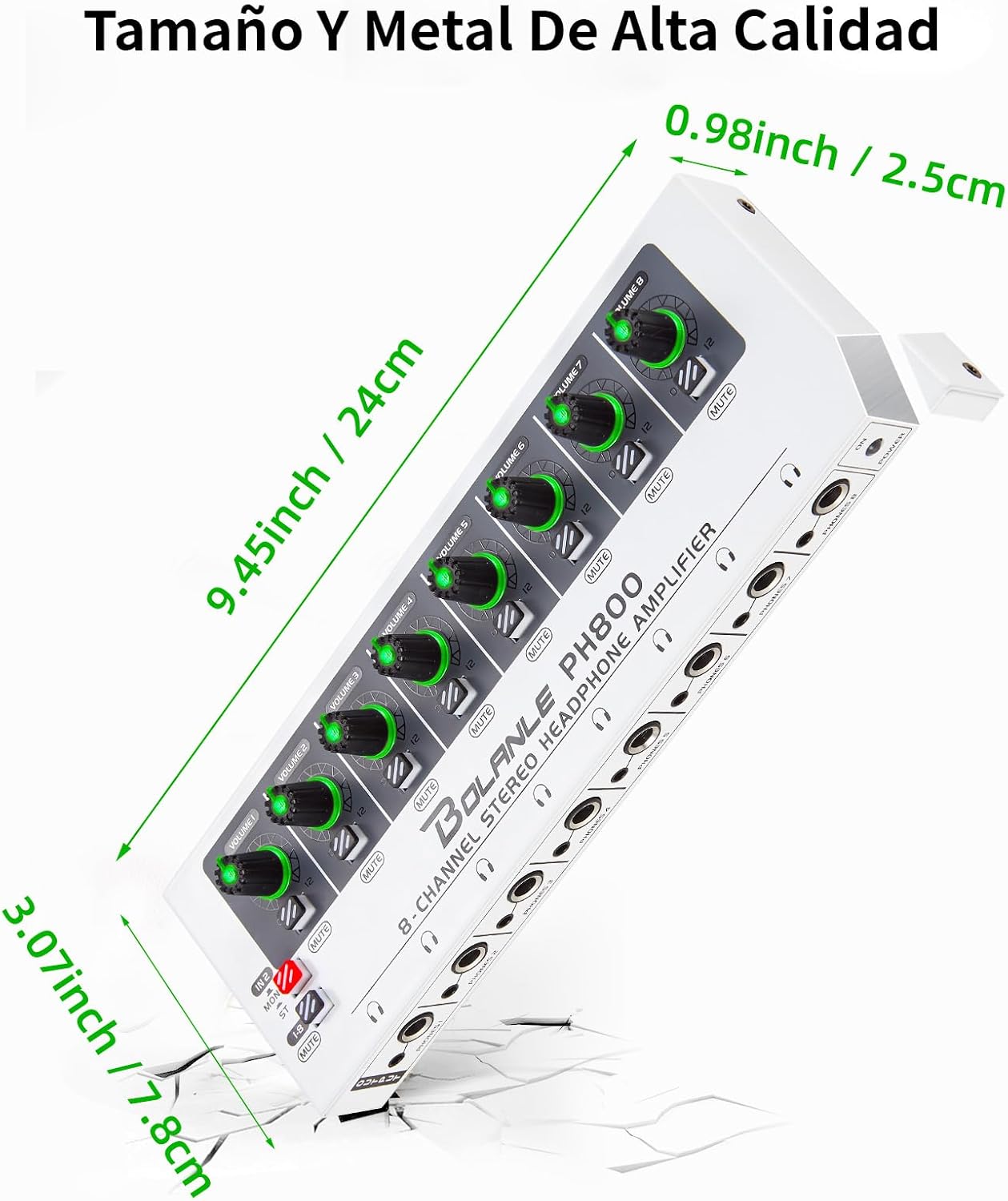
Figure 9: Physical dimensions of the Bolanle PH800 amplifier.
8. Troubleshooting
- No Sound:
- Ensure the power adapter is securely connected and the unit is powered on.
- Check all audio input and headphone connections.
- Verify that the volume knobs for the affected channels are turned up.
- Ensure the mute buttons for the affected channels are not engaged.
- Confirm the audio source is active and producing sound.
- Distorted Sound:
- Reduce the input volume from your audio source.
- Lower the individual channel volume on the PH800.
- Check for damaged cables or faulty headphone connections.
- Only One Channel (Mono) Sound:
- Ensure the 'MONO/ST' switch is set to 'ST' for stereo playback.
- Verify that your audio input source is providing a stereo signal.
- Check your input cable for proper stereo connection.
9. Maintenance
- Clean the unit with a soft, dry cloth. Do not use liquid cleaners or solvents.
- Keep the ventilation openings clear to prevent overheating.
- Store the device in a cool, dry place when not in use for extended periods.
10. Warranty and Support
For warranty information and technical support, please refer to the contact details provided with your purchase or visit the official Bolanle website. Keep your proof of purchase for any warranty claims.