
INFURIDER YF-5800G
INFURIDER YF-5800G Portable Ammonia Gas Detector User Manual
Model: YF-5800G
1. Introduction
The INFURIDER YF-5800G is a portable ammonia (NH3) gas detector designed for monitoring NH3 concentrations in various environments, including farms, pigsties, and livestock breeding facilities. This device provides real-time NH3 readings, temperature, and humidity, featuring audible and visual alarms to alert users to potentially hazardous conditions. This manual provides essential information for the safe and effective operation and maintenance of your YF-5800G detector.
2. Safety Information
Read all safety warnings and instructions carefully before using the device. Failure to follow these instructions may result in electric shock, fire, or serious injury.
- Do not operate the device in explosive atmospheres unless specifically rated for such environments.
- Ensure the device is properly charged before use to avoid unexpected power loss during critical measurements.
- Do not attempt to repair or modify the device. Refer all servicing to qualified personnel.
- Keep the sensor area clean and free from obstructions to ensure accurate readings.
- Always be aware of the ammonia hazard index and take appropriate safety measures when alarms are triggered.
3. Product Overview
Familiarize yourself with the components of your INFURIDER YF-5800G Ammonia Gas Detector.

Figure 3.1: Front view of the INFURIDER YF-5800G detector with key components labeled. These include the sensor, charging interface, charging indicator light, display, alarm indicator light, temperature unit button (°C/°F), alarm setting button, power on/off button, mode button, increment button, and decrement button.
The device features a clear display for readings, intuitive buttons for navigation, and a robust design for portable use.
4. Specifications
Key technical specifications for the INFURIDER YF-5800G Ammonia Gas Detector:
- Measuring Range: 0-100 PPM (Ammonia)
- Ammonia Resolution: 0.1 PPM
- Accuracy: ±2%
- Operating Temperature: -10 to 50 °C
- Power Source: Battery powered (1600 mAh Lithium Battery)
- Charging: USB Charging
- Display: LCD with colorful backlight, showing NH3 concentration, humidity, and temperature.
- Alarms: Light and sound indicator.
- Dimensions: Approximately 173mm / 6.81in (height)
- Weight: 500 grams

Figure 4.1: Display showing the measuring range (0-100 PPM), ammonia resolution (0.1 PPM), and accuracy (±2%).
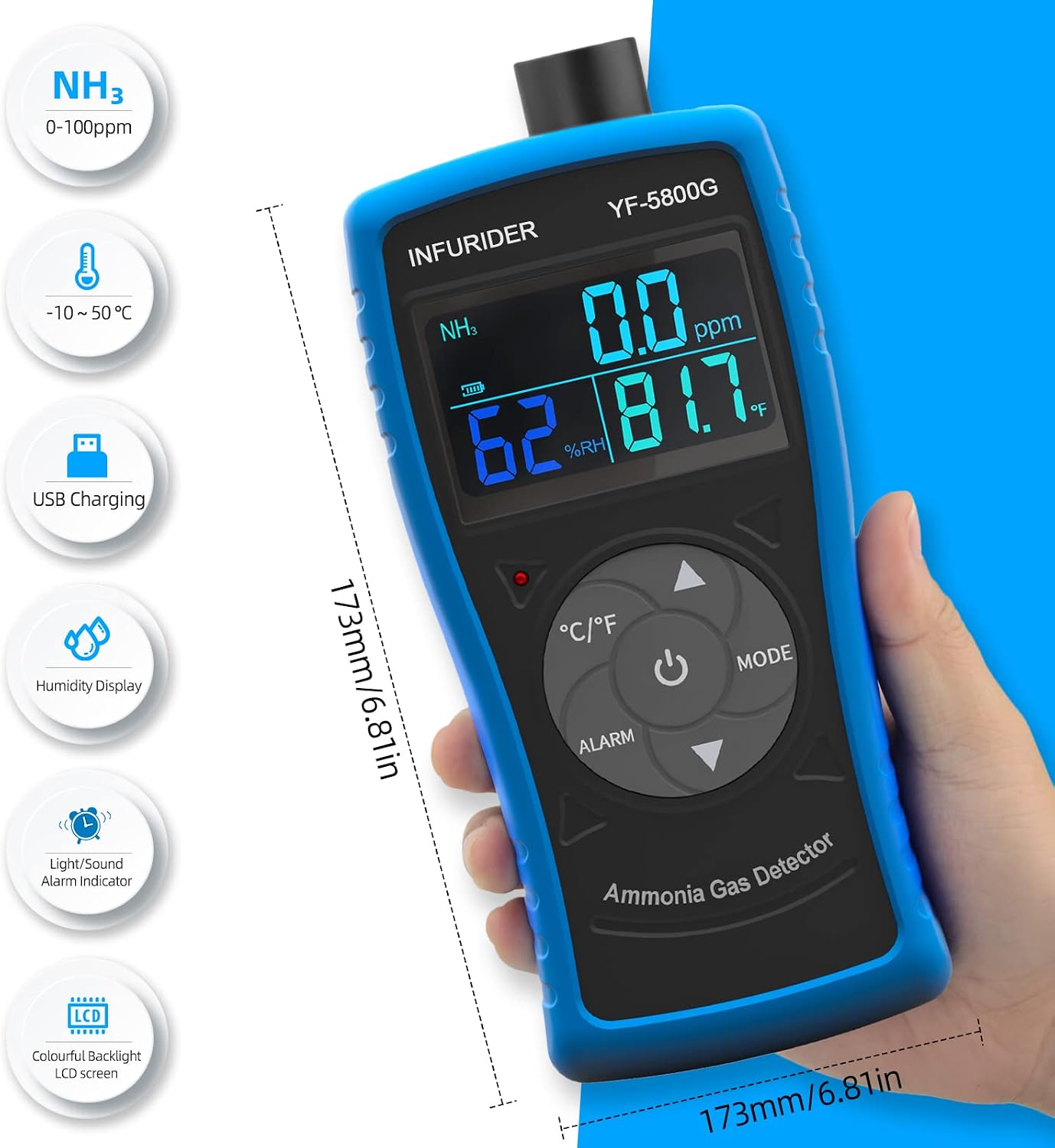
Figure 4.2: Device dimensions (173mm / 6.81in) and icons representing key features like NH3 measurement, temperature, USB charging, humidity display, light/sound alarm, and LCD backlight.
5. Setup
5.1 Charging the Device
Before initial use, fully charge the INFURIDER YF-5800G detector. Use the provided USB cable to connect the device to a compatible USB power source (e.g., computer, USB wall adapter).
- Connect the USB cable to the charging interface on the device.
- During charging, the green light will be on.
- Once fully charged, the red light will be on.
- The device is powered by a 1600 mAh Lithium Battery.

Figure 5.1: Close-up of the USB charging interface. The green light indicates charging, and the red light indicates a full charge.
6. Operating Instructions
6.1 Power On/Off
Press and hold the Power On/Off button (usually the central button with a power symbol) to turn the device on or off. The display will illuminate upon power-on.
6.2 Display Information
The LCD displays the following information:
- NH3 Concentration: Shown in PPM (parts per million).
- Humidity: Indicated as %RH.
- Temperature: Displayed in °C or °F.
- Battery Indicator: Shows current battery level.
6.3 Button Functions
- °C/°F Button: Press to switch between Celsius and Fahrenheit temperature units.
- ALARM Button: Used to access and adjust alarm settings.
- MODE Button: Used to cycle through different display modes or settings.
- Increment Button (Up Arrow): Used to increase values during setting adjustments.
- Decrement Button (Down Arrow): Used to decrease values during setting adjustments.
6.4 Setting Alarms
To set the ammonia concentration alarm threshold:
- Press the ALARM button to enter alarm setting mode.
- Use the Increment and Decrement buttons to adjust the desired NH3 alarm threshold.
- Press the ALARM button again or wait for a few seconds to save the setting and exit.
When the detected NH3 concentration exceeds the set alarm threshold, the device will activate both audible and visual alarms (alarm indicator light will flash).
6.5 Ammonia Gas Hazard Index
Understanding the potential risks associated with different ammonia concentrations is crucial for safety. The following table outlines the hazard index for human exposure to ammonia gas:

Figure 6.1: Visual representation of ammonia gas concentration levels and their corresponding effects on the human body.
| NH3 Concentration (PPM) | Effect on Human Body |
|---|---|
| 100 ppm | Most people feel uncomfortable, harmless with short exposure. |
| 250 ppm | Stimulates the nose, throat, eyes, and other senses. |
| 400 ppm | Eye pain, tears for 30 minutes. |
| 700 ppm | The limit that the human body can endure; it is not advisable to stay. |
| 2500 ppm | Severe cough, irritation of the nose, throat, etc. 15 minutes may cause death. |
Note: Always evacuate the area immediately if high ammonia concentrations are detected and alarms are triggered.
7. Maintenance
- Cleaning: Wipe the device with a soft, damp cloth. Do not use abrasive cleaners or solvents. Ensure no liquid enters the sensor or charging port.
- Sensor Care: Keep the sensor opening free from dust, dirt, and debris. Do not insert any objects into the sensor port.
- Storage: Store the device in a cool, dry place away from direct sunlight and extreme temperatures when not in use.
- Battery: Recharge the battery regularly, even if the device is not in frequent use, to maintain battery health.
8. Troubleshooting
| Problem | Possible Cause | Solution |
|---|---|---|
| Device does not power on. | Low battery or no charge. | Charge the device using the provided USB cable. |
| Inaccurate readings. | Sensor obstructed or dirty; device not calibrated (if applicable). | Clean the sensor area. Ensure proper ventilation around the sensor. If issues persist, contact support. |
| Alarm not sounding/flashing. | Alarm threshold set too high; alarm function disabled (if applicable); device malfunction. | Check and adjust alarm settings. Ensure NH3 concentration exceeds the threshold. If problem persists, contact support. |
| Display is blank or frozen. | Software error; low battery. | Try restarting the device. Charge the battery. If the issue continues, contact customer support. |
9. Warranty and Support
For warranty information, technical support, or service inquiries, please contact INFURIDER customer service. Refer to the product packaging or the official INFURIDER website for contact details.
Please have your product model (YF-5800G) and purchase information ready when contacting support.
Related Documents - YF-5800G
 |
Rockchip Gstreamer 用户指南 本文档提供了Rockchip平台上的Gstreamer用户指南,详细介绍了Gstreamer框架、MPP插件、AFBC功能、编译方法、命令示例及常见问题解答,旨在帮助开发者高效利用Rockchip硬件进行多媒体处理。 |
 |
HYUNDAI Vehicle Maintenance Guide: Scheduled Service and Owner Care Comprehensive maintenance guide for HYUNDAI vehicles, detailing scheduled services, owner checks, fluid management, tire care, electrical systems, appearance, emissions, and more to ensure optimal performance and longevity. |
 |
Eaglerise FMX-50-1050 DALI-2 0-10 LD 50W LED Power Supply Datasheet Technical datasheet for the Eaglerise FMX-50-1050 DALI-2 0-10 LD, a 50W constant current LED driver with DALI-2, Push Dimming, and 0-10V control. Features include 100-305VAC input, adjustable output current, and comprehensive protection. |
 |
Surron Hyper Bee Electric Motorcycle Owner's Manual Your essential guide to the Surron Hyper Bee electric motorcycle. This owner's manual from CHONGQING QIULONG TECHNOLOGY CO., LTD covers operation, safety, maintenance, and features for offroad riders. |
 |
Mastercool Automotive A/C Service Equipment & Tools Catalog 2026 Comprehensive catalog of Mastercool automotive A/C service equipment, recovery machines, vacuum pumps, leak detectors, tools, and accessories for R134a and R1234yf systems. |
 |
Toyota Hycross Price List - September 21, 2025 Explore the official price list for the all-new Toyota Hycross, featuring detailed pricing for various Petrol and Hybrid variants. Includes Ex-Showroom, Road Tax, HSRP, Toyota Protect, Extended Warranty, and On Road prices. Information on insurance coverage and terms & conditions is also provided. |
Ask a question about this manual
Ask about setup, troubleshooting, compatibility, parts, safety, or missing instructions. Manuals+ will review the question and use this page’s manual context to help answer it.