
Solim B1200
Solim 1120Wh Portable Power Station & Bluetooth Speaker User Manual
Model: B1200 | Brand: Solim
Introduction
The Solim 1120Wh Portable Power Station & Bluetooth Speaker is a versatile device designed to provide reliable power and immersive audio for various applications, including outdoor activities, home backup, and entertainment. It features a high-capacity LiFePO4 battery, multiple output ports, fast charging capabilities, and an integrated Bluetooth speaker with wireless microphones.
What's in the Box

This image displays the complete package contents. The Solim Portable Power Station comes with all necessary accessories to get started.
- 1 x Portable Power Station Speaker
- 1 x AC Charging Cable
- 1 x Car Charger Cable
- 1 x User Manual
- 2 x Microphones
- 4 x AA battery (for microphones)
Product Overview

This image shows the Solim Portable Power Station, highlighting its integrated Bluetooth speaker with a vibrant LED light ring and the included wireless microphones. It is designed for both power supply and audio entertainment.
The Solim Power Station is engineered for both power and sound. Its robust design integrates a powerful battery with a high-quality Bluetooth speaker, making it ideal for various scenarios.
Key Features:
- Integrated Bluetooth Speaker: World-first power station with a built-in Bluetooth speaker, offering 3D surround sound and independent electronic crossover for superior audio quality.
- High Capacity & Output: 1120Wh capacity and 1200W (Peak 2400W) output, capable of powering 90% of common appliances.
- LiFePO4 Battery: Built-in LiFePO4 (LFP) battery for superior heat and cold resistance (-4°F to 113°F) and over 3,000 charging cycles to 80% health.
- Advanced BMS: Equipped with a Battery Management System (BMS) for comprehensive safety and protection.
- Fast Charging: Recharges from 0% to 100% in approximately 1.6 hours via 800W AC input. Supports solar and car charging.
- Multiple Output Ports: 9 output ports including AC, USB-C PD, USB-A QC3.0, DC5521, and a car port.
- Emergency LED Light: Features a wide LED flashlight with 3 brightness levels and an SOS flashing mode.
- Clear Digital Display: Provides real-time information on battery status, remaining charge time, input/output power, and fault indications.
- Portable Design: Integrated handle for easy transport.
Setup
Before first use, ensure the power station is fully charged. Unpack all components and inspect for any damage.
Initial Charging:

This image illustrates the various charging methods for the Solim Power Station: AC outlet, solar panels, and car charger. The unit can be fully charged via AC in 1.6 hours.
- Connect the provided AC Charging Cable to the AC input port on the power station.
- Plug the other end into a standard wall outlet (110V).
- The digital display will indicate charging status. A full charge takes approximately 1.6 hours.
- Alternatively, use a compatible solar panel (11V-50V/5A, 200W Max) or the Car Charger Cable (12V-24V/5.5A) via the XT60 interface for charging.
Microphone Setup:
- Insert the 4 AA batteries (2 per microphone) into the wireless microphones.
- Turn on the microphones and the power station. They should automatically pair with the power station's Bluetooth speaker.
Operating Instructions
Powering On/Off:
- Press and hold the main power button to turn the unit on or off.
Using Output Ports:

This image provides a detailed diagram of the 9 output ports available on the Solim Power Station, including AC outlets, USB-C, USB-A, DC, and a car port, allowing simultaneous charging of multiple devices.
- To use AC outlets (110V/1200W), press the AC button.
- USB-C PD (100W & 30W), USB-A QC3.0 (22.5W & 18W), DC5521, and car port (12V/10A) are available for various devices.
- Connect your devices to the appropriate ports. The digital display will show output power.
Bluetooth Speaker Operation:

This image depicts the Solim Power Station's speaker function in an outdoor setting, emphasizing its ability to provide both power and entertainment. The speaker features 3D surround sound and Bluetooth 5.0 connectivity.
- Ensure the power station is on.
- Activate Bluetooth on your mobile device and select "Solim B1200" (or similar) from the available devices to pair.
- Adjust volume using the dedicated controls on the power station or your paired device.
- Use the wireless microphones for karaoke or public speaking.
LED Flashlight:
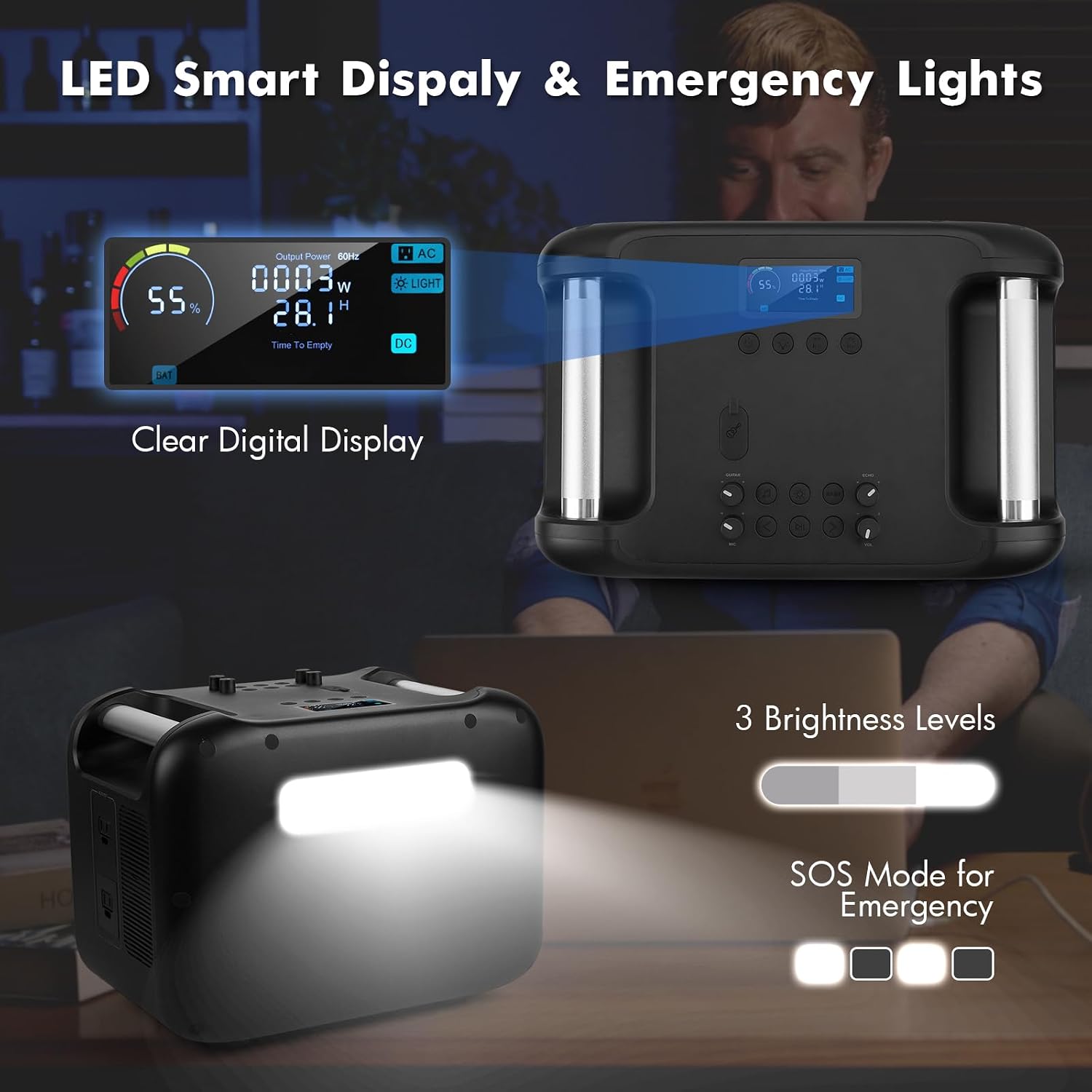
This image highlights the emergency LED light feature of the Solim Power Station, demonstrating its three brightness levels and SOS flashing mode. The clear digital display is also visible, showing battery and power information.
- Press the light button to cycle through 100% brightness, 50% brightness, and SOS flashing modes.
Digital Display:
- The colorful clear digital display provides real-time information: remaining battery percentage, estimated remaining charge/discharge time, input power (W), output power (W), and fault indications.
Usage Examples:

This image presents a table of estimated usage times for various common devices when powered by the Solim Power Station, demonstrating its versatility for different power needs.
The 1120Wh capacity and 1200W output allow for extended use of various electronics and small appliances. Examples include:
- Mobile phone (approx. 78 charges)
- Camera (approx. 64 charges)
- Drone (approx. 22 hours)
- Camp light (approx. 96+ hours)
- 50" TV (approx. 8 hours)
- Laptop (approx. 15 charges)
- Electric Kettle (approx. 3 uses)
Note: Actual usage times may vary depending on device power consumption and usage conditions.
Maintenance
- Store the power station in a cool, dry place away from direct sunlight and extreme temperatures.
- For long-term storage, charge the unit to approximately 50-80% every 3-6 months to preserve battery health.
- Clean the exterior with a soft, dry cloth. Do not use abrasive cleaners or immerse the unit in water.
- Ensure ventilation openings are clear of dust and debris to allow proper cooling.
Troubleshooting
| Problem | Possible Cause | Solution |
|---|---|---|
| Unit does not power on. | Battery is depleted. | Charge the power station using the AC adapter. |
| No output from AC ports. | AC output not activated; Overload protection triggered. | Press the AC button to activate. Reduce connected load if overloaded. |
| Bluetooth speaker not pairing. | Bluetooth not enabled on device; Unit too far from device. | Ensure Bluetooth is on and the unit is within range. Restart both devices. |
| Microphones not working. | Batteries low/dead; Not properly paired. | Replace AA batteries. Ensure microphones are turned on and within range. |
| Digital display shows error. | Internal fault; Over-temperature/low-temperature protection. | Refer to the specific error code on the display. If persistent, contact customer service. |
Specifications
| Feature | Detail |
|---|---|
| Model Number | B1200 |
| Battery Type | LiFePO4 (LFP) |
| Capacity | 1120Wh |
| AC Output | 1200W (Rated), 2400W (Peak) |
| USB-C PD Output | 100W & 30W |
| USB-A QC3.0 Output | 22.5W & 18W |
| DC5521 Output | 2 ports |
| Car Port Output | 12V/10A |
| AC Input Charging | 800W Max (approx. 1.6 hours to full) |
| Solar Charging | 11V-50V/5A, 200W Max (via XT60) |
| Car Charging | 12V-24V/5.5A (via XT60) |
| Operating Temperature | -4°F to 113°F (-20°C to 45°C) |
| Connectivity | Bluetooth 5.0 |
| Manufacturer | SHENZHEN UIBI TECHNOLOGY CO.,LTD |
Warranty and Support
Solim offers a Lifetime Warranty for this product, ensuring high-quality customer service and support.
- For any questions or assistance regarding your Solim Portable Power Station, please contact Solim customer service.
- Responses are typically provided within 24 hours.
- Refer to the official Solim website or the contact information provided in your product packaging for the most up-to-date support channels.
Product Video
This video demonstrates the Solim Power Station being used for a barbecue, showcasing its portability and ability to power outdoor cooking appliances while providing entertainment.
Ask a question about this manual
Ask about setup, troubleshooting, compatibility, parts, safety, or missing instructions. Manuals+ will review the question and use this page’s manual context to help answer it.