1. Introduction
Thank you for purchasing the Crazon Buggy Speed Drift 1:10 Remote Control Car. This manual provides essential information for the safe operation, maintenance, and troubleshooting of your new RC vehicle. Please read this manual thoroughly before first use to ensure proper function and to maximize your enjoyment.
This high-performance remote control car is designed for speed and drift capabilities, offering an exciting and interactive experience. It features a colorful design, is made from safe, child-friendly materials, and includes fun sounds and lights for enhanced play.
2. Safety Information
Always observe the following safety precautions to prevent injury or damage to the product:
- Adult Supervision: This product is recommended for ages 3 and up. Adult supervision is highly recommended, especially during initial setup and operation.
- Battery Safety:
- Do not mix old and new batteries.
- Do not mix alkaline, standard (carbon-zinc), or rechargeable (nickel-cadmium) batteries.
- Insert batteries with correct polarity (+ and -).
- Remove batteries from the car and remote control when not in use for extended periods.
- Do not attempt to recharge non-rechargeable batteries.
- Rechargeable batteries should only be charged under adult supervision.
- Operating Environment:
- Operate the car in open, clear areas away from people, pets, and obstacles.
- Avoid operating near water, heat sources, or electrical outlets.
- Do not operate on public roads or near traffic.
- As noted in customer reviews, this car is better suited for outdoor use on dirt, sand, or hard surfaces rather than indoors.
- Avoid Contact: Keep fingers, hair, and loose clothing away from the wheels and moving parts when the car is in operation.
- Impacts: Avoid crashing the car into hard surfaces or objects, as this can cause damage to the vehicle or surrounding property.
- Cleaning: Do not immerse the car or remote control in water. Clean with a damp cloth only.
3. Package Contents
Please check the package contents to ensure all items are present:
- Crazon Buggy Speed Drift 1:10 Remote Control Car (YC21121-333)
- Remote Control Transmitter
- Instruction Manual (this document)
- (Note: Batteries for the car and remote control may be sold separately. Please check product packaging.)

Figure 3.1: The Crazon Buggy Speed Drift RC Car shown in its retail box, highlighting the car and remote control.
4. Setup
4.1. Installing Batteries in the Remote Control
- Locate the battery compartment on the back of the remote control.
- Open the battery compartment cover.
- Insert the required batteries (e.g., 2x AA, not included) into the compartment, ensuring correct polarity (+/-).
- Close the battery compartment cover securely.
4.2. Installing/Charging Batteries in the RC Car
The Crazon Buggy requires batteries for operation. Please refer to the specific battery type and charging instructions provided on the product packaging or included battery pack.
- Locate the battery compartment on the underside or rear of the RC car.
- Open the battery compartment cover.
- If using a rechargeable battery pack, connect it to the car's power connector and place it securely in the compartment. If using disposable batteries, insert them with correct polarity.
- Close the battery compartment cover securely.
- If the car uses a rechargeable battery, ensure it is fully charged before first use according to the charger's instructions.

Figure 4.1: The Crazon Buggy Speed Drift RC Car and its accompanying remote control, ready for battery installation.
5. Operating Instructions
5.1. Powering On
- Ensure batteries are correctly installed in both the car and the remote control.
- Turn on the power switch on the RC car (usually located on the chassis).
- Turn on the power switch on the remote control.
- The car and remote should automatically pair. An indicator light on the remote or car may illuminate or change color to confirm connection.
5.2. Basic Controls
The remote control typically features the following controls:
- Steering Wheel/Dial: Turn left or right to control the car's direction.
- Trigger/Lever: Pull to move forward, push to move backward or brake.
- Trim Adjustments: Small dials or sliders to fine-tune steering or throttle if the car drifts or doesn't drive straight when the controls are centered.

Figure 5.1: Rear view of the Crazon Buggy Speed Drift RC Car, showcasing its robust design and large tires suitable for various terrains.
5.3. Driving Tips
- Start slowly to get a feel for the controls.
- Practice steering and throttle control in an open area.
- For drift maneuvers, practice initiating turns at speed and counter-steering.
- Remember that the car is designed for outdoor use on surfaces like dirt, sand, or hard ground for optimal performance.
6. Maintenance
Proper maintenance will extend the life of your RC car:
- Cleaning: After each use, especially if driven on dirt or sand, gently brush off any debris from the chassis, wheels, and suspension. Use a dry or slightly damp cloth to wipe down the body. Do not use harsh chemicals or immerse in water.
- Battery Care: Always remove batteries from the car and remote control when storing for extended periods. Store batteries in a cool, dry place.
- Storage: Store the car and remote control in a cool, dry place away from direct sunlight and extreme temperatures.
- Inspection: Periodically check for loose screws, damaged wires, or worn parts. Replace any damaged components as necessary.
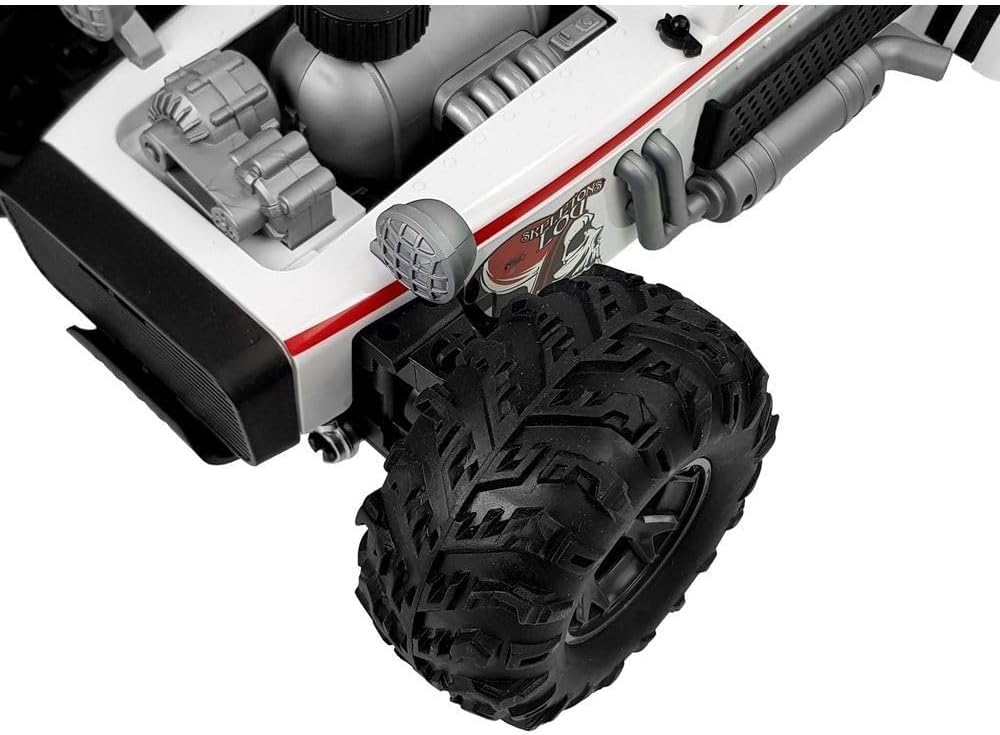
Figure 6.1: Close-up view of the front wheel and suspension system of the Crazon Buggy, illustrating its robust tire tread and chassis details.
7. Troubleshooting
If you encounter issues with your Crazon Buggy, refer to the following common problems and solutions:
| Problem | Possible Cause | Solution |
|---|---|---|
| Car does not respond to remote control. |
|
|
| Car moves slowly or inconsistently. |
|
|
| Car pulls to one side. |
|
|
| Short control range. |
|
|
8. Specifications
| Feature | Detail |
|---|---|
| Model Name | Crazon Buggy Speed Drift RC Car |
| Model Number | YC21121-333 |
| Brand | Generic |
| Scale | 1:10 |
| Dimensions (L x W x H) | 30 x 55 x 25 cm |
| Weight | 2.2 kg |
| Material | Plastic |
| Power Source | Battery Powered (Batteries Required: Yes) |
| Operation Mode | Remote Control |
| Special Features | Portable, Colorful design, Fun sounds and lights |
| Recommended Age | Kid |
9. Warranty and Support
Specific warranty information for the Crazon Buggy Speed Drift 1:10 Remote Control Car is not provided in this manual. For details regarding warranty coverage, returns, or technical support, please refer to the product packaging or contact the retailer or manufacturer directly.
Please retain your proof of purchase for any warranty claims.


