
FUT088
FUT088 Single Zone RGB+CCT LED Strip Remote Controller User Manual
Model: FUT088
Introduction
This manual provides detailed instructions for the operation and maintenance of the FUT088 Single Zone RGB+CCT LED Strip Remote Controller. The FUT088 is designed for precise control of LED lighting, featuring a full-touch interface and 2.4G connectivity. It is compatible with most MiBoxer and MiLight controllers, offering versatile lighting command for RGB+CCT, RGB, and RGBW lighting scenarios.
Key features include intuitive single zone control, a full touch interface for effortless navigation, versatile lighting command, an extended operating range of up to 30 meters (98.4 feet), and energy-efficient operation using two AAA batteries.
What's in the Box
Upon opening the package, please verify that all components are present and undamaged:
- FUT088 Single Zone RGB+CCT LED Strip Remote Controller
- Remote Wall Holder
- Instruction Manual (this document)

Image: The FUT088 remote control, its accompanying wall holder, and the instruction manual as found in the product packaging.
Product Overview
The FUT088 remote features a sleek design with a full-touch interface for intuitive control. Familiarize yourself with the various buttons and touch areas:

Image: Front view of the FUT088 remote control, highlighting the color ring, brightness slider, and control buttons.
- Color Ring: Touch-sensitive ring for selecting specific colors.
- Brightness Slider: Adjusts the brightness level of the lights.
- ON/OFF Buttons: Power on and off the connected lights.
- W Button: Activates the white light component.
- R/G/B Buttons: Direct access to Red, Green, and Blue colors.
- S-/S+ Buttons: Adjusts speed for dynamic modes or specific settings.
- M Button: Cycles through various pre-programmed modes.
Setup
1. Battery Installation
The FUT088 remote control requires two AAA batteries (not included). Follow these steps to install them:
- Locate the battery compartment cover on the back of the remote.
- Slide the cover downwards to open the compartment.
- Insert two AAA batteries, ensuring the correct polarity (+ and -) as indicated inside the compartment.
- Slide the cover back into place until it clicks securely.
2. Linking/Pairing with LED Controller
To control your LED lights, the FUT088 remote must be linked with a compatible 2.4G MiBoxer or MiLight LED controller. The linking process typically involves the following steps:
- Ensure your LED controller is powered off.
- Power on the LED controller.
- Within 3 seconds of powering on the controller, press the "ON" button on the FUT088 remote control three times.
- The LED lights should flash three times slowly, indicating successful linking.
- If the linking fails, power off the controller and repeat the steps.
Note: For unlinking, power on the LED controller and within 3 seconds, press the "OFF" button on the FUT088 remote control five times. The lights should flash ten times quickly, indicating successful unlinking.
Operating Instructions
Once linked, the FUT088 remote provides comprehensive control over your single-zone LED lighting system.
Power Control
- Press the ON button to turn the lights on.
- Press the OFF button to turn the lights off.
Color Selection
- Color Ring: Touch and slide your finger along the color ring to select any desired color from the spectrum.
- W Button: Press the W button to activate the pure white light.
- R/G/B Buttons: Press R for Red, G for Green, and B for Blue.
Brightness Adjustment
- Brightness Slider: Slide your finger along the brightness slider to increase or decrease the light intensity.
Mode Control
- M Button: Press the M button to cycle through various pre-programmed dynamic lighting modes.
- S-/S+ Buttons: When in a dynamic mode, use the S- button to decrease the speed of the mode and the S+ button to increase the speed.
Maintenance
Battery Replacement
If the remote's response becomes sluggish or the range decreases, it may be time to replace the batteries. Refer to the "Battery Installation" section under Setup for instructions.
Cleaning
To clean the remote control, use a soft, dry cloth. Do not use abrasive cleaners, solvents, or immerse the remote in water.
Storage
Store the remote control in a cool, dry place away from direct sunlight and extreme temperatures. If storing for an extended period, it is recommended to remove the batteries to prevent leakage.
Troubleshooting
- Remote not responding:
- Check battery levels and replace if necessary.
- Ensure the remote is within the operating range (up to 30m/98.4ft) of the LED controller.
- Verify that the remote is properly linked to the LED controller. If not, re-link according to the "Linking/Pairing" instructions.
- Lights not changing color/brightness:
- Confirm the remote is linked.
- Ensure the LED strip/controller supports the specific color or brightness adjustment.
- Interference:
- 2.4G devices can sometimes experience interference. Try moving the remote or controller to a different location, or ensure no other strong 2.4G signals are nearby.
Specifications
| Feature | Detail |
|---|---|
| Model Number | FUT088 |
| Product Dimensions | 5.3 x 1.85 x 0.65 inches (134 x 47 x 16.5 mm) |
| Item Weight | 1 pound (0.45 kg) |
| Connectivity Technology | 2.4G Radio Frequency |
| Operating Range | Up to 30 meters (98.4 feet) |
| Power Supply | 2 x AAA Batteries |
| Control Type | Single Zone, Full Touch |
| Supported Light Types | RGB+CCT, RGB, RGBW |
| Compatibility | Most 2.4G MiBoxer and MiLight controllers |
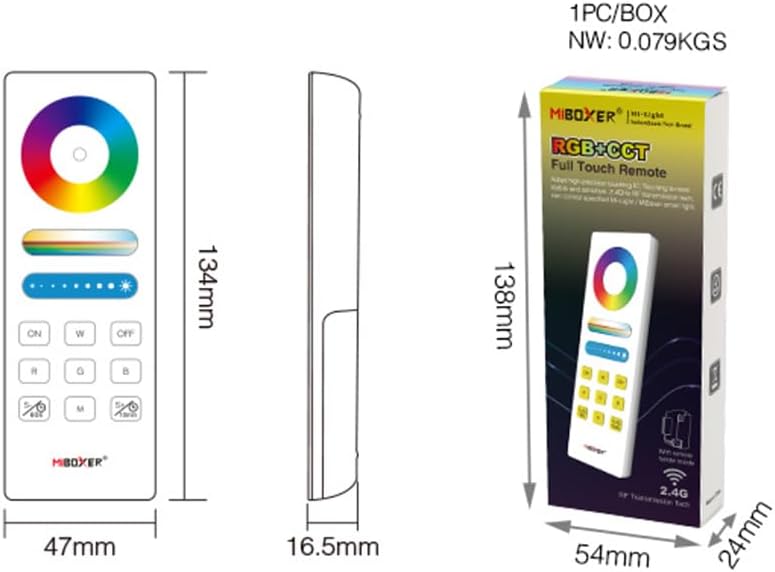
Image: Dimensional drawing of the FUT088 remote control and its retail packaging, showing measurements in millimeters.
Warranty and Support
Specific warranty information for this product is not provided in the available documentation. For warranty claims or technical support, please contact the seller or manufacturer directly through the platform where the product was purchased.
Always refer to the original purchase documentation for any applicable warranty terms and conditions.
Ask a question about this manual
Ask about setup, troubleshooting, compatibility, parts, safety, or missing instructions. Manuals+ will review the question and use this page’s manual context to help answer it.