
1. Introduction
Thank you for choosing the WARM TECH Fluid-Filled Towel Radiator. This appliance is designed to provide efficient heating for your bathroom and warm towels, combining 750W of radiant heat with a 1000W blower for rapid warmth. This manual contains important information regarding the safe installation, operation, and maintenance of your new radiator. Please read it thoroughly before use and retain it for future reference.
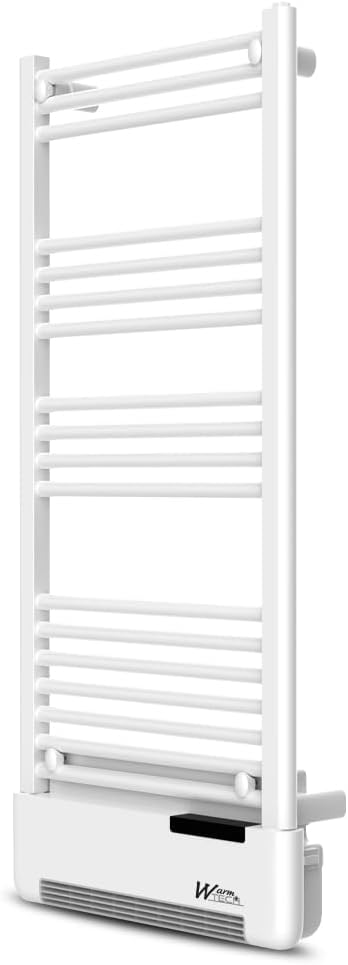
Image 1.1: Front view of the WARM TECH Fluid-Filled Towel Radiator. This image shows the white, wall-mounted unit with multiple horizontal bars for towel drying and a control panel at the bottom.
2. Safety Information
Always observe the following safety precautions to reduce the risk of fire, electric shock, or injury:
- Read all instructions before installing or using this heater.
- This heater is hot when in use. To avoid burns, do not let bare skin touch hot surfaces.
- Extreme caution is necessary when any heater is used by or near children or invalids and whenever the heater is left operating unattended.
- Do not operate any heater with a damaged cord or plug or after the heater malfunctions, has been dropped, or damaged in any manner.
- Do not use outdoors. This heater is intended for indoor, bathroom use only.
- Do not run cord under carpeting. Do not cover cord with throw rugs, runners, or similar coverings. Arrange cord away from traffic area and where it will not be tripped over.
- To disconnect heater, turn controls to off, then remove plug from outlet.
- Do not insert or allow foreign objects to enter any ventilation or exhaust opening as this may cause an electric shock or fire, or damage the heater.
- To prevent a possible fire, do not block air intakes or exhaust in any manner.
- A heater has hot and arcing or sparking parts inside. Do not use it in areas where gasoline, paint, or flammable vapors or liquids are used or stored.
- Use this heater only as described in this manual. Any other use not recommended by the manufacturer may cause fire, electric shock, or injury to persons.
- This appliance is not intended for use by persons (including children) with reduced physical, sensory or mental capabilities, or lack of experience and knowledge, unless they have been given supervision or instruction concerning use of the appliance by a person responsible for their safety.
- Children should be supervised to ensure that they do not play with the appliance.
3. Package Contents
Please check the contents of the package upon opening. Ensure all components are present and undamaged.
- WARM TECH Fluid-Filled Towel Radiator (Model WTSSF1750-2IN1)
- Wall Mounting Kit (brackets, screws, wall plugs)
- Instruction Manual
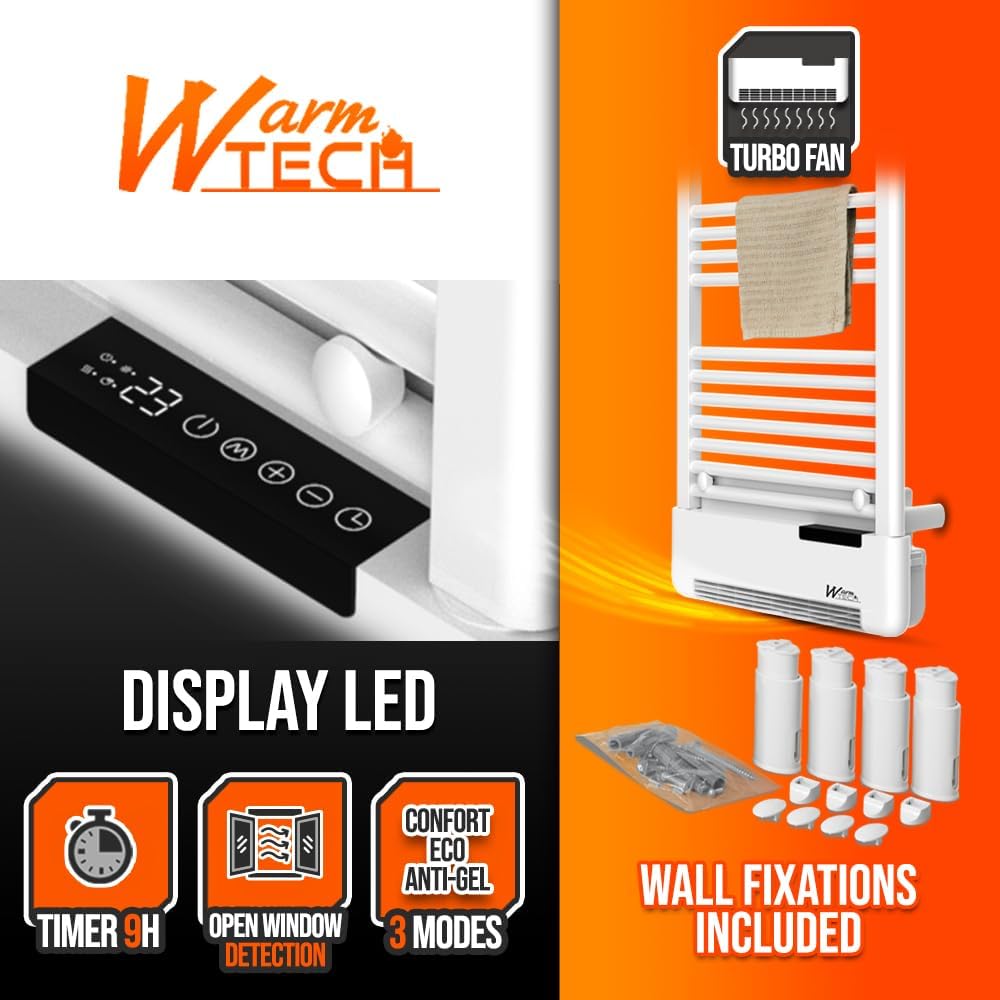
Image 3.1: The towel radiator shown with its included wall fixings. The image highlights the digital LED display and the separate bag containing mounting hardware.
4. Installation
This appliance is designed for wall-mounted installation in a bathroom environment. Ensure the installation location complies with local electrical regulations and provides adequate clearance from water sources.
4.1 Mounting the Radiator
- Choose a suitable wall location, ensuring it is structurally sound and away from direct water spray.
- Mark the drilling points for the wall brackets using the provided template or by carefully measuring the radiator's mounting points.
- Drill holes at the marked positions and insert the wall plugs.
- Secure the wall brackets to the wall using the provided screws.
- Carefully hang the radiator onto the installed wall brackets, ensuring it is level and securely seated.
4.2 Electrical Connection
The radiator operates on 230 Volts (AC). It must be connected to a suitable electrical outlet in accordance with local wiring regulations. If in doubt, consult a qualified electrician.
- Ensure the power supply is switched off at the main circuit breaker before making any electrical connections.
- Connect the radiator's power cord to a grounded electrical outlet.
- Ensure the power cord is not stretched, pinched, or routed through areas where it could be damaged.
- The appliance has an IP24 rating, indicating protection against splashing water, making it suitable for bathroom use.
5. Operating Instructions
Your WARM TECH towel radiator features a digital display and various functions for precise control over your heating.

5.1 Digital Display and Controls
The digital display shows the current temperature and selected settings. Use the control buttons (refer to the diagram on the appliance for specific button functions) to navigate menus and adjust settings.
5.2 Operating Modes
The radiator offers three main operating modes:
- Comfort Mode: Maintains a comfortable set temperature.
- Eco Mode: Operates at a slightly lower temperature to save energy.
- Anti-freeze Mode: Prevents the room temperature from dropping below a critical level (e.g., 7°C) to protect against freezing.

Image 5.1: Icon representing the Comfort, Eco, and Anti-freeze modes.
5.3 Customizable Programs and Timer
You can set personalized heating schedules using the customizable programs. The integrated timer allows you to set the operating duration for up to 9 hours.

Image 5.2: Icon indicating the 9-hour timer function.
5.4 Open Window Detection
The radiator features an automatic open window detection system. If a sudden drop in temperature is detected (indicating an open window), the heater will temporarily pause operation to conserve energy. It will resume normal operation once the window is closed and the temperature stabilizes.

Image 5.3: Icon representing the open window detection feature.
5.5 Thermostatic Control and Anti-Overheating Protection
The integrated thermostat allows you to set your desired room temperature, which the radiator will then maintain. For safety, the appliance includes anti-overheating protection, which automatically shuts off the unit if it detects an unsafe temperature.
6. Maintenance
Regular cleaning and maintenance will ensure the longevity and efficient operation of your towel radiator.
- Cleaning: Before cleaning, always unplug the radiator from the power outlet and allow it to cool completely. Wipe the exterior surfaces with a soft, damp cloth. Do not use abrasive cleaners, solvents, or harsh chemicals, as these can damage the finish.
- Dust Removal: Periodically vacuum or wipe dust from the air intake and exhaust vents to maintain optimal airflow for the blower function.
- Storage: If storing the radiator for an extended period, ensure it is clean and dry. Store it in a cool, dry place, protected from dust.
7. Troubleshooting
If you encounter issues with your WARM TECH towel radiator, refer to the following common problems and solutions:
- Radiator does not turn on:
- Check if the power cord is securely plugged into a working electrical outlet.
- Ensure the main power switch on the appliance is in the 'ON' position.
- Check your household circuit breaker or fuse box.
- Insufficient heating:
- Verify that the desired temperature setting is higher than the current room temperature.
- Ensure no windows or doors are open, triggering the open window detection.
- Check if the radiator is in Eco or Anti-freeze mode, which operates at lower temperatures.
- Blower not working or working intermittently:
- Ensure the blower function is activated through the control panel.
- Check for any obstructions in the air intake or exhaust vents.
- If the blower operates for only a few seconds and stops, this may indicate an internal issue. Contact customer support.
- Difficulty with programming:
- Refer to the detailed programming section in the full instruction manual (if available) or consult the manufacturer's website for specific programming steps.
- Ensure you are following the sequence of button presses correctly.
- Overheating protection activated:
- Unplug the radiator and allow it to cool down for at least 30 minutes.
- Check for any obstructions blocking the air vents.
- If the issue persists after cooling and checking for obstructions, contact customer support.
For problems not listed here, or if solutions do not resolve the issue, please contact WARM TECH customer support.
8. Specifications
| Feature | Specification |
|---|---|
| Brand | WARM TECH |
| Model Number | WTSSF1750-2IN1 |
| Color | White |
| Voltage | 230 Volts (AC) |
| Heating Method | Fluid-filled radiant heat + Forced air (blower) |
| Radiant Power | 750W |
| Blower Power | 1000W |
| Special Features | Customizable Programs, Timer, Open Window Detection, Thermostatic Control, Digital Display, Anti-Overheating Protection |
| Form Factor | Wall-mounted |
| Indoor/Outdoor Use | Indoor |
| Room Type | Bathroom |
| Product Dimensions (DxWxH) | 13.5 x 51.5 x 13.5 cm |
| IP Rating | IP24 (Protection against splashing water) |

Image 8.1: Visual representation of the WARM TECH towel radiator highlighting its dimensions (120 x 51.5 x 13.5 cm) and economic operation.
9. Warranty and Support
For warranty information, please refer to the documentation provided with your purchase or contact your retailer. WARM TECH is committed to providing quality products and customer satisfaction.
9.1 Customer Support
If you have any questions, require technical assistance, or need to report a problem with your WARM TECH Fluid-Filled Towel Radiator, please contact the seller or visit the official WARM TECH website for support contact details.
Return Policy: The buybox winner indicates a return policy duration of 31 days for refund/replacement.