
WEIJIESHENG T5-1
WEIJIESHENG DVB-T2 Digital Terrestrial Decoder T5-1 User Manual
Model: T5-1
1. Introduction
Thank you for choosing the WEIJIESHENG DVB-T2 Digital Terrestrial Decoder T5-1. This device allows you to receive free-to-air digital terrestrial television channels in Full HD 1080P/720P resolution, supporting HEVC Main 10 H.265 video encoding. Its compact design allows it to be discreetly placed behind your television. This manual provides detailed instructions for setup, operation, and troubleshooting to ensure optimal performance.
2. Safety Information
Please read and understand all safety instructions before using this product. Keep this manual for future reference.
- Power Supply: Use only the provided 5V/2A power adapter or a compatible USB port on your TV for power. Ensure the power source matches the device's requirements.
- Ventilation: Do not block any ventilation openings. Ensure adequate airflow around the device to prevent overheating.
- Water and Moisture: Do not expose the device to rain, moisture, or place objects filled with liquids on or near it.
- Cleaning: Disconnect the power before cleaning. Use a soft, dry cloth. Do not use liquid or aerosol cleaners.
- Servicing: Do not attempt to service this product yourself. Refer all servicing to qualified service personnel.
- Antenna Connection: Ensure the antenna is properly connected and grounded to prevent electrical hazards. This decoder is compatible with standard fishbone antennas.
3. Package Contents
Verify that all items listed below are included in your package:
- WEIJIESHENG DVB-T2 Digital Terrestrial Decoder (with integrated HDMI cable)
- 2-in-1 Universal Remote Control (AAA batteries not included)
- Mini USB IR Receiver with LED display
- 5V/2A Power Adapter (Euro plug)
- USB/Type-C Power Cable
- AV Cable
- User Manual (English and Italian)
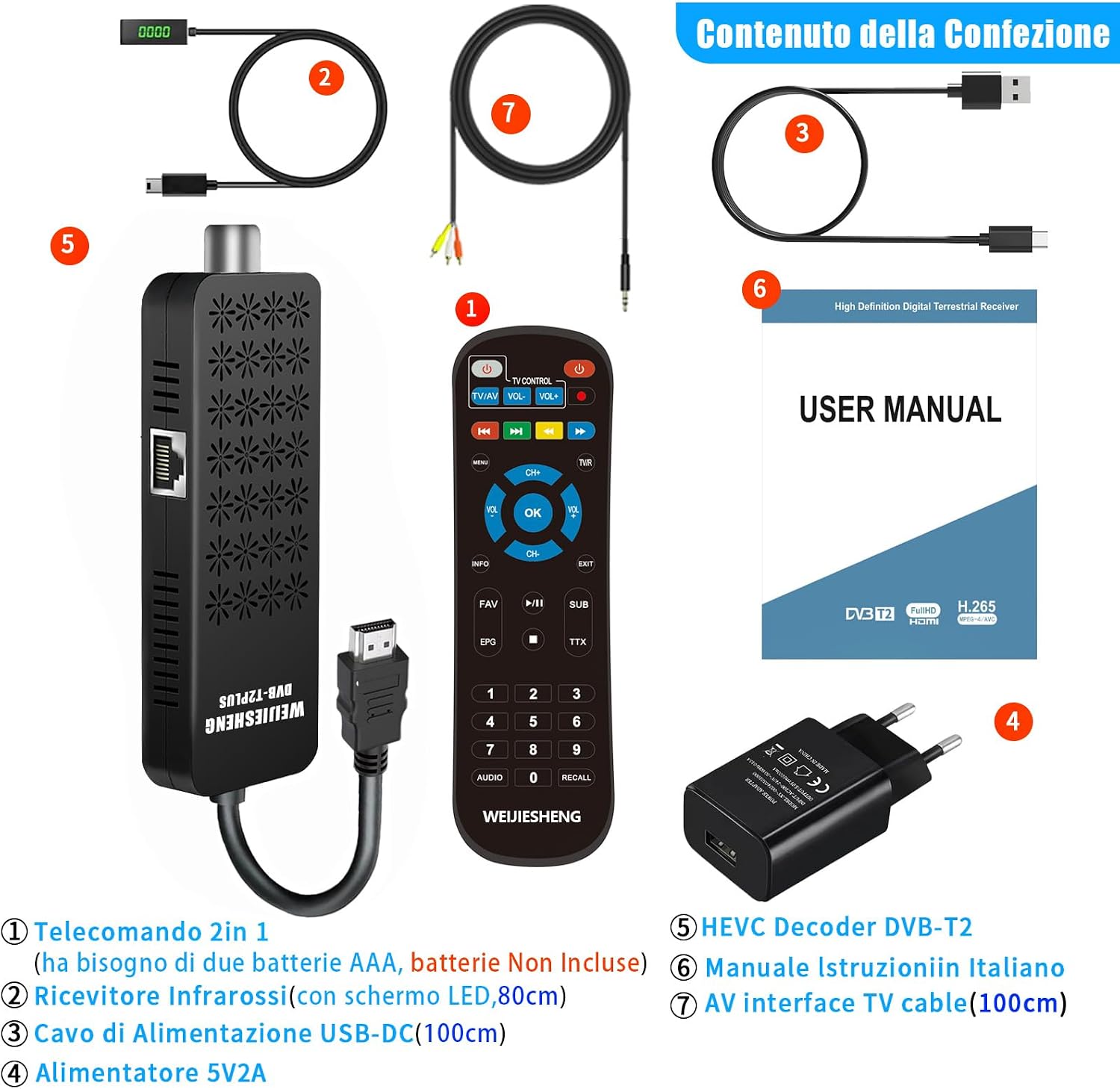
Image 3.1: Illustration of all items included in the WEIJIESHENG DVB-T2 Decoder package. This includes the decoder unit, the 2-in-1 remote control, the IR receiver, power adapter, USB/Type-C cable, AV cable, and the user manual.
4. Product Overview
The WEIJIESHENG DVB-T2 Decoder T5-1 is a compact and versatile device designed to enhance your television viewing experience by providing access to digital terrestrial channels. It supports high-definition video and offers various multimedia functionalities.
4.1 Device Components

Image 4.1: The WEIJIESHENG DVB-T2 Decoder stick, its 2-in-1 remote control, and the mini USB IR receiver. The decoder is a black rectangular stick with an integrated HDMI cable.
- DVB-T2 Decoder Stick: The main unit, featuring an integrated HDMI cable for direct connection to your TV.
- 2-in-1 Universal Remote Control: Controls both the decoder and your TV (after programming).
- Mini USB IR Receiver: Connects to the decoder to receive signals from the remote control and displays channel information.
4.2 Ports and Connections

Image 4.2: Detailed view of the WEIJIESHENG DVB-T2 Decoder showing its various ports and approximate dimensions. Ports include ANT IN, AV OUT, Ethernet, HDMI OUT (integrated cable), Type-C (power), IR IN, and USB.
- ANT IN: For connecting your terrestrial antenna.
- HDMI OUT: Integrated cable for connecting to your TV's HDMI port.
- AV OUT: For connecting to older TVs via the included AV cable.
- Ethernet Port: For wired network connection.
- USB Port: For connecting USB storage devices (e.g., for PVR, multimedia playback) or a USB Wi-Fi adapter.
- Type-C Port: For power input.
- IR IN: For connecting the external IR receiver.
5. Setup Instructions
Follow these steps to set up your WEIJIESHENG DVB-T2 Decoder:
5.1 Connecting the Decoder to Your TV
- Connect to TV:
- For modern TVs: Plug the integrated HDMI cable from the decoder directly into an available HDMI port on your television.
- For older TVs: Use the provided AV cable. Connect one end to the AV OUT port on the decoder and the other end to the corresponding AV input ports (Yellow for Video, White for Left Audio, Red for Right Audio) on your TV.
- Connect Antenna: Connect your terrestrial antenna cable to the ANT IN port on the decoder. Ensure your antenna is a standard fishbone type for optimal reception.
- Connect IR Receiver: Plug the mini USB IR receiver into the IR IN port on the decoder. Position the IR receiver in a location where it has a clear line of sight to your remote control.
- Power Connection:
- If your TV has a USB port that provides 5V power: Connect the USB/Type-C power cable from the decoder's Type-C port to your TV's USB port.
- If your TV does not have a suitable USB port or for more stable power: Connect the USB/Type-C power cable from the decoder's Type-C port to the provided 5V/2A power adapter, then plug the adapter into a wall outlet.
- Select Input: Turn on your TV and select the correct HDMI or AV input source to which the decoder is connected.

Image 5.1: Diagram illustrating the connection process for the WEIJIESHENG DVB-T2 Decoder. It shows connections for HDTV (HDMI), ANT IN, IR receiver, and power options (USB from TV or 5V2A adapter).

Image 5.2: The decoder unit connected and hidden behind a television, with the HDMI cable plugged directly into the TV and the IR receiver extended for remote control functionality. Power is supplied via a TV's USB port.
5.2 Initial Setup and Channel Scan
- Upon first power-on, the decoder will typically display an initial setup screen.
- Use the remote control to select your preferred language (e.g., English).
- Navigate to the "Channel Search" or "Auto Scan" option in the menu.
- Initiate the scan. The decoder will search for available digital terrestrial channels. This process may take several minutes.
- Once the scan is complete, the channels will be saved, and you can begin watching TV. The number of channels received depends on your antenna's position and signal strength.
6. Operating Instructions
6.1 Remote Control Functions
The 2-in-1 remote control allows you to operate both the decoder and your television. Ensure AAA batteries are inserted correctly.

Image 6.1: A user operating the WEIJIESHENG DVB-T2 Decoder with the 2-in-1 remote control while watching television. The remote features dedicated buttons for TV control, channel navigation, volume, menu, and multimedia functions.
- TV Control Section: Power, TV/AV, Volume Up/Down (for TV). These buttons can be programmed to control your TV.
- Decoder Control Section:
- Power: Turns the decoder on/off.
- MENU: Accesses the main menu.
- CH+/CH-: Changes channels.
- VOL+/VOL-: Adjusts decoder volume.
- OK: Confirms selections.
- INFO: Displays channel information.
- EXIT: Exits current menu/screen.
- FAV: Accesses favorite channel list.
- EPG: Electronic Program Guide.
- PVR: Initiates PVR recording (requires USB storage).
- Multimedia Buttons: Play, Pause, Stop, Fast Forward, Rewind.
- Numeric Buttons (0-9): Direct channel selection.
6.2 Programming the 2-in-1 Remote Control
The remote control has a learning function to control basic functions of your TV (Power, TV/AV, Volume). Follow these steps to program it:
- Place the decoder remote and your TV's original remote head-to-head, about 1-3 cm apart.
- Press and hold the [SET] button (or a similar designated learning button, refer to remote diagram if available) on the decoder remote until the LED indicator lights up steadily.
- Press the button on the decoder remote that you wish to program (e.g., [POWER] under "TV CONTROL"). The LED indicator will flash slowly.
- Press the corresponding button on your TV's original remote (e.g., TV Power button). The LED indicator on the decoder remote will flash quickly three times and then light up steadily, indicating successful learning.
- Repeat steps 3 and 4 for other buttons you wish to program (TV/AV, VOL+, VOL-).
- Once finished, press the [SET] button again to exit learning mode. The LED indicator will turn off.
Note: If the learning process fails, the LED may flash rapidly and turn off. Try again, ensuring the remotes are properly aligned and batteries are fresh.
7. Advanced Features
7.1 PVR (Personal Video Recorder)
The decoder supports PVR functionality, allowing you to record live TV programs to an external USB storage device (not included).
- Connect a USB 2.0 storage device (e.g., USB flash drive or external hard drive, formatted to FAT32) to the USB port on the decoder. Maximum supported capacity is 4TB.
- Press the [PVR] button on the remote control to start recording the current channel.
- Press [STOP] to end the recording.
- Recorded programs can be accessed via the Multimedia menu.
7.2 Multimedia Playback
Play various media files from a connected USB storage device.
- Supported formats include MP3, AC3, AAC (audio), JPEG, PNG (images), MP4, MOV, AVI, MKV, MPG, MPEG (video).
- Connect your USB storage device.
- Navigate to the "Multimedia" section in the main menu to browse and play your files.
7.3 Network Features (Ethernet / USB Wi-Fi / Cast Screen)
The decoder offers network connectivity for additional features.
- Ethernet: Connect an Ethernet cable to the Ethernet port for a wired internet connection.
- USB Wi-Fi: To enable Wi-Fi connectivity, you will need a compatible USB Wi-Fi adapter (MT7601 chipset recommended, not included). Plug the adapter into the USB port.
- YouTube & Other Websites: With an internet connection, you can access YouTube and other web services through the decoder's interface.
- Cast Screen (DLNA): The decoder supports mobile phone casting functionality (DLNA). Refer to the on-screen instructions or your phone's casting feature for details on how to mirror content.

Image 7.1: Screenshot of the WEIJIESHENG DVB-T2 Decoder's user interface, displaying various applications and settings such as Installation, STB Cast, Apps, YouTube, AV, Channel, Preference, Media Center, Setting, Network, Upgrade, and Version. This interface highlights the multimedia and network capabilities.
8. Troubleshooting
If you encounter issues with your decoder, refer to the following common problems and solutions:
| Problem | Possible Cause / Solution |
|---|---|
| No picture/sound |
|
| No channels found / Poor signal |
|
| Remote control not working |
|
| USB device not recognized |
|
| Wi-Fi not connecting |
|
9. Specifications
| Feature | Detail |
|---|---|
| Brand | WEIJIESHENG |
| Model Number | T5-1 |
| Color | Black |
| Connectivity Technology | USB, HDMI, AV, Ethernet |
| Special Features | USB-WIFI (adapter not included), Ethernet, PVR, Multimedia Player, Cast Screen (DLNA) |
| Compatible Devices | Television (LED, LCD, Tube, Projector) |
| Video Encoding | HEVC Main 10, H.265 |
| Resolution Support | Full HD 1080P/720P |
| Audio Output Mode | Stereo |
| Surround Sound Configuration | 2.0 |
| USB Support | USB 2.0 (FAT32), Max 4TB external storage |
| Power Input | 5V/2A (via power adapter or TV USB port) |

Image 9.1: The WEIJIESHENG DVB-T2 Decoder is compatible with a wide range of television models, including LED TVs, LCD monitors, older Tube TVs, and projectors, offering versatile connectivity options.
10. Maintenance
Proper care and maintenance will ensure the longevity of your WEIJIESHENG DVB-T2 Decoder.
- Cleaning: Disconnect the power before cleaning. Use a soft, dry, lint-free cloth to wipe the device. Do not use abrasive cleaners, waxes, or solvents.
- Environment: Keep the device away from direct sunlight, heat sources, and excessive dust.
- Storage: If storing the device for an extended period, disconnect it from power and store it in a cool, dry place.
11. Warranty and Support
WEIJIESHENG is committed to providing quality products and customer service.
- Customer Support: For any questions or issues, we provide 24-hour online service. Please refer to the contact information provided with your purchase or on the product packaging for assistance.
- Warranty: Specific warranty details may vary by region and retailer. Please retain your proof of purchase for warranty claims.
Related Documents - T5-1
 |
Universal Remote Control for DVB T1-T5 Series User Manual Comprehensive user manual for the DVB T1/T2/T3/T4/T5 universal remote control, including battery installation, usage instructions, and safety guidelines. |
 |
Cennik Urządzeń T-Mobile: Smartfony, Smartwatche i Więcej na Raty Poznaj aktualny cennik T-Mobile na urządzenia mobilne, smartfony, smartwatche, tablety i laptopy. Sprawdź ceny na raty 0% oraz w pełnej cenie. Oferta dla konsumentów. |
 |
Asco Series 643 Aluminium Filter Regulator: Installation and Maintenance Guide Comprehensive installation, maintenance, and technical specifications for the Asco Series 643 Aluminium Filter Regulator, designed for use in potentially explosive atmospheres (ATEX zones). |
 |
Hoymiles Flex-T5 Cable Accessories: Datasheet and Installation Guide Comprehensive datasheet for Hoymiles Flex-T5 Cable Accessories, detailing features, technical specifications, and ordering options for MiT series microinverters. Simplify solar installations with this flexible and reliable cable system. |
 |
Samsung YP-T5 Digital Audio Player User Manual A comprehensive user guide for the Samsung YP-T5 digital audio player, detailing its features, operation, connectivity, advanced settings, troubleshooting, and technical specifications. |
Ask a question about this manual
Ask about setup, troubleshooting, compatibility, parts, safety, or missing instructions. Manuals+ will review the question and use this page’s manual context to help answer it.