
1. Introduction
The youyeetoo L1RM 4D LiDAR Scanner is an advanced rangefinder module designed for various applications including robotics, smart cities, and logistics. It provides 3D position and 1D grayscale data, enabling functions such as mapping, positioning, identification, obstacle avoidance, environment scanning, and 3D reconstruction.
This manual provides essential information for the proper setup, operation, and maintenance of your L1RM 4D LiDAR Scanner.
2. Product Overview
The L1RM 4D LiDAR features a 360° horizontal and 90° vertical field of view, offering omnidirectional ultra-wide-angle scanning. It includes built-in 3-axis acceleration and 3-axis gyroscope IMU modules, supporting a push frequency of 250Hz. The device is capable of stable ranging and high-precision mapping even in strong outdoor light conditions (up to 100K lux).

Figure 2.1: L1RM 4D LiDAR Scanner with key specifications including 360°x90° FOV, 0.05m near blind spot, 30m range, 21600 points/s effective frequency, 230g weight, and 75x75x65mm compact size.

Figure 2.2: Front view of the Unitree 4D LiDAR-L1 device.
2.1. Shipping List
Verify that all components are present in the package:

Figure 2.3: The shipping list includes Unitree 4D LiDAR-L1 x 1, Rubber pad x 1, Screw package (M3) x 1, Adapter Module x 1, Hexagonal L-shaped wrench x 1, Adapter module x 1, and Data cable x 1.
2.2. Product Video Overview
Video 2.1: Official product video demonstrating the features and capabilities of the youyeetoo L1RM 4D LiDAR Scanner, including its bionic human eye view, omnidirectional scanning, and application examples.
3. Setup
Follow these steps to set up your L1RM 4D LiDAR Scanner:
- Connect the Unitree 4D LiDAR-L1 to the Adapter Module using the provided cable.
- Connect the Adapter Module to your computer via a USB to Type-C cable.
- Connect the Adapter Module to an external power source using the data cable and power adapter.

Figure 3.1: Diagram illustrating the connection of the Unitree 4D LiDAR-L1 to an Adapter Module, then to a computer via USB-C and to an external power source.
4. Operating Instructions
The L1RM LiDAR Scanner offers versatile scanning capabilities for various environments.
4.1. Omnidirectional Ultra-Wide Angle Scanning
The device provides a 360° horizontal and 90° vertical field of view, allowing for comprehensive environmental detection. This enables three-dimensional space detection with a hemispherical field of view, suitable for a wide range of commercial scenarios.

Figure 4.1: Visual representation of the L1RM's 360°x90° omnidirectional ultra-wide angle scanning, highlighting its ability to replace traditional LiDAR solutions with comparable effect at a lower cost.
4.2. Whole House Dynamic Scanning
The L1RM can quickly and accurately obtain the three-dimensional structural information of an entire house. This feature is beneficial for mobile robots, facilitating positioning and autonomous navigation, and supporting functions like whole-house cleaning and organization.

Figure 4.2: Visualization of dynamic scanning of a whole house, demonstrating the high-precision and high-density point cloud data obtained by the L1RM.
4.3. Non-Repetitive Static and Close-Range Dynamic Scanning
The L1RM supports non-repetitive static scanning, providing high-precision point cloud data for image-level scanning effects. It also features an ultra-low blind zone with a minimum detection distance of 0.05m, enabling easy close-range detection and recognition.

Figure 4.3: Examples of non-repetitive static scanning (top) and close-range dynamic scanning (bottom), illustrating the LiDAR's ability to capture detailed environmental data and detect objects as close as 5cm.
5. Maintenance
To ensure optimal performance and longevity of your youyeetoo L1RM 4D LiDAR Scanner, follow these general maintenance guidelines:
- Keep Clean: Regularly clean the exterior of the LiDAR unit with a soft, dry cloth. Avoid using abrasive cleaners or solvents that could damage the housing or optical components.
- Protect Optics: Ensure the optical windows are free from dust, dirt, and fingerprints. Use a lens cleaning cloth and appropriate cleaning solution if necessary, being careful not to scratch the surface.
- Environmental Conditions: Operate and store the LiDAR within the specified operating environment temperature range (-10°C to 60°C) to prevent damage. Avoid exposure to excessive moisture or extreme temperatures.
- Cable Management: Ensure all cables are securely connected and not under strain. Avoid sharp bends or kinks in the cables that could lead to internal damage.
- Firmware Updates: Periodically check the official youyeetoo website or support channels for any available firmware updates. Keeping the firmware up-to-date can improve performance and add new features.
6. Troubleshooting
If you encounter issues with your L1RM 4D LiDAR Scanner, refer to the following troubleshooting tips:
- No Power:
- Check all power connections. Ensure the power adapter is correctly plugged into a working outlet and the Adapter Module.
- Verify that the power indicator light on the LiDAR unit is on.
- No Data Output:
- Confirm the USB to Type-C cable is securely connected between the Adapter Module and your computer.
- Ensure the correct drivers are installed on your computer. Refer to the product WIKI for driver information.
- Check the communication interface settings (e.g., baud rate) in your software to match the LiDAR's specifications.
- Inaccurate or Inconsistent Readings:
- Clean the optical window of the LiDAR unit. Dust or smudges can interfere with laser performance.
- Ensure the operating environment is within the specified temperature range.
- Avoid strong light sources directly interfering with the LiDAR's field of view, although the L1RM has good anti-strong light ability, extreme conditions can still affect performance.
- Device Not Recognized by Software:
- Restart your computer and the LiDAR unit.
- Try a different USB port or cable.
- Consult the product WIKI for specific software setup instructions and compatibility.
For further assistance, please contact youyeetoo support or refer to the online WIKI.
7. Specifications
The following table details the technical specifications of the youyeetoo L1RM 4D LiDAR Scanner:
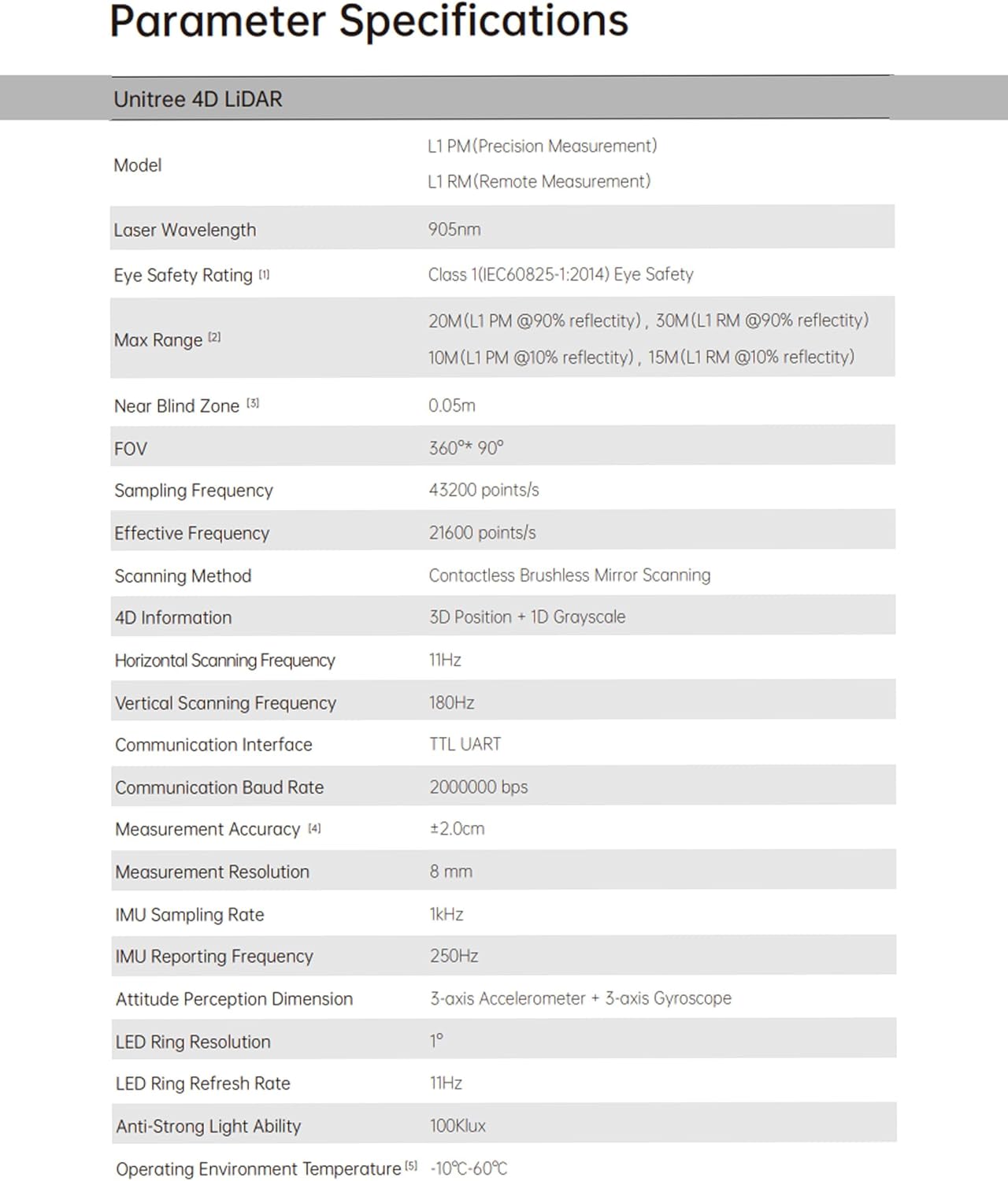
Figure 7.1: Detailed technical specifications table for Unitree 4D LiDAR, including model types, laser wavelength, eye safety rating, max range, near blind zone, FOV, sampling/effective frequency, scanning method, 4D information, scanning frequencies, communication interface/baud rate, measurement accuracy/resolution, IMU sampling/reporting frequency, attitude perception dimension, LED ring resolution/refresh rate, anti-strong light ability, and operating environment temperature.
| Feature | Specification |
|---|---|
| Brand | youyeetoo |
| Model | L1RM (Remote Measurement) |
| Mfr Part Number | AZ2-S-US-YSDP4DGWL1RM |
| Laser Wavelength | 905nm |
| Eye Safety Rating | Class I (IEC60825-1:2014) |
| Max Range | 30M (L1 RM @90% reflectivity) |
| Near Blind Zone | 0.05m |
| Field of View (FOV) | 360° x 90° |
| Sampling Frequency | 43200 points/s |
| Effective Frequency | 21600 points/s |
| Scanning Method | Contactless Brushless Mirror Scanning |
| 4D Information | 3D Position + 1D Grayscale |
| Horizontal Scanning Frequency | 11Hz |
| Vertical Scanning Frequency | 180Hz |
| Communication Interface | TTL UART |
| Communication Baud Rate | 2000000 bps |
| Measurement Accuracy | ±2.0cm |
| Measurement Resolution | 8 mm |
| IMU Sampling Rate | 1kHz |
| IMU Reporting Frequency | 250Hz |
| Attitude Perception Dimension | 3-axis Accelerometer + 3-axis Gyroscope |
| LED Ring Resolution | 1° |
| LED Ring Refresh Rate | 11Hz |
| Anti-Strong Light Ability | 100Klux |
| Operating Environment Temperature | -10°C ~ 60°C |
8. Warranty Information
The youyeetoo L1RM 4D LiDAR Scanner comes with a 1-year warranty from the date of purchase. This warranty covers defects in materials and workmanship under normal use. It does not cover damage caused by misuse, accidents, unauthorized modifications, or operation outside the specified environmental conditions.
Please retain your proof of purchase for warranty claims. For detailed warranty terms and conditions, refer to the official youyeetoo website or contact customer support.
9. Support
For additional information, technical support, or to access resources such as drivers, software, and detailed documentation, please visit the official youyeetoo WIKI:
http(s)://wiki.youyeetoo.com/Lidar/L1PM
You can also contact youyeetoo customer support through their official website for personalized assistance.