Introduction
The SeeSii TinySA Ultra is a versatile and compact spectrum analyzer and signal generator designed for a wide range of frequency analysis and signal generation tasks. This manual provides essential information for setting up, operating, maintaining, and troubleshooting your device to ensure optimal performance and longevity.
Key Features
- Wide Frequency Range: Measures from 100kHz to 5.3GHz, with an Ultra mode extending up to 6GHz for spectrum analysis.
- Dual Functionality: Operates as both a spectrum analyzer and a signal generator, offering sine wave output (0.1-800MHz) and square wave/dual tone output (up to 4.4GHz).
- Enhanced Display: Features a 4.0-inch 480x320 large touchscreen for clear and intuitive operation.
- Data Storage: Includes a built-in 32GB micro SD card for direct data recording and convenient sharing.
- PC Connectivity: Connects to a PC via USB for control and data transfer using the Tinysa-APP, compatible with Windows, Linux, and macOS.
- Long Battery Life: Equipped with a 3000mAh rechargeable battery, providing extended working time and quick charging via Type-C.
- ESD Protection: Incorporates new ESD protection for increased durability and service life.
What's in the Box
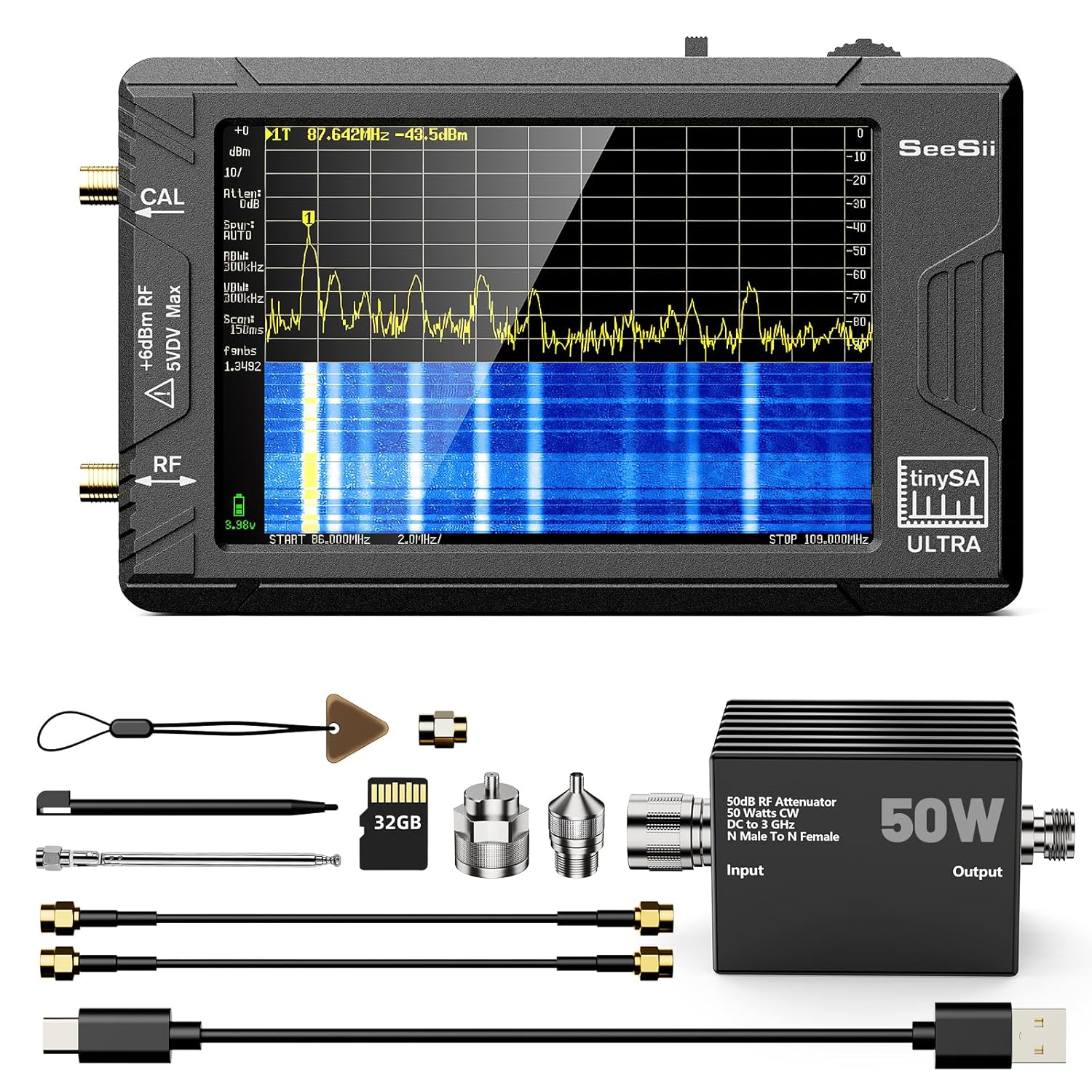
The package includes the SeeSii TinySA Ultra Spectrum Analyzer unit, a 50W N Male to N Female Type Attenuator, two 30cm SMA cables, a USB cable, an SMA connector, a touch plectrum, an antenna with SMA connector, a 32GB MicroSD card, and a touchscreen pen. These components are essential for various measurement and operational tasks.
Attenuator Details

| Frequency Range: | DC-3GHz |
| VSWR: | 1.25:1 (Max) |
| Attenuator: | 10dB |
| Impedance: | 50Ω |
| Power: | 50W |
| A connector type: | N male |
| B connector type: | N female |
| Inner conductor material: | copper Gold-plated |
Device Layout and Interfaces

The TinySA Ultra features a clear layout for easy access to its functions. On the top, you will find the power on/off button, an indicator light, and a multi-functional knob for navigation. The bottom edge includes a Type-C interface for charging and PC connection, an SD Card interface for the included 32GB micro SD card, and a 3.5mm headphone jack. The left side has CAL and RF ports for signal input and output.
Setup
Initial Charging

Before first use, fully charge the TinySA Ultra using the provided Type-C USB cable. Connect the cable to the Type-C port on the device and a suitable USB power source (e.g., computer USB port or wall adapter). The device features a 3000mAh rechargeable battery, which typically takes about 3 hours to fully charge. A full charge provides approximately 8 hours of working time.
Inserting the Micro SD Card

Locate the SD Card interface on the bottom of the device. Gently insert the included 32GB micro SD card into the slot until it clicks into place. This card is essential for recording data directly from the device.
Power On and Self-Test
To power on the device, press the power button located on the top. The device will initiate a self-test. To perform a manual self-test, navigate to CONFIG then SELF TEST using the multi-functional knob or touchscreen. This process verifies the internal components are functioning correctly. The video demonstrates the power-on sequence and accessing the self-test function.
Operating Instructions
Spectrum Analyzer Mode

The TinySA Ultra functions as a spectrum analyzer across a wide frequency range. Connect the signal source to the RF input port. Use the touchscreen or multi-functional knob to adjust parameters such as start/stop frequency, center frequency, span, and resolution bandwidth (RBW). The device supports RBW settings between 200Hz and 850kHz, allowing for detailed analysis of adjacent signals. The 4.0-inch sensitive touchscreen provides a clear visual representation of the spectrum.

The built-in Low Noise Amplifier (LNA) and attenuator enhance measurement accuracy. The low RBW settings are particularly useful for distinguishing closely spaced signals and performing intermodulation tests. The device can display 450 scan points, providing comprehensive coverage of the selected frequency range.
Signal Generator Mode
When not used as a spectrum analyzer, the TinySA Ultra can operate as a signal generator. It can produce sine waves between 0.1MHz and 800MHz, and square waves or dual tone outputs up to 4.4GHz. This functionality is useful for testing circuits, calibrating other equipment, or generating specific RF signals for various applications. Access this mode through the device's menu system.
PC Control and Software

The TinySA Ultra can be controlled via a PC using the Tinysa-APP. Connect the device to your computer using the provided USB cable. The USB interface supports the CDC protocol, allowing for a wide range of commands to be invoked over the serial interface for measurements and internal settings updates. Drivers for Windows will install automatically; Linux drivers are built into the kernel. This feature enables more advanced analysis and data logging capabilities.
Maintenance
- Cleaning: Use a soft, dry cloth to clean the device's exterior. Avoid abrasive cleaners or solvents. For the touchscreen, use a screen-specific cleaning solution if necessary.
- Storage: Store the device in a cool, dry place away from direct sunlight and extreme temperatures. When not in use for extended periods, ensure the battery is partially charged (around 50%) to prolong its lifespan.
- Firmware Updates: Regularly check the official SeeSii website or community forums for firmware updates. Keeping the firmware updated ensures optimal performance, new features, and bug fixes.
- ESD Precautions: While the device has ESD protection, always handle it with care and avoid static discharge, especially when connecting or disconnecting cables.
Troubleshooting
| Problem | Possible Cause | Solution |
|---|---|---|
| Device does not power on. | Low or depleted battery. | Connect to a power source using the Type-C cable and charge for at least 30 minutes before attempting to power on again. |
| Screen is unresponsive or frozen. | Software glitch or temporary system error. | Perform a soft reset by holding the power button for 10-15 seconds until the device restarts. If the issue persists, ensure firmware is updated. |
| Inaccurate readings in Spectrum Analyzer mode. | Incorrect calibration or external interference. | Perform a self-test and calibration (refer to "Power On and Self-Test" section). Ensure proper shielding and correct cable connections. Verify attenuator usage if high power signals are present. |
| PC software (Tinysa-APP) not recognizing the device. | Driver issue or incorrect USB connection. | Ensure the USB cable is securely connected. Try a different USB port. For Windows, check Device Manager for driver issues; drivers should install automatically. For Linux, verify kernel support. Restart both device and PC. |
| SD card not detected or data not saving. | Improperly inserted SD card or card corruption. | Remove and reinsert the SD card firmly. If the issue persists, try formatting the SD card (backup data first) or using a different compatible SD card. |
Specifications

| Display Size: | 4.0 inch |
| Spectrum Analyzer Frequency Range: | 100kHz to 5.3GHz (Ultra mode up to 6GHz) |
| Signal Generator Output: | Sine wave: 0.1-800MHz; Square wave/Dual tone: up to 4.4GHz |
| Resolution Bandwidth (RBW): | 200Hz to 850kHz |
| Battery: | 3000mAh rechargeable |
| Data Storage: | Built-in 32GB Micro SD card |
| PC Interface: | USB Type-C (CDC protocol) |
| Dimensions: | 6.3 x 4.33 x 2.17 inches |
| Weight: | 2.09 Pounds |
Warranty and Support
Seesii provides a 36-month warranty for the TinySA Ultra Spectrum Analyzer. For any technical assistance, troubleshooting, or warranty claims, please contact Seesii customer support. They aim to provide 24-hour quick responses and ensure 100% customer satisfaction.
You can find more information and support resources on the official Seesii store page: Seesii Store.