
1. Introduction
Thank you for choosing the Camii Smart Bird Feeder Camera. This device allows you to observe and interact with birds in your backyard through advanced features like AI identification, motion detection, and wireless video capture. Powered by a solar panel, it offers continuous operation and a unique bird-watching experience.
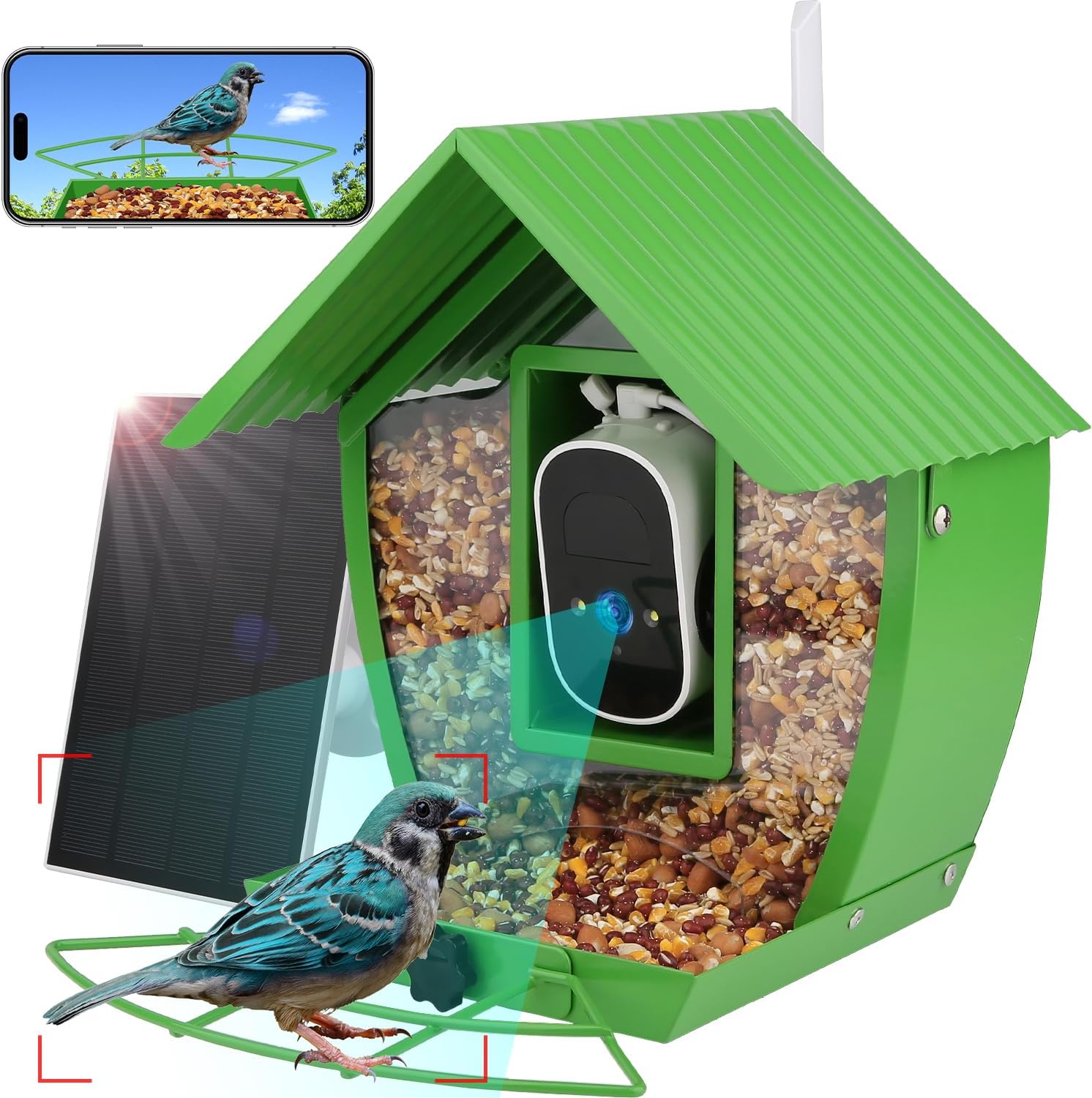
Image 1: The Camii Smart Bird Feeder Camera, showcasing its integrated camera, seed compartment, and solar panel for outdoor use.
2. Package Contents
Verify that all items are present in your package:
- Smart Bird Feeder with Camera
- Installation Package (screws, anchors, straps)
- Solar Panel
- User Manual
- Wi-Fi Antenna
- Hummingbird Feeder Attachment
- Fruit Fork
3. Setup Guide
3.1 Physical Assembly
- Attach the Perch: Secure the perch to the front base of the feeder using the provided screws.
- Attach the Bird Bath: Place the bird bath on top of the feeder. Secure it by tightening the wing nuts on either side.
- Install Wi-Fi Antenna: Screw the Wi-Fi antenna into the designated port on the back of the camera unit.
- Insert Camera: Ensure the camera is securely placed within its housing inside the feeder. Adjust its angle to point towards the perch.
- Connect Solar Panel: Plug the solar panel cable into the charging port on the camera unit. Position the solar panel in an area with maximum sunlight exposure.

Image 2: An assembled Camii Smart Bird Feeder, showing the perch, bird bath, and camera housing. The solar panel is connected and positioned for optimal charging.
3.2 App Installation and Connection
To utilize the smart features of your bird feeder, download the companion app:
- Download App: Scan the QR code provided in the physical user manual or search for "Tris Home" (or similar app name if specified in manual) in your device's app store.
- Register/Login: Create an account or log in if you already have one.
- Connect to 2.4G Wi-Fi: Ensure your mobile phone is connected to a 2.4GHz Wi-Fi network. Turn on Bluetooth.
- Add Device: In the app, click the "+" icon to add a new device. Select "Bird Camera" and follow the on-screen prompts.
- Scan QR Code: The app will display a QR code. Position your phone so the camera on the bird feeder can scan this QR code (maintain a distance of 25-35cm or about 1 ft).
- Complete Setup: Follow any remaining instructions in the app to name your device and finalize the connection.
Video 1: A step-by-step guide on how to connect the Camii Smart Bird Feeder Camera to the mobile application, including Wi-Fi setup and device pairing.
3.3 Mounting Options
The Camii Smart Bird Feeder offers versatile mounting options:
- Tree Mount: Use the provided straps to secure the feeder to a tree trunk.
- Pole Mount: Attach the feeder to a pole using the included bracket and screws.
- Wall/Fence Mount: Secure the feeder to a wall or fence using the bracket and appropriate hardware.

Image 3: The Camii Smart Bird Feeder Camera mounted on a tree, demonstrating its outdoor placement and solar panel for continuous power.
4. Operating Instructions
4.1 Bird Arrival Notifications
The feeder automatically detects visiting birds and sends real-time notifications to your phone via the app. This allows for immediate viewing of activity.

Image 4: A smartphone displaying a real-time notification from the Camii Bird Feeder Camera, indicating a bird detection in the backyard.
4.2 AI Bird Species Identification
Equipped with AI recognition technology, the feeder can identify over 10,000 bird species. Detailed information about identified birds is available through the app. Note: This feature requires a basic cloud service subscription.

Image 5: The mobile app interface demonstrating the AI identification feature, showing a bird on the feeder and providing species information.
4.3 4MP HD Color Night Vision
The camera provides 4MP HD resolution with a 110° wide-angle view, ensuring clear observation of birds both day and night, including color night vision capabilities.

Image 6: A visual representation of the camera's 4MP HD and 110° wide-angle view, highlighting its color night vision capability for clear day and night bird watching.
4.4 Stable 2.4GHz Wi-Fi Connection
The camera is equipped with a 5dBi antenna, supporting a stable 2.4GHz Wi-Fi connection to minimize signal loss and ensure consistent monitoring.

Image 7: The side view of the Camii Smart Bird Feeder Camera, emphasizing its 2.4GHz Wi-Fi connectivity and 5dBi antenna for stable signal reception.
4.5 Photo and Video Storage
The feeder automatically captures photos and videos of birds. Storage options include a 30-day free cloud service and support for an SD card (not included).

Image 8: A smartphone screen displaying a gallery of captured bird photos and videos, illustrating the free cloud service and SD card support for media storage.
5. Maintenance
5.1 Refilling Bird Seed
The feeder features a 2L large container to minimize the frequency of refills. To refill, simply tilt the top section of the feeder forward after loosening the wing nut on the back, pour in the bird seed, and then secure it back in place.
5.2 Cleaning
Regular cleaning of the feeder and bird bath is recommended to maintain hygiene for visiting birds. The design allows for easy access to the seed compartment and bath for cleaning.
5.3 Solar Charging
The integrated solar panel provides continuous charging for the camera's batteries. Ensure the solar panel is positioned to receive direct sunlight for optimal performance.
6. Troubleshooting
- Connectivity Issues: Ensure your Wi-Fi network is 2.4GHz and has a strong signal at the feeder's location. Re-pair the device if connection is lost.
- No Notifications: Check app settings to ensure motion detection and notification alerts are enabled.
- Poor Image Quality: Verify the camera lens is clean and free from obstructions. Ensure adequate lighting for optimal day/night vision.
- Battery Not Charging: Confirm the solar panel is connected correctly and receiving sufficient direct sunlight.
7. Specifications
| Feature | Detail |
|---|---|
| Brand | Camii |
| Model Number | C-Bird Feeder |
| Material | Metal |
| Camera Resolution | 4MP HD |
| Field of View | 110° Wide-Angle |
| Night Vision | Color Night Vision |
| Wi-Fi Connectivity | 2.4GHz (with 5dBi antenna) |
| Power Source | Solar Powered (2 Lithium Ion batteries included) |
| Capacity | 2 Liters |
| Special Feature | Weatherproof (IP66) |
| Mounting Type | Pole Mount, Tree Mount, Wall Mount |
| Product Dimensions | 10.04"L x 7.87"W x 10.43"H |
| Item Weight | 6.17 Pounds |
8. Warranty and Support
For warranty information or technical support, please refer to the contact details provided with your purchase or visit the official Camii website. Our customer service team is available to assist with any questions or issues you may encounter.