
1. Introduction
The PQWT L40 Indoor Pipeline Water Leak Detector is designed for efficient and accurate detection of water leaks within household scenarios, specifically focusing on indoor floor leaks. It offers a detection depth of 0.5 meters with 10cm precise targeting. The device utilizes a high-performance triangular sensor and adjustable filters to isolate clear leak sounds, ensuring reliable detection in various indoor settings.
The detector operates by capturing sound signals from leaks through its sensor. This data is then processed and displayed visually as a spectrum and signal bars on the screen, while simultaneously playing the audio through professional headphones. This dual approach allows users to pinpoint leaks effectively by both listening for unusual sounds and observing abnormal signal patterns.
The L40 model is built for stability and durability, featuring a wide operating temperature range from -20℃ to +50℃. The main unit is lightweight at 0.75Kg and boasts a long battery life of 15 hours on standby. It supports convenient 5V USB charging and operates within a wide frequency range of 1-10000Hz. The device also supports 11 languages for user convenience.
2. Product Components
The PQWT L40 Water Leak Detector package includes the following main components:
- Host Machine: The main unit with a high-definition display screen for data visualization.
- Vertical Sensor: A specialized sensor for indoor ground pipeline leak detection.
- Headphones: Professional noise-cancelling headphones for clear audio detection.
- Strap: For comfortable carrying of the host machine during operation.
- USB Data Cable: For charging and data transfer.
- Universal Adapter: For charging.
- Carry Case: For safe storage and transport of all components.

Image: The main unit of the PQWT L40 Water Leak Detector, along with its vertical sensor, professional headphones, and connecting cables.
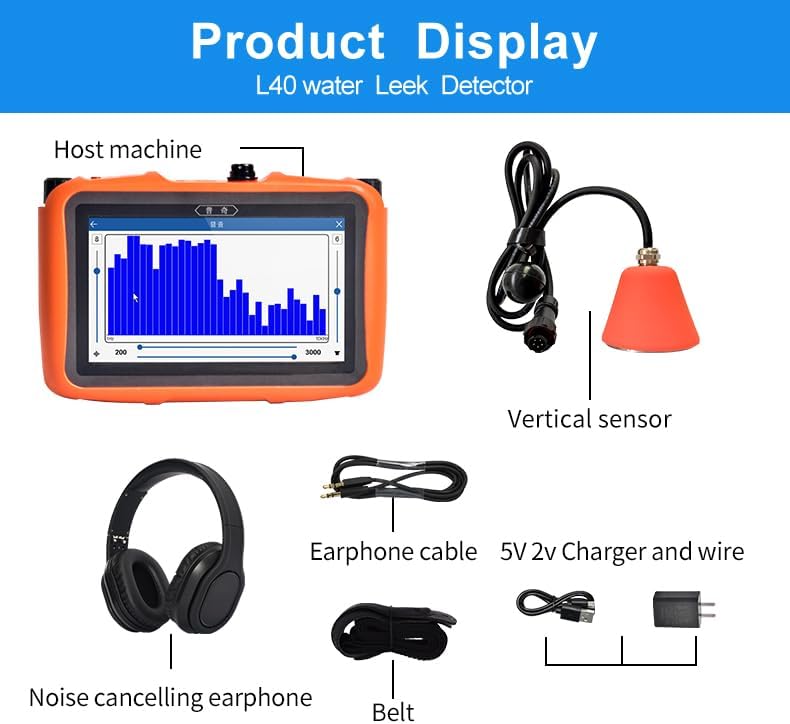
Image: Detailed view of the PQWT L40 components: Host machine, Vertical sensor, Earphone cable, 5V 2V Charger and wire, Noise cancelling earphone, and Belt.
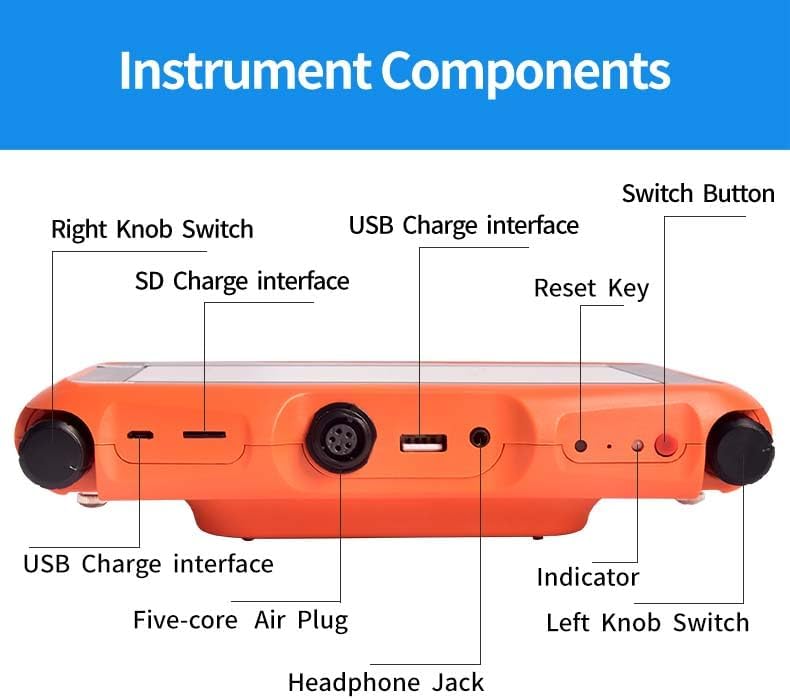
Image: Side view of the PQWT L40 host machine, highlighting the Right Knob Switch, USB Charge interface, SD Charge interface, Reset Key, Indicator, Left Knob Switch, Five-core Air Plug, and Headphone Jack.
3. Assembly Instructions
Follow these steps to assemble your PQWT L40 Water Leak Detector:
- Connect the Strap: Attach the provided strap to the host machine for ease of carrying.
- Connect the Sensor: Connect the air plug of the sensor cable to the host machine's air plug. Ensure the white small dot on the air plug aligns with the corresponding mark on the host machine's port before inserting.
- Connect the Headphones: Plug the earphone cable into the headphone jack on the host machine.
- Power On: Long-press the "Switch Button" to boot the device and enter the main interface.

Image: Visual guide for connecting the strap, sensor, and headphones to the host machine.
4. Operating Instructions
The PQWT L40 offers two primary detection modes: General Detection and Locating Mode.
4.1. General Detection Mode
General Detection mode is primarily used for initial checks of indoor pipes over a large area to identify potential leakage zones.
- Enter Main Interface: Long-press the Switch Button to power on the device and enter the main interface.
- Select General Detection: On the main interface, click to enter the "General Detection" mode.
- Start Detection: Turn on the left knob switch to activate sound reception. Place the sensor along one end of the suspected pipeline.
- Observe and Move: Pay close attention to the sound volume in the headset and observe the spectrum change on the screen. Move the sensor forward along the pipeline, detecting points in the same manner.
- Identify Suspected Area: When the spectrum on the instrument screen is high and the sound in the headset significantly increases, this indicates a suspected leakage area. Mark this area.
Video: Demonstrates the general detection process, showing how to move the sensor and interpret the screen and audio feedback to identify potential leak areas.
4.2. Locating Mode
Locating mode is used to precisely pinpoint the leakage point within a suspected leakage area identified during general detection.
- Enter Locating Mode: From the main interface, click to enter the "Locating" mode.
- Start Detection in Suspected Area: In the suspected leakage area, begin detection from the first point. Click any position in the spectrum bar on the screen.
- Interpret Signal: The signal value will be displayed on top of the spectrum bar. The thin bar represents instantaneous environmental noise, while the thick bar represents the sound from underground. Focus on observing the thick bar signal.
- Lock and Move: Once the thick bar signal is stable, click again on any position in the spectrum bar to lock it. Move the sensor to the next point and repeat the process.
- Identify Leak Point: The detection point with the highest thick spectrum bar and largest signal value is identified as the suspected leaking point.

Image: The PQWT L40 in use for indoor water leak detection, demonstrating the application of the vertical sensor.
5. Maintenance
- Cleaning: Regularly wipe the host machine and sensors with a soft, dry cloth. Avoid using abrasive cleaners or solvents.
- Storage: Store the device and its components in the provided carry case in a cool, dry place when not in use.
- Battery Care: Charge the battery regularly, even if the device is not in frequent use, to maintain battery health. Avoid fully discharging the battery for extended periods.
- Sensor Protection: Handle sensors with care to prevent damage. Ensure cables are not kinked or strained.
6. Troubleshooting
| Problem | Possible Cause | Solution |
|---|---|---|
| Device does not power on. | Low battery or power button not pressed correctly. | Charge the device using the provided USB cable and adapter. Ensure the power button is pressed and held until the device starts. |
| No sound from headphones. | Headphones not connected properly or volume too low. | Check headphone connection. Adjust the left knob switch to increase volume. Ensure headphones are functional. |
| Inaccurate detection results. | Improper sensor placement or high environmental noise. | Ensure firm contact of the sensor with the surface. Minimize environmental noise. Re-evaluate pipeline direction if uncertain. |
| Screen not responding. | Software glitch or device freeze. | Press the Reset Key to restart the device. If the issue persists, contact support. |
7. Specifications
| Feature | Detail |
|---|---|
| Model | L40 |
| Detection Depth | 0.5m |
| Targeting Precision | 10cm |
| Sensor Technology | Acoustic Sensor (Vertical Sensor for L40) |
| Control Method | Touch Screen |
| Operating Temperature | -20℃ to +50℃ |
| Item Weight (Main Unit) | 0.75 Kg (approx. 1.65 lbs) |
| Battery Life (Standby) | 15 hours |
| Charging | 5V USB |
| Frequency Range | 1-10000Hz |
| Supported Languages | 11 languages (English, Turkish, Italian, French, Spanish, Arabic, Russian, Korean, German, Portuguese, Polish) |
| Product Dimensions | 7.48 x 16.14 x 18.11 inches |
| Material | Plastic |
8. Warranty and Support
The PQWT L40 Water Leak Detector comes with a 2-year warranty, ensuring worry-free use. For technical support, troubleshooting assistance, or warranty claims, please refer to the contact information provided with your product packaging or visit the official PQWT website.
PQWT was established in 2006 with a mission for "precise perception of the underground world," focusing on the research and development of groundwater detection and non-destructive pressure pipeline detection technology. PQWT's solutions have served over 180 countries worldwide, assisting in water resource development and completing over 100,000 kilometers of pipeline inspections.


