
Introduction
Thank you for choosing the Mersoco BR698 Wireless Headphones. These headphones are designed to provide a high-quality audio experience for TV watching, featuring 2.4G digital RF technology for an extended range and no audio delay. The integrated charging dock and noise reduction technology ensure comfort and an immersive listening experience. This manual provides detailed instructions for setup, operation, and maintenance to help you get the most out of your device.

Image: Mersoco BR698 Wireless Headphones with their charging dock, showcasing the sleek design.
What's in the Box
Please check the package contents to ensure all items are present:
- User Manual
- Cable (likely audio cables for various connections)
- Charging Station (Transmitter Base)
- Ear Cushions (pre-installed or spare)
- Eartip
Product Features
- 2.4 GHz Technology: Provides an excellent wireless range up to 160 feet (50 meters) with no audio delay, ensuring perfect synchronization between video and sound.
- Noise Reduction Technology: Features soft-touch padding and an elastic headband for comfort. The noise reduction function can be individually turned on or off, supporting a maximum noise reduction of -8 dB to minimize external disturbances.
- Easy Plug & Play: Simple connection to TVs using optical, RCA, or 3.5mm AUX input cables. No complex Bluetooth pairing is required.
- Immersive Audio: Delivers highly accurate sound with excellent clarity and immersive bass, allowing for private TV viewing without disturbing others.
- Long Battery Life & Convenient Charging: A full charge provides up to 13 hours of playtime. The transmitter base doubles as a charging station, fully recharging the headphones in 3 hours.

Image: Illustration highlighting the 2.4GHz wireless technology for zero audio delay, showing people enjoying TV with headphones.
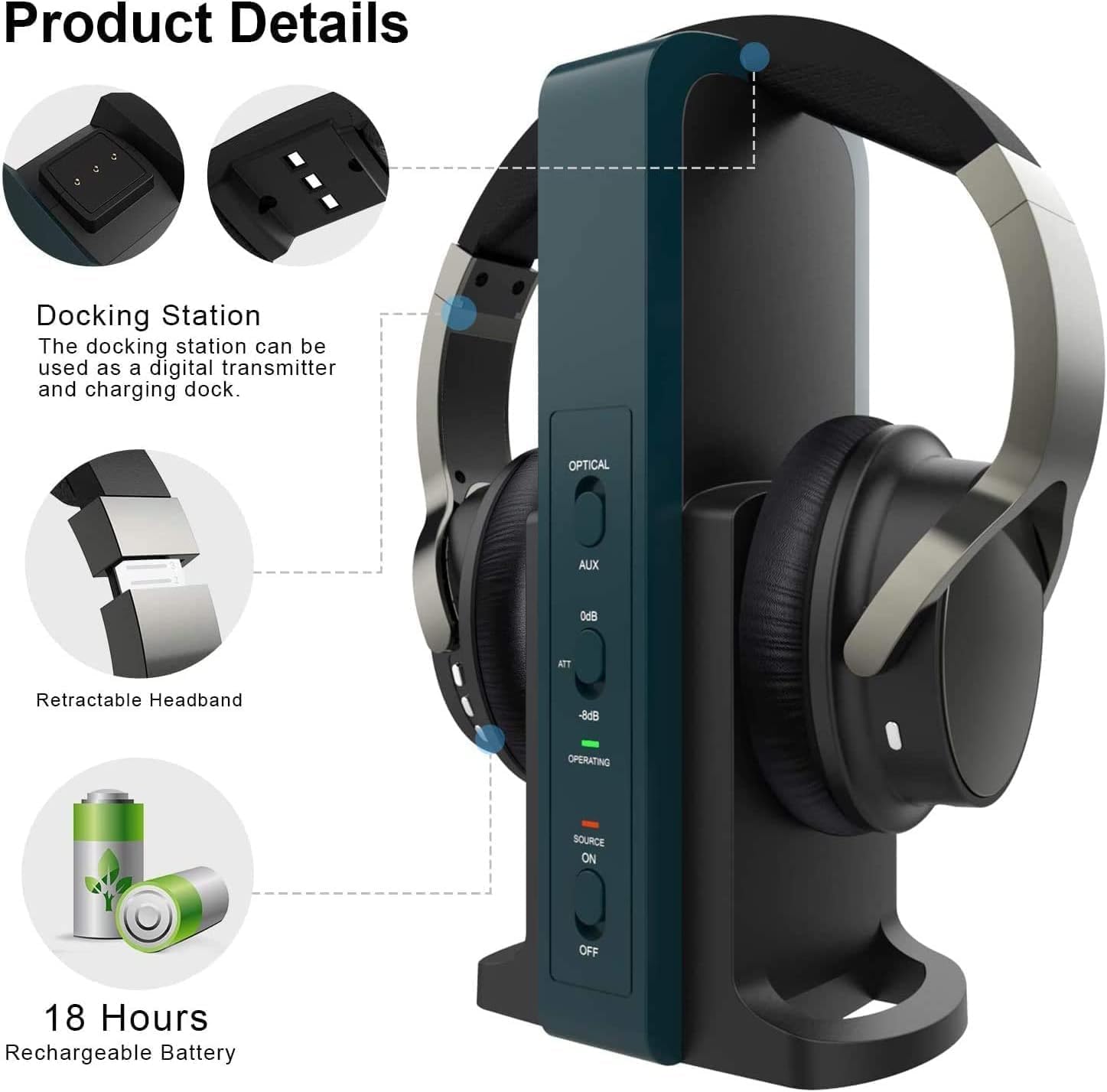
Image: Detailed view of the headphones and docking station, showing features like the retractable headband and battery life.
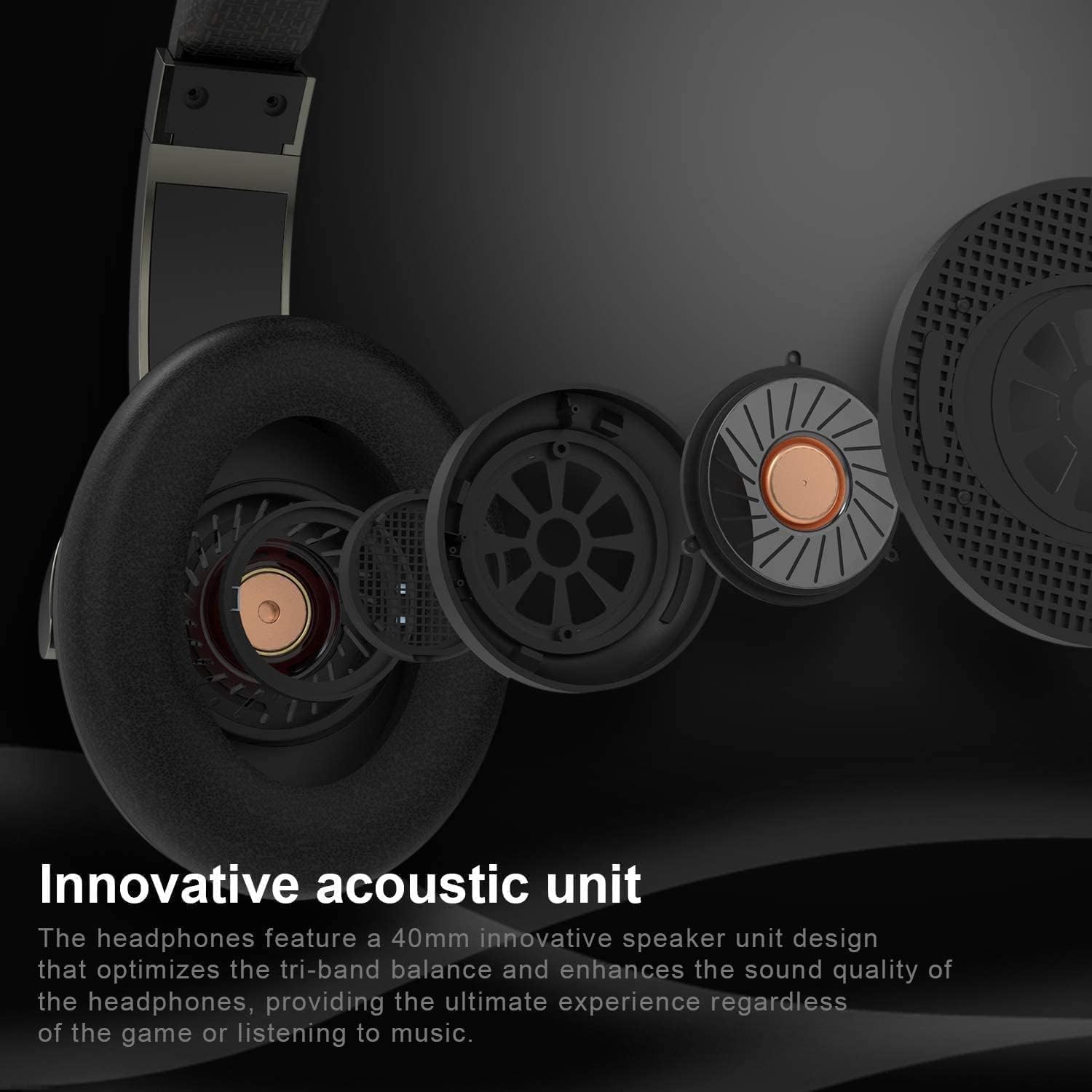
Image: Exploded view of the headphone's innovative acoustic unit, emphasizing sound quality.
Setup Guide
Follow these steps to connect your Mersoco BR698 Wireless Headphones to your TV.
1. Identify Your TV's Audio Output Port
Before connecting, check the back of your TV for available audio output ports. The Mersoco BR698 supports Optical (SPDIF/TOSLINK), RCA (Red/White), and 3.5mm AUX/Headphone outputs. You will only need to use ONE of these connections.
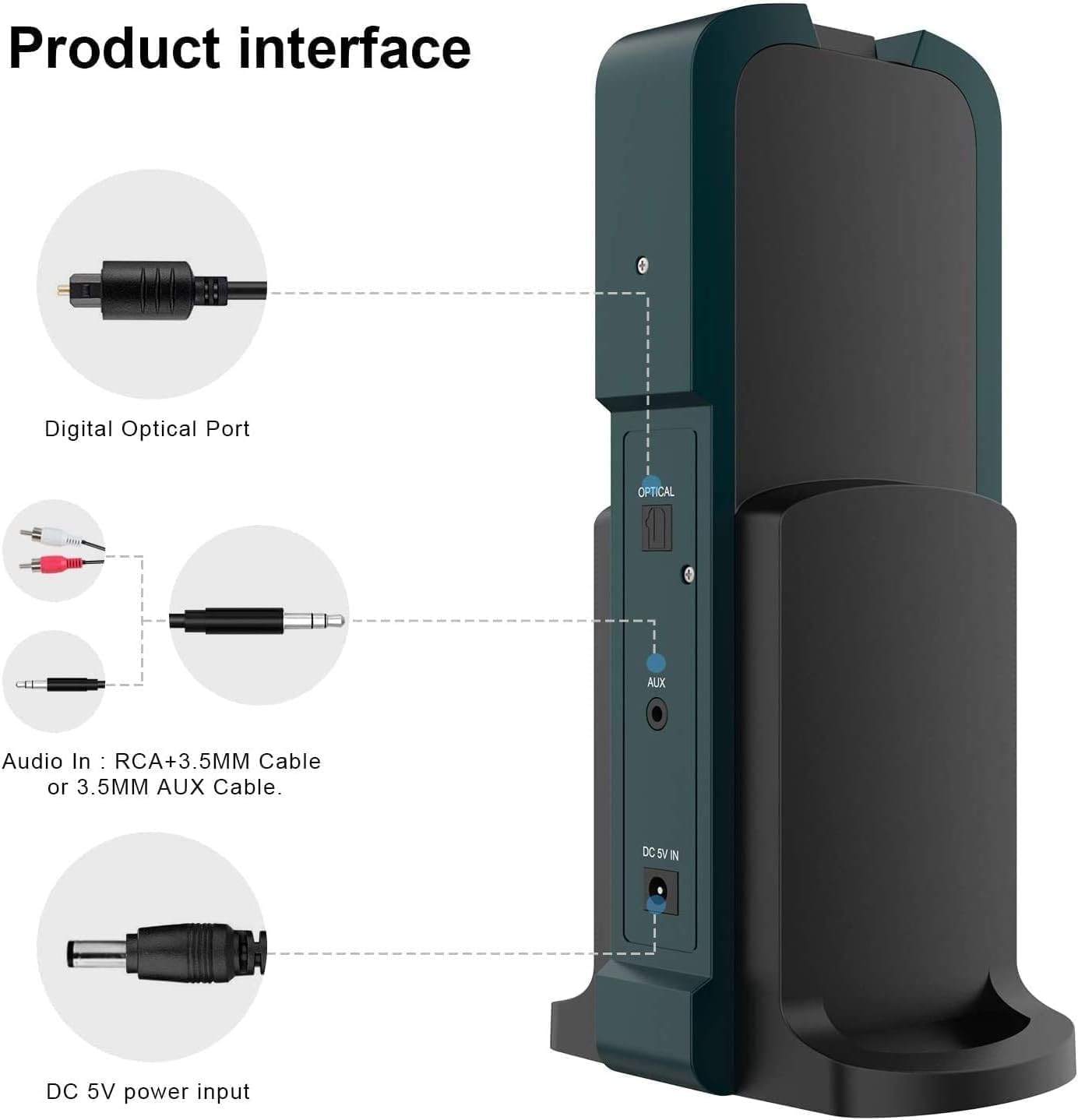
Image: Close-up of the transmitter base showing the Optical, AUX, and DC 5V IN ports.
2. Connect Power to the Transmitter Base
Plug the provided power adapter into the DC 5V IN port on the back of the transmitter base, then plug the adapter into a wall outlet.
3. Connect the Transmitter Base to Your TV
Use the appropriate audio cable (Optical, RCA, or 3.5mm AUX) to connect the transmitter base to your TV's audio output port. Ensure a secure connection.
Video: This video demonstrates how to identify your TV's audio output ports and connect the Mersoco BR698 transmitter base using Optical, RCA, or AUX cables. It also shows how to power on the base and headset for successful connection.
4. Adjust TV Audio Settings (If Using Optical)
If you are using the Optical connection, you may need to adjust your TV's audio output settings. Navigate to your TV's audio settings menu and change the Digital Audio Output Format to PCM. Refer to your TV's user manual for specific instructions.
5. Power On the Transmitter Base
Slide the AUX/OPTICAL mode switch on the transmitter base to the correct position corresponding to your chosen connection type (Optical or AUX). Then, press the "SOURCE ON" button. The operating indicator light will turn green when the connection is successful.
6. Power On the Headset
Press and hold the power button on the headset for 3 seconds to turn it on. The indicator light on the headset will turn red, signifying that it is connected to the transmitter base.
Operating Instructions
Volume Control
Adjust the volume directly on the headset using the dedicated volume controls. You can also adjust the output level from the transmitter base if needed, though headset controls are generally preferred for convenience.
Noise Reduction
The headphones feature an adjustable noise reduction function. Use the controls on the headset to activate or deactivate this feature based on your environment and preference. This helps to minimize ambient noise for a clearer listening experience.

Image: The headphones and transmitter base, illustrating the noise blocking capability for an undisturbed listening experience.
Maintenance
Charging the Headphones
To charge the headphones, simply place them on the transmitter base. Ensure the charging contacts align properly. The headphones will fully charge in approximately 3 hours, providing up to 13 hours of use.

Image: The headphones correctly placed on the charging dock, highlighting the ease of charging.
Replacing Ear Cushions
The ear cushions are designed to be removable for cleaning or replacement. Gently pull to detach them and push to reattach. This allows for customization or maintenance of hygiene.
Troubleshooting
- No Sound:
- Ensure the transmitter base is powered on and connected to the TV's audio output.
- Verify the headset is powered on and fully charged.
- Check that the correct audio input mode (Optical or AUX) is selected on the transmitter base.
- If using Optical, confirm your TV's digital audio output is set to PCM.
- Adjust the volume on both the headset and your TV.
- Audio Delay:
- The 2.4G RF technology is designed for zero audio delay. If you experience delay, ensure no other wireless devices are causing interference.
- Check all cable connections for looseness.
- Poor Sound Quality:
- Ensure all cables are securely connected.
- Check for any physical obstructions between the transmitter and headphones that might interfere with the signal.
- Verify the audio source quality from your TV.
Specifications
| Brand | Mersoco |
| Model Number | BR698 |
| Color | Black |
| Ear Placement | Over Ear |
| Noise Control | Active Noise Cancellation |
| Item Weight | 0.99 Kilograms |
| Battery Charge Time | 3 Hours |
| Frequency Range | 2.4 GHz |
| Wireless Technology | RF |
| Connectivity Technology | Wireless |
| Compatible Devices | Television |
| Control Type | Volume Control, Remote |
Warranty and Support
The Mersoco BR698 Wireless Headphones come with a 60-day warranty from the date of purchase. For technical support, troubleshooting assistance, or warranty claims, please visit the official Mersoco store on Amazon or contact customer service through the platform where you purchased the product.
Official Mersoco Store: Mersoco Store