Introduction
This manual provides comprehensive instructions for the installation, setup, operation, and maintenance of your DSTMLOCKFTY Fingerprint Door Lock. Please read this manual carefully before installation and use to ensure proper function and security. Keep this manual for future reference.
Product Overview
The DSTMLOCKFTY Fingerprint Door Lock is a smart biometric door knob designed for enhanced security and convenience. It offers multiple unlocking methods, including fingerprint recognition, smartphone app control, and traditional emergency keys. The lock features quick biometric recognition, auto-locking capabilities, and various access modes suitable for residential and commercial environments.

Image: The DSTMLOCKFTY Fingerprint Door Lock, showing the exterior knob with fingerprint sensor, the interior knob, a set of emergency keys, and a smartphone displaying the control app.
Package Contents
Please verify that all components are present before beginning installation:
- Fingerprint Door Knob (Exterior and Interior Assemblies)
- Latch Mechanism
- Strike Plate
- Mounting Screws
- Emergency Spare Keys (2)
- Type-C Charging Cable
- User Manual (This document)
Installation Guide
The DSTMLOCKFTY Fingerprint Door Lock is designed for easy installation on most standard doors. A screwdriver is typically the only tool required. Ensure your door meets the following specifications:
- Door Thickness: 35-55mm (1.38 - 2.17 inches)
- Backset (Distance from door edge to handle hole center): 60-70mm (2.36 - 2.75 inches) adjustable

Image: Diagram illustrating the required door thickness and backset dimensions for proper installation of the door lock.
Step-by-Step Installation:
- Prepare the Door: Ensure your door has the correct bore holes and backset. If replacing an existing knob, remove the old hardware.
- Install the Latch: Insert the latch mechanism into the door edge hole. Ensure the bevel of the latch bolt faces the door frame. Secure with screws.
- Install the Exterior Knob: Feed the spindle and wires from the exterior knob through the latch mechanism and the door hole.
- Install the Interior Knob: Connect the wires from the exterior knob to the interior knob assembly. Align the interior knob with the exterior knob and secure it with the provided mounting screws.
- Install the Strike Plate: Mount the strike plate on the door frame, aligning it with the latch bolt. Secure with screws.
- Test Operation: Close the door and test the mechanical operation of the latch and knob. Ensure smooth movement before proceeding to electronic setup.
Initial Setup and App Control
The smart lock can be controlled via the TUYA SMART APP. This app allows you to manage fingerprints, access codes, view unlock records, and configure lock settings.
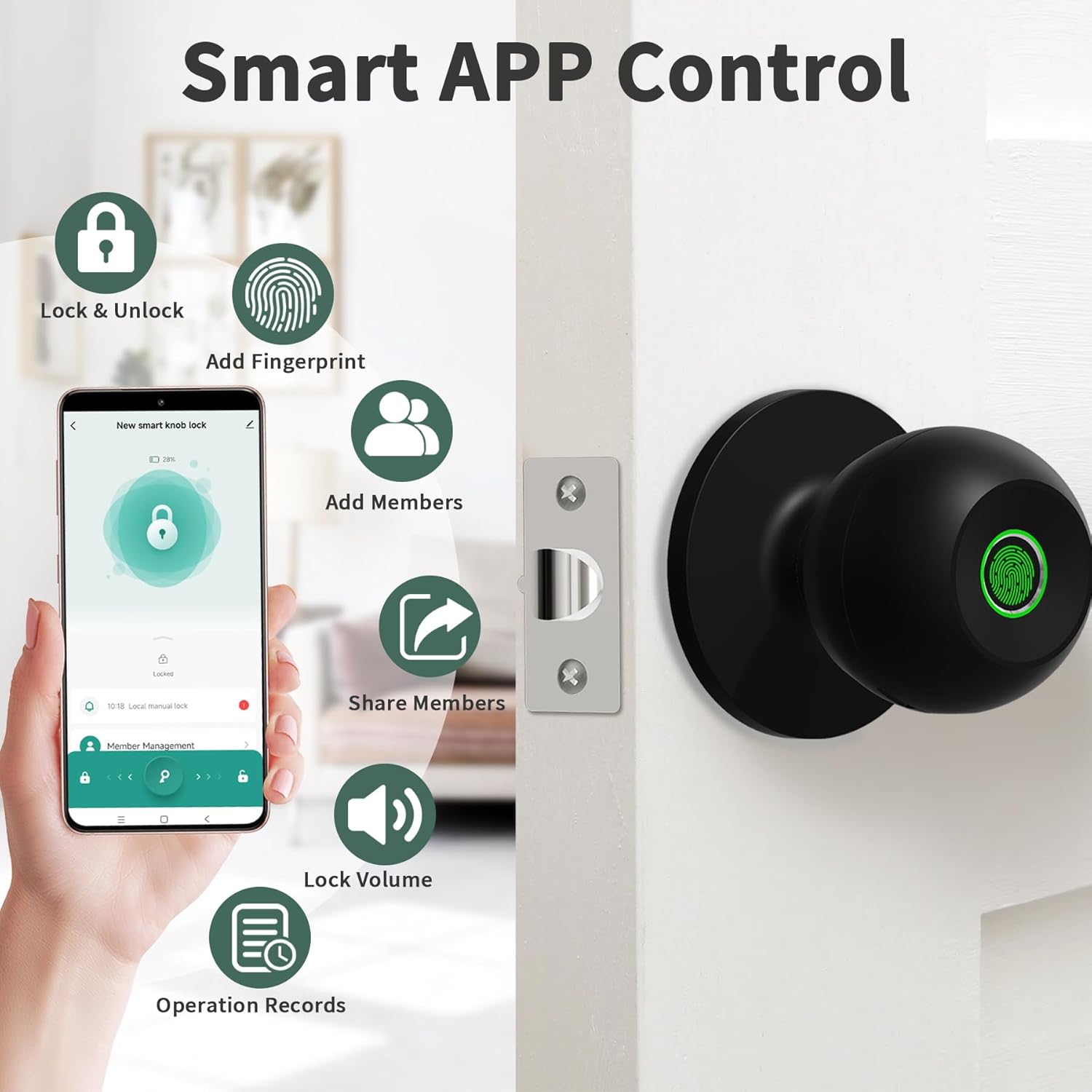
Image: A smartphone screen showing the TUYA SMART APP with icons for lock/unlock, adding fingerprints, adding members, sharing members, adjusting lock volume, and viewing operation records.
App Download and Pairing:
- Download App: Search for "TUYA SMART APP" in your smartphone's app store (iOS or Android) and install it.
- Create Account: Open the app and register for a new account or log in if you already have one.
- Add Device: Follow the in-app instructions to add a new device. Ensure your phone's Bluetooth is enabled and the lock is powered on. The app will guide you through the pairing process.
Adding Fingerprints:
The lock can store up to 20 unique fingerprints. For optimal recognition, ensure your finger is clean and dry.

Image: An illustration detailing the biometric fingerprint recognition technology, showing 360-degree recognition, 0.3-second recognition speed, and 99% recognition rate, with a capacity for 20 fingerprints.
- In the TUYA SMART APP, navigate to the lock's settings and select "Fingerprint Management" or "Add Fingerprint".
- Follow the on-screen prompts to place your finger on the lock's sensor multiple times from different angles until the fingerprint is successfully registered.
- Repeat for all desired users.
Adding Access Codes:
You can generate up to 20 access codes for family, guests, or service personnel. One-time codes are also supported.

Image: An illustration showing different types of users (family, agent, roommate, repairman, relatives) who can be assigned access codes, highlighting the capacity for up to 20 user codes and one-time codes.
- In the TUYA SMART APP, go to "Access Code Management" or "Add Code".
- Choose the type of code (permanent, timed, one-time) and generate or input the desired code.
- Share the code with the intended user.
Operating Instructions
The DSTMLOCKFTY Fingerprint Door Lock offers three primary unlocking methods and various operational modes.

Image: An illustration showing the three unlocking methods: Fingerprint Unlock, APP Unlock, and Key Unlock, emphasizing convenience and security.
Unlocking Methods:
- Fingerprint Unlock: Place your registered finger on the sensor. The lock will unlock in approximately 0.5 seconds.
- App Unlock: Use the TUYA SMART APP on your smartphone to remotely unlock the door via Bluetooth. (Requires optional gateway for Wi-Fi remote access).
- Key Unlock: In case of emergency or battery depletion, use the provided physical keys to unlock the door.
Lock Modes:
The lock supports different modes to suit various security needs:

Image: An overhead view of a house layout illustrating three lock modes (Passage Mode, Normal Mode, Privacy Mode) and the 5-second auto-lock feature, applicable to diverse scenarios.
- Normal Mode (Auto-Lock): After unlocking with a fingerprint, app, or key, the lock will automatically re-lock after 5 seconds. This is the default secure mode.
- Passage Mode: The door remains unlocked, allowing free entry and exit without requiring authentication. This mode is useful for high-traffic periods.
- Privacy Mode: When activated from the interior knob, only the administrator's fingerprint or app can unlock the door from the outside. This provides enhanced privacy and security.

Image: A series of images demonstrating how to activate Auto Lock, Passage Mode, and Security Mode using the interior knob's thumb turn.
Maintenance
Proper maintenance ensures the longevity and reliable operation of your DSTMLOCKFTY Fingerprint Door Lock.
- Cleaning: Wipe the lock's surface with a soft, dry cloth. Avoid abrasive cleaners or solvents that could damage the finish or electronic components.
- Fingerprint Sensor: Keep the fingerprint sensor clean and free of dirt or moisture for optimal performance.
- Battery Charging: The lock is rechargeable via a Type-C port. Charge the battery when the low battery indicator appears in the app or on the lock. A fully depleted battery can be temporarily charged via the Type-C port for emergency access.
- Mechanical Check: Periodically check that all screws are tight and the latch mechanism operates smoothly.
Troubleshooting
| Problem | Possible Cause | Solution |
|---|---|---|
| Fingerprint not recognized. | Finger is dirty, wet, or improperly placed. Fingerprint not registered. | Ensure finger is clean and dry. Place finger firmly and completely on the sensor. Re-register fingerprint if issues persist. |
| Lock does not respond. | Battery is low or depleted. | Charge the lock using the Type-C cable. Use emergency keys for immediate access. |
| App cannot connect to the lock. | Bluetooth is off. Lock is out of range. App is not updated. | Ensure Bluetooth is enabled on your phone. Move closer to the lock. Update the TUYA SMART APP to the latest version. |
| Auto-lock not functioning. | Lock is in Passage Mode. | Check the lock mode in the app or by rotating the interior thumb turn. Switch to Normal Mode for auto-locking. |
| Door cannot be locked from outside. | Privacy Mode is active. | Deactivate Privacy Mode from the interior knob or via the app. |
Specifications
- Brand: DSTMLOCKFTY
- Model: DSTMLOCKFTY-001
- Lock Type: Biometric Fingerprint Door Knob
- Unlocking Methods: Fingerprint, App (Bluetooth), Emergency Key
- Fingerprint Capacity: Up to 20
- Access Code Capacity: Up to 20
- Recognition Speed: Approximately 0.5 seconds
- Door Thickness Compatibility: 35-55mm
- Backset Compatibility: 60-70mm (Adjustable)
- Material: Metal
- Color: Black
- Connectivity: Bluetooth (Optional Wi-Fi with gateway)
- Power: Rechargeable (Type-C charging)
- Dimensions (L x W x H): 22.9 x 9.9 x 9.9 cm
- Item Weight: 707 g
Warranty and Support
For warranty information and technical support, please refer to the documentation provided with your purchase or contact DSTMLOCKFTY customer service. Keep your purchase receipt as proof of purchase for warranty claims.
Customer Service: Please visit the official DSTMLOCKFTY website or contact your retailer for support contact details.