
1. Introduction
The GuliTech FY6600 series is a Dual Channel DDS Arbitrary Signal Generator designed for various electronic testing and measurement applications. It features advanced digital signal processing technology to produce stable, precise, and low-distortion signals. This manual provides essential information for the proper setup, operation, and maintenance of your FY6600 device.
Key Features
- Utilizes a professional 14-bit high-speed D/A chip for enhanced signal accuracy.
- Upgraded sampling rate of 250MSa/s for clearer waveform contours.
- Waveform memory depth upgraded to 8192 * 14bits, allowing restoration of high-precision signal details.
- Integrated VCO (Voltage Controlled Oscillator) function.
- Phase resolution up to 0.1 degrees for precise control of signal delays.
- Pure copper material used for signal output terminals.
- Features imported long-life keys for comfortable operation.
- Simultaneous display of two-channel waveforms on the LCD interface.
- Four TTL outputs for expanded application possibilities.
- Small signal output capability: 1mVpp to 20Vpp amplitude range with 1mV resolution.
- Wide frequency range: Sine wave 1uHz~60MHz, Square wave 1uHz~25MHz, other waves 1uHz~20MHz, with 1uHz frequency resolution.
- Square wave rising edge time as low as 7nS (within 5V).
- Maximum measurement frequency of 100MHz, minimum 0.01Hz.
2. Product Overview
The FY6600 series signal generator is designed for ease of use and provides a comprehensive set of controls and connectors. Familiarize yourself with the device's layout before operation.
Front Panel

Figure 2.1: Front Panel Layout. Key components include the Power Button, Menu Button, Function Shortcut Buttons, Output Terminals (CH1, CH2), Direction Buttons, Input Terminal, and the main Knob for parameter adjustment.
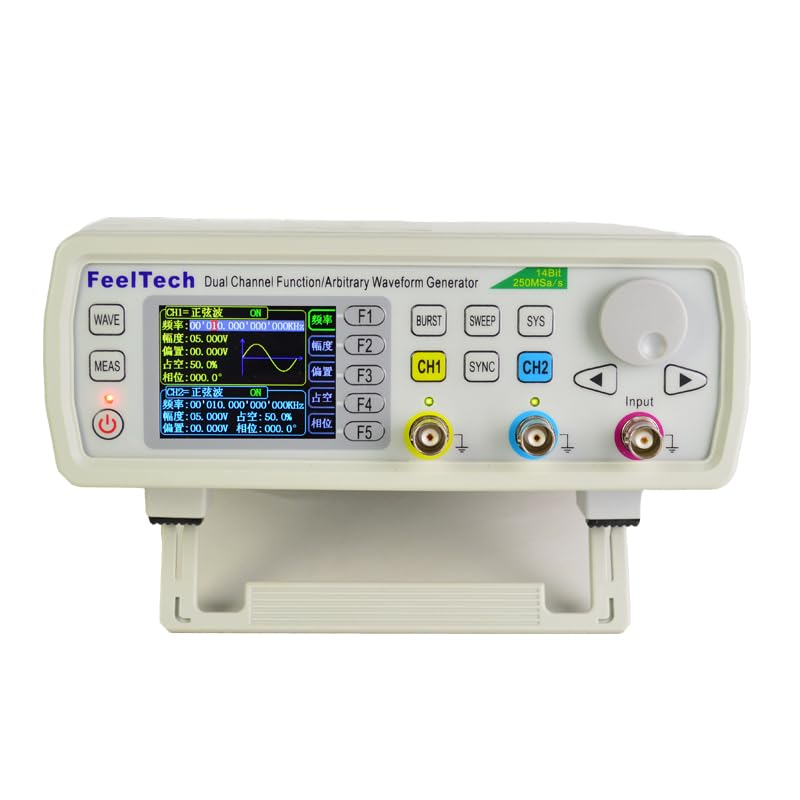
Figure 2.2: GuliTech FY6600 Signal Generator Front View. This image shows the device's display and primary controls in an operational state.
Rear Panel
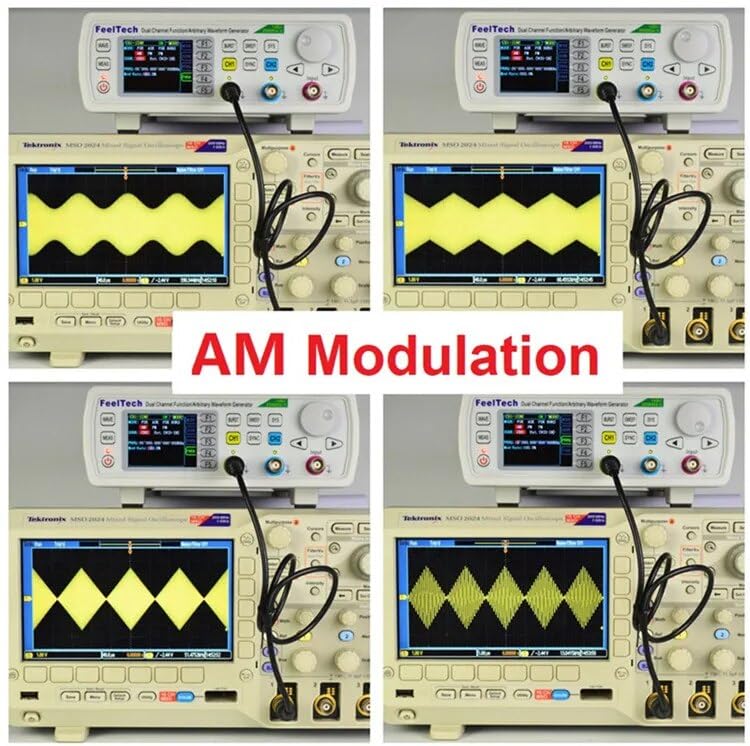
Figure 2.3: Rear Panel Layout. Features include the AC Power Input, Power Switch, USB Communication Interface, 4 Channel TTL Output, and a Special Function Port.
3. Setup
3.1 Unpacking and Inspection
- Carefully remove the signal generator and all accessories from the packaging.
- Inspect the device for any signs of physical damage that may have occurred during transit. If damage is found, contact your supplier immediately.
- Verify that all listed accessories are present.
3.2 Power Connection
- Ensure the power switch on the rear panel is in the OFF position.
- Connect the provided AC power cord to the AC Power Input on the rear panel (refer to Figure 2.3).
- Plug the other end of the power cord into a suitable AC power outlet.
3.3 Initial Power On
- Press the power switch on the rear panel to the ON position.
- The device will perform a self-test, and the LCD screen will illuminate, displaying the startup sequence.
- Once the startup is complete, the main interface will be displayed, ready for operation.
4. Operating Instructions
This section details the primary functions and operational procedures for the FY6600 signal generator.
4.1 Basic Operation
- Channel Selection: Use the CH1 and CH2 buttons to select the desired output channel for configuration.
- Parameter Adjustment: Use the main Knob to adjust selected parameter values. Press the knob to confirm or switch between parameter digits.
- Menu Navigation: Use the Menu Button to access different function menus. Direction Buttons (up/down/left/right) navigate within menus.
- Function Shortcuts: Dedicated buttons (WAVE, MEAS, BURST, SWEEP, SYS) provide quick access to frequently used functions.
4.2 Main Interface Functions
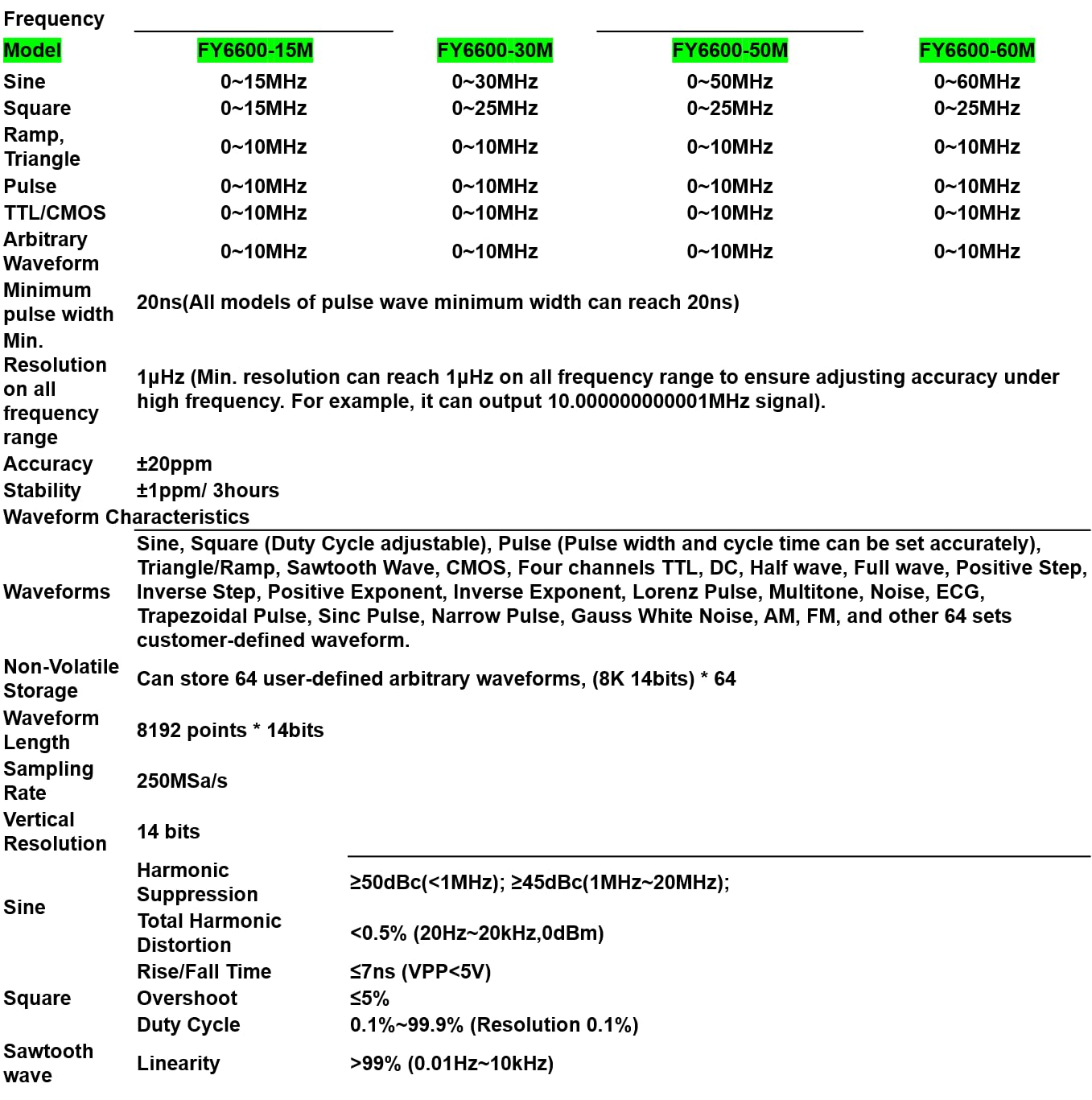
Figure 4.1: Various Display Interfaces.
- CH1 Main Interface: Displays current waveform type (e.g., SINE), frequency (FREQ), amplitude (AMPL), offset (OFFS), duty cycle (DUTY), and phase (PHAS) for Channel 1. Similar display for CH2.
- Synchronization: Allows synchronization of CH1 and CH2 outputs, enabling precise phase relationships between the two channels.
- Sweep Function: Configures frequency sweeps. Parameters include start frequency (START), end frequency (END), sweep time, and sweep mode (Linear/Logarithm). The 'Press Adj Knob' prompt indicates how to start/stop sweeping.
- VCO Function: Voltage Controlled Oscillator settings. Allows external voltage to control output frequency, amplitude, or duty cycle.
- Modulation Function: Accesses various modulation types such as PSK, ASK, PM, FM, and BURST. Source can be internal or external (e.g., CH2, VCO-IN).
- Burst Function: Configures burst mode operation, allowing a specific number of waveform cycles to be outputted.
- Counter: Measures the frequency and period of an external signal. Displays COUNT, CYCLE, +WIDE, -WIDE, and DUTY. Includes settings for GATE time and COUPLING mode (AC/DC).
- Frequency Meter: Measures frequency of external signals. Displays FREQ, +WIDE, -WIDE, DUTY, GATE, and COUPLING. Maximum measurement frequency up to 100MHz.
- System: Accesses system settings such as MODEL information, VERSION, LANGUAGE, BUZZER control, and UPLINK status.
4.3 Waveform Generation
The FY6600 can generate a variety of standard and arbitrary waveforms:
- Standard Waveforms: Sine, Square, Ramp, Triangle, Pulse, TTL/CMOS.
- Arbitrary Waveforms: Includes Sine, Square (Duty Cycle adjustable), Pulse (Pulse width and cycle time can be set accurately), Triangle/Ramp, Sawtooth Wave, CMOS, Four channels TTL, DC, Half wave, Full wave, Positive Step, Inverse Step, Positive Exponent, Inverse Exponent, Lorenz Pulse, Multitone, Noise, ECG, Trapezoidal Pulse, Sinc Pulse, Narrow Pulse, Gauss White Noise, AM, FM, and 64 sets of user-defined waveforms.

Figure 4.2: Examples of standard waveforms displayed on an oscilloscope.

Figure 4.3: Examples of complex and arbitrary waveforms displayed on an oscilloscope.
4.4 Modulation Functions
The FY6600 supports various modulation types to create complex signals.
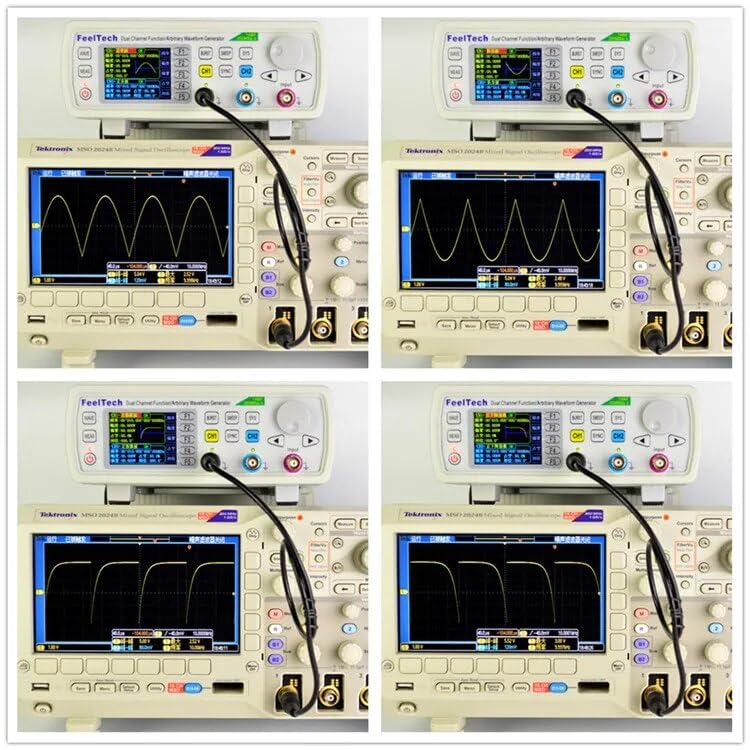
Figure 4.4: Example of Amplitude Modulation (AM) waveforms.
5. Maintenance
5.1 Cleaning
- Ensure the device is powered off and disconnected from the power source before cleaning.
- Use a soft, dry cloth to clean the exterior of the instrument.
- For stubborn dirt, a slightly damp cloth with a mild detergent can be used, followed by a dry cloth.
- Avoid using abrasive cleaners, solvents, or chemicals that could damage the casing or display.
5.2 Storage
- Store the device in a cool, dry environment, away from direct sunlight and extreme temperatures.
- Protect the device from dust and moisture when not in use.
- If storing for extended periods, consider using the original packaging for protection.
6. Troubleshooting
This section provides solutions to common issues you might encounter with your FY6600 signal generator.
- No Power:
- Check if the power cord is securely connected to both the device and the power outlet.
- Ensure the power switch on the rear panel is in the ON position.
- Verify the power outlet is functional by testing with another device.
- No Output Signal:
- Ensure the correct channel (CH1 or CH2) is selected and enabled.
- Check the amplitude setting; it might be set too low.
- Verify that output cables are correctly connected to the output terminals and the receiving device (e.g., oscilloscope).
- Confirm that the waveform type and frequency are correctly configured.
- Incorrect Waveform Display:
- Check the settings on the receiving device (e.g., oscilloscope time base, voltage scale).
- Ensure the output impedance of the signal generator matches the input impedance of the receiving device (typically 50Ω).
- Recalibrate the device if necessary (refer to system settings).
- Device Unresponsive:
- Try restarting the device by turning it off and then on again.
- If the issue persists, contact customer support.
7. Specifications
The following table provides detailed technical specifications for the GuliTech FY6600 series signal generators.
| Parameter | FY6600-15M | FY6600-30M | FY6600-50M | FY6600-60M |
|---|---|---|---|---|
| Frequency Range | ||||
| Sine | 0~15MHz | 0~30MHz | 0~50MHz | 0~60MHz |
| Square | 0~15MHz | 0~25MHz | 0~25MHz | 0~25MHz |
| Ramp | 0~10MHz | 0~10MHz | 0~10MHz | 0~10MHz |
| Triangle | 0~10MHz | 0~10MHz | 0~10MHz | 0~10MHz |
| Pulse | 0~10MHz | 0~10MHz | 0~10MHz | 0~10MHz |
| TTL/CMOS | 0~10MHz | 0~10MHz | 0~10MHz | 0~10MHz |
| Arbitrary Waveform | 0~10MHz | 0~10MHz | 0~10MHz | 0~10MHz |
| Minimum pulse width | 20ns (All models of pulse wave minimum width can reach 20ns) | |||
| Resolution on all frequency range | 1uHz (Min. resolution can reach 1uHz on all frequency range to ensure adjusting accuracy under high frequency. For example, it can output 10.0000000001MHz signal). | |||
| Accuracy | ±20ppm | |||
| Stability | ±1ppm/3hours | |||
| Waveform Characteristics | ||||
| Waveforms | Sine, Square (Duty Cycle adjustable), Pulse (Pulse width and cycle time can be set accurately), Triangle/Ramp, Sawtooth Wave, CMOS, Four channels TTL, DC, Half wave, Full wave, Positive Step, Inverse Step, Positive Exponent, Inverse Exponent, Lorenz Pulse, Multitone, Noise, ECG, Trapezoidal Pulse, Sinc Pulse, Narrow Pulse, Gauss White Noise, AM, FM, and other 64 sets customer-defined waveform. | |||
| Non-Volatile Storage | Can store 64 user-defined arbitrary waveforms, (8K 14bits) * 64 | |||
| Waveform Length | 8192 points * 14bits | |||
| Sampling Rate | 250MSa/s | |||
| Vertical Resolution | 14 bits | |||
| Harmonic Suppression | ≥50dBc (<1MHz); ≥45dBc (1MHz~20MHz); | |||
| Total Harmonic Distortion | <0.5% (20Hz~20kHz,0dBm) | |||
| Rise/Fall Time (Square) | ≤7nS (VPP<5V) | |||
| Overshoot (Square) | ≤5% | |||
| Duty Cycle (Square) | 0.1%~99.9% (Resolution 0.1%) | |||
| Linearity (Sawtooth wave) | >99% (0.01Hz~10kHz) | |||
General Specifications
- Product Dimensions: 22 x 15 x 12 cm
- Weight: 500 g
- Manufacturer: FeelTech(FeelElec)
- Country of Origin: China
8. Warranty and Support
For warranty information, please refer to the terms and conditions provided at the time of purchase or contact your vendor. For technical support, troubleshooting assistance, or service inquiries, please reach out to GuliTech customer service or your authorized distributor. Ensure you have your product model number (FY6600 60M) and purchase details available when seeking support.