
LSAPT A8
LSAPT Bluetooth Headset V5.0 User Manual
Model: A8
1. Introduction
This manual provides detailed instructions for the LSAPT Bluetooth Headset V5.0, Model A8. Please read this manual carefully before using the product to ensure proper operation and to maximize its lifespan. This ultralight business earphone is designed for clear communication and comfortable wear, featuring noise-canceling technology and broad compatibility.

Image: The LSAPT Bluetooth Headset V5.0 in grey, shown alongside its compact charging case.
2. Package Contents
Verify that all items are present in your product package:
- LSAPT Bluetooth Headset V5.0 (Model A8)
- Charging Cable
- User Manual
- Multiple Ear Tip Sizes (6 different bud sizes)
3. Product Overview
Familiarize yourself with the components and controls of your LSAPT Bluetooth Headset.
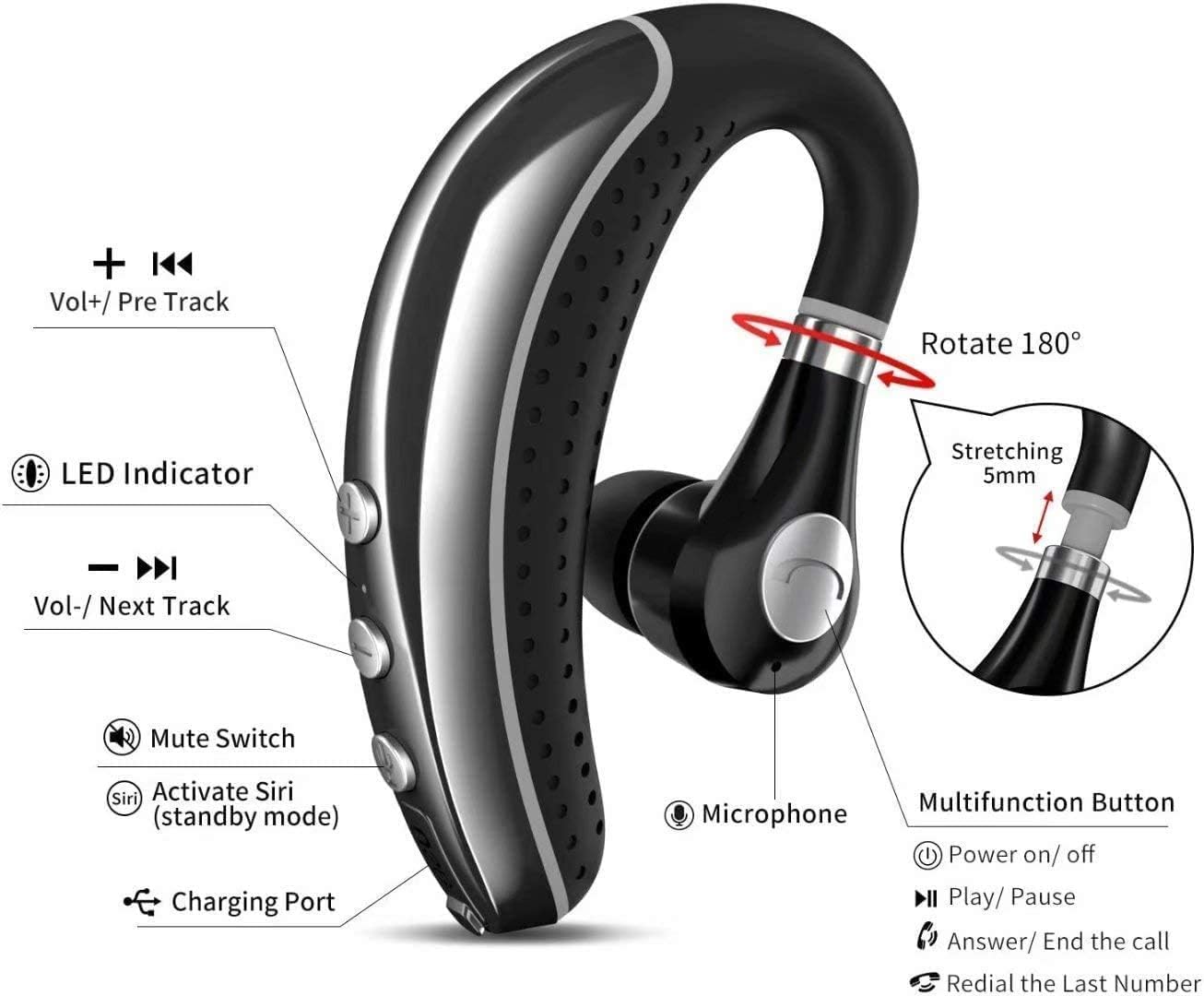
Image: A detailed diagram illustrating the headset's features, including the rotatable ear hook, LED indicator, volume controls, mute switch, multifunction button, microphone, and charging port.
- Multifunction Button: Power on/off, Play/Pause, Answer/End call, Redial last number.
- Volume Up (+)/Previous Track: Increase volume, navigate to previous track.
- Volume Down (-)/Next Track: Decrease volume, navigate to next track.
- Mute Switch: Mute/unmute microphone during calls.
- Activate Siri (Standby Mode): Access voice assistant.
- LED Indicator: Displays power and connection status.
- Charging Port: USB charging port.
- Microphone: Built-in HD omnidirectional microphone with CVC6.0 noise reduction.
- Rotatable Ear Hook: 180-degree rotation for left or right ear wear, with 5mm stretching for comfort.
4. Setup
4.1 Charging the Headset
Before first use, fully charge the headset. The headset takes approximately 1.5 hours to fully charge. The LED indicator will show charging status.
- Connect the charging cable to the headset's charging port and a USB power source.
- The LED indicator will typically show a solid color (e.g., red) during charging and turn off or change color (e.g., blue) when fully charged.
4.2 Bluetooth Pairing
Follow these steps to pair your headset with a Bluetooth-enabled device:
- Ensure the headset is turned off.
- Press and hold the Multifunction Button for approximately 5-7 seconds until the LED indicator flashes red and blue alternately, indicating pairing mode.
- On your device (smartphone, tablet, laptop), enable Bluetooth and search for available devices.
- Select "A8" from the list of found devices.
- Once connected, the LED indicator on the headset will typically flash blue slowly or turn off, and you will hear a voice prompt indicating successful connection.
Watch the official pairing guide video for a visual demonstration:
Video: A demonstration of how to pair the LSAPT Bluetooth Headset with a mobile phone. The video shows the headset being powered on and then appearing in the Bluetooth device list for connection.

Image: The headset is compatible with a wide range of Bluetooth devices including phones, tablets, notebooks, computers, and PSPs.
4.3 Multi-Point Connection (Connect 2 Devices Simultaneously)
The headset supports connecting to two Bluetooth devices at the same time:
- Pair the headset with the first device as described in Section 4.2.
- Once connected, disable Bluetooth on the first device.
- Put the headset back into pairing mode (red and blue flashing).
- Pair the headset with the second device.
- After successful pairing with the second device, re-enable Bluetooth on the first device. The headset should automatically connect to both devices.

Image: A visual representation of the headset's ability to maintain simultaneous connections with two separate mobile phones.
5. Operating Instructions
Learn how to use the various functions of your LSAPT Bluetooth Headset.

Image: An infographic detailing the various functions accessible via simple clicks on the headset, including call rejection, answer/end, volume control, play/pause, and track control.
5.1 Power On/Off
- Power On: Press and hold the Multifunction Button for approximately 3 seconds until you hear a voice prompt and the LED indicator flashes blue.
- Power Off: Press and hold the Multifunction Button for approximately 5 seconds until you hear a voice prompt and the LED indicator turns off.
5.2 Call Management
- Answer/End Call: Short press the Multifunction Button.
- Reject Call: Press and hold the Multifunction Button for 2 seconds.
- Redial Last Number: Double-press the Multifunction Button.
- Mute/Unmute: During a call, toggle the Mute Switch.
5.3 Music Playback
- Play/Pause: Short press the Multifunction Button.
- Next Track: Short press the Volume Down (-) button.
- Previous Track: Short press the Volume Up (+) button.
5.4 Volume Control
- Increase Volume: Press the Volume Up (+) button.
- Decrease Volume: Press the Volume Down (-) button.
5.5 Voice Assistant
- Activate Voice Assistant (Siri/Google Assistant): In standby mode, press the "Activate Siri" button.
6. Maintenance
Proper care will extend the life of your headset:
- Cleaning: Use a soft, dry cloth to clean the headset. Do not use harsh chemicals or abrasive materials.
- Storage: Store the headset in a cool, dry place, away from extreme temperatures and direct sunlight. Use the provided carrying case to protect it from damage and loss.
- Battery Care: To preserve battery life, charge the headset regularly, even if not in frequent use. Avoid fully discharging the battery for extended periods.
- Water Resistance: The headset is water-resistant, but not waterproof. Avoid submerging it in water or exposing it to heavy rain. Dry thoroughly if it gets wet.
7. Troubleshooting
If you encounter issues with your headset, refer to the following common problems and solutions:
| Problem | Possible Cause | Solution |
|---|---|---|
| Headset does not power on. | Low battery. | Charge the headset fully. |
| Cannot pair with device. | Headset not in pairing mode; Bluetooth off on device; device too far. | Ensure headset is in pairing mode (flashing red/blue). Turn on Bluetooth on your device. Move headset closer to device (within 10 meters). Clear previous pairings on your device and try again. |
| No sound or low volume. | Volume too low; headset not connected; incorrect audio output selected. | Increase headset and device volume. Ensure headset is connected. Check your device's audio output settings. |
| Poor call quality / crackling sound. | Interference; low battery; microphone obstructed. | Move away from sources of interference. Charge the headset. Ensure microphone is clear and positioned correctly. |
| Headset disconnects frequently. | Out of range; low battery; interference. | Stay within 10 meters of your device. Charge the headset. Reduce interference from other wireless devices. |
8. Specifications
| Feature | Detail |
|---|---|
| Model Name | A8 |
| Brand | LSAPT |
| Connectivity Technology | Bluetooth |
| Bluetooth Version | 5.0 |
| Bluetooth Range | Up to 10 meters (33 feet) |
| Noise Control | Active Noise Cancellation (CVC6.0) |
| Battery Life (Talk/Music) | 6-8 hours talk, 6-7 hours music |
| Standby Time | Up to 180 hours |
| Charging Time | Approx. 1.5 hours |
| Item Weight | 0.1 Kilograms (3.52 ounces) |
| Water Resistance Level | Water Resistant |
| Compatible Devices | Smartphones, Tablets, Laptops, Desktops, Smart Speakers, Car Audio Systems |
| Control Method | Touch / Physical Buttons |
| Earpiece Shape | Rounded Tips |
| Material | Plastic |
9. Warranty and Support
For warranty information and customer support, please refer to the contact details provided on the product packaging or the official LSAPT website. Keep your purchase receipt for warranty claims.
Ask a question about this manual
Ask about setup, troubleshooting, compatibility, parts, safety, or missing instructions. Manuals+ will review the question and use this page’s manual context to help answer it.