1. Introduction
Thank you for choosing the ALANAS AL004 Digital Alarm Clock. This manual provides detailed instructions for setting up, operating, and maintaining your new alarm clock. Please read this manual thoroughly before use to ensure proper functionality and to maximize your product experience.

Figure 1: Front view of the ALANAS AL004 Digital Alarm Clock. The large LED display shows the time as 10:26, the day as Wednesday (WED), and indicates PM. Two alarm icons are visible, suggesting dual alarm functionality. The clock has a sleek, mirror-like finish.
2. Product Overview
2.1 Key Features
- Modern Mirror Design: Reflective surface with large, easy-to-read LED digits.
- Dual Alarms: Set two independent alarms with five flexible repeat modes (Mon-Sun, Mon-Fri, Mon-Sat, Sat-Sun, One-Time).
- Adjustable Brightness: 4 levels of display brightness for comfortable viewing day and night.
- Customizable Snooze: Snooze duration configurable from 5 to 60 minutes.
- Dual USB Charging Ports: Conveniently charge two external devices (e.g., smartphones, earbuds).
- Battery Backup: Built-in CR2032 coin battery retains time and alarm settings during power outages.
- Weekday Display: Shows the current day of the week.
- 12/24 Hour Format: Easily switch between time display formats.
2.2 Components and Controls

Figure 2: Detailed diagram of the ALANAS AL004 clock's controls. The 'Top Button View' labels buttons for Time Settings, Alarm Settings 1, Alarm Settings 2, Snooze, Brightness Settings, Down key, and Up key. The 'Back View' labels USB 1, USB 2, Ventilation holes, DC 5V input, Wall-mount hole, CR2032 battery compartment, and Base.
Refer to Figure 2 for the location of the following controls:
- Time Settings Button: Used to enter time setting mode.
- Alarm Settings 1 Button: Used to set Alarm 1.
- Alarm Settings 2 Button: Used to set Alarm 2.
- Snooze Button: Activates snooze during an alarm, or adjusts snooze duration.
- Brightness Settings Button: Adjusts display brightness.
- Up Key (+): Increases values or navigates menus.
- Down Key (-): Decreases values or navigates menus.
- USB 1 & USB 2 Ports: For charging external devices.
- DC 5V Input: Power input for the clock.
- CR2032 Battery Compartment: Houses the backup battery.
3. Setup
3.1 Power Connection
- Connect the provided USB cable to the DC 5V input port on the back of the clock.
- Plug the other end of the USB cable into a 5V 1A DC power adapter (not included for environmental protection reasons) and then into a wall outlet.
- The clock display will illuminate.
3.2 Battery Backup Installation
The clock includes a CR2032 coin battery for memory backup. This battery ensures that time and alarm settings are retained during a power outage, but it does not power the display.
- Locate the CR2032 battery compartment on the back of the clock (refer to Figure 2).
- Open the compartment cover.
- Insert a CR2032 coin battery, ensuring the correct polarity (+ side up).
- Close the compartment cover securely.

Figure 3: Illustration of the memory backup function. The clock retains settings during a power outage thanks to the built-in coin battery.
4. Operating Instructions
4.1 Setting the Time
- Press and hold the Time Settings button (⏱) on the top of the clock until the hour digits begin to flash.
- Use the Up Key (+) or Down Key (-) to adjust the hour.
- Press the Time Settings button again to confirm the hour and move to minute adjustment.
- Use the Up Key (+) or Down Key (-) to adjust the minutes.
- Press the Time Settings button again to confirm the minutes and move to 12/24 hour format selection.
- Use the Up Key (+) or Down Key (-) to select between 12-hour (with AM/PM indicator) or 24-hour format.
- Press the Time Settings button one last time to save all settings and exit time setting mode.
4.2 Setting Alarms (Alarm 1 & Alarm 2)
The ALANAS AL004 features two independent alarms. The setting process is identical for both.

Figure 4: Dual alarm functionality with five flexible repeat modes: Monday-Friday (Weekdays), Monday-Sunday (Daily), Monday-Saturday (Weekdays & Sat), Saturday-Sunday (Weekends), and One-Time (Single day).
- Press and hold the Alarm Settings 1 (⏰1) or Alarm Settings 2 (⏰2) button until the hour digits for that alarm begin to flash.
- Use the Up Key (+) or Down Key (-) to adjust the alarm hour.
- Press the respective Alarm Settings button again to confirm the hour and move to minute adjustment.
- Use the Up Key (+) or Down Key (-) to adjust the alarm minutes.
- Press the respective Alarm Settings button again to confirm the minutes and move to alarm repeat mode selection.
- Use the Up Key (+) or Down Key (-) to select one of the five repeat modes (refer to Figure 4):
- 1-5: Monday - Friday
- 1-7: Monday - Sunday (Daily)
- 1-6: Monday - Saturday
- 6-7: Saturday - Sunday (Weekends)
- 1-1: One-Time (Single day)
- Press the respective Alarm Settings button one last time to save all settings and exit alarm setting mode.
4.3 Activating/Deactivating Alarms
To toggle an alarm on or off, simply press the Alarm Settings 1 (⏰1) or Alarm Settings 2 (⏰2) button briefly (do not hold). The corresponding alarm icon on the display will appear or disappear.
4.4 Adjusting Display Brightness
The clock offers 4 levels of brightness adjustment.

Figure 5: The 4-level dimmer allows adjustment from 100% to 0% brightness for optimal comfort.
- Press the Brightness Settings button (☀) on the top of the clock repeatedly to cycle through the 4 brightness levels (100%, 75%, 50%, 0% / Off).
- Select the desired brightness level.
4.5 Automatic Dimming
For deeper sleep, the clock can automatically adjust its brightness.

Figure 6: The automatic dimming feature adjusts display brightness from 6 PM to 6 AM.
The display brightness will automatically dim between 6:00 PM and 6:00 AM to provide a more comfortable sleeping environment. This feature works in conjunction with your manually selected brightness level.
4.6 Snooze Function
When an alarm sounds, press the large Snooze button on top of the clock to temporarily silence the alarm.

Figure 7: Customizable snooze duration from 5 to 60 minutes.
To customize the snooze duration (default is typically 9 minutes):
- While the alarm is sounding, press and hold the Snooze button. The snooze time will flash.
- Use the Up Key (+) or Down Key (-) to adjust the snooze duration from 5 to 60 minutes.
- Press the Snooze button briefly to confirm the setting.
4.7 USB Charging Ports
The ALANAS AL004 is equipped with two USB output ports (USB 1 and USB 2) on the back, allowing you to charge your electronic devices.
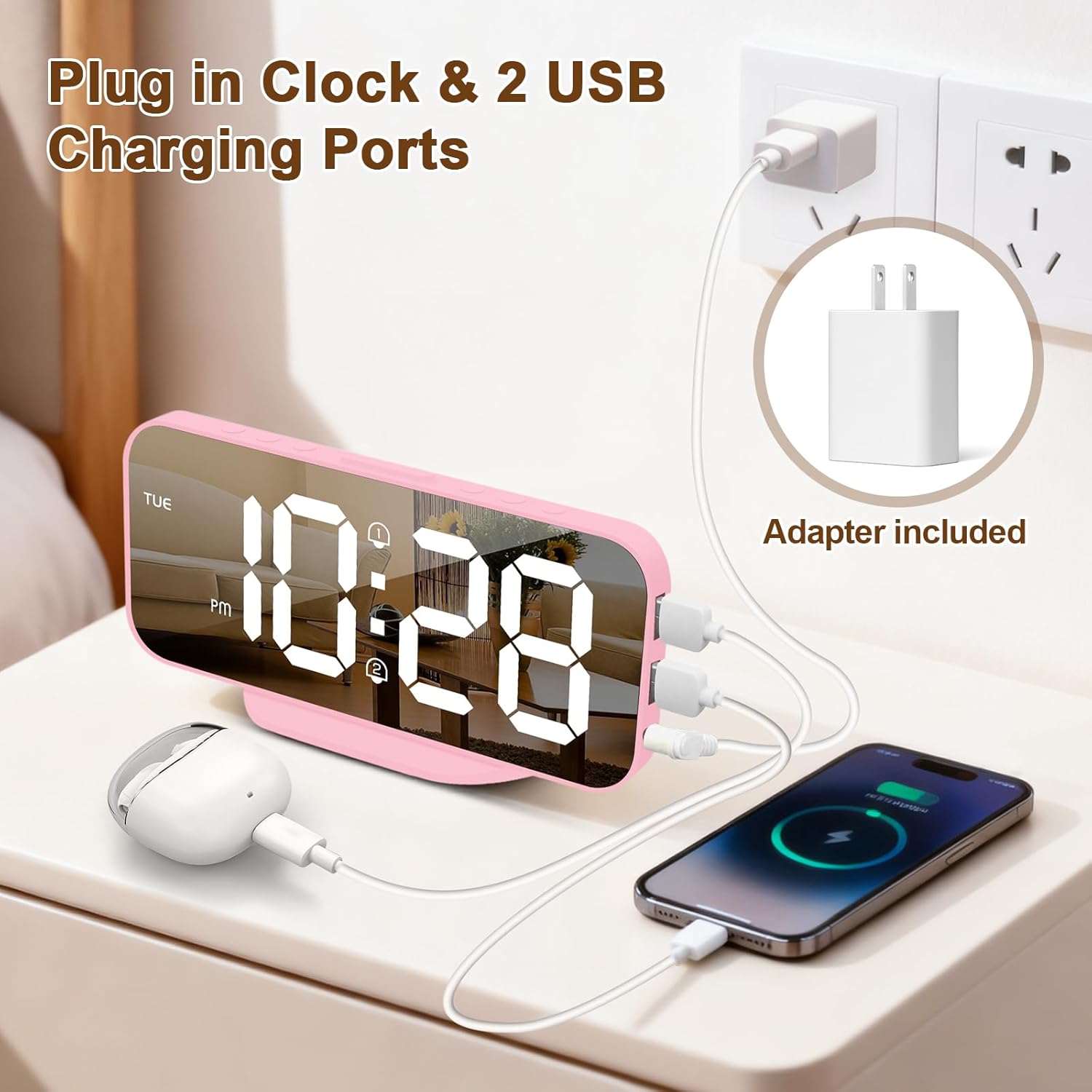
Figure 8: The clock's dual USB charging ports can charge devices like smartphones and earbuds.
Simply connect your device's charging cable to one of the USB ports on the clock. Ensure the clock is powered on for the charging function to work.
5. Maintenance
- Cleaning: Wipe the clock's surface with a soft, dry cloth. Avoid using abrasive cleaners or solvents.
- Battery Replacement: If the backup battery (CR2032) is depleted, replace it with a new one to ensure settings are retained during power interruptions.
- Placement: Place the clock on a stable, flat surface. Avoid direct sunlight, extreme temperatures, or high humidity.
6. Troubleshooting
- Display is blank: Ensure the clock is properly connected to a power source using the USB cable and a 5V 1A adapter. Check the power outlet.
- Time/Alarm settings are lost after power outage: Verify that a functional CR2032 coin battery is correctly installed in the backup battery compartment.
- Alarm does not sound: Ensure the alarm is activated (alarm icon visible on display). Check that the alarm volume is not set to zero (if applicable, though this model typically has a fixed alarm sound).
- USB charging not working: Ensure the clock is powered on. Check the USB cable and the device being charged. Ensure the correct end of the charging cable is inserted into the clock's USB port; incorrect insertion can cause the clock to reset.
- Display is too bright/dim: Use the Brightness Settings button to adjust the display to your preferred level. Note the automatic dimming feature between 6 PM and 6 AM.
7. Specifications
| Feature | Specification |
|---|---|
| Brand | ALANAS |
| Model Number | AL004 |
| Dimensions (L x W x H) | 7.42 x 3.81 x 16.51 cm |
| Weight | 159 g |
| Material | Plastic and Electronic |
| Display Type | Digital LED |
| Special Features | Dual Alarm, Large Display, Adjustable Brightness, USB Charging Ports, Snooze, Weekday Display |
| Power Source | DC 5V 1A (via USB cable, adapter not included) |
| Backup Battery | CR2032 Coin Battery (included) |
| USB Output | 2 USB ports for device charging |
8. Warranty and Support
For warranty information or technical support, please refer to the documentation provided with your purchase or contact your retailer. Keep your purchase receipt as proof of purchase.
