
1. Important Safety Information
Please read this manual thoroughly before operating the VESOGY 9158F Infrared Thermometer Gun. Keep this manual for future reference.
- WARNING: NOT FOR HUMAN USE. This device is designed for industrial and household surface temperature measurement only. It is not intended for medical use or measuring human body temperature. Readings for humans or animals will be inaccurate.
- Laser Safety: Do not look directly into the laser beam or point it at people or animals. Avoid direct eye exposure.
- Do not use the device in environments with explosive gas, steam, or dust.
- Keep the device away from electromagnetic fields generated by arc welders or induction heaters.
- Do not expose the device to extreme temperatures, humidity, or direct sunlight.
- If the device is damaged, do not operate it. Contact support for assistance.
2. Product Overview
The VESOGY 9158F is a non-contact infrared thermometer gun designed for accurate surface temperature measurements. It features a wide temperature range, adjustable emissivity, and a clear backlit display.
Key Features:
- High Accuracy: Measures within ±2% or ±2°C with a 12:1 distance-to-spot ratio.
- Fast Measurement: Provides readings in approximately 1 second.
- Wide Temperature Range: -58°F to 932°F (-50°C to 500°C).
- Multiple Modes: Includes Max, Min, and Average temperature display.
- Adjustable Emissivity: For improved accuracy on various surfaces.
- Backlit VA Color Display: Ensures readability in low-light conditions.
- Auto Shut-off: Extends battery life.
- Low Battery Indicator.
Device Components and Functions:
Familiarize yourself with the main components and their functions as illustrated below.
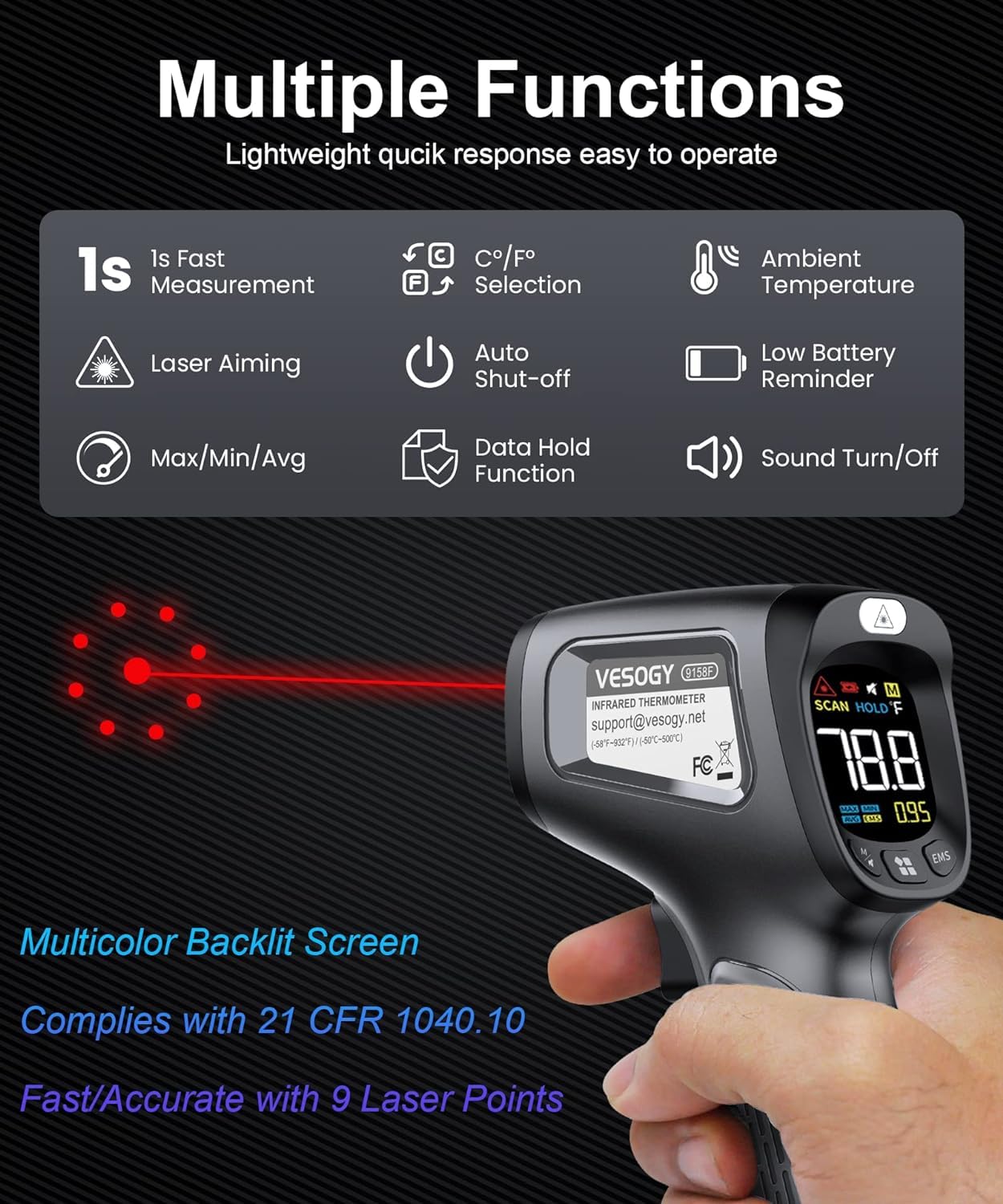
Figure 2.1: Overview of VESOGY 9158F functions and features.
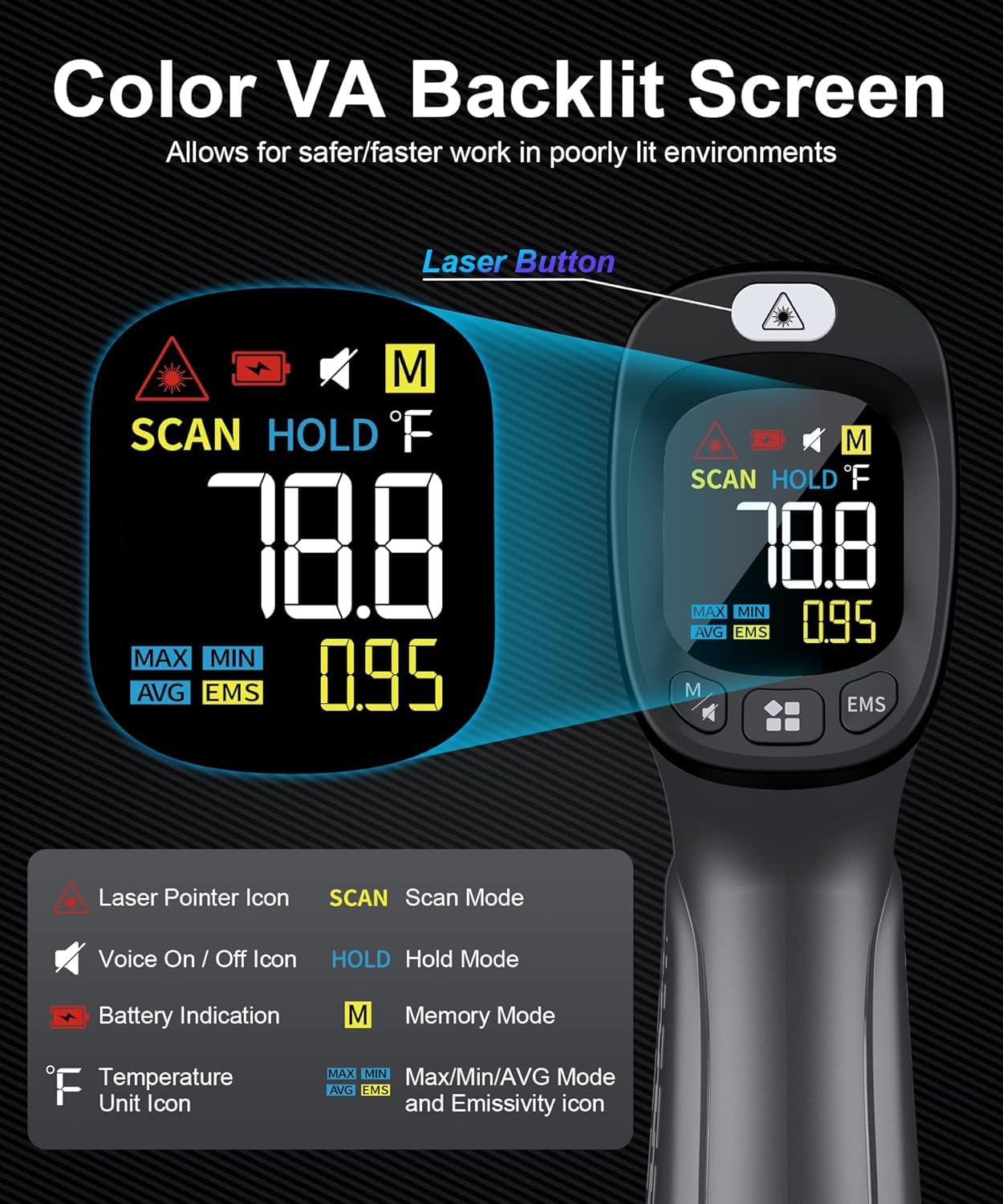
Figure 2.2: Detailed view of the VA Backlit Display and its indicators.
- Laser Pointer Icon: Indicates the laser is active for aiming.
- SCAN Mode: Appears when the trigger is pressed and the device is actively measuring.
- HOLD Mode: Appears when the trigger is released, indicating the last measurement is held on the display.
- M (Memory) Mode: Accesses stored data.
- MAX/MIN/AVG: Displays maximum, minimum, or average temperature of a scan session.
- EMS: Indicates emissivity setting.
- °F/°C Unit Icon: Shows the selected temperature unit.
- Battery Indication: Displays current battery level.
3. Setup
3.1 Battery Installation
The VESOGY 9158F requires two (2) AAA batteries (included). Follow these steps to install them:
- Locate the battery compartment on the handle of the thermometer.
- Open the battery compartment cover.
- Insert two AAA batteries, ensuring correct polarity (+ and -).
- Close the battery compartment cover securely.
3.2 Initial Power-On
After installing the batteries, the device is ready for use. Press the measurement trigger to power on the device. The display will illuminate.
4. Operating Instructions
4.1 Taking a Measurement
To measure the surface temperature of an object:
- Point the thermometer at the target object.
- Press and hold the measurement trigger. The laser pointer will activate (if enabled) to help aim, and the display will show 'SCAN'.
- The real-time temperature will be displayed.
- Release the trigger to hold the last measured temperature on the display. 'HOLD' will appear.
4.2 Switching Temperature Units (°C/°F)
To switch between Celsius (°C) and Fahrenheit (°F), press the °C/°F button located on the device.
4.3 Max/Min/Average Modes
The device can display the maximum, minimum, or average temperature recorded during a continuous scan. Press the 'MODE' button to cycle through these options:
- MAX: Displays the highest temperature measured during the scan.
- MIN: Displays the lowest temperature measured during the scan.
- AVG: Displays the average temperature measured during the scan.

Figure 4.1: Displaying MAX, MIN, and AVG temperatures during measurement.
4.4 Data Hold Function
When the measurement trigger is released, the last measured temperature is automatically held on the display, indicated by 'HOLD'. This allows you to record the reading.
4.5 Auto Shut-off
To conserve battery life, the thermometer will automatically shut off after approximately 20 seconds of inactivity.
5. Emissivity Adjustment
Emissivity is a measure of an object's ability to emit infrared energy. Different materials have different emissivity values. For accurate measurements, it is important to adjust the thermometer's emissivity setting to match the target material.
5.1 Distance to Spot (D:S) Ratio
The VESOGY 9158F has a Distance to Spot (D:S) ratio of 12:1. This means that at a distance of 12 inches, the measurement spot diameter is 1 inch. To ensure accuracy, the target area should be larger than the spot size.

Figure 5.1: Distance to Spot ratio and Emissivity Table.
5.2 Adjusting Emissivity
To adjust the emissivity:
- Press the 'EMS' button to enter emissivity adjustment mode.
- Use the up/down arrow buttons (if available, or refer to device specific buttons) to increase or decrease the emissivity value.
- Refer to the Emissivity Table (Figure 5.1) for common materials.
- Press the 'EMS' button again or wait for a few seconds to exit adjustment mode.
Note: Most organic materials, painted or oxidized surfaces have an emissivity of 0.95. For highly reflective surfaces, consider applying a matte black paint or tape to the measurement area to improve accuracy.
6. Maintenance
6.1 Cleaning the Device
To ensure accurate readings and prolong the life of your thermometer:
- Clean the lens with a soft, damp cloth or cotton swab. Do not use abrasive cleaners.
- Wipe the device casing with a damp cloth. Do not immerse the device in water.
- Ensure the device is dry before storage or next use.
6.2 Battery Replacement
When the low battery indicator appears on the display, replace the batteries promptly with two new AAA batteries. Refer to Section 3.1 for battery installation instructions.
6.3 Storage
Store the thermometer in a cool, dry place, away from direct sunlight and extreme temperatures. Remove batteries if storing for extended periods to prevent leakage.
7. Troubleshooting
| Problem | Possible Cause | Solution |
|---|---|---|
| No display/Device won't turn on | Dead or incorrectly installed batteries | Check battery polarity or replace batteries. |
| Inaccurate readings | Incorrect emissivity setting; Target too small; Distance too far; Lens dirty | Adjust emissivity; Ensure target is larger than spot size; Move closer to target; Clean the lens. |
| Laser not working | Laser function disabled; Device malfunction | Check if laser is enabled (refer to device buttons); If not, contact support. |
| Display shows 'HI' or 'LO' | Temperature is outside the measurement range | Ensure the target temperature is within -58°F to 932°F (-50°C to 500°C). |

Figure 7.1: Appropriate uses and critical warning against human temperature measurement.
8. Specifications
| Feature | Specification |
|---|---|
| Model Number | 9158F |
| Temperature Range | -58°F to 932°F (-50°C to 500°C) |
| Accuracy | ±2% or ±2°C |
| Distance to Spot Ratio (D:S) | 12:1 |
| Response Time | 1000 Milliseconds (1 second) |
| Emissivity | Adjustable |
| Display Type | Digital, VA Color Backlit |
| Power Source | 2 x AAA Batteries |
| Auto Off | Yes (approx. 20 seconds) |
| Special Features | High Accuracy, Large Display, Low Battery Indicator, Non-Contact |
| Material | Plastic |
| Connectivity Technology | Infrared |
| Indoor/Outdoor Usage | Indoor |
| UPC/GTIN | 701151741698 |
9. Warranty and Support
This product is covered by a standard manufacturer's warranty. For specific warranty details, please refer to the documentation provided with your purchase or contact the seller directly.
Customer Support:
If you encounter any issues or have questions regarding your VESOGY 9158F Infrared Thermometer Gun, please contact your retailer or the manufacturer's customer support for assistance.