
ROPVACNIC A1
ROPVACNIC Robot Vacuum Cleaner User Manual
Model: A1
Introduction
This user manual provides essential information for the safe and efficient operation of your ROPVACNIC Robot Vacuum Cleaner. Please read this manual thoroughly before using the product and retain it for future reference.
The ROPVACNIC Robot Vacuum Cleaner is designed to simplify your home cleaning with its advanced features, including 3000Pa Cyclone Suction, smart APP and voice control capabilities, and automatic self-charging. It is ideal for various floor types, including hard floors and low-pile carpets, and is particularly effective at managing pet hair.

Image: The ROPVACNIC Robot Vacuum Cleaner, a sleek black circular device, shown alongside a smartphone displaying its control application.
Important Safety Instructions
To reduce the risk of injury or damage, read these safety instructions carefully and keep them at hand when setting up, using, and maintaining the device.
- Always ensure the power adapter is connected to a power source with the correct voltage.
- Do not operate the robot vacuum in wet environments or near water.
- Keep loose clothing, hair, and body parts away from openings and moving parts.
- Do not allow children to operate the robot vacuum. Supervise children and pets when the device is in operation.
- Remove any loose cables, small objects, or fragile items from the floor before operation to prevent entanglement or damage.
- Do not use the robot vacuum to pick up large debris, liquids, burning or smoking materials.
- Only use manufacturer-specified attachments and accessories.
- If the power cord is damaged, it must be replaced by the manufacturer or a qualified service agent to avoid hazards.
Package Contents
Verify that all components are present and in good condition upon opening the package:
- ROPVACNIC Robot A1 (1 unit)
- Spare HEPA Filter (1 unit)
- Charging Base (1 unit)
- Remote Control (1 unit)
- Power Adapter (1 unit)
- Self Cleaning Tool (1 unit)
- 600ML Large Dust Box (1 unit, pre-installed or separate)
- Spare Side Brushes (4 units)
- Product User Manual (this document)
- APP Instruction Guide (1 unit)
Product Overview
Familiarize yourself with the main components and features of your robot vacuum cleaner.
Key Features:
- 3000Pa Cyclone Suction: Powerful suction for effective cleaning of dust, pet hair, crumbs, and debris.
- Smart APP and Voice Control: Control the robot via a smartphone app or voice commands (compatible with Alexa or Google Assistant).
- Low Profile Design: At 2.99 inches in height, it easily cleans under furniture.
- No-Entanglement Design: Specifically engineered to prevent pet hair from tangling.
- Automatic Self-Charging: Returns to the charging base automatically when cleaning is complete or battery is low.
- Multiple Cleaning Modes: Auto, Spot, Edge, Schedule, Manual Control, and Zigzag cleaning.

Image: A smartphone screen displaying the ROPVACNIC Smart Life app interface, highlighting features like 5 Clean Modes, Set Cleaning Schedules, Real-time Status, and Share with Your Family. The image also shows the robot vacuum in Edge Mode and Auto Mode.

Image: The robot vacuum cleaner positioned under a cabinet, illustrating its ability to clean hard-to-reach areas due to its slim 2.99-inch height. Icons represent 15° Carpet Climbing, 3-Point Cleaning System, and Intelligent Sensor Technology.
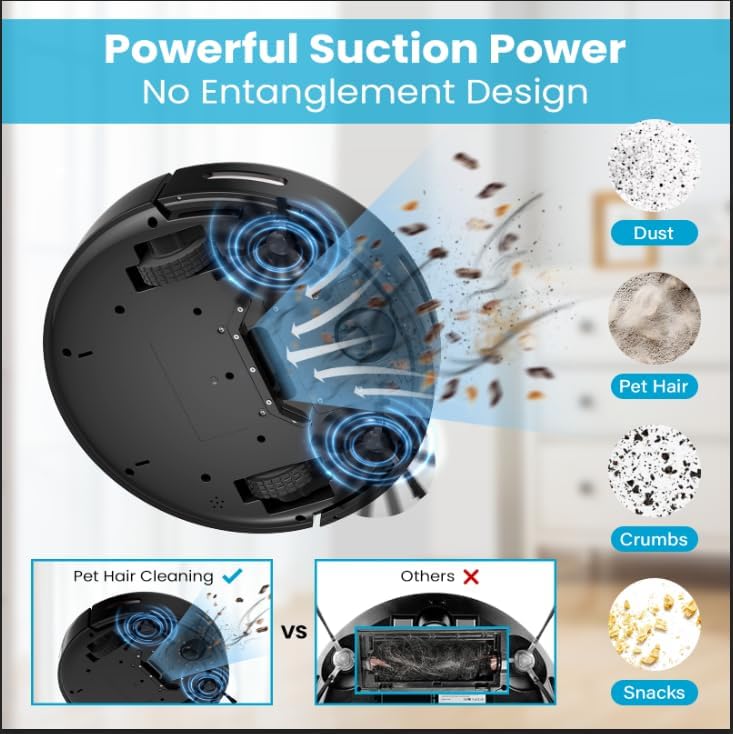
Image: A diagram illustrating the powerful suction of the robot vacuum, showing it collecting dust, pet hair, crumbs, and snacks. A comparison highlights the no-entanglement design for pet hair cleaning versus traditional roller brushes that can get tangled.
Setup Guide
1. Charging Base Placement
Place the charging base against a wall in an open, uncluttered area. Ensure there is at least 1.5 feet (0.5 meters) of clear space on either side of the base and 5 feet (1.5 meters) in front of it. Connect the power adapter to the charging base and plug it into a wall outlet.
2. Initial Charge
Place the robot vacuum onto the charging base, ensuring the charging contacts align. The indicator lights on the robot will illuminate to show it is charging. For first-time use, fully charge the robot vacuum for at least 6 hours.
3. App Connection (Optional but Recommended)
- Download the "ROPVACNIC Smart" app from your smartphone's app store.
- Register an account and log in.
- Follow the in-app instructions to add your device. Ensure your Wi-Fi network is 2.4GHz.
- Once connected, you can control the robot, set schedules, and monitor its status from your phone.
Operation
Starting a Cleaning Cycle
- Manual Start: Press the power button on the robot or the "Clean" button on the remote control.
- App Control: Use the ROPVACNIC Smart app to start, stop, or pause cleaning from anywhere.
- Voice Control: Connect to Alexa or Google Assistant and use voice commands like "Alexa, turn on vacuum cleaner."

Image: A person relaxing on a couch, using voice commands to control the ROPVACNIC Robot Vacuum Cleaner, demonstrating compatibility with Amazon Alexa and Google Assistant.
Cleaning Modes
Your robot vacuum offers six distinct cleaning modes to suit various needs:
- Auto Cleaning: The robot intelligently navigates and cleans the entire floor area.
- Spot Cleaning: Focuses on a specific dirty area, cleaning in a spiral pattern.
- Edge Cleaning: Cleans along walls and furniture edges.
- Schedule Cleaning: Set specific times for the robot to automatically start cleaning.
- Manual Control: Use the remote control or app to manually steer the robot.
- Zigzag Cleaning: Cleans in a systematic zigzag pattern (can be set on the robot itself, refer to APP Instruction Guide for details).
Automatic Recharging
When the battery is low or a cleaning cycle is complete, the robot will automatically return to its charging base. Ensure the charging base is accessible and free from obstructions.
Maintenance and Care
Regular maintenance ensures optimal performance and extends the lifespan of your robot vacuum.
Emptying the Dust Box
- Press the dust box release button and pull out the 600ML dust box.
- Open the dust box cover and empty its contents into a trash bin.
- Clean the filter inside the dust box using the provided cleaning tool or by gently tapping it. Do not wash the HEPA filter with water.
- Reinsert the dust box until it clicks into place.
Cleaning Side Brushes
- Periodically check the side brushes for tangled hair or debris.
- Carefully remove any obstructions. If brushes are worn or damaged, replace them with the spare brushes provided.
Cleaning Sensors and Charging Contacts
- Wipe the anti-drop sensors, anti-collision sensors, and charging contacts on both the robot and the charging base with a clean, dry cloth.
Troubleshooting
If you encounter issues with your robot vacuum, refer to the following common problems and solutions:
| Problem | Possible Cause | Solution |
|---|---|---|
| Robot does not turn on. | Battery is low or depleted. | Place the robot on the charging base and ensure it is fully charged. |
| Robot does not charge. | Charging contacts are dirty or misaligned. | Clean the charging contacts on both the robot and the base. Ensure proper alignment. |
| Robot gets stuck frequently. | Obstacles on the floor or low clearance furniture. | Clear loose cables and small objects. Use virtual walls or block off problematic areas. |
| Poor cleaning performance. | Dust box is full, filters are clogged, or brushes are dirty/damaged. | Empty the dust box, clean/replace filters, and clean/replace side brushes. |
| Cannot connect to Wi-Fi/App. | Incorrect Wi-Fi band (only 2.4GHz supported) or network issues. | Ensure your Wi-Fi is 2.4GHz. Restart your router and the robot. Try reconnecting through the app. |
Specifications
| Feature | Detail |
|---|---|
| Brand | ROPVACNIC |
| Model Name | A1 |
| Suction Power | 3000Pa Cyclone Suction |
| Color | Black |
| Product Dimensions (L x W x H) | 13" x 13" x 2.99" |
| Dust Box Capacity | 600ML |
| Control Methods | APP, Voice (Alexa/Google Assistant), Remote Control |
| Special Features | Intelligent Sensing System, Automatic Recharging, Anti-collision & Anti-fall, Tang-free for Pet Hair, Large-Capacity Batteries, Double Electric Rotating Brush, Compact and Sturdy Design, Scheduled Cleaning, Optimized Filtration System, Ultra-Quiet Cleaning, Suitable for Hardwood Floor & Low Pile Carpet |
Warranty and Support
For warranty information and technical support, please refer to the contact details provided on the product packaging or the official ROPVACNIC website. Keep your purchase receipt as proof of purchase for any warranty claims.
If you encounter any issues not covered in this manual, please contact ROPVACNIC customer service for assistance.
Related documentsA1


Ask a question about this manual
Ask about setup, troubleshooting, compatibility, parts, safety, or missing instructions. Manuals+ will review the question and use this page’s manual context to help answer it.