
JBL Boombox 3 Wi-Fi
JBL Boombox 3 Wi-Fi Portable Speaker User Manual
Model: Boombox 3 Wi-Fi
Introduction
This user manual provides essential information for the safe and effective operation of your JBL Boombox 3 Wi-Fi Portable Speaker. Please read this manual thoroughly before using the product to ensure optimal performance and longevity. The JBL Boombox 3 Wi-Fi delivers massive JBL Original Pro Sound with deep, powerful bass, designed to provide an immersive audio experience.
Product Overview
Key Features
- JBL Original Pro Sound: Experience powerful audio with deep bass from a built-in subwoofer, two mid-range drivers, and dual tweeters, forming a best-in-class 3-way speaker design.
- IP67 Dustproof and Waterproof: Designed for outdoor use, the speaker is protected against dust ingress and can withstand immersion in water up to 1 meter for 30 minutes.
- Wireless Connectivity: Supports both Bluetooth and Wi-Fi for versatile audio streaming.
- Voice Assistant Integration: Compatible with Alexa and Google Home for smart home control and hands-free operation.
- JBL One App: Utilize the dedicated mobile application for enhanced control over audio settings and features.
- Long Battery Life: Provides extended playback time on a single charge.
What's in the Box
- JBL Boombox 3 Wi-Fi Portable Speaker
- Power cable
- User manual (this document)
Speaker Components and Controls
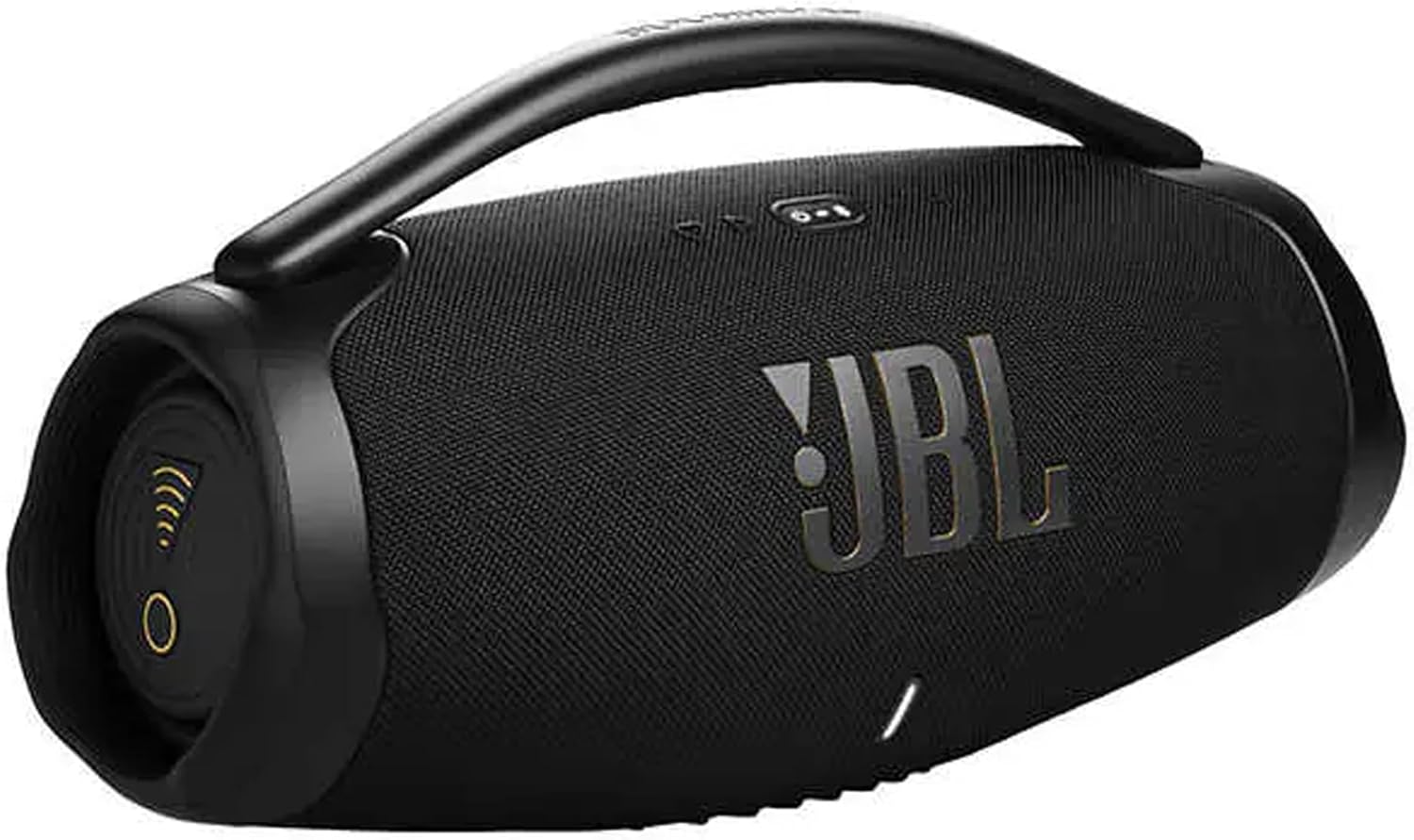
Figure 1: Front view of the JBL Boombox 3 Wi-Fi speaker, showcasing the JBL logo and speaker grille.

Figure 2: Top panel controls including Power, Bluetooth pairing, Volume Up/Down, and a Moment button. Battery indicator lights are also visible.

Figure 3: Rear panel with the charging port (AC connector) and a USB port, protected by a waterproof flap.

Figure 4: Side view of the JBL Boombox 3 Wi-Fi speaker, highlighting the passive radiator which enhances bass output.
Setup
- Initial Charge: Before first use, fully charge the speaker using the provided power cable. Connect the power cable to the AC connector on the rear of the speaker and plug it into a power outlet. The battery indicator lights on the top panel will show charging progress.
- Power On: Press the Power button on the top panel to turn on the speaker.
- Bluetooth Pairing:
- Press the Bluetooth button on the top panel. The Bluetooth indicator will flash, indicating pairing mode.
- On your device (smartphone, tablet, etc.), go to Bluetooth settings and select "JBL Boombox 3 Wi-Fi" from the list of available devices.
- Once connected, the Bluetooth indicator will remain solid.
- Wi-Fi Setup (JBL One App):
- Download the JBL One app from your device's app store.
- Open the app and follow the on-screen instructions to connect your JBL Boombox 3 Wi-Fi to your home Wi-Fi network. This enables features like AirPlay, Alexa, and Google Home integration, and allows for higher fidelity audio streaming.
Operating Instructions
- Volume Control: Use the Volume Up (+) and Volume Down (-) buttons on the top panel to adjust the playback volume.
- Music Playback:
- Press the Play/Pause button (often integrated with the Bluetooth button or a dedicated button) to play or pause audio.
- Use the skip button (often an arrow icon) to skip tracks.
- Voice Assistant: Once configured through the JBL One app, activate your preferred voice assistant (Alexa or Google Home) by pressing the dedicated voice assistant button or by voice command, depending on setup.
- JBL One App Features: The app allows for advanced audio customization, including equalizer settings, firmware updates, and multi-speaker pairing for a wider soundstage.
Maintenance
- Cleaning: Use a soft, damp cloth to clean the speaker's exterior. Do not use abrasive cleaners or solvents.
- Waterproof/Dustproof Care:
- Ensure the rear port cover is securely closed before exposing the speaker to water or dust.
- While IP67 rated, avoid prolonged submersion or exposure to saltwater/chlorinated water. If exposed, rinse with fresh water and dry thoroughly before charging.
- Storage: Store the speaker in a cool, dry place away from direct sunlight and extreme temperatures when not in use for extended periods.
Troubleshooting
| Problem | Possible Cause | Solution |
|---|---|---|
| Speaker does not power on. | Low battery; Power cable not connected. | Charge the speaker fully; Ensure power cable is securely connected. |
| No sound from speaker. | Volume too low; Device not connected; Incorrect input source. | Increase volume on speaker and device; Re-pair Bluetooth/Wi-Fi; Check app settings. |
| Bluetooth connection unstable. | Device too far; Interference; Low battery. | Move device closer to speaker; Avoid obstacles; Charge speaker. |
| Wi-Fi connection issues. | Incorrect Wi-Fi password; Router issues; Speaker out of range. | Verify Wi-Fi credentials in JBL One app; Restart router; Move speaker closer to router. |
Specifications
| Feature | Detail |
|---|---|
| Model Name | Boombox 3 Wi-Fi |
| Speaker Type | Portable Bluetooth Speaker |
| Compatible Devices | Television, Tablet, Smartphone |
| Subwoofer Diameter | 7.5 Inches |
| Surround Sound Channel Configuration | 2.1 |
| Waterproof Rating | IP67 (Dustproof and Waterproof) |
| Control Method | Voice, Buttons |
| Wireless Communication Technology | Bluetooth, Wi-Fi |
| Speaker Size | 10.1 Inches |
| Power Source | Battery Powered |
| Audio Driver Type | Dynamic Driver |
| Bluetooth Range | 10 Meters |
| Connectivity Protocol | Bluetooth, Wi-Fi |
| UPC | 723592740290 |
| Manufacturer | JBL |
| Speaker Maximum Output Power | 80 Watts |
| Audio Output Mode | 3D Dolby Atmos |
| Mounting Type | Tabletop Mount |
Warranty and Support
The JBL Boombox 3 Wi-Fi Portable Speaker comes with a limited warranty. For detailed warranty information, product registration, and technical support, please visit the official JBL website or contact their customer service. Keep your proof of purchase for warranty claims.
Ask a question about this manual
Ask about setup, troubleshooting, compatibility, parts, safety, or missing instructions. Manuals+ will review the question and use this page’s manual context to help answer it.