1. Important Safety Information
WARNING: Read the ENTIRE instruction manual to become familiar with the features of the product before operating. Failure to operate the product correctly can result in damage to the product, personal property, and cause serious injury. This is a sophisticated hobby product. It must be operated with caution and common sense and requires some basic mechanical ability. Failure to operate this Product in a safe and responsible manner could result in injury or damage to the product or other property. This product is not intended for use by children without direct adult supervision. Do not use with incompatible components or alter this product in any way outside of the instructions provided by Horizon Hobby, LLC. The product manual contains instructions for safety, operation, and maintenance. It is essential to read and follow all the instructions and warnings in the manual, prior to assembly, setup, or use, in order to operate correctly and avoid damage or serious injury.
2. Product Overview
The Spektrum NX7e is a 7-channel 2.4GHz DSMX® transmitter designed for remote control aircraft. It features Spektrum AirWare™ programming for intuitive setup and operation, making it suitable for a range of RC pilots. The transmitter includes a 2.8-inch 320x240 color display and a 2200mAh Lithium-Ion battery.

Front view of the Spektrum NX7e 7-Channel Transmitter, showcasing its display, gimbals, and control switches.
Key Features:
- 7-Channel support for various aircraft configurations.
- Pre-loaded BNF model templates for simplified setup.
- Modern case design with a white finish.
- Folding antenna for convenient storage and transport.
- Spektrum AirWare™ programming software for user-friendly setup.
- DSMX Technology for reliable response.
- 2.8-inch 320x240 color display.
- USB-C and Micro SD connectivity for data management and updates.
- 250-model memory capacity.
- Multiple color palette choices and customizable display colors.
- Integrated 2200mAh Lithium-Ion Battery.
- Supports Airplane, Helicopter, Sailplane, and Multirotor programming.
- Wireless trainer system capability (requires optional SRXL2 DSMX Remote Receiver).
3. What's in the Box
Upon unboxing your Spektrum NX7e transmitter, verify that all components are present:
- (1) Spektrum™ NX7e 7-Channel 2.4GHz DSMX® Transmitter
- (1) 2200mAh Li-Ion Transmitter Battery (pre-installed)
- (1) USB-C Cable
- (1) NX7e Product Manual (this document)
4. Setup Guide
4.1 Initial Charging
The NX7e transmitter includes a pre-installed 2200mAh Lithium-Ion battery. Before first use, fully charge the battery using the provided USB-C cable and a compatible USB power source (not included). The charging indicator on the transmitter will provide status updates.
4.2 Powering On/Off
To power on the transmitter, press and hold the power button located on the front panel until the display illuminates. To power off, press and hold the power button until the shutdown sequence completes.
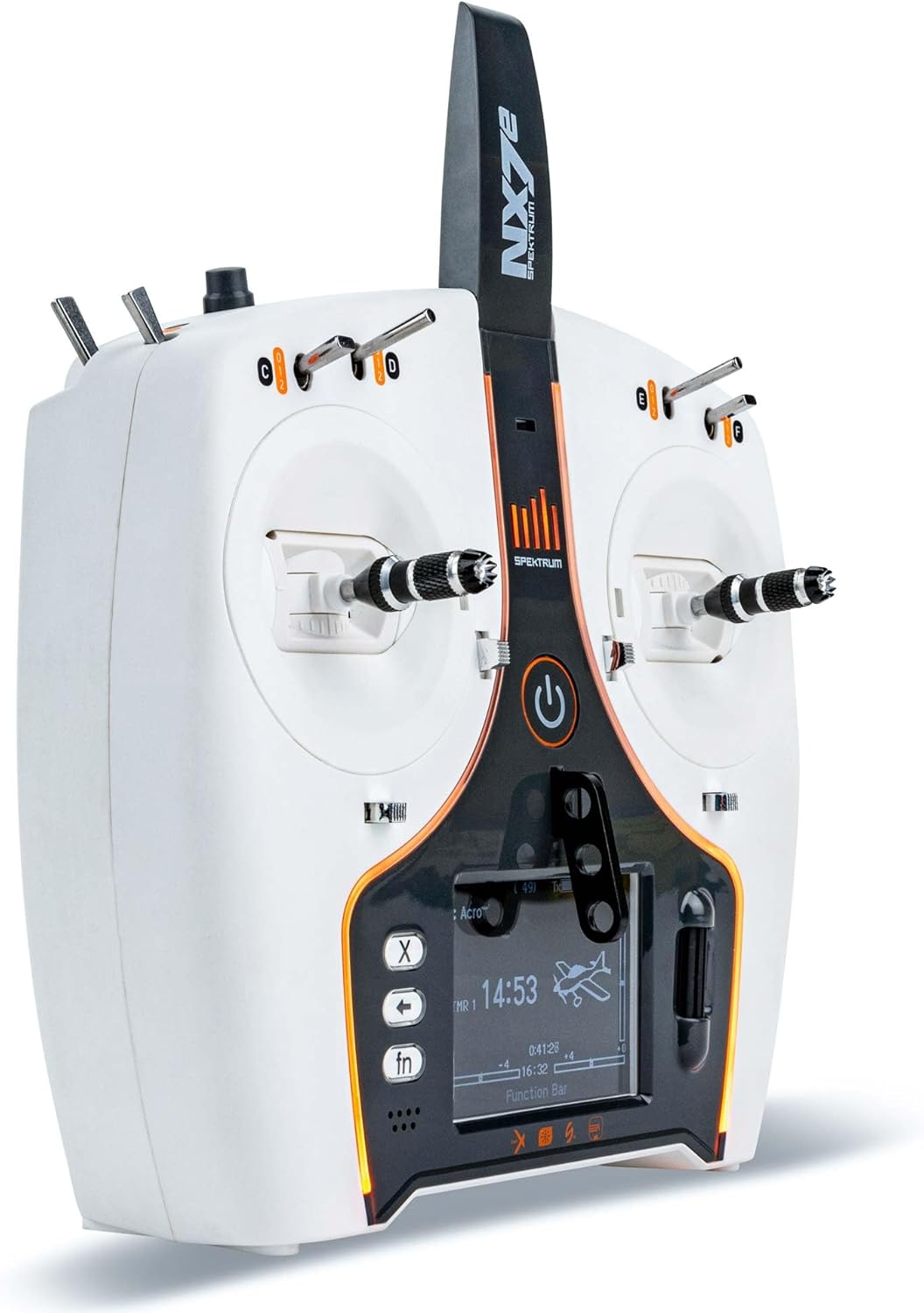
Angled view of the Spektrum NX7e transmitter, highlighting the central power button and the color display.
4.3 Model Selection and Creation
The NX7e features 250-model memory. Navigate through the Spektrum AirWare™ menu using the scroll wheel and buttons to select an existing model or create a new one. For BNF (Bind-N-Fly) aircraft, utilize the pre-loaded templates for simplified setup.
4.4 Binding to a Receiver
To establish communication between the transmitter and your aircraft's receiver, a binding process is required. Refer to your receiver's specific instructions for its binding procedure. Generally, this involves putting the receiver into bind mode and then initiating the bind function from the NX7e transmitter's menu. Ensure the transmitter and receiver are in close proximity during this process.
5. Operating Instructions
5.1 Controls and Switches
The NX7e transmitter is equipped with various gimbals, switches, and buttons for controlling your model. Familiarize yourself with their functions as configured for your specific model setup.

Top view of the Spektrum NX7e transmitter, illustrating the various switches (C, D, E, F) and their labels.

Side view of the Spektrum NX7e transmitter, showing switches A, B, and rotary knob I.
5.2 Flight Modes
Utilize the programmable flight modes to switch between different control settings, such as beginner, intermediate, or advanced flight characteristics, or specific functions like landing mode or acrobatic mode. These are typically assigned to specific switches on the transmitter.
5.3 Display Navigation
The 2.8-inch color display provides real-time information and access to programming menus. Use the navigation buttons and scroll wheel to move through menus, adjust settings, and monitor telemetry data (if supported by your receiver and model setup).
6. Maintenance
6.1 Battery Care
Regularly charge the internal 2200mAh Li-Ion battery. Avoid fully discharging the battery to prolong its lifespan. Store the transmitter with the battery at approximately 50% charge if not used for extended periods.
6.2 Cleaning
Clean the transmitter's exterior with a soft, dry cloth. Avoid using solvents or abrasive cleaners, which can damage the finish or internal components.
6.3 Firmware Updates
Periodically check the Spektrum website for firmware updates for your NX7e transmitter. Updates can provide new features, improvements, and bug fixes. Use the USB-C and Micro SD connectivity to perform updates as per the instructions provided on the Spektrum support page.

Rear view of the Spektrum NX7e transmitter, indicating the USB-C port for charging and data transfer, and the Micro SD card slot for firmware updates and model storage.
7. Troubleshooting
7.1 Transmitter Not Powering On
- Ensure the battery is sufficiently charged. Connect the USB-C cable and allow it to charge for a period.
- Verify the power button is pressed and held correctly.
7.2 Binding Issues
- Confirm the receiver is in bind mode.
- Ensure the transmitter and receiver are within close range (e.g., 1-2 meters) during the binding process.
- Check for any interference sources nearby.
- Verify that the correct model type is selected on the transmitter.
7.3 Boot Screen Freeze
If the transmitter freezes on the Spektrum logo during startup, this may indicate a firmware issue. Attempt the following steps:
- Power off the transmitter by holding the power button.
- Remove and reinsert the battery if accessible and safe to do so.
- Attempt a firmware re-installation using an SD card. Instructions for this process, including obtaining the necessary firmware files, are typically available on the official Spektrum product support website. A serial number may be required for firmware downloads.
- If the issue persists, contact Spektrum product support for further assistance.
8. Specifications
| Feature | Detail |
|---|---|
| Channels | 7 |
| Model Number | SPMR7100 |
| Technology | DSMX |
| Display | 2.8" 320x240 Color Display |
| Battery | 2200mAh Lithium-Ion (included) |
| Connectivity | USB-C, Micro SD |
| Model Memory | 250 |
| Product Dimensions | 12.9 x 10.9 x 6.2 inches |
| Item Weight | 3.28 pounds |
| Manufacturer Recommended Age | 14 years and up |
9. Warranty and Support
For warranty information, technical support, or service inquiries, please contact Horizon Hobby, LLC. Details regarding warranty coverage and support procedures can typically be found on the official Spektrum or Horizon Hobby websites. It is recommended to register your product upon purchase.
Online Resources:
- Visit the official Spektrum Store on Amazon for product information.
- Refer to the Horizon Hobby website for comprehensive support, firmware downloads, and contact information.