1. Introduction
Thank you for choosing the NOVARIDE Nova-Bike Pro NRBB300 Folding Electric Bicycle. This manual provides essential information for the safe assembly, operation, maintenance, and troubleshooting of your electric bicycle. Please read this manual thoroughly before your first ride and retain it for future reference.
The Nova-Bike Pro NRBB300 is designed for urban commuting and recreational use, offering a convenient and efficient mode of transport with its foldable design and electric assist capabilities.

Image 1.1: Full view of the NOVARIDE Nova-Bike Pro NRBB300 Folding Electric Bicycle.
2. Safety Information
Your safety is paramount. Always adhere to local traffic laws and regulations. Failure to follow these safety guidelines may result in serious injury or property damage.
- Helmet Use: Always wear a certified bicycle helmet when riding.
- Pre-Ride Check: Before each ride, inspect brakes, tires, battery level, and ensure all quick releases and folding mechanisms are securely fastened.
- Visibility: Use lights and reflective gear, especially when riding in low-light conditions or at night.
- Weather Conditions: Exercise caution when riding in wet or slippery conditions. Braking distance increases significantly.
- Weight Limit: Do not exceed the maximum weight capacity specified in the specifications section.
- Age Restriction: This electric bicycle is intended for adult use.
- Maintenance: Regular maintenance is crucial for safe operation. Refer to the maintenance section.
3. Package Contents
Upon unpacking, please verify that all components are present and undamaged. If any items are missing or damaged, contact customer support immediately.
- NOVARIDE Nova-Bike Pro NRBB300 Folding Electric Bicycle (partially assembled)
- Battery (integrated or separate, depending on model variant)
- Battery Charger
- User Manual
- Tools for assembly (if required)
- Fenders
- Keys (for battery lock, if applicable)
4. Setup
The Nova-Bike Pro NRBB300 comes partially assembled. Follow these steps to prepare your bicycle for its first ride.
4.1 Unfolding the Bicycle
- Place the folded bicycle on a stable surface.
- Release the frame folding latch, typically located in the middle of the main frame tube. Carefully unfold the frame until it locks into place. Ensure the latch is fully engaged and secured.
- Raise the handlebar stem and secure it with its quick-release lever. Ensure the stem is aligned with the front wheel.
- Raise the seat post to your desired riding height and secure it with the quick-release lever. Ensure the minimum insertion mark is not visible.
- Unfold the pedals (if they are foldable) until they click into their riding position.

Image 4.1: Side view of the NOVARIDE Nova-Bike Pro NRBB300, illustrating the frame structure and folding points.
4.2 Battery Charging
Before first use, fully charge the battery. The battery may be charged while installed on the bicycle or removed.
- Connect the charger to a standard wall outlet.
- Connect the charger's output plug to the bicycle's charging port or directly to the battery if removed.
- The charger indicator light will typically show red during charging and turn green when fully charged.
- Charging time may vary. Refer to the specifications for estimated charging duration.
- Always use the original charger provided with your bicycle.
4.3 Pre-Ride Inspection
Perform these checks before every ride:
- Tires: Check tire pressure. Ensure tires are inflated to the recommended PSI (indicated on the tire sidewall).
- Brakes: Test both front and rear brakes. Ensure they engage smoothly and effectively.
- Quick Releases: Confirm all quick-release levers (seat post, handlebar stem, frame hinge) are securely tightened.
- Lights: Verify that the front and rear lights are functional.
- Battery: Check the battery charge level on the display.
5. Operating Instructions
Familiarize yourself with the controls and functions of your Nova-Bike Pro NRBB300 before riding.
5.1 Powering On/Off
To power on the electric system, press and hold the power button on the handlebar display. To power off, press and hold the same button.

Image 5.1: Close-up of the handlebars, showing the display and control buttons.
5.2 Pedal Assist System (PAS)
The Nova-Bike Pro NRBB300 features a Pedal Assist System (PAS) with multiple levels. The motor provides assistance as you pedal. Use the '+' and '-' buttons on the display to adjust the assist level (typically 0-3).
- Level 0: No electric assistance. The bicycle operates like a standard bike.
- Level 1: Minimal assistance, suitable for flat terrain or light exercise.
- Level 2: Moderate assistance, ideal for varied terrain.
- Level 3: Maximum assistance, for climbing hills or achieving higher speeds with less effort.
5.3 Braking
The bicycle is equipped with disc brakes for reliable stopping power. Apply both front and rear brakes simultaneously for balanced and effective braking. Avoid sudden, hard braking, especially with the front brake, to prevent loss of control.
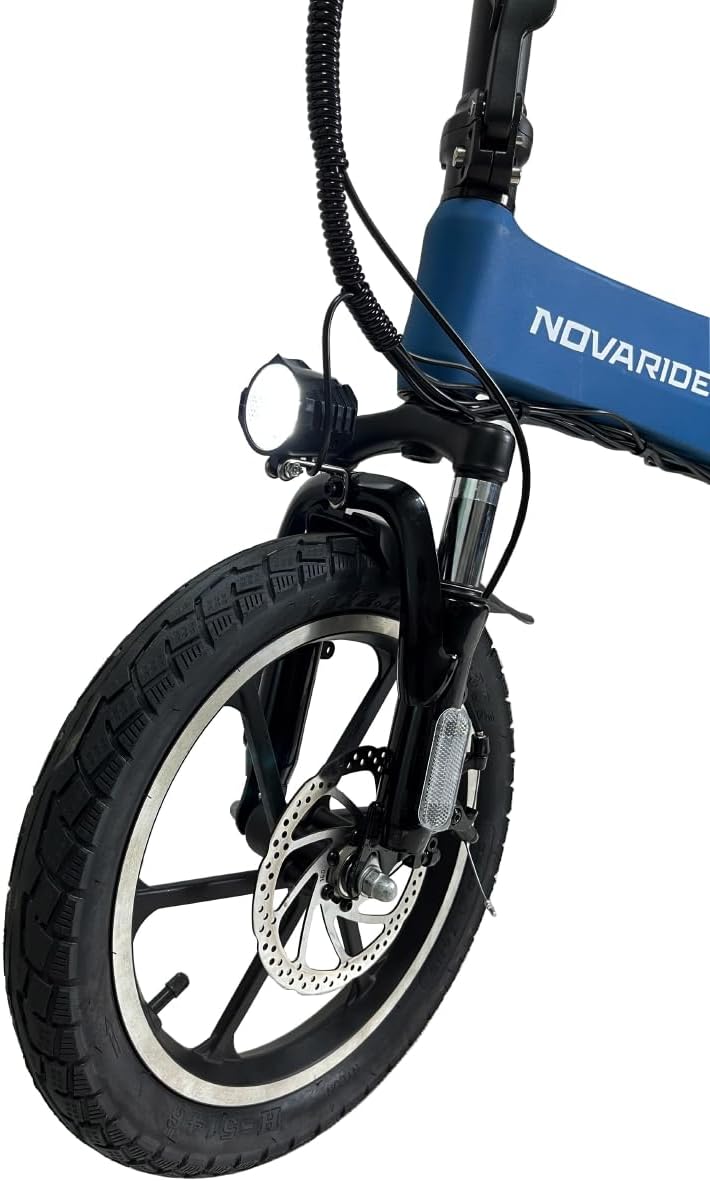
Image 5.2: Close-up of the front wheel, showing the disc brake and headlight.

Image 5.3: Close-up of the rear wheel, motor, and taillight.
5.4 Folding the Bicycle
To fold the bicycle for storage or transport:
- Ensure the electric system is powered off.
- Lower the seat post completely.
- Release the handlebar stem quick-release and fold the handlebars down.
- Release the frame folding latch and carefully fold the frame in half. Ensure it is secured in the folded position.
- Fold the pedals inward if they are foldable.
6. Maintenance
Regular maintenance ensures the longevity and safe operation of your electric bicycle.
- Cleaning: Clean the bicycle regularly with a damp cloth. Avoid high-pressure washing directly on electrical components.
- Tires: Check tire pressure weekly and inflate as needed. Inspect tires for wear, cuts, or punctures.
- Brakes: Regularly check brake pads for wear and brake cables for tension. Adjust or replace as necessary.
- Chain: Keep the chain clean and lubricated to ensure smooth gear changes and prevent rust.
- Battery Care: Store the battery in a cool, dry place. If storing for extended periods, charge it to 50-70% every 1-2 months. Avoid fully discharging the battery.
- Fasteners: Periodically check all bolts, nuts, and quick releases for tightness.
7. Troubleshooting
This section addresses common issues you might encounter with your Nova-Bike Pro NRBB300.
| Problem | Possible Cause | Solution |
|---|---|---|
| Electric assist not working | Battery low or not connected; System not powered on; PAS level 0 selected; Loose connection | Charge battery; Power on system; Select PAS level 1-3; Check all electrical connections |
| Brakes feel weak | Worn brake pads; Loose brake cable; Contaminated disc rotor | Inspect and replace brake pads; Adjust brake cable tension; Clean disc rotor with appropriate cleaner |
| Tires losing air quickly | Puncture; Loose valve stem | Inspect tire for punctures and repair/replace tube; Tighten valve stem |
| Unusual noises during ride | Loose components; Dry chain; Brake rub | Check all fasteners; Lubricate chain; Adjust brake calipers |
For issues not listed here or if problems persist, please contact NOVARIDE customer support.
8. Specifications
| Feature | Specification |
|---|---|
| Model | NRBB300 (Nova-Bike Pro) |
| Brand | NOVARIDE |
| Wheel Size | 16 Inches |
| Motor Power | 250W |
| Max Speed | 25-32 KM/H |
| Autonomy (Range) | 35-40 KM |
| Frame Material | Aluminum Alloy or Carbon Fiber |
| Number of Speeds | 3 |
| Brake Type | Disc Brake |
| Suspension | Rigid |
| Special Feature | Foldable |
| Recommended Age Range | Adult |
| Dimensions (Folded) | 84 x 64 x 38 cm (approximate) |
| Weight | 22.5 kg (approximate) |
9. Warranty and Support
NOVARIDE products are covered by a limited warranty against manufacturing defects. Please refer to the warranty card included with your purchase or visit the official NOVARIDE website for detailed warranty terms and conditions.
For technical support, spare parts, or warranty claims, please contact NOVARIDE customer service through the contact information provided on our website or your purchase documentation. When contacting support, please have your model number (NRBB300) and proof of purchase readily available.