
LOFICOPER J48
LOFICOPER Bluetooth 5.3 AUX Adapter J48 User Manual
Model: J48
1. Introduction
The LOFICOPER Bluetooth 5.3 AUX Adapter (Model J48) is designed to convert non-Bluetooth audio devices into Bluetooth-enabled systems. This allows for wireless audio streaming and hands-free calling in various environments, including cars, home stereo systems, and with speakers or headphones. Featuring Bluetooth 5.3 technology, it ensures stable signal transmission and clear audio quality with CVC noise reduction.

Image 1: LOFICOPER Bluetooth 5.3 AUX Adapter, a compact black device with an LED display and 3.5mm AUX connector.
2. Package Contents
Please verify that all items are present in the package:
- 1x LOFICOPER Bluetooth 5.3 AUX Adapter (Model J48)
- 1x 3.5mm AUX Cable
- 1x Type-C Charging Cable
- 1x User Manual

Image 2: Contents of the LOFICOPER Bluetooth AUX Adapter package, including the adapter, AUX cable, Type-C charging cable, and user manual.
3. Product Overview
Familiarize yourself with the components and controls of your LOFICOPER Bluetooth AUX Adapter:
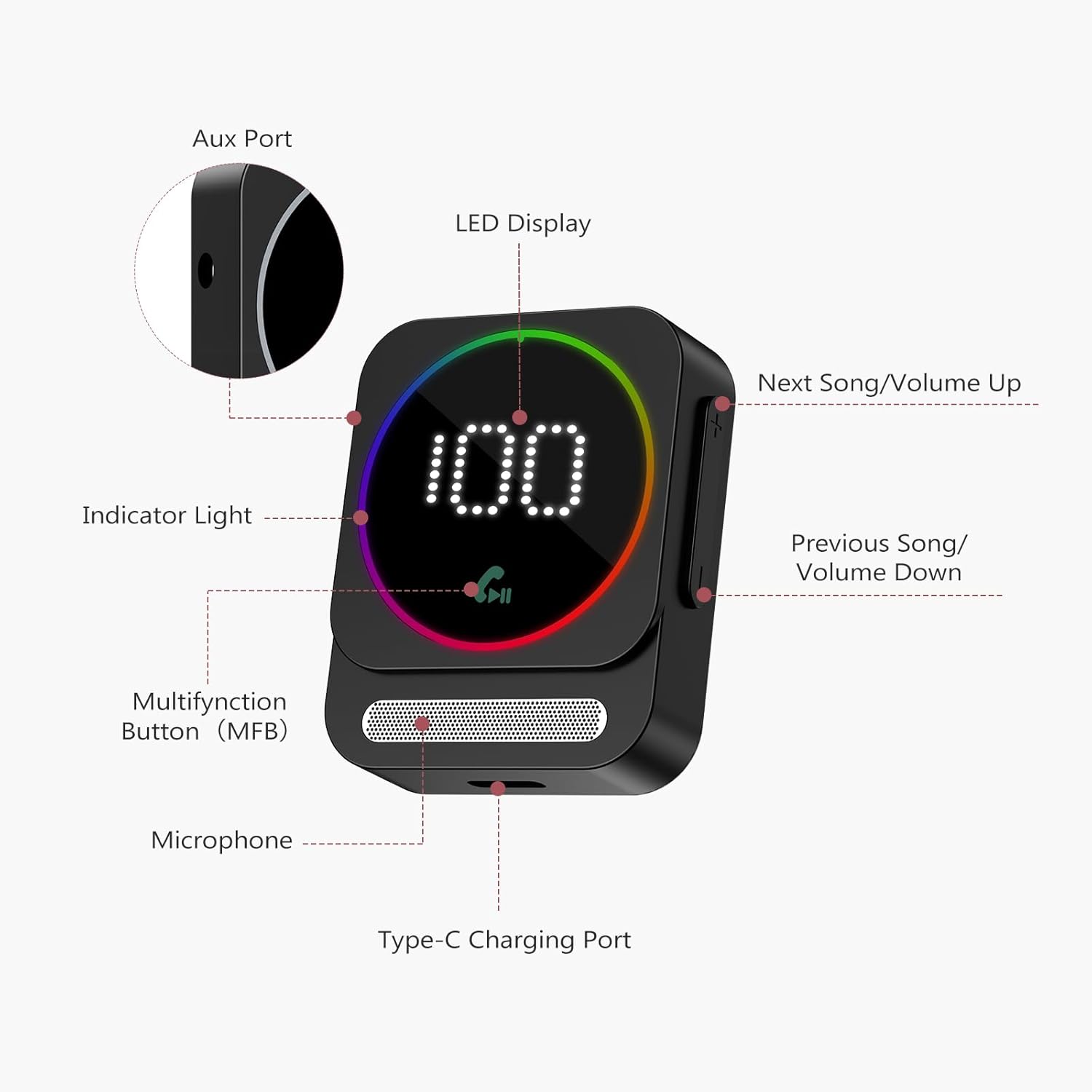
Image 3: Labeled diagram of the LOFICOPER Bluetooth AUX Adapter, showing the Aux Port, LED Display, Indicator Light, Multifunction Button (MFB), Microphone, Type-C Charging Port, Next Song/Volume Up button, and Previous Song/Volume Down button.
- Aux Port: 3.5mm audio output for connecting to non-Bluetooth devices.
- LED Display: Shows battery power, volume level, and connection status.
- Indicator Light: Provides visual feedback on device status.
- Multifunction Button (MFB): Controls power, play/pause, and call functions.
- Microphone: For hands-free calling.
- Type-C Charging Port: For charging the device.
- Next Song/Volume Up (+): Short press for next song, long press to increase volume.
- Previous Song/Volume Down (-): Short press for previous song, long press to decrease volume.
4. Specifications
| Bluetooth Version | V5.3 |
| Bluetooth Range | Up to 33 feet (10 meters) |
| Bluetooth Pairing Name | J48 |
| Supported Audio Formats | MP3, WAV, WMA, FLAC, APE |
| Noise Reduction Technology | CVC |
| Standby Time (connected) | Approximately 24 hours |
| Talk Time (maximum volume) | Approximately 15 hours |
| Music Playback Time (maximum volume) | Approximately 15 hours |
| Charging Time | Approximately 2 hours |
| Charging Port | Type-C |
| Power Source | Battery Powered |
| Item Weight | 2.08 ounces (0.06 Kilograms) |
| Package Dimensions | 6.46 x 2.8 x 0.83 inches |

Image 4: Diagram illustrating the Bluetooth 5.3 chip, highlighting stable connection, long range, and low noise features.

Image 5: Illustration showing the LED display indicating battery level and volume, along with Type-C charging and 20 hours of battery life.
5. Setup Guide
5.1 Charging the Device
- Connect the provided Type-C charging cable to the Type-C charging port on the adapter.
- Connect the other end of the cable to a 5V/1A USB power adapter (not included). Do not use a fast charger.
- The LED display will indicate charging status. A full charge takes approximately 2 hours.
5.2 Connecting to an Audio Source
- Insert the 3.5mm AUX connector of the adapter into the AUX input port of your car audio system, speaker, or headphones.
- Alternatively, use the provided 3.5mm AUX cable to connect the adapter's AUX port to the audio source's AUX input.
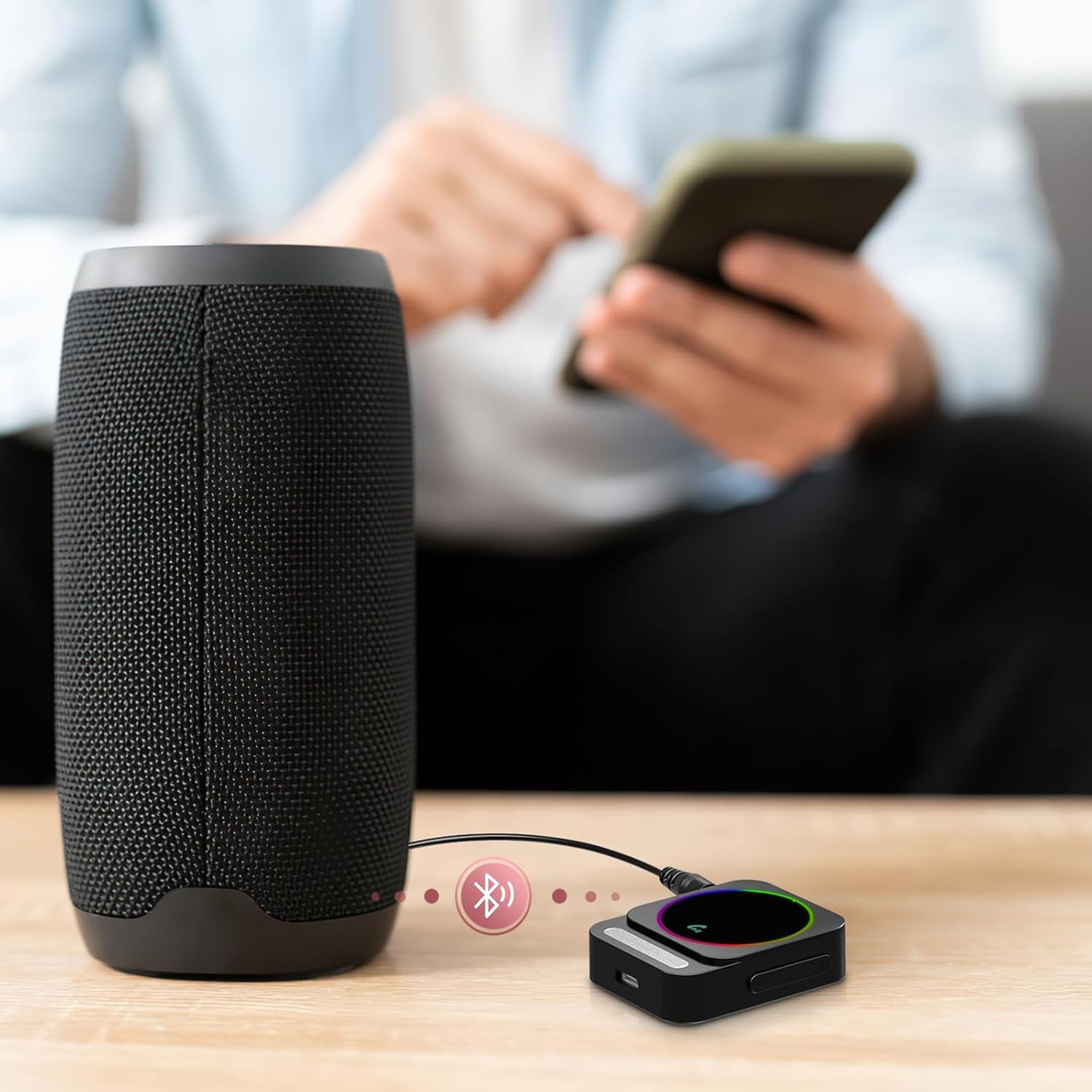
Image 6: The LOFICOPER Bluetooth AUX Adapter connected to a portable speaker via its 3.5mm AUX connector, indicating wireless audio streaming.
5.3 Bluetooth Pairing
- Power On: Long press the Multifunction Button (MFB) to turn on the device. The LED display will light up.
- Pairing Mode: The adapter will automatically enter pairing mode, indicated by a flashing Bluetooth icon on the LED display.
- Connect from your device: On your mobile phone, tablet, or other Bluetooth-enabled device, go to Bluetooth settings and search for available devices.
- Select "J48": Choose "J48" from the list of found devices to establish a connection.
- Connection Confirmation: Once connected, the Bluetooth icon on the adapter's LED display will stop flashing and remain solid.
6. Operating Instructions
6.1 Power ON/OFF
- Power ON: Long press the Multifunction Button (MFB).
- Power OFF: Long press the Multifunction Button (MFB).
6.2 Music Playback
- Pause/Play: While music is playing, short press the Multifunction Button (MFB).
- Next Song: Short press the "+" button.
- Previous Song: Short press the "-" button.
- Volume Up: Long press the "+" button.
- Volume Down: Long press the "-" button.
6.3 Hands-Free Calling
- Answer a Call: Short press the Multifunction Button (MFB) when an incoming call rings.
- Hang Up a Call: Short press the Multifunction Button (MFB) during an active call.
- Reject a Call: Press and hold the Multifunction Button (MFB) for 2 seconds during an incoming call.

Image 7: The Bluetooth adapter in a car, demonstrating hands-free call functions like answer, hang up, and reject, promoting safe driving.
6.4 Connecting Two Devices Simultaneously
The adapter supports connecting to two Bluetooth devices at the same time:
- Connect the first device following the standard pairing procedure (Section 5.3).
- After the first device is successfully connected, turn off its Bluetooth function.
- Pair the second device with the adapter.
- Once the second device is connected, reactivate Bluetooth on the first device. Both devices should now be connected, allowing you to switch between them for audio playback or calls.

Image 8: Illustration showing the LOFICOPER Bluetooth AUX Adapter connected to both a smartphone and a tablet, demonstrating the ability to pair with two devices simultaneously.
7. Maintenance
- Keep the device dry. Avoid exposure to moisture or liquids.
- Clean the device with a soft, dry cloth. Do not use harsh chemicals or abrasive cleaners.
- Store the device in a cool, dry place when not in use.
- Avoid extreme temperatures.
8. Troubleshooting
| Problem | Possible Cause | Solution |
| Device does not turn on. | Low battery. | Charge the device using the provided Type-C cable and a 5V/1A adapter. |
| Cannot pair with Bluetooth device. | Adapter not in pairing mode; Bluetooth on source device is off or already connected to another device; adapter too far from source device. | Ensure the adapter is powered on and the Bluetooth icon is flashing. Turn off and on Bluetooth on your source device. Move the adapter closer to the source device (within 10m). |
| No audio output. | Incorrect AUX connection; volume too low; adapter not connected to Bluetooth device. | Ensure the AUX cable is securely connected to both the adapter and the audio source. Increase the volume on both the adapter and the connected device. Verify Bluetooth connection. |
| Poor audio quality/noise. | Interference; device too far from source; CVC noise reduction not effective in extreme conditions. | Move the adapter closer to the source device. Avoid sources of strong electromagnetic interference. |
| Automatic shutdown. | No Bluetooth device connected for more than 5 minutes. | This is normal behavior to conserve battery. Reconnect a Bluetooth device to continue use. |
9. Important Notes
- The LED screen will automatically turn off after 10 seconds of no operation to conserve power.
- Bluetooth connection range may be affected by physical obstructions like walls.
- This device is NOT compatible with S-o-n-y products.
10. Warranty and Support
For warranty information or technical support, please refer to the contact details provided with your purchase or visit the official LOFICOPER website. Keep your purchase receipt for warranty claims.
Ask a question about this manual
Ask about setup, troubleshooting, compatibility, parts, safety, or missing instructions. Manuals+ will review the question and use this page’s manual context to help answer it.