
1. Introduction
Thank you for purchasing the ZonQoonz COB 200W Stage Light. This professional lighting fixture is designed to provide powerful and versatile illumination for a wide range of events, including concerts, theatrical productions, discos, weddings, bars, and private parties. Featuring high-quality COB LED beads, it offers both cold white and warm white light, along with smooth color mixing and excellent wash effects. Please read this manual thoroughly before operation to ensure safe and optimal performance.
2. Safety Information
- Always connect the unit to a grounded power outlet.
- Do not open the housing. There are no user-serviceable parts inside. Refer all servicing to qualified personnel.
- Avoid direct eye exposure to the light source.
- Ensure proper ventilation. Do not block ventilation openings.
- Keep the unit away from moisture, water, and high temperatures.
- Disconnect from power before cleaning or maintenance.
3. Package Contents
Verify that all items are present and in good condition upon opening the package:
- 1 x ZonQoonz COB 200W Stage Light (COB Par)
- 1 x Power Cable
- 1 x Mounting Bracket
- 2 x Mounting Knobs
- 1 x User Manual

Figure 3.1: Package Contents
4. Product Overview
The ZonQoonz COB 200W Stage Light features two powerful COB LED modules, capable of producing both cold white and warm white light. The robust metal housing ensures durability, while the integrated cooling fan maintains optimal operating temperature for extended service life.
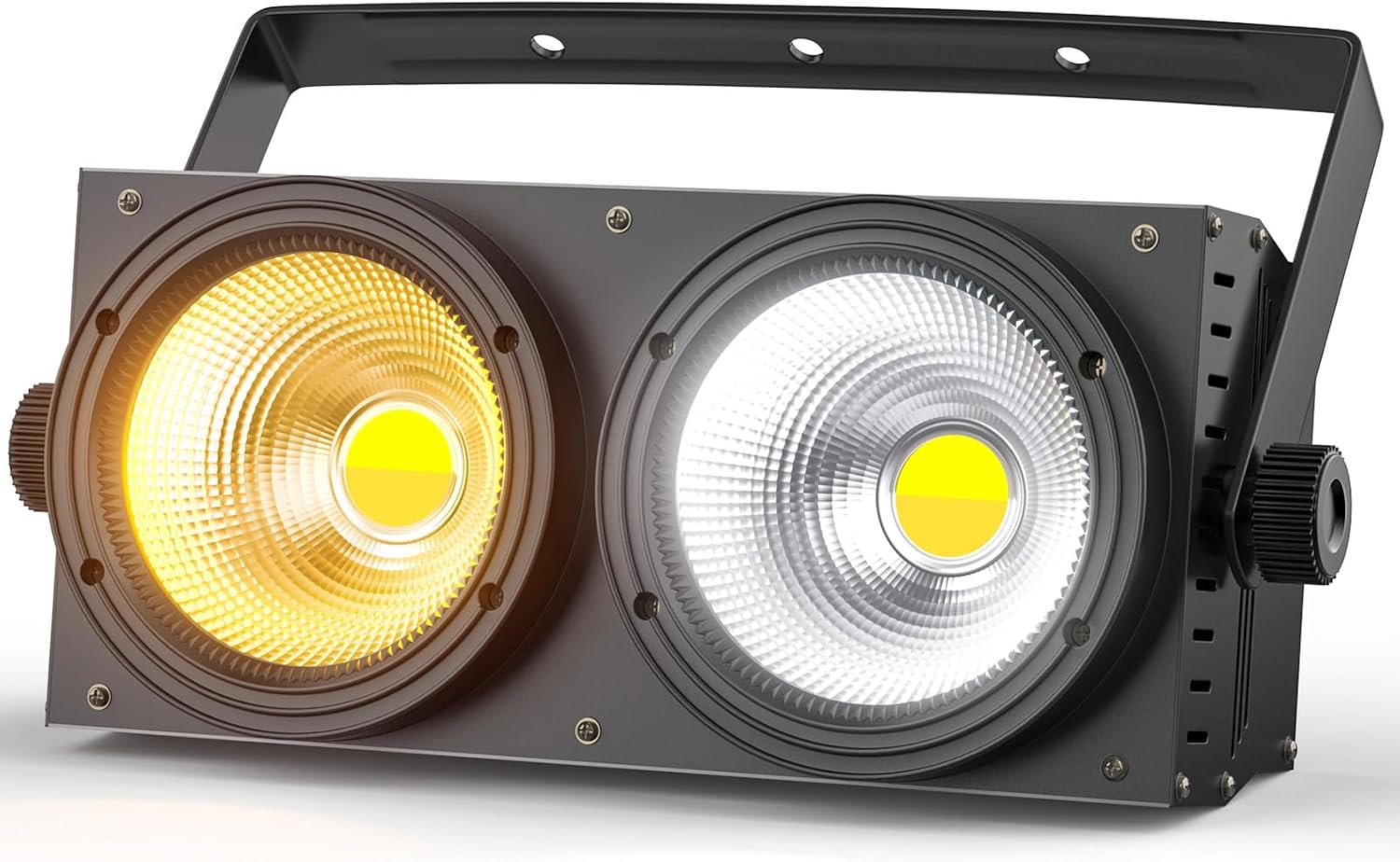
Figure 4.1: Front View of the Stage Light

Figure 4.2: Detail of COB LED Modules
The rear panel includes power input/output, DMX input/output, and a digital display with control buttons (Menu, Up, Down, Enter) for easy setting adjustments.

Figure 4.3: Rear Panel and Controls
5. Setup
5.1 Mounting
Attach the included mounting bracket to the sides of the light using the provided knobs. The bracket allows for flexible positioning on a truss, stand, or flat surface. Ensure the light is securely fastened before operation.
5.2 Power Connection
Connect the power cable to the 'POWER IN' port on the rear panel and then to a suitable grounded power outlet. The unit supports power linking via the 'POWER OUT' port for connecting multiple units.
5.3 DMX Connection (Optional)
For DMX control, connect a DMX cable from your DMX controller's output to the 'DMX IN' port of the first light. For multiple lights, daisy-chain them by connecting the 'DMX OUT' of the first light to the 'DMX IN' of the next, and so on.
6. Operating Modes
The ZonQoonz COB 200W Stage Light supports four primary control modes:
6.1 Sound Activation Mode
In this mode, the light reacts to ambient sound, creating dynamic lighting effects synchronized with music or audio. Use the control panel to select this mode and adjust sensitivity if available.
6.2 Master-Slave Mode
Connect multiple units via DMX cables. Set one unit as the 'Master' and the others as 'Slave' units. The slave units will then mimic the master's settings and effects, allowing for synchronized lighting displays without a DMX controller.
6.3 Automatic Mode
The light features built-in automatic programs that cycle through various effects and color changes. Select this mode via the control panel to enjoy pre-programmed light shows.
6.4 DMX Mode
For professional control, connect the light to a DMX controller. This mode allows precise control over individual parameters such as brightness, color temperature (cold white/warm white mixing), and strobe effects. Refer to the DMX channel chart (if provided separately or on the product display) for detailed control mapping.

Figure 6.1: Color Temperature Options

Figure 6.2: Light Output Examples

Figure 6.3: Application Scenarios
7. Maintenance
7.1 Cleaning
Regularly clean the exterior of the fixture with a soft, dry cloth. Do not use abrasive cleaners or solvents. Ensure the ventilation openings are free from dust and debris to maintain proper cooling.
7.2 Storage
When not in use, store the light in a cool, dry place, away from direct sunlight and extreme temperatures.
8. Troubleshooting
- No Power: Check the power cable connection, ensure the outlet is active, and verify the unit's power switch is on.
- No Light Output: Confirm the selected operating mode and brightness settings. If in DMX mode, check DMX signal and address settings.
- Fans Noisy: While some fan noise is normal for cooling, excessive noise might indicate dust buildup. Ensure ventilation is clear. If noise persists, contact support.
- Intermittent Operation: Check all cable connections (power, DMX). Ensure stable power supply.
9. Specifications
| Feature | Detail |
|---|---|
| Model Number | AL-01496 |
| Power | 200W COB LED |
| Light Source Type | COB (Chip On Board) |
| Color Temperature | Cold White & Warm White (2-in-1) |
| Control Modes | Sound Activation, Master-Slave, Automatic, DMX (8CH) |
| Voltage | 220V (AC) |
| Material | Iron and Aluminum |
| Product Dimensions | 34.5 x 21 x 18 cm |
| Item Weight | 3.11 Kilograms |
| Energy Efficiency | EPREL Link |

Figure 9.1: Product Dimensions

Figure 9.2: Energy Label
10. Warranty and Support
ZonQoonz products are manufactured to the highest quality standards. For warranty information, technical support, or service inquiries, please refer to the contact details provided with your purchase or visit the official ZonQoonz website. Keep your proof of purchase for warranty claims.