
1. Introduction
This manual provides instructions for the VEWINGL DC-2135Max 12-Digit Desk Calculator. Designed for office, school, home, and business use, this calculator features a large LCD display, comfortable computer-style keys, and dual power capabilities. Please read this manual thoroughly to ensure proper use and maintenance of your device.

Image 1.1: The VEWINGL DC-2135Max 12-Digit Desk Calculator, showcasing its large display and key layout.
2. Product Features
- 12-Digit Large LCD Display: Provides clear visibility of numbers with a fixed 30-degree viewing angle for enhanced readability.
- Large Computer Keys: Designed for comfortable and accurate input, similar to a computer keyboard, made from high-strength ABS material.
- Dual Power Source: Operates on solar power in well-lit environments and includes a AAA battery for continuous operation in low light conditions.
- Automatic Sleep Function: The calculator automatically powers off after 8 minutes of inactivity to conserve battery life.
- Essential Functions: Includes basic arithmetic, percentage, memory functions (MC, MR, M+, M-), rounding, and a backspace key.
- Durable Construction: Made from ABS plastic and rubber, designed to withstand daily use.
- Non-Slip Design: Equipped with 4 non-slip feet to ensure stability on surfaces.
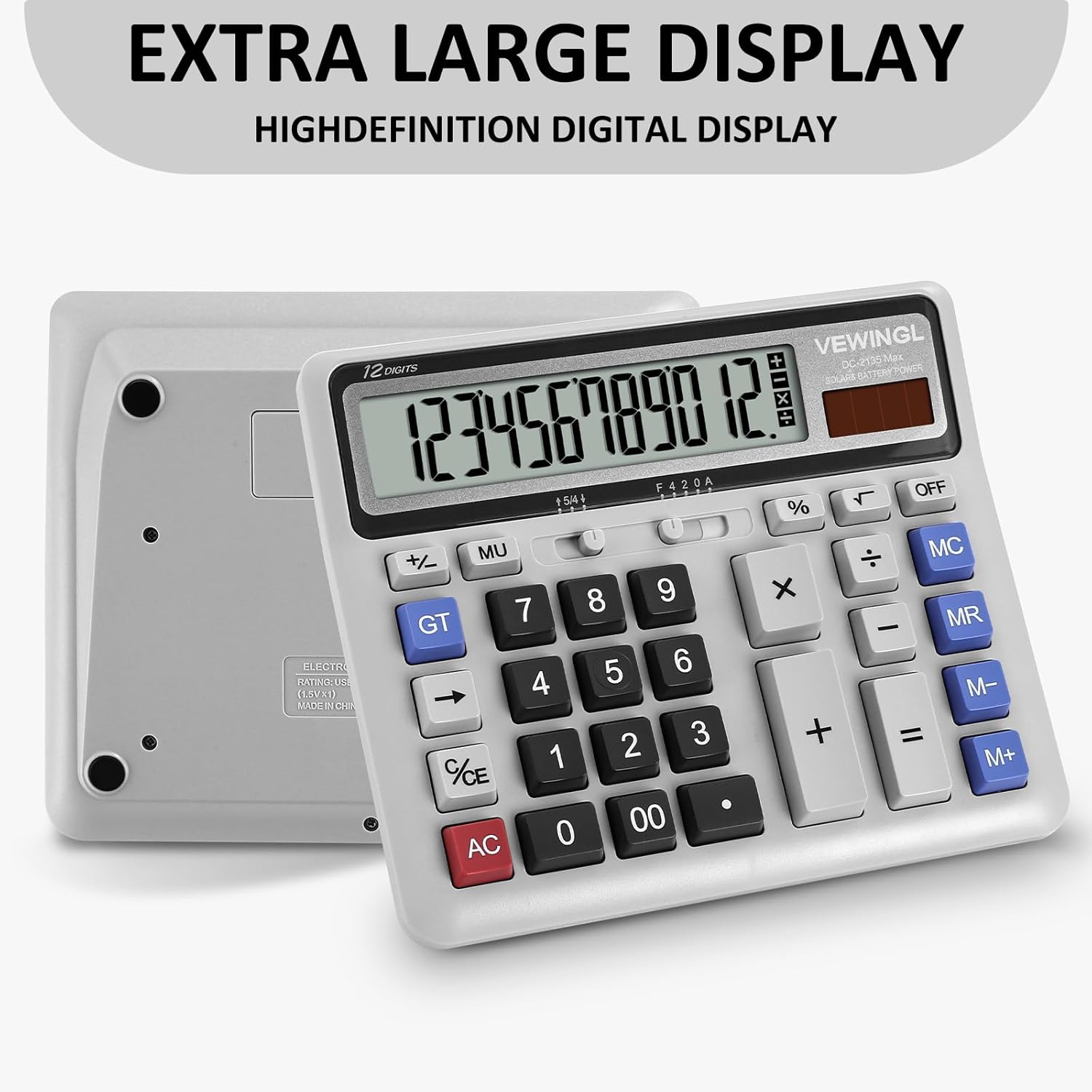
Image 2.1: Rear view of the calculator highlighting the extra-large, high-definition digital display.

Image 2.2: Close-up of the calculator showing the extra-large buttons and overall dimensions (7.6 inches by 6.4 inches).
3. Setup
3.1 Power Source
The VEWINGL DC-2135Max calculator utilizes a dual power system:
- Solar Power: The calculator will operate using its built-in solar panel when exposed to sufficient light.
- Battery Power: For use in low-light conditions or when solar power is insufficient, the calculator uses one AAA battery. A AAA battery is included with the product.
3.2 Battery Installation
- Locate the battery compartment cover on the back of the calculator.
- Gently slide or unclip the cover to open the compartment.
- Insert one AAA battery, ensuring the correct polarity (+ and -) as indicated inside the compartment.
- Replace the battery compartment cover securely.

Image 3.1: Illustration of the dual power feature and the process of installing the AAA battery in the compartment.
4. Operation
4.1 Basic Calculations
- Addition (+): Enter the first number, press '+', enter the second number, press '='.
- Subtraction (-): Enter the first number, press '-', enter the second number, press '='.
- Multiplication (×): Enter the first number, press '×', enter the second number, press '='.
- Division (÷): Enter the first number, press '÷', enter the second number, press '='.
- Percentage (%): Enter a number, press '×', enter the percentage value, press '%'. For example, to calculate 10% of 200, enter '200', press '×', enter '10', press '%'.
4.2 Memory Functions
- M+ (Memory Plus): Adds the displayed value to the memory.
- M- (Memory Minus): Subtracts the displayed value from the memory.
- MR (Memory Recall): Recalls the value stored in memory to the display.
- MC (Memory Clear): Clears the value stored in memory.
4.3 Clear Functions
- AC (All Clear): Clears all entries and calculations, resetting the calculator.
- C/CE (Clear Entry): Clears the last entered number or the current calculation without affecting previous entries or memory. Pressing it twice may act as an 'AC' in some modes.
4.4 Other Functions
- Backspace (←): Deletes the last digit entered.
- GT (Grand Total): Accumulates the results of all calculations. Pressing GT will display the grand total.
- +/- (Sign Change): Changes the sign of the displayed number (positive to negative, or negative to positive).
- Decimal Point (.): Used to enter decimal numbers.
- 00: Allows for quick entry of two zeros.
- Rounding Switch (F 5/4 2 0 A): Adjusts the rounding behavior and number of decimal places. Refer to the markings on the calculator for specific settings.
- OFF: Manually turns off the calculator.

Image 4.1: Side view of the calculator demonstrating its ergonomic 30-degree angle for comfortable use.
5. Maintenance
- Cleaning: Wipe the calculator with a soft, dry cloth. Do not use liquid cleaners or abrasive materials.
- Battery Replacement: Replace the AAA battery when the display becomes dim or unresponsive in low light. Follow the battery installation steps in Section 3.2.
- Storage: Store the calculator in a cool, dry place away from direct sunlight and extreme temperatures.
- Avoid Impact: While durable, avoid dropping the calculator or subjecting it to strong impacts to prevent damage.
6. Troubleshooting
- Display is blank or dim:
- Ensure the calculator is in a well-lit area for solar power.
- Check if the AAA battery needs replacement.
- Press the 'AC' button to reset.
- Incorrect calculation results:
- Verify all numbers and operations were entered correctly.
- Clear the calculator using 'AC' and re-enter the calculation.
- Check the rounding switch setting.
- Buttons are unresponsive:
- Ensure no debris is lodged under the keys.
- Replace the battery if the calculator is otherwise unresponsive.
- Calculator turns off unexpectedly:
- The automatic sleep function activates after 8 minutes of inactivity. This is normal operation.
- If it turns off during active use, check the battery and light conditions.
7. Specifications
| Feature | Specification |
|---|---|
| Model | DC-2135Max |
| Display | 12-Digit LCD, 4.8 Inches, 30-degree fixed angle |
| Power Source | Dual Power (Solar and 1x AAA Battery) |
| Dimensions (L x W x H) | 19.3 x 16.26 x 0.25 cm (approx. 7.6 x 6.4 inches) |
| Weight | 304 g |
| Material | Acrylonitrile Butadiene Styrene (ABS) Plastic, Rubber |
| Automatic Shut-off | After 8 minutes of inactivity |
8. Warranty and Support
For warranty information and customer support, please refer to the product packaging or contact VEWINGL customer service directly. Details for contacting support are typically provided with your purchase documentation.