
1. Introduction
This manual provides detailed instructions for the proper use and maintenance of your Ankbit E700 Bluetooth 5.1 Hybrid Active Noise Cancelling Headphones. Please read this manual thoroughly before using the product to ensure optimal performance and longevity.
2. Package Contents
Verify that all items listed below are present in your package:
- Ankbit E700 Active Noise Cancelling Headphones
- Carrying Case
- USB-C to 3.5mm Audio Cable
- USB Charging Cable
- User Manual (this document)
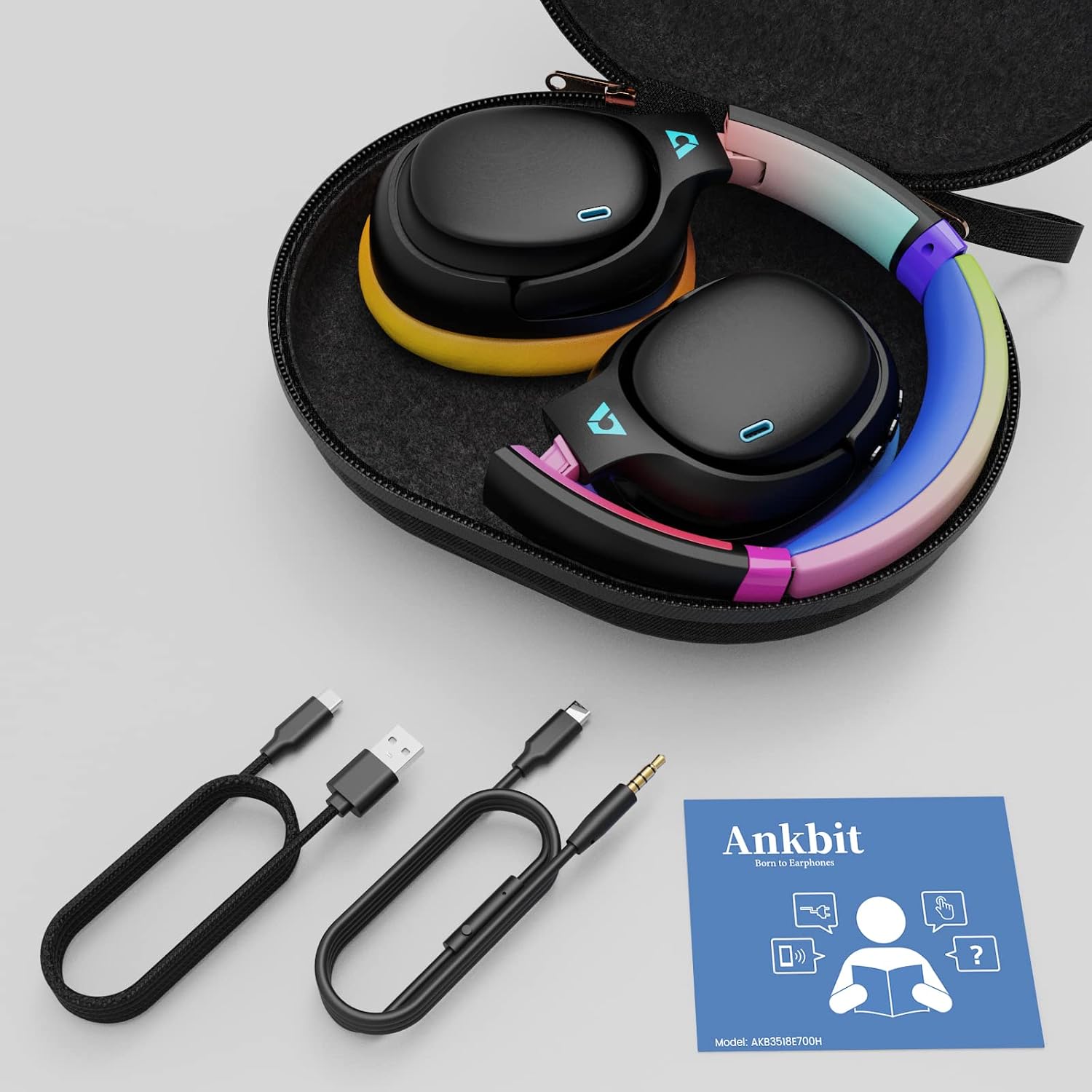
Image: Ankbit E700 headphones and included accessories in their protective carrying case.
3. Product Overview
The Ankbit E700 headphones feature a foldable design, adjustable headband, and soft earcups for comfort. Controls are located on the right earcup.

Image: Front view of the Ankbit E700 headphones, highlighting the colorful design and overall structure.
3.1 Key Components
- Earcups: Over-ear design with ultra-soft protein leather earcups for comfort.
- Headband: Adjustable and padded for a secure fit.
- Controls: Power, Volume Up/Down, Multi-function button, ANC button.
- Ports: USB-C charging port, 3.5mm audio jack.
- Microphone: Built-in CVC 8.0 noise-cancelling microphone for clear calls.
4. Setup
4.1 Charging the Headphones
Before first use, fully charge your Ankbit E700 headphones. Connect the provided USB charging cable to the USB-C port on the headphone and a power source (e.g., computer USB port, USB wall adapter). The LED indicator will show charging status.
- A full charge takes approximately 3 hours.
- A 5-minute quick charge provides up to 5 hours of playback.

Image: Visual representation of the headphones' battery life and quick charge capability.
4.2 Powering On/Off
- To Power On: Press and hold the Power button for approximately 3 seconds until the LED indicator lights up.
- To Power Off: Press and hold the Power button for approximately 3 seconds until the LED indicator turns off.
4.3 Bluetooth Pairing
To connect your headphones to a Bluetooth-enabled device:
- Ensure the headphones are powered off.
- Press and hold the Power button for approximately 5 seconds until the LED indicator flashes blue and red, indicating pairing mode.
- On your device, enable Bluetooth and search for 'Ankbit E700' in the list of available devices.
- Select 'Ankbit E700' to connect. The LED indicator will turn solid blue once connected.
4.4 Wired Connection
For a wired audio experience, use the provided USB-C to 3.5mm audio cable. Connect the USB-C end to your headphones and the 3.5mm end to your audio source. This mode does not require battery power.
5. Operation
5.1 Basic Controls
The control buttons are located on the right earcup:
- Power Button: Power on/off, play/pause music (single press), answer/end calls (single press).
- Volume Up (+): Increase volume (single press), next track (long press).
- Volume Down (-): Decrease volume (single press), previous track (long press).
5.2 Call Management
The built-in CVC 8.0 noise-cancelling microphone ensures clear hands-free calls.
- Answer/End Call: Single press the Power button.
- Reject Call: Long press the Power button.
- Mute Microphone: A dedicated mute button may be available (refer to product diagram if provided).

Image: The headphones are designed for crystal-clear calls with CVC 8.0 noise cancellation.
5.3 Active Noise Cancelling (ANC) Modes
The Ankbit E700 features Hybrid Active Noise Cancelling technology with two independent ANC chips and five microphone chips, capable of blocking up to 35dB of noise. There are multiple modes to suit your environment:
- ANC On: Activates maximum noise cancellation, ideal for noisy environments like transport or offices.
- Transparency Mode: Allows you to hear your surroundings while still enjoying your audio, useful for awareness in outdoor settings.
- ANC Off (Normal Mode): Disables noise cancellation.
Press the dedicated ANC button on the earcup to cycle through these modes.

Image: Hybrid Active Noise Cancelling adapts to various environments.
5.4 Audio Quality Features
Equipped with the high-end QCC5125 chip and custom oversized 40mm dynamic drivers, the E700 headphones support various high-definition audio codecs:
- LDAC: Enables transfer of 3 times more data than standard Bluetooth codecs (up to 990kbps) for Hi-Res Wireless Audio.
- aptX HD: Provides high-resolution audio over Bluetooth.
- aptX LL (Low Latency): Minimizes audio delay, ideal for gaming and video.
- aptX, AAC, SBC: Standard Bluetooth audio codecs for broad compatibility.

Image: LDAC technology delivers high-resolution, detail-rich sound.
6. Care and Maintenance
- Clean the headphones with a soft, dry cloth. Do not use harsh chemicals or abrasive materials.
- Store the headphones in their protective carrying case when not in use to prevent damage.
- Avoid exposing the headphones to extreme temperatures, humidity, or liquids.
7. Troubleshooting
If you encounter any issues with your Ankbit E700 headphones, please refer to the following common solutions:
- No Power: Ensure the headphones are fully charged.
- Cannot Pair: Ensure the headphones are in pairing mode (flashing blue/red LED) and within range of your device. Try restarting both devices.
- No Sound: Check volume levels on both headphones and the connected device. Ensure the correct audio output is selected on your device. If using a wired connection, ensure the cable is fully inserted.
- Poor Audio Quality: Ensure there are no obstructions between the headphones and your Bluetooth device. Try moving closer to the device. If using LDAC, ensure your device supports it and it is enabled.
8. Specifications
| Feature | Detail |
|---|---|
| Model Name | E700 |
| Connectivity Technology | Wireless (Bluetooth 5.1) |
| Noise Control | Hybrid Active Noise Cancellation (up to 35dB) |
| Audio Codecs Supported | LDAC, aptX HD, aptX LL, aptX, AAC, SBC |
| Audio Driver Type | Dynamic Driver |
| Audio Driver Size | 40mm |
| Battery Life (Standard Mode) | Up to 60 Hours |
| Battery Life (Wireless ANC Mode) | Up to 45 Hours (at 60% volume) |
| Charging Time | Approx. 3 Hours (5 min charge for 5 hours playback) |
| Microphone | Built-in CVC 8.0 Noise-Cancelling Microphone |
| Headphones Jack | 3.5 mm Jack (USB-C to 3.5mm Audio Cable included) |
| Material | Plastic |
| Item Weight | 270 Grams (9.5 ounces) |
| Product Dimensions | 8.26 x 6.69 x 1.57 inches |
| Special Feature | Foldable Design |
| Impedance | 24 Ohm |
9. Warranty and Support
Ankbit products come with a standard warranty. For detailed warranty information, technical support, or customer service inquiries, please visit the official Ankbit website or contact their customer support team directly. Keep your purchase receipt for warranty claims.
Official Ankbit Store: Ankbit Store on Amazon


