
1. Introduction
This manual provides essential information for the safe and efficient operation of your ZonQoonz 100W COB LED Projector. Please read this manual thoroughly before installation and use, and retain it for future reference.
The ZonQoonz 100W COB LED Projector is a powerful and durable lighting unit designed for various applications, including photography, stage lighting, events, and architectural illumination. It features a high-efficiency COB LED source, offering both cool white and warm white light options with high color rendering (Ra > 90).
2. Safety Information
- Ensure the power supply voltage matches the product's requirements (90-220V AC, 50-60Hz).
- Do not open the housing; there are no user-serviceable parts inside. Refer all servicing to qualified personnel.
- Avoid direct eye exposure to the light source.
- Keep the device away from water, moisture, and extreme temperatures.
- Ensure proper ventilation to prevent overheating. Do not block ventilation openings.
- Always disconnect power before cleaning or performing any maintenance.
- Install the fixture securely using the provided brackets and screws.
3. Package Contents
Verify that all items are present and in good condition upon unpacking:
- 1 x ZonQoonz 100W COB LED Projector (with integrated power cable)
- 2 x Mounting Brackets
- 2 x Screws
- 1 x User Manual
4. Product Overview
The ZonQoonz 100W COB LED Projector is designed for versatility and performance. Key features include:
- High-Efficiency COB LED: Provides superior light output and color rendering (Ra > 90) compared to traditional LEDs, offering natural and vibrant light.
- Adjustable White Light: Capable of producing both cool white and warm white light, allowing for flexible lighting environments.
- Robust Construction: Made from high-quality cast aluminum for durability and a long lifespan.
- Multiple Control Modes: Supports DMX512 (2/3 channels), Sound Activated, Master-Slave, and Automatic modes for diverse operational needs.
- Flexible Installation: Equipped with two brackets and screws for easy mounting on walls, trusses, or placement on the floor. The light angle is adjustable.

Figure 4.1: Front view of the ZonQoonz 100W COB LED Projector.

Figure 4.2: Key features of the COB PAR Light, highlighting cool/warm white output, high brightness, aluminum housing, and DMX control.
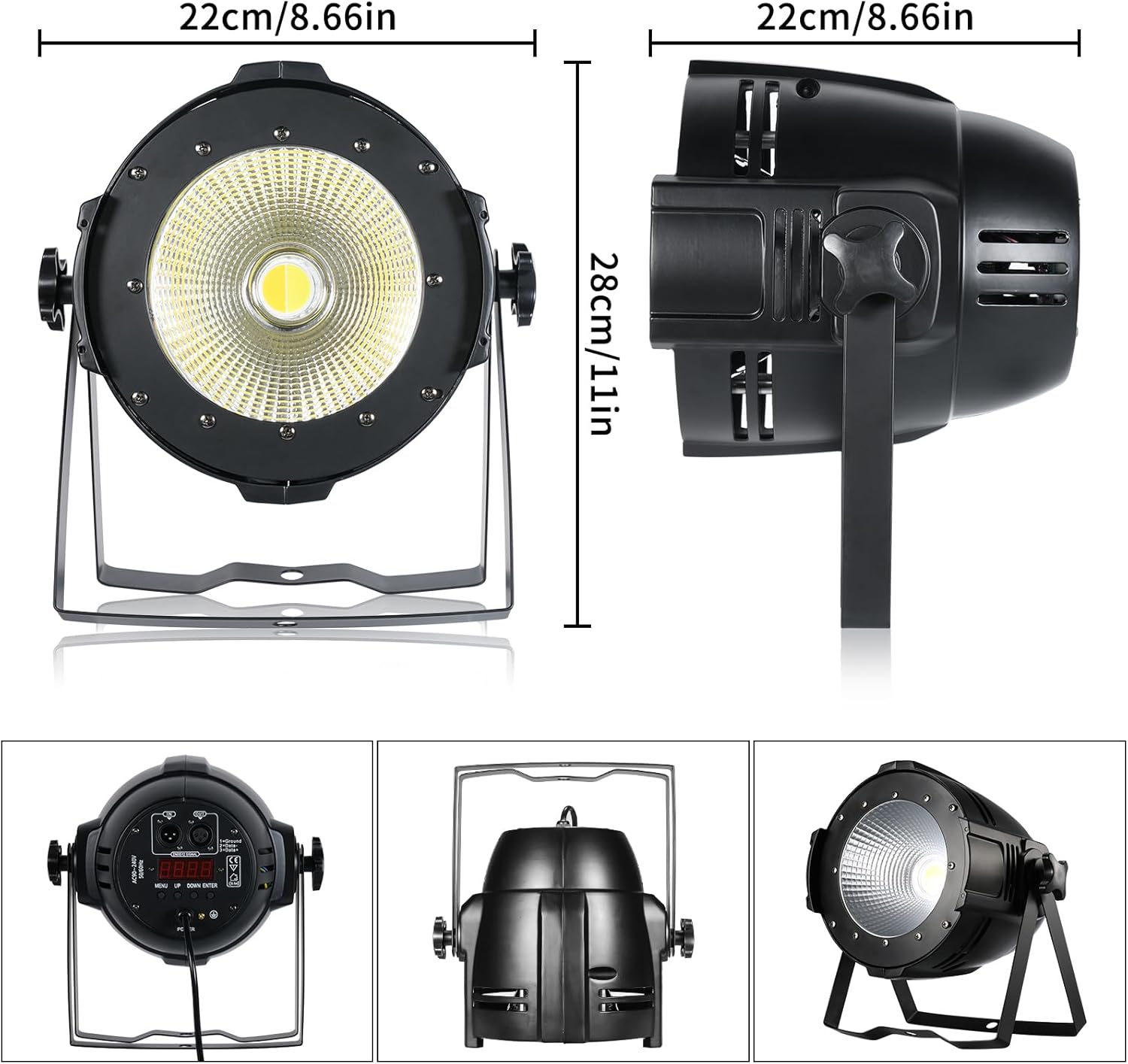
Figure 4.3: Product dimensions (22cm width, 28cm height) and views of the rear control panel and mounting options.
5. Setup
5.1 Mounting
- Attach the two provided mounting brackets to the sides of the projector using the included screws.
- Securely mount the projector to a stable surface (wall, truss, or floor) ensuring it is firmly fixed to prevent accidental falls.
- Adjust the angle of the projector as needed by loosening the side knobs, positioning the light, and then tightening the knobs.
5.2 Power Connection
- Ensure the projector is switched off before connecting to power.
- Connect the integrated power cable to a compatible power outlet (90-220V AC, 50-60Hz).
5.3 DMX Connection (Optional)
- For DMX control, connect a DMX cable from your DMX controller to the DMX IN port on the projector.
- If linking multiple units, connect the DMX OUT of the first unit to the DMX IN of the next unit in a daisy chain.
6. Operating Modes
The projector offers several operating modes, selectable via the control panel on the rear of the unit.

Figure 6.1: Illustration of available control modes: DMX 512, Sound Activated, Auto, and Master-Slave.
6.1 Automatic Mode
In Automatic mode, the projector cycles through pre-programmed light sequences and effects without external input. This mode is suitable for general illumination or simple event lighting.
6.2 Sound Activated Mode
The projector's built-in microphone detects ambient sound, and the light effects will synchronize with the rhythm of the music or sound. Adjust sensitivity via the control panel if available.
6.3 Master-Slave Mode
This mode allows multiple projectors to operate in synchronization without a DMX controller. Connect the DMX OUT of the "Master" unit to the DMX IN of the "Slave" units. Set the Master unit to a desired mode (e.g., Auto or Sound Activated), and the Slave units will mimic its behavior.
6.4 DMX512 Control Mode
For professional control, connect the projector to a DMX512 controller. The projector uses 2 or 3 DMX channels. Refer to the DMX channel chart (usually provided in a separate DMX manual or on the device itself) for specific channel functions, which typically include:
- Channel 1: Dimmer (overall brightness)
- Channel 2: Cool White Intensity
- Channel 3: Warm White Intensity / Strobe Speed (depending on 2 or 3 channel mode)
Use the control panel to set the DMX address for each unit. Ensure each unit has a unique DMX address if operating independently, or the same address if they are to respond identically to DMX signals.

Figure 6.2: Examples of light effects achievable with the projector, including cool white, warm white, and mixed cool+warm white.

Figure 6.3: Further examples of stage lighting effects using different white light temperatures.
7. Maintenance
- Cleaning: Regularly clean the lens and housing with a soft, dry cloth. Do not use abrasive cleaners or solvents. Ensure the device is unplugged before cleaning.
- Inspection: Periodically check power cables and DMX cables for any signs of damage. Ensure all mounting hardware is secure.
- Storage: When not in use, store the projector in a dry, dust-free environment.
8. Troubleshooting
| Problem | Possible Cause | Solution |
|---|---|---|
| No power | Power cable disconnected; no power from outlet; faulty fuse. | Check power cable connection; test outlet with another device; check/replace fuse (if accessible and safe). |
| Light not responding to DMX | Incorrect DMX address; faulty DMX cable; DMX controller issue; incorrect DMX mode selected. | Verify DMX address setting; check DMX cable integrity; ensure DMX controller is functioning; confirm DMX mode is active on the projector. |
| Light flickering or inconsistent output | Unstable power supply; loose connection; internal fault. | Ensure stable power; check all connections; if problem persists, discontinue use and contact support. |
| Overheating | Blocked ventilation; prolonged use in high ambient temperature. | Ensure ventilation openings are clear; operate in a well-ventilated area; allow for cooling periods. |
If you encounter issues not listed here or if solutions do not resolve the problem, please contact customer support.
9. Specifications
| Brand | ZonQoonz |
| Model Number | AL-01513 |
| Input Voltage | 90-220V AC, 50-60Hz |
| Rated Power | 100 Watts |
| Light Source | 1 x COB LED |
| Luminous Flux | 1000 Lumen |
| Color Rendering Index (CRI) | >90 |
| Control Channels | 2/3 CH (DMX) |
| Control Modes | DMX512, Sound Activated, Master-Slave, Automatic |
| Material | Cast Aluminum |
| Color | Black |
| Dimensions (L x W x H) | 25 x 25 x 36 cm (9.8 x 9.8 x 14.2 inches) |
| Weight | 2.72 Kilograms (6 lbs) |
| Certification | CE |
| Energy Efficiency Rating | A |

Figure 9.1: Product data sheet with detailed technical specifications. For more information, refer to the EPREL database.

Figure 9.2: EU Energy Label indicating an 'A' efficiency rating.
10. Warranty and Support
ZonQoonz products are manufactured to high-quality standards. For warranty information, please refer to the terms and conditions provided at the point of purchase or contact your retailer.
For technical support or inquiries, please contact ZonQoonz customer service through the retailer where the product was purchased. Please have your model number (AL-01513) and purchase date available.
Information regarding spare parts availability and software updates is not provided at this time.