
1. Product Overview
The CATTLEMAN CUISINE WiFi Sous Vide Cooker is a precision immersion circulator designed for consistent and accurate temperature control, ensuring perfectly cooked food. Featuring 1000W of power and IPX7 waterproofing, this device offers convenient Wi-Fi connectivity for remote control via a smartphone application.
Key Features:
- High-End WiFi Remote Control: Connect to Wi-Fi and manage temperature and time settings using the dedicated app on your smartphone. The app also provides 18 recipes with detailed instructions.
- Efficient and Quality Cooking: 1000W heating element with a temperature range of 77-194°F (25-90°C) and 3D water circulation technology ensures uniform heating.
- Timer and Touchscreen: Features a 0-99 hour timer with an audible alert upon completion. An LED display and sensitive touch controls offer ease of use and durability.
- User-Friendly Design: Simple operation with adjustable clamps suitable for containers from 4-16L. The removable stainless steel sleeve facilitates easy cleaning.
- IPX7 Waterproof: Allows for complete submersion cleaning.
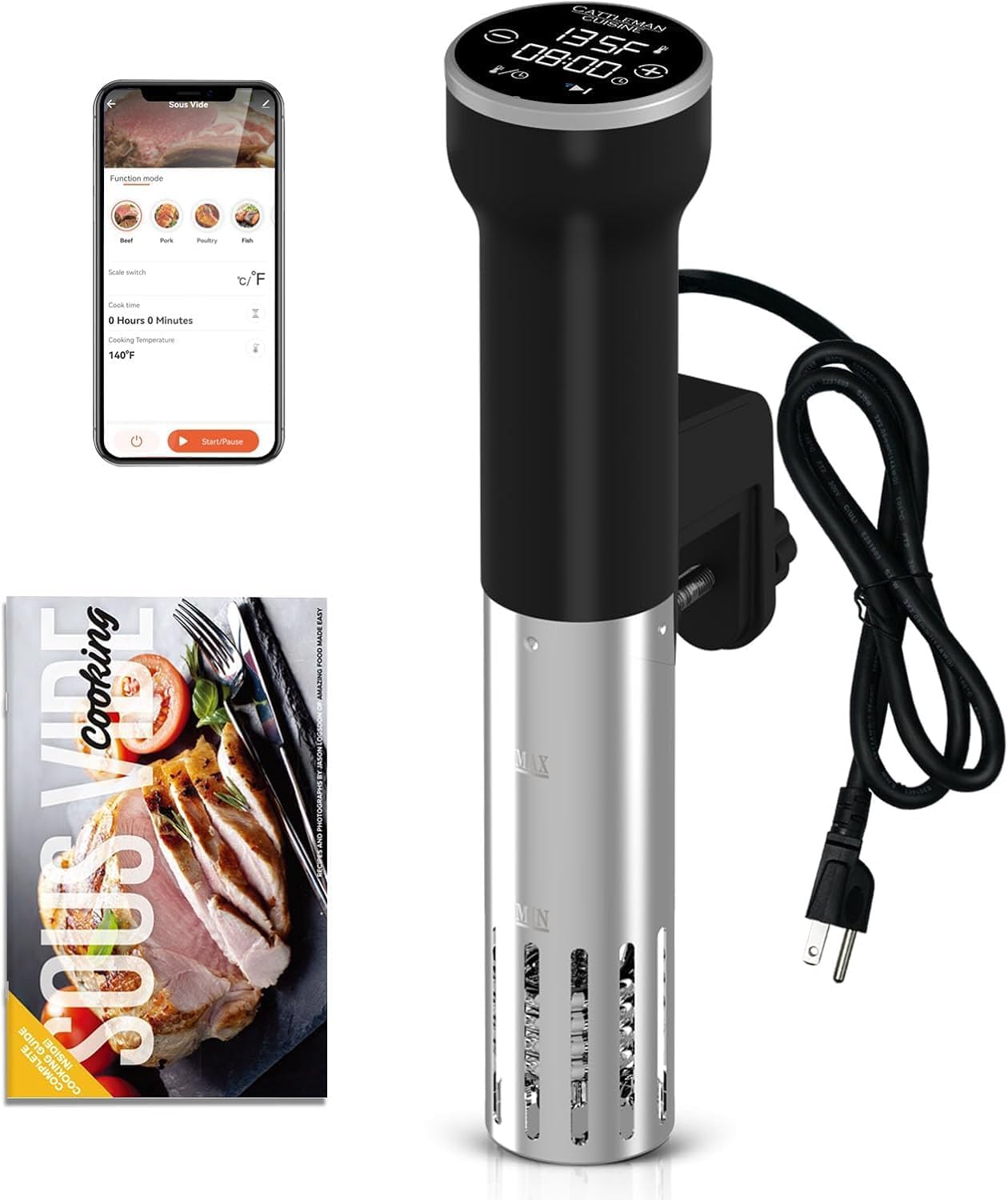
Product Video: Introduction to the CATTLEMAN CUISINE Sous Vide Machine
This video provides an overview of the CATTLEMAN CUISINE WiFi Sous Vide Machine, demonstrating its key features and how it operates.
2. Setup Instructions
Follow these steps to set up your CATTLEMAN CUISINE Sous Vide Cooker for first use.
2.1 Unpacking and Initial Inspection
- Carefully remove all components from the packaging.
- Inspect the device for any signs of damage. Do not use if damaged.
- Ensure all included components, such as the user manual, are present.
2.2 Attaching the Sous Vide Cooker
- Select a heat-resistant pot or container with a capacity between 4 and 16 liters.
- Attach the adjustable clamp of the sous vide cooker to the side of your chosen container. Ensure it is securely fastened.
- Fill the container with water, ensuring the water level is between the 'MIN' and 'MAX' markers on the sous vide cooker.

2.3 Power Connection
- Plug the power cord into a standard 120V electrical outlet.
- The device will power on, and the LED display will illuminate.
2.4 Wi-Fi Connection (Optional)
To use the remote control features, connect your device to Wi-Fi:
- Download the dedicated CATTLEMAN CUISINE app on your smartphone.
- Ensure your phone is connected to a 2.4GHz Wi-Fi network. The sous vide cooker only supports 2.4GHz Wi-Fi.
- On the sous vide cooker, press and hold the '+' and '-' buttons simultaneously for 5 seconds to activate Wi-Fi connection mode. The Wi-Fi icon on the display will flash.
- Follow the in-app instructions to complete the connection process. The Wi-Fi icon will turn solid blue when connected, or red if not connected.

3. Operating Instructions
Learn how to use your sous vide cooker for precise and delicious cooking.
3.1 Basic Operation (Manual Control)
- Set Temperature: Use the '+' and '-' buttons to adjust the desired cooking temperature. The temperature can be set in 0.5°C steps.
- Set Time: Press the temperature/time switch button (usually indicated by a clock icon or 'T') to switch to time setting mode. Use the '+' and '-' buttons to set the cooking duration (0-99 hours). Time can be set in 1-minute steps for 0-2 hours, and 5-minute steps for 2-99 hours.
- Start Cooking: Once temperature and time are set, press the ON/OFF/Pause button (usually a power icon) to start the heating process. The circulator will begin heating the water to the set temperature.
- Pause Function: During cooking, press the ON/OFF/Pause button once to pause the operation. Press again to resume.
- Switch °C/°F: Press and hold the temperature/time switch button for 3 seconds to toggle between Celsius and Fahrenheit display.

3.2 App Control
Once connected to Wi-Fi, you can control the sous vide cooker remotely via the app:
- Open the CATTLEMAN CUISINE app on your smartphone.
- Select your connected sous vide device.
- Adjust temperature and time settings directly within the app interface.
- Start, pause, or stop the cooking process from your phone.
- Access a variety of recipes and cooking guides provided in the app.

3.3 Cooking Process (Four Steps)
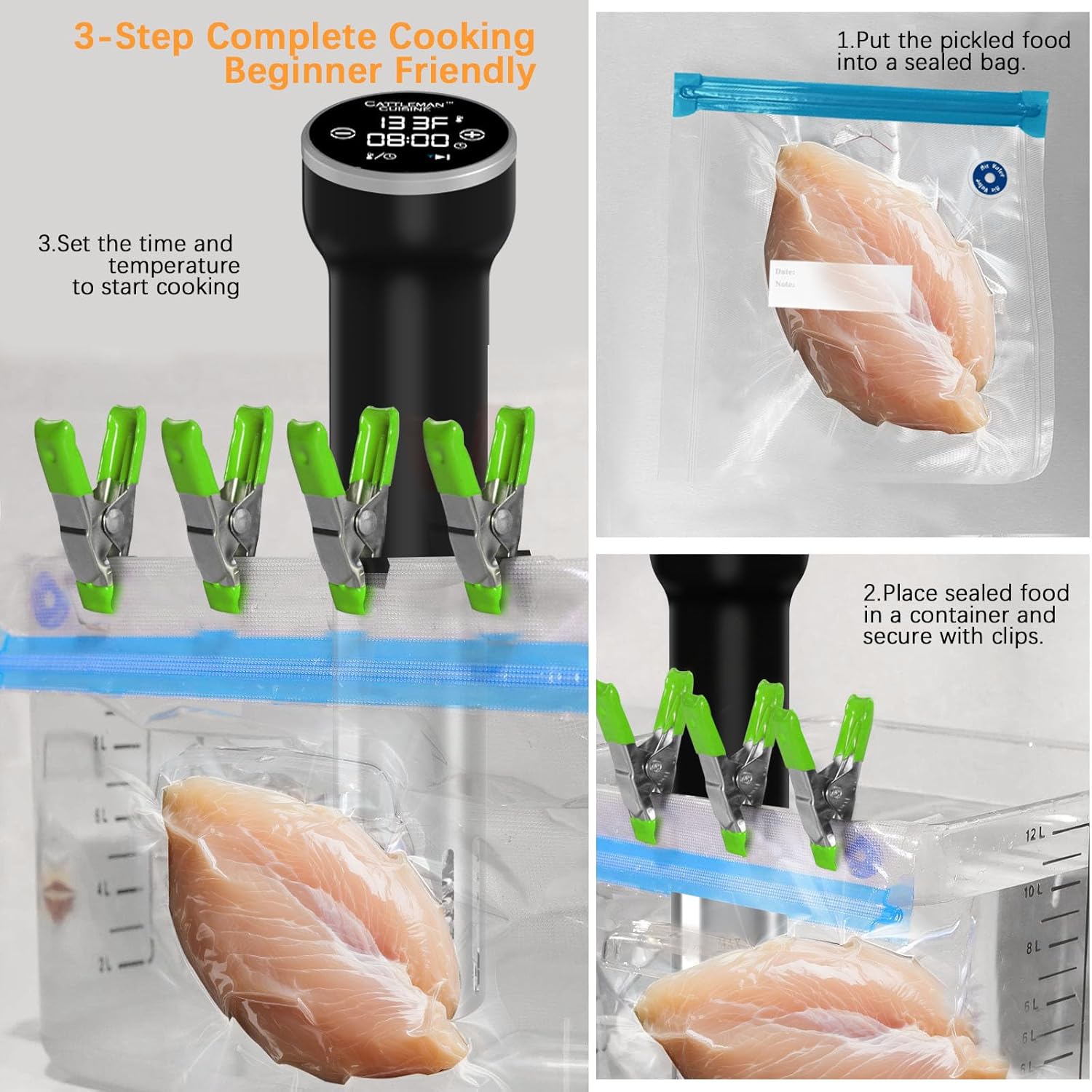
- Prepare Food: Season your food and place it into a vacuum-sealable bag. Ensure the bag is properly sealed to remove air.
- Secure Cooker & Water: Secure the sous vide cooker to your container and fill with water, ensuring the water level is between the MIN and MAX markers.
- Set & Start: Set your desired temperature and time using either the device controls or the smartphone app, then press start.
- Immerse Food: Once the water reaches the target temperature, carefully submerge the sealed food bag into the water bath. You may use clips to keep the bag submerged.
- Finish: When the cooking cycle is complete, the device will beep and automatically switch off. Carefully remove the food bag, sear if desired, and serve.
3.4 Temperature Guidelines for Meats
Achieve desired doneness with precise temperature control:
| Doneness | Temperature Range |
|---|---|
| Rare | 125-131°F (51.7-55°C) |
| Medium-Rare | 131-140°F (55-60°C) |
| Medium | 140-149°F (60-65°C) |
| Medium Well | 149-156°F (65-69°C) |
| Well-done | 160-192°F (71-89°C) |

3.5 Product Video: How to Use Sous Vide Cooker
This video demonstrates the practical steps of using the sous vide cooker for various food items.
4. Maintenance and Cleaning
Proper maintenance ensures the longevity and optimal performance of your sous vide cooker.
4.1 Cleaning the Device
- Disconnect Power: Always unplug the sous vide cooker from the power outlet before cleaning.
- Remove Sleeve: The stainless steel sleeve at the bottom of the circulator is removable for easy cleaning. Gently twist and pull to detach it.
- Rinse: Rinse the removable sleeve and the heating element under running water. Due to its IPX7 waterproof rating, the entire lower part of the device can be submerged for cleaning.
- Wipe Down: Use a soft cloth to wipe down the exterior of the device. For stubborn stains, a mild dish soap can be used. Avoid abrasive cleaners or scouring pads.
- Dry Thoroughly: Ensure all parts are completely dry before reassembling and storing.

4.2 Storage
- Store the sous vide cooker in a clean, dry place.
- Its portable and lightweight design allows for convenient storage in kitchen cabinets or drawers.
5. Troubleshooting
Refer to this section for solutions to common issues.
| Problem | Possible Cause | Solution |
|---|---|---|
| Device does not power on. | Not plugged in; power outlet issue. | Ensure the power cord is securely plugged into a working outlet. Check the circuit breaker. |
| Water not heating or circulating. | Device not started; water level too low. | Press the ON/OFF/Pause button to start. Ensure water is above the 'MIN' line. The device has minimum water level protection. |
| Wi-Fi connection fails. | Incorrect Wi-Fi band; incorrect password; device too far from router. | Ensure your router is broadcasting a 2.4GHz network and your phone is connected to it. Re-enter Wi-Fi password carefully. Move the device closer to the router. Reset Wi-Fi on the device by holding '+' and '-' buttons for 5 seconds. |
| Temperature reading seems inaccurate. | Sensor obstruction; scale buildup. | Clean the heating element and temperature sensor area. Ensure water circulation is unobstructed. |
| Timer alert not sounding. | Volume settings on app (if applicable); device malfunction. | Check app notification settings. If issue persists, contact customer support. |
6. Specifications
Detailed technical specifications for the CATTLEMAN CUISINE WiFi Sous Vide Cooker.
| Feature | Specification |
|---|---|
| Model Number | CTMCS-US-LS-SV02Q-W |
| Product Dimensions (D x W x H) | 2.75" x 5.11" x 12.2" |
| Item Weight | 1.9 pounds |
| Wattage | 1000 watts |
| Voltage | 120 volts |
| Capacity (Recommended Container) | 4-16 liters |
| Temperature Range | 77-194°F (25-90°C) |
| Control Method | App, Touchscreen |
| Material | Stainless Steel |
| Color | Black |
| Waterproof Rating | IPX7 |
| Included Components | User manual |
7. Warranty and Support
For warranty information and customer support, please refer to the documentation included with your product or contact CATTLEMAN CUISINE directly.
- Customer Service: If you encounter any issues not covered in this manual, or require further assistance, please reach out to CATTLEMAN CUISINE customer support.
- Online Resources: Visit the official CATTLEMAN CUISINE website for additional product information, FAQs, and recipe ideas.
