
1. Introduction
The VERT Wearable Jump Device is an advanced tool designed to accurately measure and track jump performance. Its compact and lightweight design allows for easy attachment to clothing, providing real-time data to enhance athletic training and reduce injury risk. This manual provides comprehensive instructions for setting up, operating, and maintaining your VERT device.

Figure 1: VERT Wearable Jump Device and App Interface
2. What's Included
Your VERT Wearable Jump Device package contains the following components:
- Sensor Unit
- Clip
- Belt
- Charger (USB)

Figure 2: Package Contents
3. Setup
- Charge the Device: Before first use, fully charge your VERT sensor using the provided USB charger. The device has over 3 hours of battery life on a full charge.
- Download the App: Download the official VERT Jump app from the Apple App Store. The device is compatible with iPhone and iPad.
- Power On Sensor: Softly press the red button on the VERT sensor to turn it on. A light indicator will confirm power.
- Pair with App: Open the VERT Jump app on your iOS device. Navigate to the 'Settings' section within the app. Select 'Connect' and choose your VERT sensor from the list of available devices. The app will remember your sensor for future use.
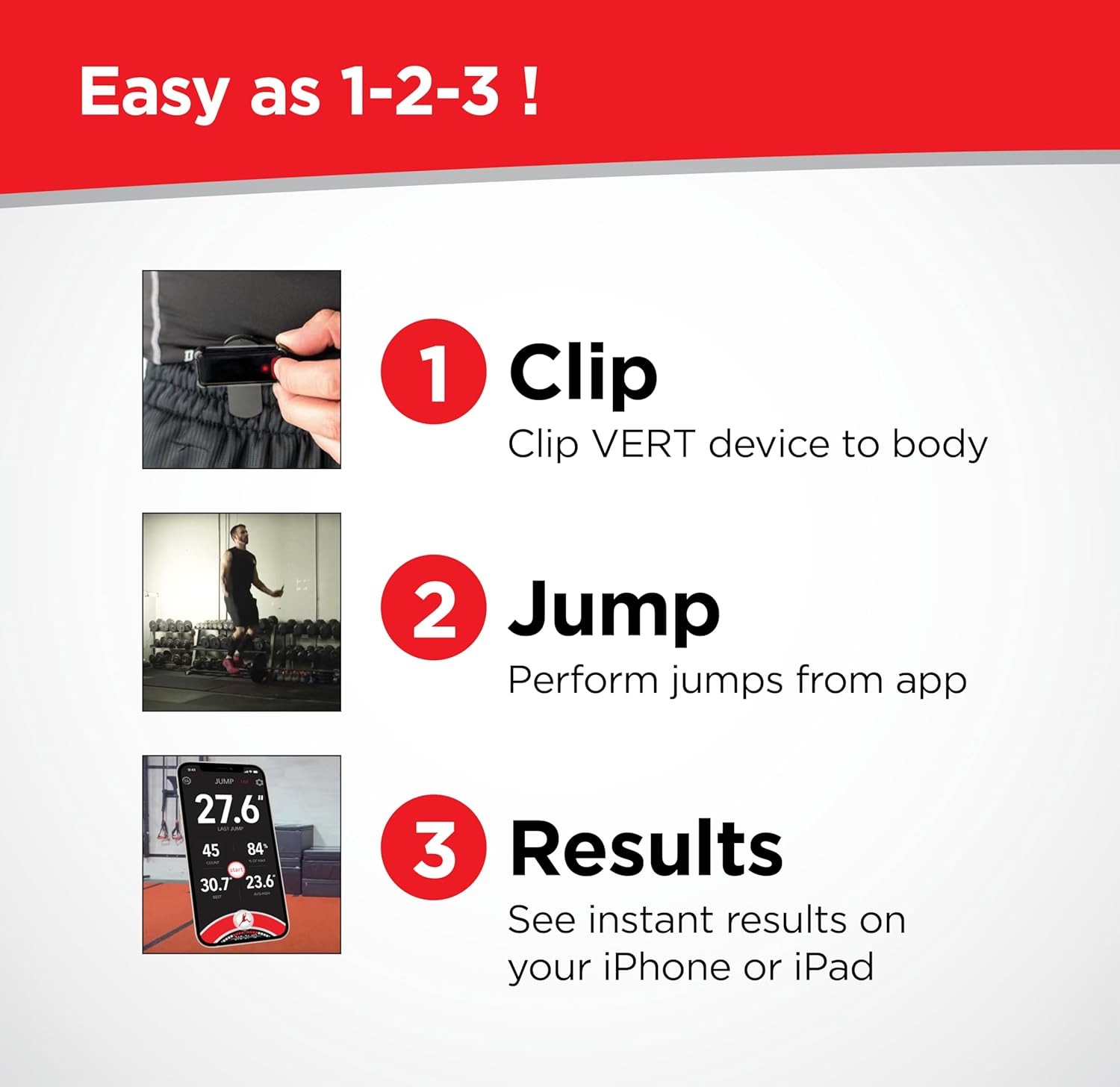
Figure 3: Easy 1-2-3 Setup and Use
Setup Video Guide
Video 1: Official video guide on how to properly use the VERT Wearable Jump Device for accurate jump measurement.
4. Operating Instructions
- Attach the Device: Securely clip the VERT sensor to your shorts or pants at the waistband, ensuring it is centered on your back for optimal accuracy.
- Start a Session: In the VERT Jump app, navigate to the 'Jump' page. Press the 'Start' button to begin a jump tracking session.
- Perform Jumps: Execute your jumps as desired. The device will automatically detect and record each jump.
- View Real-time Data: The app provides immediate feedback on jump height, jump count, and landing impacts.
- End Session: When finished, press the 'Stop' button in the app to end the session. All data will be synced to the cloud for storage and later review.

Figure 4: Device Placement
Operation Video Guide
Video 2: Video demonstrating the step-by-step process of setting up and using the VERT Wearable Jump Device, including app pairing and initial jump tracking.
5. Key Features
- Accurately track jump height and jump count in real-time with the iOS app.
- Measure landing impacts (landing stiffness) to improve landing mechanics.
- Perform assessments for vertical, reactive strength, and asymmetry anywhere.
- All data synced to cloud for storage.
- Over 3 hours of battery life, USB rechargeable.
- Includes the newly released Jump Higher Program from The VERT Performance Lab.

Figure 5: Device Dimensions and Technical Overview
6. Technical Specifications
| Attribute | Detail |
|---|---|
| Brand | VERT |
| Model | B0CKY6DWVT |
| Material | Plastic |
| Color | Black |
| Compatible Devices | iPhone and iPad |
| Screen Size | 0.96 Inches |
| Item Weight | 0.22 Kilograms (7.8 ounces) |
| Battery Life | 3 Hours |
| Sensor Type | Wearable |
| Battery Description | Rechargeable |
| UPC | 051497425982 |
| Manufacturer | VERT |
| Package Dimensions | 5.35 x 5.24 x 2.52 inches |
| Country of Origin | USA |
7. Maintenance
- Cleaning: Wipe the device with a soft, damp cloth. Do not use harsh chemicals or abrasive cleaners.
- Charging: Recharge the device regularly, especially if it will be stored for an extended period, to maintain battery health.
- Storage: Store the device in a cool, dry place away from direct sunlight and extreme temperatures.
8. Troubleshooting
- Device Not Connecting:
- Ensure the device is powered on (red button pressed).
- Check that Bluetooth is enabled on your iOS device.
- Restart both the VERT sensor and your iOS device.
- Ensure the VERT app has Bluetooth permissions enabled in your iOS device settings.
- Inaccurate Readings:
- Verify the device is securely clipped to your waistband and centered on your back. Loose placement can affect accuracy.
- Ensure your movements are clear and distinct for each jump.
- App Availability:
- If the app is reported as unavailable in your region, please contact VERT customer support for assistance. App availability can vary by geographical location.
9. Warranty and Support
The VERT Wearable Jump Device comes with a 6 Months Limited Warranty from the date of purchase. This warranty covers manufacturing defects and malfunctions under normal use. It does not cover damage caused by misuse, accidents, unauthorized modifications, or improper maintenance.
For warranty claims, technical support, or any inquiries regarding your VERT device, please visit the official VERT Store on Amazon or contact VERT customer service directly through their website.