Introduction
The GRAM PRES Digital Pocket Gram Scale is a high-precision weighing instrument designed for accurate measurements of various small items. With its compact size and multiple weighing units, it is ideal for use with jewelry, diamonds, herbs, powders, food, and more. This manual provides detailed instructions for the proper setup, operation, and maintenance of your scale to ensure optimal performance and longevity.

Image: The GRAM PRES Digital Pocket Gram Scale, showcasing its compact design, digital display, control buttons, and included accessories: a 50g calibration weight and two AAA batteries.
Key Features
- High Precision: Ranges to 300g with 0.01g accuracy.
- Multiple Units: Supports 6 weighing units (g, oz, ozt, dwt, ct, gn).
- Portable Design: Pocket-sized for convenience on the go.
- Backlit LCD Display: Ensures easy readability in various lighting conditions.
- Tare Function: Allows for zeroing out the weight of containers.
- Auto Shut-off: 3-minute auto shut-off function to conserve battery life.
- Overload Protection: Protects the scale from damage due to excessive weight.

Image: Visual representation of the scale's key features, including its gold titanium plating, backlit LCD, smart auto-off, overload indication, 6 available units, and low battery indication.
Setup
Battery Installation
Your scale requires 2 AAA batteries, which are included. To install the batteries:
- Locate the battery compartment on the underside of the scale.
- Open the battery compartment cover.
- Insert the 2 AAA batteries, ensuring correct polarity (+/-).
- Close the battery compartment cover securely.
Operating Instructions
Power On/Off
To turn the scale ON, press the ON/OFF button (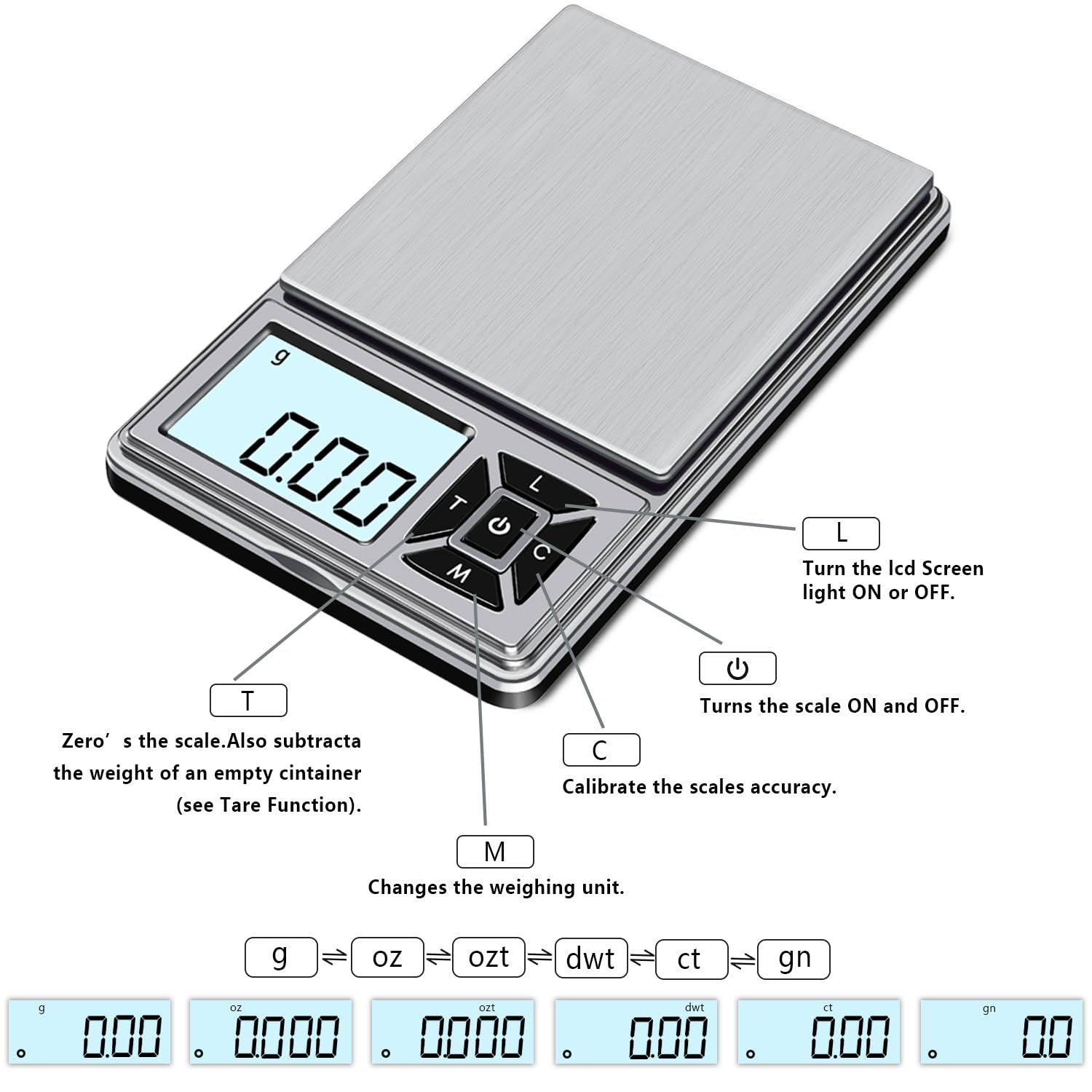 ). The display will show "88888" and then "0.00g" when ready for weighing.
To turn the scale OFF, press and hold the ON/OFF button for a few seconds until the display turns off. The scale also features a 3-minute auto shut-off function to save power.
Unit Conversion
To change the weighing unit, press the M (Mode) button. The scale will cycle through the available units: grams (g), ounces (oz), troy ounces (ozt), pennyweights (dwt), carats (ct), and grains (gn).

Image: A visual guide demonstrating the six different weighing units (g, oz, ozt, dwt, ct, gn) and how the display changes with each unit selection.
Tare Function
The tare function allows you to subtract the weight of a container, so you only measure the net weight of the contents.
- Turn on the scale and wait for it to display "0.00g".

Image: Step 1 of the tare function, showing the scale displaying "0.00".
- Place the empty container on the weighing platform.

Image: Step 2 of the tare function, showing an empty container placed on the scale, displaying its weight.
- Press the T (Tare) button. The display will reset to "0.00g".

Image: Step 3 of the tare function, showing the scale display reset to "0.00" after pressing the Tare button.
- Add the items you wish to weigh into the container. The display will show only the weight of the items.

Image: Step 4 of the tare function, showing the scale displaying the weight of the contents added to the tared container.
Calibration
For accurate readings, it is recommended to calibrate your scale periodically, especially after initial use or if moved to a new location. A 50g calibration weight is included.
- Turn the scale ON. Ensure the scale is on a flat, stable surface and there is nothing on the weighing platform.
- Press and hold the C (Calibrate) button until the display shows "CAL". Then release the button.
- The display will then show the required calibration weight, which is "50.00g".
- Place the 50g calibration weight gently on the center of the weighing platform.
- Wait for the display to show "PASS". This indicates successful calibration. The scale will then return to normal weighing mode.

Image: A step-by-step visual guide on how to calibrate the scale using the 50g calibration weight.
Maintenance
Cleaning
To clean the scale, wipe it with a slightly damp cloth. Do not immerse the scale in water or use abrasive cleaners, as this can damage the internal components and the finish.
Storage
Store the scale in a cool, dry place. Avoid extreme temperatures and humidity. When not in use for extended periods, it is advisable to remove the batteries to prevent leakage.
Troubleshooting
| Problem | Possible Cause | Solution |
|---|---|---|
| Inaccurate readings | Scale not calibrated; unstable surface; low battery; overload. | Recalibrate the scale; place on a flat, stable surface; replace batteries; ensure weight is within capacity. |
| "Lo" displayed | Low battery. | Replace batteries. |
| "O-Ld" displayed | Overload. | Remove excess weight immediately. |
| Scale does not turn on | Batteries incorrectly installed or dead. | Check battery polarity; replace batteries. |
Specifications
- Product Dimensions: 4.7 x 2.9 x 0.7 inches
- Item Weight: 4.16 ounces
- Model Number: GP-EU300-0.01
- Batteries: 2 AAA batteries (included)
- Manufacturer: GRAM PRES
- Color: Black-EU300
- Recommended Uses: Jewelry, Diamond, Arrows, Powders, Herbs, Food, Coins
- Special Features: Auto Shut Off, Backlit Display, Precision Balanced
- Display Type: LCD
- Capacity: 300g
- Accuracy: 0.01g
- Weighing Units: g, oz, ozt, dwt, ct, gn

Image: The product packaging, detailing key specifications such as model, capacity, accuracy, weighing units, power, auto-off, scale size, and net weight.
Warranty and Support
GRAM PRES is committed to quality and customer satisfaction. Your Digital Pocket Gram Scale comes with:
- 30-Day Risk-Free Refund: If you are not satisfied, you may return the product within 30 days for a refund.
- 2-Year Warranty: Covers manufacturing defects and ensures reliable performance.
- 24-Hour After-Sales Service: Our dedicated support team is available to assist you with any questions or concerns.
For support, please contact our customer service team. Refer to the contact information provided on the product packaging or purchase platform.