
Unifone S22 Flip
Unifone S22 Rugged Flip Phone User Manual
Brand: Unifone | Model: S22 Flip
1. Introduction
This manual provides essential information for the safe and efficient use of your Unifone S22 Rugged Flip Phone. Please read this manual thoroughly before operating your device to ensure optimal performance and longevity.
The Unifone S22 is a durable and versatile smart flip phone designed for reliability in various environments. It combines the classic flip phone design with modern Android 11 (Go edition) functionality, offering a touchscreen interface alongside physical buttons.
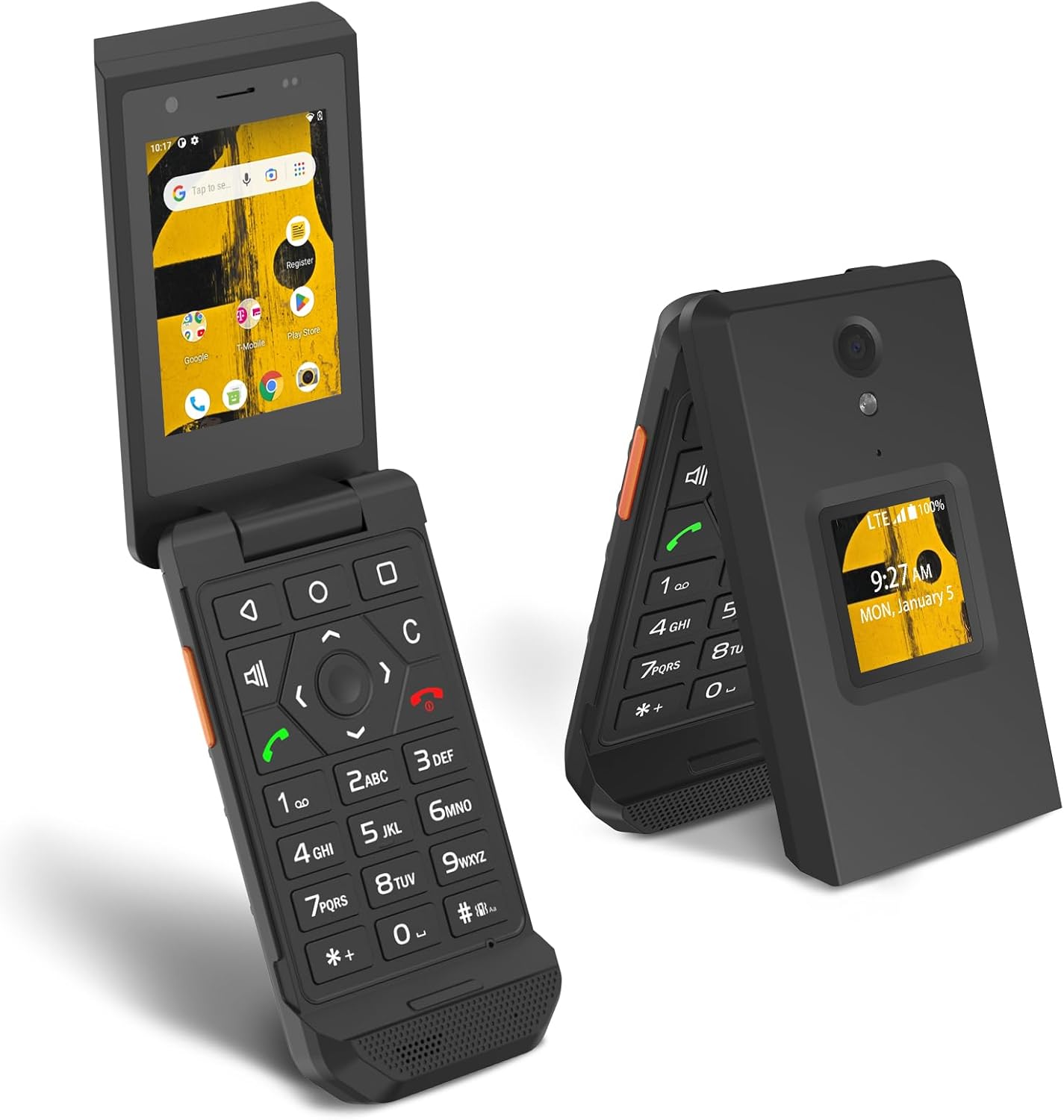
Image: The Unifone S22 Rugged Flip Phone shown both open, displaying its touchscreen and physical keypad, and closed, highlighting its compact form factor and external display.
2. What's in the Box
Verify that all items are present in your product packaging:
- Unifone S22 Rugged Flip Phone with pre-installed battery
- User Manual (this document)
- Charger
- Earphone Adapter

Image: A flat lay of the Unifone S22 Flip Phone and its accessories, including the phone, charger, earphone adapter, and quick start guide.
3. Setup
3.1. SIM Card and MicroSD Card Installation
Your Unifone S22 supports a single SIM card and a MicroSD card for expanded storage. Follow these steps to install them:
- Power off the phone and remove the back cover.
- Locate the SIM card slot and MicroSD card slot.
- Carefully insert your SIM card into the designated slot with the gold contacts facing down. Ensure it clicks into place.
- If using, insert the MicroSD card into its slot.
- Replace the back cover securely.

Image: The back of the Unifone S22 Flip Phone with the cover removed, revealing the battery compartment and slots for SIM and MicroSD cards.
3.2. Battery Installation
The 2000mAh removable battery is typically pre-installed. If not, align the battery contacts with the phone's terminals and gently press it into place. Ensure it is seated firmly before replacing the back cover.
3.3. Powering On/Off
- To power on: Press and hold the Power button until the screen illuminates.
- To power off: Press and hold the Power button, then select 'Power off' from the options.
3.4. Initial Setup and APN Settings
Upon first power-on, follow the on-screen prompts for initial setup. If you experience connectivity issues (e.g., no LTE), you may need to manually configure the Access Point Name (APN) settings. This is common when using a SIM card previously used in another device or with certain virtual operators.
Method for APN Reset:
- Insert the SIM card and turn on the device.
- Navigate to Settings > Network & internet > Mobile network > Advanced > Access Point Names.
- Tap the Menu icon (three dots) in the upper right corner.
- Select Reset to default.
- Wait for the default APN settings to restore.
Video: A general guide on how to properly install a SIM card in a flip phone. While this video features a different model (AGM M8 Flip), the installation process is similar for the Unifone S22.
4. Operating Your Phone
4.1. Navigation: Touchscreen and Physical Buttons
The Unifone S22 offers dual input methods: a 2.8-inch touchscreen and a traditional physical keypad. You can use either to navigate the Android 11 (Go edition) interface.
- Touchscreen: Swipe, tap, and pinch to interact with apps and menus, similar to a standard smartphone.
- Physical Buttons: Use the directional pad and number keys for navigation, dialing, and text input.

Image: The Unifone S22 Flip Phone highlighting its 2.8-inch touchscreen and the tactile physical buttons on the keypad.
4.2. Making Calls
- Open the phone to access the keypad or touchscreen.
- Dial the number using the physical keypad or the on-screen dialer.
- Press the green call button to initiate the call.
- To end a call, press the red end call button or close the flip.
4.3. Sending Messages
- Open the Messaging app.
- Select 'New Message' or choose an existing conversation.
- Enter the recipient's number or select from contacts.
- Type your message using the keypad (T9 predictive text or multi-press) or the touchscreen keyboard.
- Press 'Send'.
4.4. Using the Camera
The Unifone S22 is equipped with a 5MP rear camera and a 2MP front camera for photos and video calls.
- Open the Camera app from the home screen or app drawer.
- Frame your shot using the screen.
- Tap the capture button on the screen or use a designated physical button (if available) to take a photo.
- Switch between front and rear cameras as needed.

Image: The Unifone S22 Flip Phone showcasing its 5MP rear camera and 2MP front camera, with example photos of people in outdoor settings.
5. Key Features
5.1. Durable and Rugged Design (IP68 Rated)
The Unifone S22 is built to withstand challenging environments. Its IP68 rating ensures it is:
- Waterproof: Protected against immersion in water up to 1.5 meters for 30 minutes.
- Dust-proof: Completely sealed against dust ingress.
- Drop-proof: Designed to endure drops from a certain height onto hard surfaces.

Image: Visual representation of the phone's IP68 rating, showing it resistant to drops, water, and dust.
5.2. Powerful Performance
Equipped with a Qualcomm QM215 Snapdragon 215 (28 nm) processor and 2GB RAM, the S22 delivers smooth performance for essential tasks. It runs on Android 11 (Go edition), optimized for efficiency on devices with limited resources.
5.3. Versatile 4G LTE Connectivity
Stay connected with 3G and 4G LTE network support. Please note that this phone is compatible with T-Mobile and its virtual operators ONLY. It is NOT compatible with AT&T or Verizon networks. The phone is unlocked, but may not be compatible with government-subsidized SIM cards with free monthly plans.
5.4. Long-Lasting Removable Battery
The 2000mAh removable battery provides extended usage times:
- Up to 11 hours of talk time.
- Up to 280 hours of standby time.
The device charges via a Type-C port.

Image: The Unifone S22 Flip Phone emphasizing its long-lasting 2000mAh removable battery and the convenience of Type-C charging.
6. Maintenance
6.1. Cleaning Your Device
To clean your phone, use a soft, lint-free cloth. Avoid using harsh chemicals, cleaning solvents, or aerosol sprays, as these may damage the device's finish or internal components. For the touchscreen, a screen cleaner designed for electronics can be used.
6.2. Battery Care
- Avoid exposing the battery to extreme temperatures.
- Do not puncture, disassemble, or modify the battery.
- Use only the provided charger or a compatible Type-C charger.
6.3. Environmental Considerations
Despite its rugged design, avoid prolonged exposure to direct sunlight, excessive heat, or extreme cold. Ensure all port covers are securely closed to maintain the IP68 water and dust resistance.
7. Troubleshooting
7.1. No Network/LTE Connectivity
If you are experiencing issues with network connectivity or LTE, refer to the APN Settings section (3.4) to manually reset or configure your Access Point Names. Ensure your SIM card is correctly inserted and activated with a compatible carrier (T-Mobile or its virtual operators).
7.2. Phone Not Responding
If the phone becomes unresponsive, try a soft reset by pressing and holding the Power button for approximately 10-15 seconds until the device restarts. If this does not work, remove and reinsert the battery, then attempt to power on again.
7.3. Short Battery Life
If your battery life is shorter than expected, consider the following:
- Reduce screen brightness.
- Close unused applications running in the background.
- Disable Wi-Fi, Bluetooth, or GPS when not in use.
- Limit streaming video or heavy data usage.
8. Specifications
| Feature | Detail |
|---|---|
| Model Name | S22 Flip |
| Operating System | Android 11.0 (Go edition) |
| Processor | Qualcomm QM215 Snapdragon 215 (28 nm), Quad Core 2.26GHz |
| RAM | 2 GB |
| Memory Storage Capacity | 16 GB (expandable via MicroSD) |
| Screen Size | 2.8 Inches (Touchscreen) |
| Resolution | 120 x 61 |
| Rear Camera | 5 MP |
| Front Camera | 2 MP |
| Battery Capacity | 2000 mAh (Removable) |
| Talk Time | Up to 11 Hours |
| Standby Time | Up to 280 Hours |
| Connectivity | 3G, 4G LTE, Wi-Fi, Bluetooth, NFC, GPS |
| Durability Rating | IP68 (Waterproof, Dust-proof, Drop-proof) |
| Dimensions (Folded) | 6 x 11.5 x 2.5 cm |
| Dimensions (Unfolded) | 6 x 21 x 1.2 cm |
| Item Weight | 230g (8.11 oz) |
| Audio Jack | 3.5 mm (adapter required) |
9. Warranty and Support
9.1. Limited Warranty
Your Unifone S22 Rugged Flip Phone comes with a limited warranty. Please refer to the 'Quick Start Guide and Limited Warranty Statement' included in your product packaging for detailed terms and conditions regarding warranty coverage, duration, and claims procedures.
9.2. Customer Support
For technical assistance, troubleshooting beyond this manual, or warranty inquiries, please contact Unifone customer support through the contact information provided in your product documentation or on the official Unifone website.
Related Documents - S22 Flip
 |
CAT S22 FLIP User Manual: Rugged Smartphone Guide Comprehensive user manual for the CAT S22 FLIP, a rugged flip smartphone. Covers safety precautions, setup, features like camera, Wi-Fi, Bluetooth, and detailed specifications. |
 |
Easyfone Prime-A1 Pro 4G LTE Flip Phone: Quick Start Guide for Seniors Get started with your Easyfone Prime-A1 Pro 4G LTE flip phone for seniors. This quick start guide provides essential instructions on setup, features like the SOS button and charging dock, and basic operations for an easy mobile experience. |
 |
Easyfone Prime-A1 Pro Quick Start Guide This document provides a quick start guide for the Easyfone Prime-A1 Pro unlocked senior cell phone, covering setup, basic functions, and features. |
 |
CAT S22 FLIP User Manual: Comprehensive Guide to Your Rugged Smartphone This user manual provides detailed instructions and safety information for the CAT S22 FLIP, a rugged smartphone designed for demanding environments. Learn about setup, features, maintenance, and more. |
 |
CAT S22 FLIP User Manual: Guide to Rugged Smartphone Features and Operation Explore the features, safety guidelines, and operational instructions for the rugged CAT S22 FLIP smartphone. This user manual provides comprehensive details on setup, usage, and maintenance. |
 |
SWAGTEK 245123 4G Flip Phone User Manual Comprehensive user manual for the SWAGTEK 245123 4G Flip Phone, covering overview, introduction, phone functions, settings, multimedia features, services, tools, maintenance, and FCC compliance information. |