
ACEMIRO 20" X 32"RGB Backlit+Front Light Single Door Left Open
ACEMIRO Medicine Cabinet with Lights and Mirror User Manual
Model: 20" X 32"RGB Backlit+Front Light Single Door Left Open
1. Introduction
This user manual provides detailed instructions for the installation, operation, and maintenance of your ACEMIRO Medicine Cabinet with Lights and Mirror. This cabinet features advanced lighting options including RGB backlighting and adjustable front lighting, an anti-fog function, and convenient storage solutions. Please read this manual thoroughly before installation and use to ensure proper function and safety.
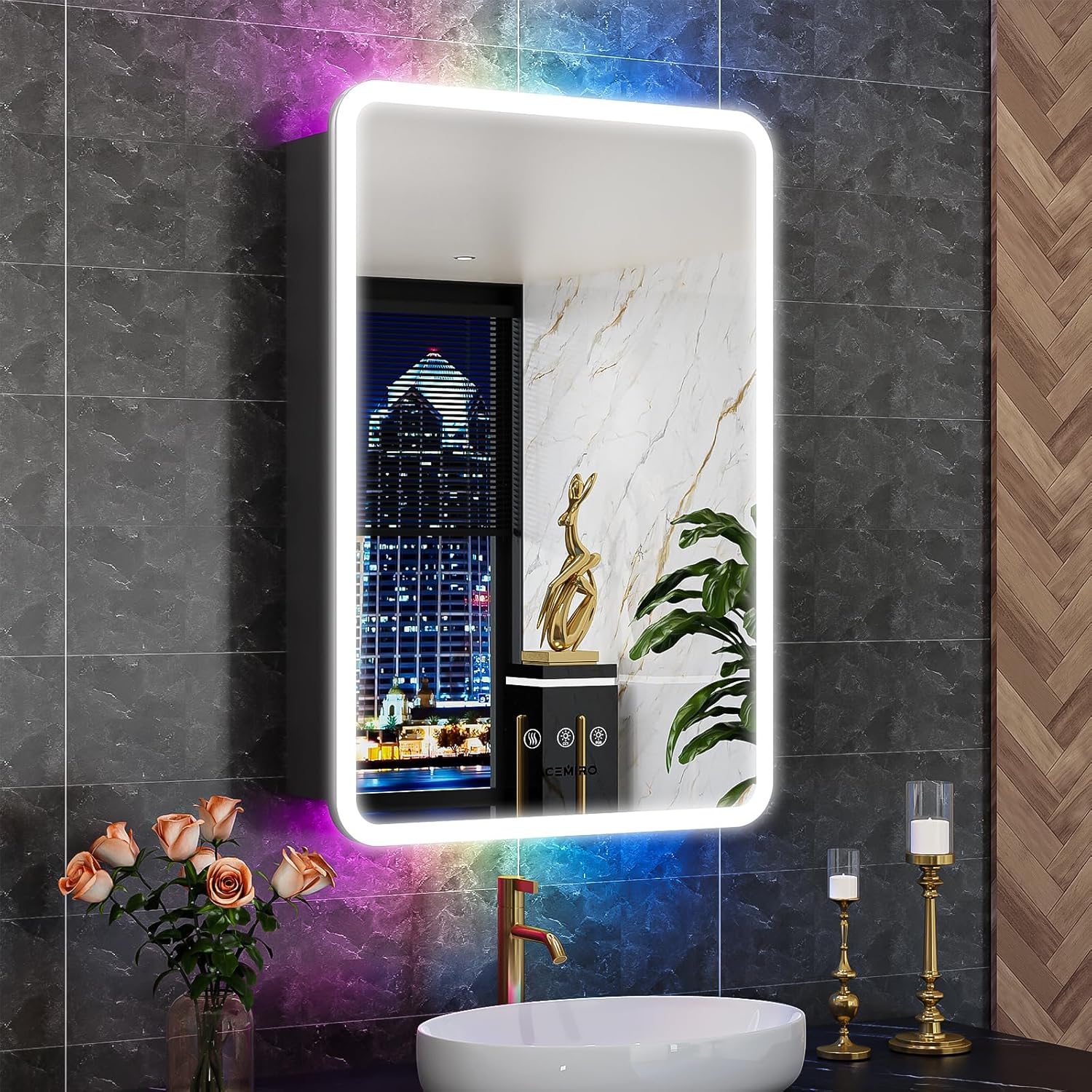
Figure 1.1: ACEMIRO Medicine Cabinet with Lights and Mirror.
This image shows the ACEMIRO Medicine Cabinet with its RGB backlighting and front lighting illuminated, installed above a sink in a contemporary bathroom setting. The mirror reflects the room, highlighting its sleek design and integrated lighting features.
2. Key Features
- Dimmable RGB Backlight & Front Light: Offers 3000K-6000K 3-color temperature adjustment for front light and 11 multi-color RGB backlight selections. Both are stepless dimmable from 10% to 100% brightness.
- Anti-Fog Function: Features a 2-minute rapid heating and 1-hour auto turn-off defogger for clear reflection.
- Memory Function: Remembers your last light and brightness settings for convenience.
- Thoughtful Design: Includes rounded frame edges, adjustable tempered glass shelves, soft-closing hinges, and door frame grooves for enhanced safety and usability.
- Integrated Power: Built-in 12A outlet and 2 USB ports for charging and powering bathroom devices.
- Flexible Storage: Two adjustable explosion-proof tempered glass shelves, each bearing up to 11 pounds and 5mm thick.
- Installation: Designed for wall-mounted and hardwired installation.

Figure 2.1: Overview of ACEMIRO Medicine Cabinet Features.
This image visually summarizes the key features of the medicine cabinet, including multicolor RGB backlight, 3 color temperature options, brightness dimmable, anti-fog, memory function, touch button control, double-sided mirror, hardwired installation, shatter-proof tempered glass, and adjustable shelves.

Figure 2.2: Thoughtful Details for Your Convenience.
This image highlights specific design elements: built-in outlets and USB ports, adjustable tempered glass shelves with clips, aesthetic and protective round corner edges, and soft-closing DTC buffer hinges, demonstrating the cabinet's user-centric design.
3. Setup and Installation
The ACEMIRO Medicine Cabinet is designed for wall-mounted and hardwired installation. It is crucial to follow all local electrical codes and safety guidelines during installation. Professional installation is recommended.
3.1 Before Installation
- Unpack all components and inspect for any damage.
- Ensure all necessary mounting hardware is present (included).
- Turn off the main power supply at the circuit breaker before beginning any electrical work.
- Consult the detailed manual instructions provided in the packaging for specific wiring diagrams and mounting templates.
3.2 Installation Steps (Overview)
- Prepare the Wall: Identify a suitable location on the wall, ensuring it can support the weight of the cabinet and its contents. Mark drilling points according to the provided template.
- Mount the Bracket: Secure the mounting bracket to the wall using appropriate fasteners for your wall type.
- Electrical Connection: Connect the cabinet's electrical wiring to your home's electrical system. This step requires caution and should ideally be performed by a qualified electrician.
- Hang the Cabinet: Carefully lift and hang the medicine cabinet onto the mounted bracket.
- Secure the Cabinet: Secure the cabinet to the wall using additional screws if specified in the detailed instructions.
- Install Shelves: Insert the adjustable tempered glass shelves into the desired positions inside the cabinet.
For comprehensive step-by-step instructions, please refer to the "Instructions for Use (IFU)" PDF document available for download or included with your product.

Figure 3.1: Wall Switch Support.
This image illustrates that the medicine cabinet supports control via a standard wall switch, allowing for convenient power management.
4. Operating Instructions
Your ACEMIRO Medicine Cabinet features intuitive touch controls for various functions.
4.1 Lighting Control
- Front Light (CCT Adjustment): Short press the designated touch button to cycle through 3 color temperatures: 3000K (Warm Light), 4500K (Natural Light), and 6000K (White Light).
- Brightness Dimming: Long press the front light touch button to steplessly adjust the brightness from 10% to 100%. Release when desired brightness is achieved.
- RGB Backlight: Short press the RGB touch button to cycle through 11 multi-color selections, including 8 static modes (White, Colorful, Red, Yellow, Green, Cyan, Blue, Purple) and 3 dynamic modes (Illusory Color, Color Changing Meteor, Breathing Color Changing).
- Memory Function: The cabinet will remember your last brightness and color temperature settings for both front and RGB lights upon restart.
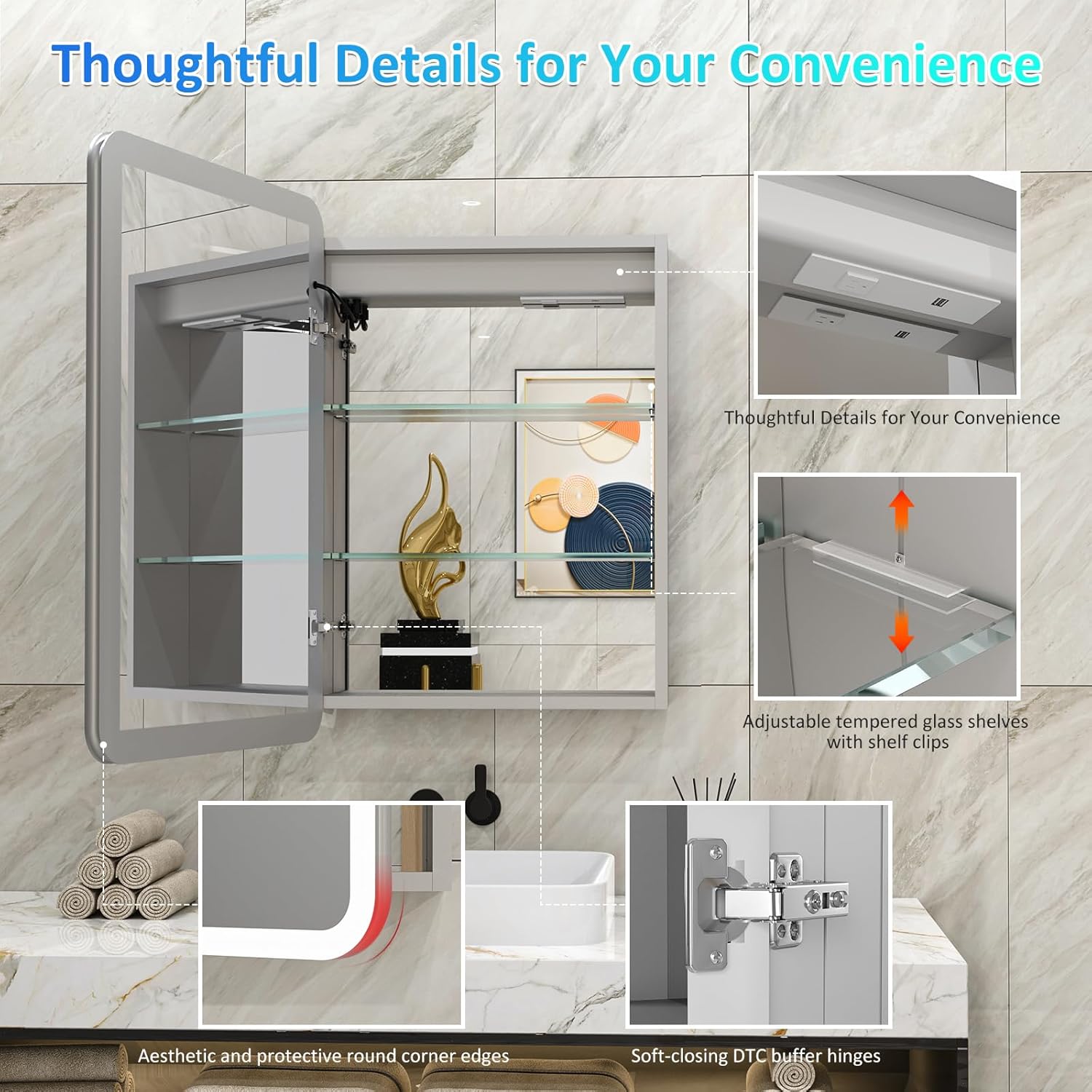
Figure 4.1: Color Temperature and Stepless Dimming.
This image demonstrates the three color temperature options (3000K Warm, 4500K Natural, 6000K White) and the stepless dimming capability of the front light, along with the memory function.

Figure 4.2: Elegant Multi-Color Selection.
This image displays the various static and dynamic RGB backlight modes available, allowing users to customize the ambiance of their bathroom.
4.2 Anti-Fog Function
- Activation: Short press the anti-fog touch button to activate the defogger.
- Operation: The defogger will heat up for 2 minutes to quickly clear fog and will automatically turn off after 1 hour for safety and energy saving.
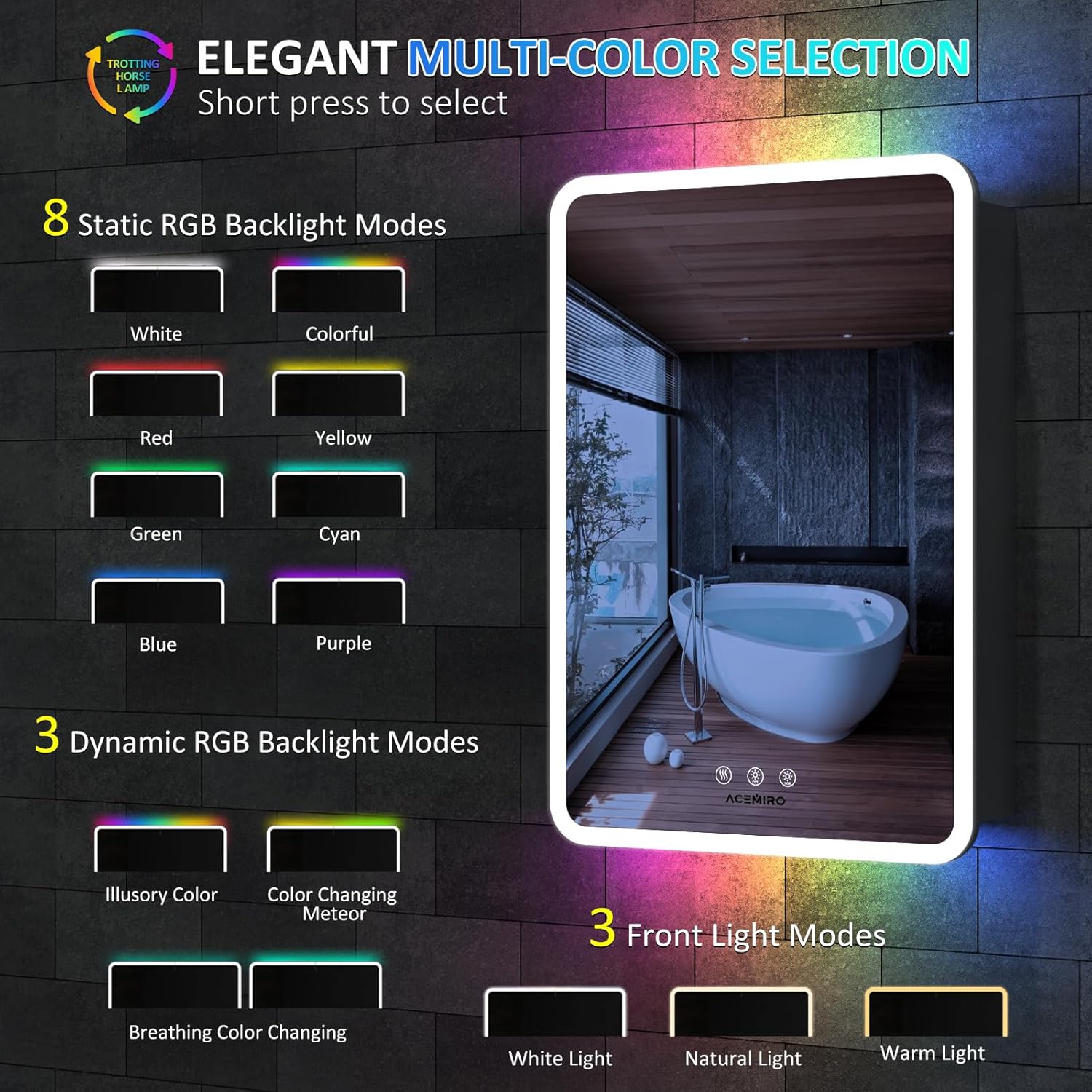
Figure 4.3: Anti-Fog Function in Use.
This image illustrates the effectiveness of the anti-fog function, showing a clear reflection on the mirror even in a steamy environment, with the defogger icon highlighted.
4.3 USB Ports and Outlets
- The built-in 12A outlet and 2 USB ports are located inside the cabinet.
- These ports are suitable for charging mobile devices, electric shavers, toothbrushes, and other small electronics.
- Ensure the cabinet is properly powered for these features to function.

Figure 4.4: Built-in USB Ports & Outlets.
This close-up image shows the integrated 12A outlet and two USB ports conveniently located inside the medicine cabinet, providing power access for various devices.
5. Maintenance
Regular maintenance will help preserve the appearance and functionality of your medicine cabinet.
- Cleaning the Mirror: Use a soft, lint-free cloth and a non-abrasive glass cleaner. Spray the cleaner onto the cloth, not directly onto the mirror, to avoid liquid seeping into the edges.
- Cleaning the Cabinet: Wipe down the aluminum alloy frame and interior surfaces with a soft, damp cloth. Avoid harsh chemicals or abrasive cleaners that could damage the finish.
- Shelf Care: The tempered glass shelves can be removed for cleaning. Wash with mild soap and water, then dry thoroughly before reinserting.
- Electrical Components: Ensure all electrical connections remain dry. Do not spray water directly onto the cabinet, especially near outlets or wiring.
6. Troubleshooting
If you encounter any issues with your medicine cabinet, please refer to the following common troubleshooting steps:
| Problem | Possible Cause | Solution |
|---|---|---|
| Lights not turning on. | No power supply; loose wiring; faulty touch sensor. | Check circuit breaker. Ensure all wiring connections are secure. Try gently pressing the touch button multiple times. |
| Anti-fog function not working. | Defogger not activated; power issue. | Ensure the anti-fog button is pressed. Verify power supply to the cabinet. |
| USB ports/outlets not working. | No power supply; device not properly connected. | Check power supply to the cabinet. Ensure devices are fully plugged in. |
| Mirror appears foggy after defogger use. | Excessive humidity; defogger area too small. | Ensure bathroom is adequately ventilated. The defogger targets a specific area of the mirror. |
If the problem persists after attempting these solutions, please contact ACEMIRO customer service for further assistance.
7. Specifications
| Attribute | Detail |
|---|---|
| Brand | ACEMIRO |
| Model | 20" X 32"RGB Backlit+Front Light Single Door Left Open |
| Product Dimensions | 5.6"D x 20"W x 32"H |
| Mounting Type | Wall Mount (Hardwired) |
| Light Features | Illuminated, RGB Backlit, Dimmable, CCT Adjustment (3000K-6000K) |
| Special Features | Anti-Fog, Memory Function, Rounded Rectangle, Removable Shelf, Adjustable Shelf, Built-in 12A Outlet & 2 USB Ports |
| Number of Shelves | 2 (Tempered Glass, 5mm thick, 11 lbs capacity each) |
| Finish Type | Aluminum Alloy |
| Item Weight | 43.7 pounds |
| Assembly Required | Yes |

Figure 7.1: LED Light Strip Specifications.
This image provides details about the LED light strip used in the cabinet, including UL listing, 192 LED beads/meter, CRI>90 Ra, 6000K-3000K adjustable range, 50,000+ hours lifespan, and no flash frequency.

Figure 7.2: Shatter-Proof Tempered Glass.
This image visually compares the durability of the cabinet's 5mm shatter-proof tempered glass mirror against ordinary glass, highlighting its enhanced safety feature.
8. Warranty and Support
ACEMIRO is committed to providing high-quality products and excellent customer service.
- Warranty: This product comes with a 2-year warranty, ensuring carefree use and support for manufacturing defects.
- Packaging: The medicine cabinet is securely packaged to prevent damage during transit, having passed drop and impact tests.
- Customer Service: For any damages, unexpected problems, or inquiries, please contact ACEMIRO customer service via Amazon email. Free replacements are offered for service issues.
- Safety Warnings: Always adhere to proper installation guidelines, handle glass components with care, and be aware of potential electrical hazards.

Figure 8.1: ACEMIRO Customer Service.
This image outlines ACEMIRO's customer service commitment, including 24/7 online service, no-return solution (free replacements), and a 2-year warranty.
9. Product Video
Watch the official product video for a visual overview of the ACEMIRO Medicine Cabinet with Lights & Mirror.
Video 9.1: ACEMIRO Medicine Cabinet with Lights & Mirror Overview.
This short video demonstrates the key features and aesthetic appeal of the ACEMIRO Medicine Cabinet, showcasing its lighting effects and overall design in a bathroom setting.