
SKYRC SK-100197 Q200neo
SKYRC Q200neo Charger Instruction Manual
Model: SK-100197 Q200neo
1. Introduction
The SKYRC Q200neo is an advanced multi-function smart charger designed for various battery types used in remote control (RC) applications. It features four independent output ports, allowing for simultaneous charging of different batteries. With both AC and DC input capabilities, it offers flexibility for use at home or in the field. This manual provides essential information for the safe and efficient operation, setup, and maintenance of your Q200neo charger.
2. Key Features
- Dual Power Input: Supports DC input voltage from 10-30V and AC input voltage from 100-240V (50/60Hz).
- High Power Output: Offers a maximum AC charge wattage of 200W and DC charge wattage of 400W.
- Quadruple Output Ports: Four independent ports for simultaneous charging of different batteries.
- Versatile Battery Compatibility: Charges Li-Po, Li-HV, Li-Fe, Li-Ion (1-6 cells), Ni-MH, Ni-Cd (2-15 cells), and Pb (3S/6S/12S) batteries.
- Multiple Operation Modes: Includes Balance Charge, Charge, Discharge, Storage, Parallel (for Li-Po/Li-Fe/Li-Ion/Li-HV), Cycle, Re-peak (for Ni-MH/Ni-Cd), Normal, AGM Charge, Cold Charge (for Pb).
- USB-C Power Delivery: Features a 20W USB-C output with QC3.0 (18W) and PD (20W) support for charging external devices.
- DC Power Supply Function: Provides a stable DC output from 1.0-30.0V with a maximum of 100W per single port.
- Compact Design: Case size of 123*119*78mm and weight of 680g.

Image: The SKYRC Q200neo Charger showcasing its AC 200W, DC 400W power capabilities, four independent charging ports, and 20W USB-C Power Delivery.
3. Setup
- Unpacking: Carefully remove the charger and all accessories from the packaging. Verify that all components listed in the packing list are present.
- Power Connection:
- AC Input: Connect the AC power cord to the charger's AC input port and then to a suitable wall outlet (100-240V AC).
- DC Input: Alternatively, connect a DC power source (10-30V DC) to the charger's DC input port using appropriate cables. Ensure correct polarity.
- Initial Power-On: Once connected to a power source, the charger will power on and display the main interface.
- Connecting Batteries: Connect your battery to one of the four output ports (A, B, C, or D) using the appropriate charging cable and balance board (if applicable). Ensure the battery type and cell count match the charger's settings.

Image: The SKYRC Q200neo Charger, showing its compact form factor and the main display.
4. Operation
The Q200neo charger features an intuitive interface for selecting and managing charging tasks. Use the scroll wheel and buttons to navigate menus and confirm selections.
4.1. Charging Modes
The charger supports various modes depending on the battery type:
- Li-Po/Li-HV/Li-Fe/Li-Ion: Balance Charge, Charge, Discharge, Storage, Parallel.
- Ni-MH/Ni-Cd: Charge, Cycle, Re-peak, Discharge.
- Pb: Normal, AGM Charge, Cold Charge, Discharge.
To initiate a charge:
- Connect the battery to the desired port.
- Select the correct battery type and charging mode from the menu.
- Adjust charging parameters such as current and cell count.
- Confirm settings to begin the charging process.
4.2. USB-C Power Delivery
The USB-C port can be used to charge compatible external devices. It supports QC3.0 (5V=3A, 9V=2A, 12V=1.5A, 18W) and PD (5V=3A, 9V=2.2A, 12V=1.67A, 20W) protocols. Simply connect your device to the USB-C port.
4.3. DC Power Supply Function
The Q200neo can act as a DC power supply, providing an output voltage from 1.0-30.0V and current from 0.1-10.0A, with a maximum output power of 100W per single port. This feature is useful for powering other DC-compatible devices.

Image: A detailed view of the SKYRC Q200neo Charger's four independent charging ports, illustrating its multi-battery charging capability.
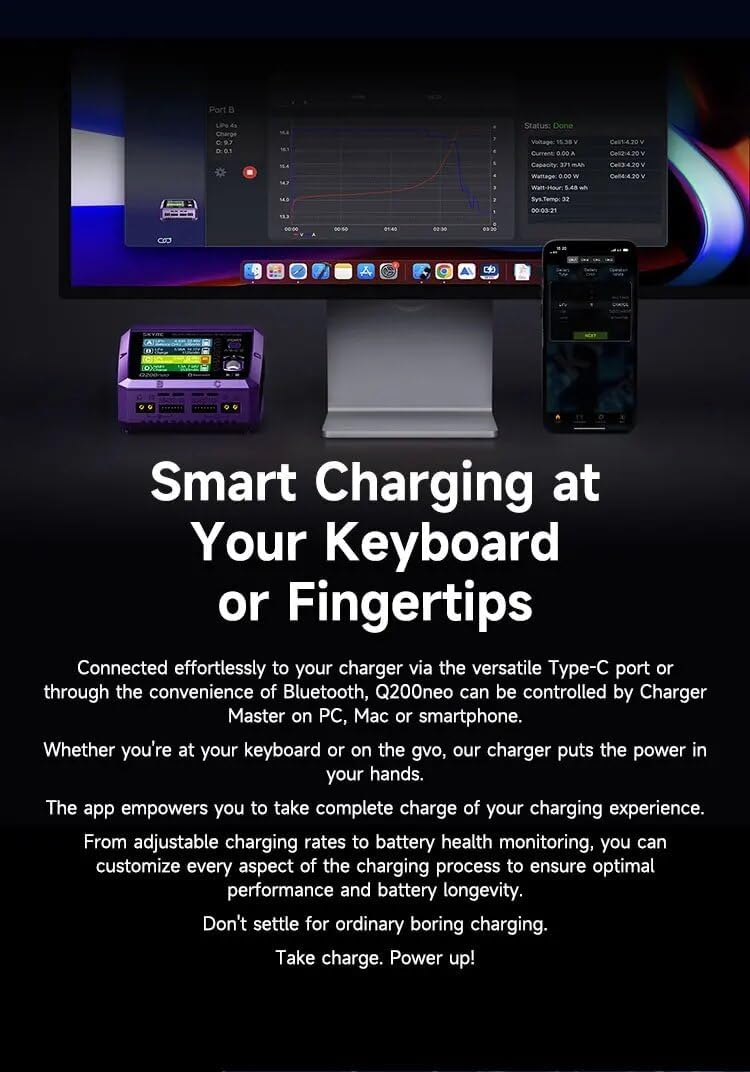
Image: The SKYRC Q200neo Charger connected to a computer and smartphone, indicating its ability to be controlled and monitored via an application.
5. Maintenance
- Cleaning: Regularly clean the charger's exterior with a soft, dry cloth. Do not use solvents or abrasive cleaners. Ensure no dust or debris accumulates in the ports or vents.
- Storage: Store the charger in a cool, dry place away from direct sunlight and extreme temperatures.
- Operating Conditions: The optimal operating temperature is 0℃-40℃ (32℉-104℉) with working humidity between 0%-75%. For storage, maintain temperatures between -10℃-70℃ (14℉-158℉) and humidity between 0%-75%.
6. Troubleshooting
- Charger Not Powering On: Ensure the AC or DC power input is correctly connected and the power source is active. Check the power cable for damage.
- Charging Error Message: Refer to the charger's display for specific error codes. Common issues include incorrect battery type selection, reversed polarity, or a damaged battery. Disconnect the battery and re-check all settings and connections.
- Battery Not Charging: Verify that the battery is properly connected to the correct port and that the charging parameters (current, cell count) are set appropriately for the battery.
- Overheating: Ensure the charger has adequate ventilation. Do not cover the charger during operation. If overheating persists, reduce the charging current.
For persistent issues or error codes not listed, please consult the official SKYRC support resources.
7. Specifications

Image: A table summarizing the key technical specifications of the SKYRC Q200neo Charger.
| Parameter | Value |
|---|---|
| Model | SK-100197 Q200neo |
| DC Input Voltage | 10-30V |
| AC Input Voltage | 100-240V 50/60HZ |
| Charge Wattage (AC) | 200W MAX |
| Charge Wattage (DC) | 400W MAX |
| Discharge Wattage (Main port) | 5W |
| Discharge Wattage (Balance port) | 25W MAX (Li-po 6s) |
| USB-C Power Delivery (QC3.0) | 5V=3A, 9V=2A, 12V=1.5A (18W) |
| USB-C Power Delivery (PD) | 5V=3A, 9V=2.2A, 12V=1.67A (20W) |
| DC Power Supply Output Voltage | 1.0-30.0V |
| DC Power Supply Output Current | 0.1-10.0A |
| DC Power Supply Output Power | Max. 100W single port |
| Battery Types/Cells (Li-Po/Li-HV/Li-Fe/Li-Ion) | 1-6 cells |
| Battery Types/Cells (Ni-MH/Ni-Cd) | 2-15 cells |
| Battery Types/Cells (Pb) | 3S/6S/12S |
| Charge Current | 0.1-10.0A |
| Discharge Current | 0.1-2.0A |
| Balance Current | 800mA MAX |
| Operating Temperature | 0℃-40℃ (32℉-104℉) |
| Working Humidity | 0%-75% |
| Storage Temperature | -10℃-70℃ (14℉-158℉) |
| Storage Humidity | 0%-75% |
| Case Material | PC-ABS V0 |
| Case Size | 123*119*78mm (4.84*4.69*3.07 inches) |
| Weight | 680g (1.5 lbs) |

Image: The SKYRC Q200neo Charger positioned next to a ruler, demonstrating its compact dimensions.
8. Warranty and Support
For warranty information, technical support, or service inquiries, please refer to the official SKYRC website or contact your authorized dealer. Keep your purchase receipt as proof of purchase for warranty claims.
Related documentsSK-100197 Q200neo


Ask a question about this manual
Ask about setup, troubleshooting, compatibility, parts, safety, or missing instructions. Manuals+ will review the question and use this page’s manual context to help answer it.